Are you struggling with slow WiFi or dead zones in your home? You might have heard about WiFi 6 mesh systems as a solution.
But here’s the question: do these systems really need an Ethernet backhaul to work their best? Understanding this can save you time, money, and frustration. You’ll discover how Ethernet backhaul impacts your WiFi 6 mesh setup and whether it’s worth the extra effort.
Keep reading to find out how to get the fastest, most reliable connection for your devices.

Credit: www.reddit.com
Wifi 6 Mesh Basics
Wifi 6 is the latest wireless standard that improves internet speed and capacity. Mesh systems use multiple devices to cover large areas with strong Wi-Fi signals.
Combining Wifi 6 with mesh networks helps reduce dead zones and supports many devices at once. This is important for homes with many users and smart devices.
Key Features Of Wifi 6
Wifi 6 offers several features that make it better than previous Wi-Fi versions. It increases speed, reduces interference, and improves battery life for connected devices.
- Higher data rates for faster downloads and uploads
- Better performance in crowded areas like apartments
- Improved efficiency to handle many devices at once
- Lower latency for smoother video calls and gaming
- Longer battery life for connected devices
How Mesh Networks Work
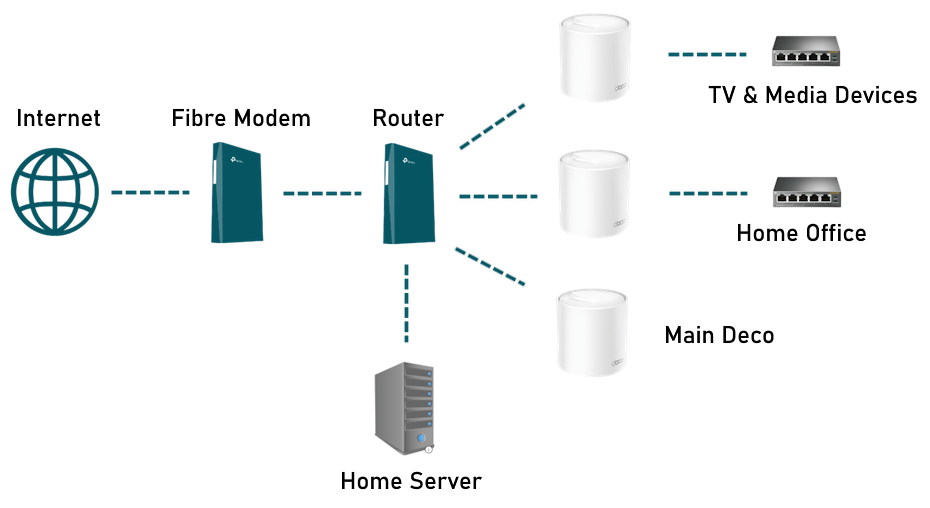
Mesh networks use multiple nodes that communicate with each other to spread Wi-Fi signals evenly. This creates a strong connection in every corner of a home or office.
| Component | Role |
| Main Router | Connects to the internet and controls the network |
| Satellite Nodes | Extend Wi-Fi coverage by linking to the main router |
| Backhaul Link | Connects nodes to each other, can be wireless or Ethernet |
Ethernet Backhaul Explained
WiFi 6 mesh systems improve internet coverage in large homes. They use multiple devices to spread WiFi signals evenly.
Ethernet backhaul is a way to connect these devices using wires. This helps the system work better and faster.
What Is Ethernet Backhaul
Ethernet backhaul uses an Ethernet cable to link mesh nodes. This cable carries data between the main router and other nodes.
This wired connection avoids wireless interference. It keeps the data flow steady and strong.
- Connects nodes directly with cables
- Reduces wireless traffic
- Improves overall network speed
- Provides stable and reliable links
Benefits Of Wired Connections
| Benefit | Description |
| Better Speed | Ethernet cables carry data faster than WiFi links. |
| Less Interference | Wired connections avoid signals from other devices. |
| Stable Connection | Data flows smoothly without drops or delays. |
| Higher Capacity | Supports many devices without slowing down. |
When Backhaul Matters
WiFi 6 mesh systems can connect nodes wirelessly or with Ethernet cables. Ethernet backhaul means linking nodes with wires.
Using Ethernet for backhaul can improve your network’s speed and stability. It matters most in busy or large homes.
Impact On Network Speed
Ethernet backhaul frees WiFi radios to only handle device connections. This avoids wireless traffic sharing between nodes.
- Speeds stay fast across all nodes
- Less slowdown when many devices connect
- Better performance for streaming and gaming
Reducing Interference
Wireless backhaul uses the same frequency bands as devices. This can cause signal clashes and weaker signals.
| Type of Backhaul | Interference Level |
| Wireless | High |
| Ethernet | Low |
Improving Reliability
Wired backhaul keeps the connection stable, even with many users or walls. Wireless links may drop or slow down.
- Consistent speeds without drops
- Better signal through walls and floors
- Less chance of network interruptions

Credit: www.amazon.ca
Wireless Vs Wired Backhaul
WiFi 6 mesh systems use backhaul to connect nodes. Backhaul links the main router to other mesh points.
There are two main types: wireless backhaul and wired backhaul. Both affect speed and coverage differently.
Performance Differences
Wired backhaul usually offers faster speeds and lower delay. It uses Ethernet cables to connect mesh nodes directly.
Wireless backhaul sends data over WiFi signals. It may slow down if walls or distance block the signal.
- Wired backhaul provides stable and consistent speed
- Wireless backhaul speed may drop with interference
- Wired backhaul supports more devices without lag
- Wireless backhaul is flexible but can have higher latency
Installation Considerations
Wired backhaul needs Ethernet cables between mesh nodes. This can be hard if walls or floors block access.
Wireless backhaul is easier to install. It only requires placing mesh nodes within WiFi range of each other.
- Wired backhaul may require drilling or cable routing
- Wireless backhaul needs no physical cables
- Wired backhaul is better for large homes with existing Ethernet
- Wireless backhaul suits homes without cable access
Cost Implications
Wired backhaul can cost more due to cables and installation work. You might hire a professional to run cables.
Wireless backhaul reduces installation costs. You only pay for the mesh system, not extra wiring.
- Wired backhaul adds cost for cables and labor
- Wireless backhaul lowers setup expenses
- Wired backhaul may increase home value if Ethernet is installed
- Wireless backhaul offers cost savings for renters or temporary setups
Choosing The Right Setup
WiFi 6 mesh systems can use different ways to connect nodes. One choice is using Ethernet backhaul. This means connecting nodes with wires for better speed and stability.
Choosing if you need Ethernet backhaul depends on your home and how you use the network. This guide helps you decide the best setup for your needs.
Home Size And Layout
Large or multi-story homes may need Ethernet backhaul. WiFi signals can weaken through walls and floors. Wired connections keep the mesh system fast and steady.
Smaller homes with open layouts often work well without Ethernet. The mesh nodes can connect wirelessly and cover the area.
- Large homes: Ethernet backhaul improves speed
- Many walls/floors: Wired links reduce signal loss
- Small, open homes: Wireless mesh usually works fine
Device Density And Usage
Homes with many devices need stable connections. Ethernet backhaul helps keep speeds high when many devices use WiFi at once.
If you use the internet for streaming, gaming, or video calls, Ethernet backhaul lowers lag and drops. Light users may not notice much difference.
- Many devices: Ethernet backhaul supports heavy traffic
- High use: Wired links reduce delays and buffering
- Light use: Wireless backhaul may be enough
Budget And Technical Skills
Ethernet backhaul often costs more. You need cables and possibly extra work to install them. This may require some technical skills.
Wireless backhaul is easier to set up and cheaper. It suits users who want simple installation without wiring their home.
- Higher budget and skills: Ethernet backhaul is better
- Lower budget or no wiring skills: Use wireless backhaul
- Consider future needs before choosing setup
Optimizing Wifi 6 Mesh Without Ethernet
Wifi 6 mesh systems can work without Ethernet backhaul. They use wireless connections to link nodes. This guide helps you optimize your setup without cables.
Explore strategies to improve performance. Focus on placement, channel selection, and updates. These steps help boost your Wifi network.
Placement Strategies
Good placement is key for a strong signal. Place your router and nodes carefully. Avoid walls and metal objects that block signals.
Elevate devices for better coverage. Keep them in open spaces. This helps the signal reach more areas.
- Place nodes in central locations
- Avoid placing near large appliances
- Use shelves or stands for elevation
Channel Selection
Channels affect Wifi performance. Use less crowded channels for a better connection. This reduces interference from other networks.
Check your router’s settings to change channels. Find a channel with low traffic. This helps improve speed and reliability.
- Use router apps to scan for busy channels
- Select channels with less interference
- Monitor performance and adjust if needed
Firmware Updates
Firmware updates improve performance and security. Keep your devices updated for the best experience. Check for updates regularly.
Visit the manufacturer’s website or app. Download and install updates as they become available. This helps maintain a stable network.
- Enable automatic updates if available
- Check for updates every month
- Follow instructions for manual updates
Future Trends In Mesh Networking
Mesh networking is evolving quickly. New technologies are shaping its future. Understanding these trends is key for tech enthusiasts.
Wifi 6 mesh systems are at the forefront. They promise faster speeds and better connectivity. But do they need Ethernet backhaul? Let’s explore.
Advancements In Wireless Backhaul
Wireless backhaul is improving. It provides a way for mesh nodes to communicate. This reduces the need for Ethernet cables.
- Speeds are increasing with Wifi 6.
- Coverage is expanding with new technologies.
- Reliability is improving through better protocols.
Integration With Smart Homes
Smart homes are becoming more common. Mesh systems are integrating seamlessly with smart devices. This makes homes more efficient.
| Device | Function |
| Smart Light | Lighting Control |
| Thermostat | Temperature Regulation |
| Security Camera | Home Surveillance |

Credit: www.reddit.com
Frequently Asked Questions
Do Wifi 6 Mesh Systems Require Ethernet Backhaul?
WiFi 6 mesh systems do not always require Ethernet backhaul. They can use wireless backhaul but Ethernet offers faster, stable connections. Ethernet backhaul reduces interference and improves overall network performance, especially in large homes or dense environments.
What Benefits Does Ethernet Backhaul Provide Wifi 6?
Ethernet backhaul offers faster data transfer and lower latency. It reduces wireless congestion and interference between mesh nodes. This enhances network stability, coverage, and speeds, ensuring a smoother experience for multiple connected devices.
Can Wifi 6 Mesh Work Well Without Ethernet Backhaul?
Yes, WiFi 6 mesh systems can function well wirelessly. However, performance may drop in large homes or with heavy network traffic. Using Ethernet backhaul optimizes speed and reliability but isn’t mandatory for basic setups.
Is Ethernet Backhaul Necessary For Large Wifi 6 Networks?
For large WiFi 6 networks, Ethernet backhaul is highly recommended. It ensures better coverage, reduces lag, and supports multiple devices simultaneously. Without it, wireless backhaul might struggle to maintain consistent speeds across distant nodes.
Conclusion
Wifi 6 mesh systems work well without Ethernet backhaul. But adding Ethernet can improve speed and stability. It helps when your home is large or has many devices. Wireless backhaul is easier to set up but may face interference. Ethernet backhaul offers a stronger connection and less lag.
Consider your home size, device number, and setup skills. Choose the option that fits your needs best. This way, your network stays fast and reliable every day.


