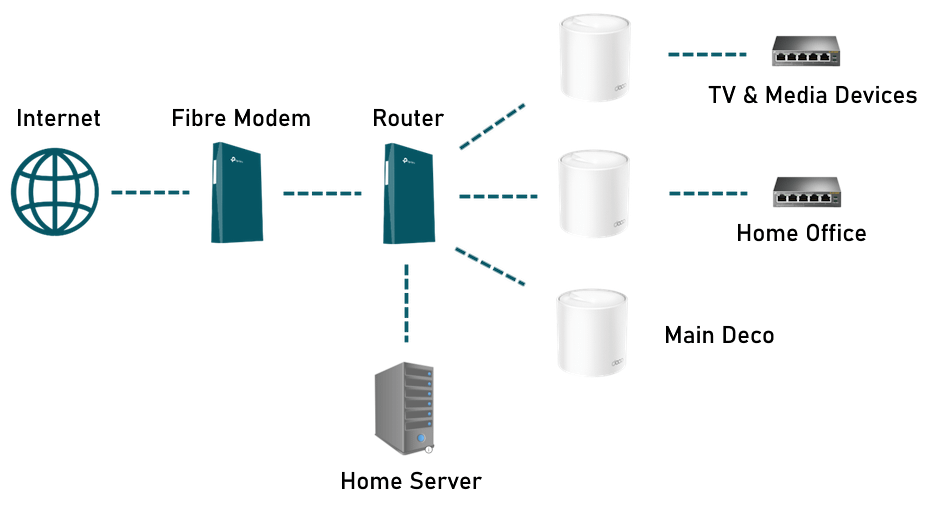
Are you thinking about upgrading your home network with a WiFi 6E mesh system? You might be wondering if you really need an Ethernet backhaul to get the best performance.
This question is key because it can affect your internet speed, reliability, and overall experience. You’ll discover what Ethernet backhaul means for WiFi 6E mesh systems and whether it’s worth the extra effort. By the end, you’ll know exactly how to set up your network for fast, smooth, and seamless connectivity.
Keep reading to make the smartest choice for your home.
Wifi 6e Mesh Basics
Wifi 6E is the latest wireless standard that adds a new frequency band. It uses the 6 GHz band to offer faster speeds and less interference.
Mesh systems use multiple devices to spread wifi evenly in your home. This helps reduce dead spots and keeps the connection strong.
Key Features Of Wifi 6e
Wifi 6E brings new features that improve wireless networks. These features help with speed, capacity, and lower delay in busy environments.
- Extra 1,200 MHz of spectrum in the 6 GHz band
- Higher data rates for faster downloads and uploads
- Lower latency for smoother video calls and gaming
- Better performance in crowded places with many devices
- Improved security with updated encryption standards
How Mesh Systems Work
Mesh systems use several nodes to create one large wifi network. Each node connects to others to share internet across your home or office.
| Mesh System Component | Role |
|---|---|
| Main Router | Connects to the internet and manages the network |
| Satellite Nodes | Spread wifi signal to areas far from the main router |
| Backhaul Link | Connects nodes to each other to share data efficiently |
What Is Ethernet Backhaul
Ethernet backhaul is a wired connection between mesh system nodes. It uses Ethernet cables to link devices directly.
This connection helps share data fast and reduces wireless interference. It supports better network performance.
Role In Mesh Networks
Ethernet backhaul connects mesh nodes with wires. This creates a stable and fast data path.
It allows each node to communicate without using wireless signals for backhaul. This frees up wireless channels for devices.
- Improves network speed
- Reduces signal interference
- Increases coverage reliability
Benefits Over Wireless Backhaul
Ethernet backhaul gives faster speeds than wireless links. It avoids delays caused by wireless interference.
It also provides a more stable connection. This helps in crowded areas where many devices use Wi-Fi.
- Higher data transfer rates
- Lower latency and delays
- Less chance of dropped connections
- Better performance in busy networks
Wifi 6e Mesh With Ethernet Backhaul
Wifi 6E mesh systems offer fast wireless internet using new 6 GHz bands. They help cover large homes with strong signals.
Ethernet backhaul links mesh nodes with cables. This can improve speed and reduce wireless traffic between nodes.
Performance Advantages
Using Ethernet backhaul helps keep mesh nodes connected with stable, fast links. This avoids slowdowns from wireless interference.
Wifi 6E can use wide channels in 6 GHz. Ethernet backhaul makes sure these channels stay free for devices, not for node communication.
- Higher speeds across the whole mesh network
- Lower latency for gaming and video calls
- Less wireless congestion on the 6 GHz band
- More reliable connection in crowded WiFi areas
Setup Considerations
Ethernet backhaul needs cables between mesh units. This can be tricky in homes without wiring or with distant nodes.
Choose cable paths carefully. Use high-quality Ethernet cables for best results. Check if your mesh system supports Ethernet backhaul.
- Plan cable routes before installing nodes
- Use Cat5e or better cables for fast speeds
- Confirm mesh units have Ethernet ports
- Test connections after setup for stability

Credit: www.reddit.com
When Wireless Backhaul Suffices
Wifi 6E mesh systems can use either wireless or ethernet backhaul. Wireless backhaul sends data between nodes without cables. This works well in many homes.
Choosing wireless backhaul depends on your home’s size, layout, and signal challenges. You do not always need ethernet cables.
Home Size And Layout
Small to medium homes often work well with wireless backhaul. The mesh nodes can stay close enough to keep strong signals.
Open floor plans help wireless backhaul perform better. Walls and floors reduce signal strength. Larger homes or many walls may need ethernet.
- Small homes fit wireless backhaul easily
- Open layouts reduce signal loss
- Many walls or floors weaken wireless links
- Big homes might need ethernet cables
Interference And Signal Strength
Wireless backhaul needs a clear path for good signal strength. Many devices and appliances cause interference. This can slow down your mesh network.
If you notice weak or slow connections, interference may be the cause. Ethernet backhaul avoids this problem by using cables instead of wireless signals.
- Wireless backhaul needs strong, clear signals
- Microwaves, walls, and other devices cause interference
- Interference lowers speed and reliability
- Ethernet backhaul bypasses wireless interference
Comparing Speeds And Reliability
Wifi 6E mesh systems offer fast wireless connections by using the 6 GHz band. These systems can connect multiple devices with higher speeds and less interference. One key question is whether they need Ethernet backhaul to perform well.
Backhaul refers to the way mesh nodes communicate with each other. It affects the speed and reliability of the whole network. Let’s compare Ethernet backhaul and wireless backhaul to see their impact.
Ethernet Vs Wireless Backhaul
Ethernet backhaul uses wired connections between mesh nodes. This provides a stable and fast link that is not affected by wireless interference. It can support the full speed of Wifi 6E without losing performance.
Wireless backhaul uses the same wireless channels to connect nodes. It is easier to set up but shares bandwidth with your devices. This can reduce speed and increase latency, especially in busy networks.
- Ethernet backhaul:More reliable, consistent speeds, less interference
- Wireless backhaul:Convenient, no cables, but lower max speed
Real-world Use Cases
In homes with many devices or thick walls, Ethernet backhaul helps keep speeds high. It also improves reliability for streaming and gaming. Users get fewer drops and smoother connections.
For smaller spaces or simple setups, wireless backhaul works well. It is easier to install and looks cleaner without extra cables. This suits users who want quick mesh coverage without extra wiring.
- Large homes benefit from Ethernet backhaul for best speed and reliability
- Wireless backhaul suits apartments and smaller houses with fewer devices
- Wired backhaul is ideal where interference or walls block wireless signals
- Wireless backhaul works when running cables is difficult or costly

Credit: www.reddit.com
Cost And Installation Factors
WiFi 6E mesh systems offer better connectivity. They may need Ethernet backhaul for best performance. Let’s explore the costs and installation factors.
Understanding these factors helps in making informed choices. It’s important to weigh both cost and ease of installation.
Wiring Challenges
Installing Ethernet backhaul can be tricky. Older homes may not have existing Ethernet wiring. Running cables through walls is hard and time-consuming.
Professional help might be needed. This adds to the cost and complicates the installation process.
- Old homes often lack Ethernet cables
- Drilling through walls may be necessary
- Hiring professionals increases costs
Budget Impact
Ethernet backhaul increases the setup cost. WiFi 6E mesh systems are already pricey. Adding Ethernet wiring can stretch the budget further.
Consider if wireless backhaul meets your needs. This option can save money if performance is acceptable.
| WiFi 6E Mesh System | High Cost |
| Ethernet Backhaul | Additional Cost |
| Professional Installation | Extra Expense |
Future-proofing Your Network
Wifi 6E mesh systems are the latest in home networking. They offer faster speeds and more reliable connections.
Do these systems need Ethernet backhaul for optimal performance? Let’s explore their evolving standards and scalability.
Evolving Wifi Standards
Wifi standards have changed over the years. Each new version offers better speed and efficiency.
- Wifi 4: Basic speeds for everyday use
- Wifi 5: Improved speed and capacity
- Wifi 6: Better for crowded areas
- Wifi 6E: Adds more bandwidth for less congestion
Scalability Of Mesh Systems
Mesh systems can grow with your needs. You can add more nodes to cover larger areas.
| Number of Nodes | Coverage Area |
| 1 Node | Small apartment |
| 2 Nodes | Medium home |
| 3+ Nodes | Large home or office |

Credit: www.reddit.com
Frequently Asked Questions
Do Wifi 6e Mesh Systems Require Ethernet Backhaul?
Wifi 6E mesh systems do not always need Ethernet backhaul. However, using Ethernet backhaul can improve speed and reliability by reducing wireless interference and congestion in your network.
How Does Ethernet Backhaul Improve Wifi 6e Mesh Performance?
Ethernet backhaul provides a dedicated wired connection between mesh nodes. This reduces latency, increases stability, and maximizes Wifi 6E speeds, especially in large homes or areas with heavy device usage.
Can Wifi 6e Mesh Work Well Without Ethernet Backhaul?
Yes, Wifi 6E mesh can work without Ethernet backhaul. It uses wireless backhaul, but performance may drop in congested or large spaces compared to wired connections.
Is Ethernet Backhaul Necessary For Streaming Or Gaming?
For streaming and gaming, Ethernet backhaul is recommended. It ensures lower latency and stable speeds, providing a better experience with minimal buffering or lag on Wifi 6E mesh networks.
Conclusion
Wifi 6E mesh systems work well on their own. Ethernet backhaul can help if your home has thick walls. It makes the connection faster and more stable. Not everyone needs it, but some do. Think about your home size and internet use.
A wired link can improve speed and reduce lag. But many find wireless enough for daily tasks. Choose what fits your setup and budget. Simple choices make a big difference in your wifi experience.


