Are you tired of slow Wi-Fi in your brick house? You’re not alone.
Thick brick walls can block your signals, leaving you frustrated with weak connections in certain rooms. But can mesh Wi-Fi fix this problem? Imagine having strong, reliable internet everywhere in your home—no dead zones, no buffering. You’ll discover how mesh Wi-Fi works in brick houses and whether it’s the solution you’ve been searching for.
Keep reading to find out if this technology can finally give your home the fast, seamless internet you deserve.
How Brick Walls Affect Wifi Signals
Brick walls can change how wifi signals move inside a house. These walls are thick and made of solid material. This can make it hard for signals to pass through.
Understanding how brick walls affect wifi helps to set up better mesh wifi networks. It also helps to know the problems that can happen inside brick houses.
Signal Absorption By Brick
Brick absorbs wifi signals and weakens them. The thicker the brick wall, the more signal it absorbs. This means the wifi signal loses strength after passing through a brick wall.
- Brick has dense material that blocks signals.
- Wet or old bricks absorb more signal.
- Multiple brick walls reduce signal strength greatly.
- Signal loss can cause slow internet or drops.
Interference And Reflection Issues
Wifi signals can bounce off brick walls. This causes interference and reflection. These effects can create dead spots or weak wifi areas inside the house.
| Issue | Effect on Wifi |
| Signal Reflection | Creates echo signals that confuse devices |
| Interference | Causes signal overlap and reduces speed |
| Dead Spots | Areas with no or very weak wifi |
| Signal Delay | Slows down data transmission |

Credit: www.reddit.com
Basics Of Mesh Wifi Systems
Mesh wifi systems help improve wireless internet in homes. They use multiple devices called nodes to spread wifi signals.
This system works well in large or complex houses, including those made with brick walls. Understanding how mesh networks function and their benefits helps to see why they are popular.
How Mesh Networks Function
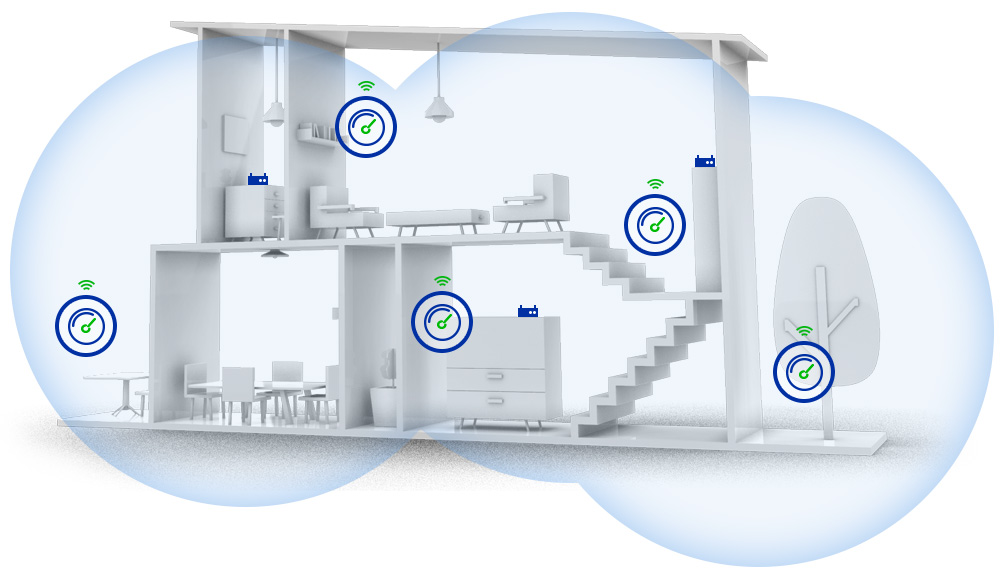
Mesh networks use several nodes placed in different rooms. These nodes communicate with each other to create one strong wifi network. This way, your device connects to the nearest node for the best signal.
- One node connects to the modem and shares internet.
- Other nodes repeat and extend the signal throughout the house.
- Nodes work together to avoid dead spots and weak signals.
- The system can adjust automatically if one node fails.
Benefits Over Traditional Routers
Mesh wifi systems offer many advantages compared to single routers. They provide better coverage and reduce dead zones, especially in homes with thick brick walls.
| Feature | Mesh Wifi | Traditional Router |
| Coverage | Wide with multiple nodes | Limited to one device |
| Signal Strength | Strong in all rooms | Weak in far rooms |
| Setup | Simple and flexible | Can be complex |
| Handling Obstacles | Better through walls | Often blocked by walls |
Mesh Wifi Performance In Brick Homes
Mesh wifi systems help provide better internet coverage in homes. Brick houses can affect how well wifi signals travel.
Understanding how mesh wifi works in brick homes helps improve signal strength and coverage.
Signal Strength And Coverage
Brick walls block wifi signals more than wooden or drywall walls. This reduces signal strength inside the house.
Mesh wifi uses multiple devices to spread the signal. This helps cover large brick homes better than one router.
- Mesh nodes placed near brick walls may have weaker signals.
- Placing nodes in open areas improves coverage.
- More mesh nodes can help reach farther rooms.
- Using 5 GHz bands offers faster speed but less range.
- 2.4 GHz bands travel farther but are slower.
Common Challenges And Solutions
Brick walls cause wifi signals to weaken or drop. This leads to slow internet or dead zones in some rooms.
To fix these problems, place mesh nodes carefully and use the right settings.
- Put mesh nodes in central, open spaces for better signal flow.
- Use wired connections between mesh nodes if possible.
- Avoid placing nodes near metal objects or appliances.
- Choose mesh systems with strong antennas for better reach.
- Test signal strength in different rooms and adjust node locations.
Optimizing Mesh Wifi For Brick Walls
Mesh Wifi can enhance internet coverage in brick houses. Brick walls often block signals, making it hard for traditional routers to work well.
Using a mesh system can help. It uses multiple nodes to spread the signal around the house.
Best Placement For Nodes
Place nodes in open areas. Avoid placing them near brick walls or heavy furniture.
- Central locations are best for nodes.
- Elevate nodes on shelves for better range.
- Avoid placing nodes in corners or behind objects.
Using Wired Backhaul
Wired backhaul can improve signal strength. It connects nodes with cables, bypassing brick interference.
Using Ethernet cables, connect nodes directly. This minimizes signal loss through brick walls.
Choosing The Right Frequency Bands
Mesh systems use different frequency bands. Choose the right one to get the best performance.
| Frequency Band | Best Use |
| 2.4 GHz | Long range, less speed |
| 5 GHz | Short range, more speed |
| 6 GHz | Newest, less interference |
Alternative Solutions For Better Coverage
Brick walls can block WiFi signals and cause weak coverage. Mesh WiFi systems often help, but there are other options too.
This section explains different ways to improve WiFi in brick houses. You can pick what works best for your home.
Range Extenders Vs Mesh Systems
Range extenders catch your WiFi signal and send it farther. They are cheaper but can slow down your network.
Mesh systems use many units that work together. They cover large areas without losing speed. Mesh is better for big brick houses.
- Range extenders are easy to set up
- Extenders can create slow spots
- Mesh systems give steady, fast coverage
- Mesh costs more but covers better
Powerline Adapters
Powerline adapters use your home’s electrical wires to send internet. They avoid WiFi signals blocked by brick walls.
Plug one adapter near your router and another where you want better internet. It gives a wired connection without extra cables.
- No WiFi signal loss through walls
- Easy to move and set up
- Works well in brick houses
- Speed depends on wiring quality
Upgrading To Wifi 6 Or 6e
Wifi 6 and 6E are the latest WiFi versions. They handle more devices and work better through walls than older WiFi.
New routers with Wifi 6 or 6E improve speed and coverage. They reduce delays and keep connections strong in brick homes.
- Faster internet speeds
- Better signal through walls
- Support for many devices
- More reliable connections
Real User Experiences And Case Studies
Mesh WiFi systems promise better coverage in difficult homes. Brick houses pose a special challenge because bricks block signals. Many users share their real experiences using mesh WiFi in these homes.
This article looks at success stories and lessons from setups that did not work well. These cases help understand how mesh WiFi performs in brick houses.
Success Stories In Brick Houses
Some users report good mesh WiFi coverage in brick homes. They often place nodes strategically near windows or hallways. This helps signals pass through or around thick walls.
- One family placed three nodes on different floors. Their internet worked well even in the basement.
- Another user added a mesh node near the main brick wall. It boosted the signal in the living room and kitchen.
- Some users combined mesh WiFi with wired connections between nodes. This improved speed and stability.
These setups show that mesh WiFi can work in brick houses with the right placement and sometimes extra wiring.
Lessons From Failed Setups
Not all mesh WiFi setups succeed in brick homes. Many fail due to poor node placement or thick walls blocking signals.
| Problem | Cause | Effect |
|---|---|---|
| Weak signal in far rooms | Nodes placed too far apart or behind thick walls | Internet drops or very slow speeds |
| Interference from metal objects | Nodes near appliances or metal furniture | Signal interruptions and slower connections |
| Incorrect setup | Mesh nodes not synced correctly | Network instability and frequent disconnects |
Users learned that placing nodes in open spaces and testing signal strength helps. Wired backhaul between nodes also improves reliability in brick houses.
Tools To Test And Improve Wifi In Brick Homes
Brick walls can weaken wifi signals in homes. Testing and improving wifi can enhance connectivity.
Use tools to analyze wifi strength and speed. These tools help find the best solutions for brick houses.
Signal Analyzers And Apps
Signal analyzers help identify weak spots. They show where the signal drops in your home.
- WiFi Analyzer: A tool to visualize the strength of your wifi.
- NetSpot: Offers heat maps for signal strength.
- WiFi SweetSpots: Measures wifi speed at different locations.
Speed Testing Tips
Testing wifi speed can reveal network performance. Use online tools to check speed regularly.
| Tool | Purpose |
| Speedtest by Ookla | Measures download and upload speeds |
| Fast.com | Simple tool for checking download speed |
| Google Speed Test | Quick access via Google search |
Credit: caspianprimesolutions.com

Credit: www.reddit.com
Frequently Asked Questions
Does Mesh Wifi Work Well In Brick Houses?
Yes, mesh WiFi works in brick houses but signals weaken through thick walls. Multiple nodes improve coverage by creating a strong network throughout the home.
How Many Mesh Wifi Nodes Are Needed In Brick Homes?
Typically, 3 to 4 nodes cover a medium brick house effectively. More nodes may be needed for larger or multi-story brick homes to ensure seamless connectivity.
Can Mesh Wifi Overcome Brick Wall Interference?
Mesh WiFi helps reduce interference by using multiple nodes. However, brick walls still cause some signal loss, so node placement is crucial for optimal performance.
Is Mesh Wifi Better Than Traditional Routers In Brick Houses?
Yes, mesh WiFi offers better coverage in brick homes by using several nodes. Traditional routers often fail to penetrate thick walls, causing dead zones.
Conclusion
Mesh WiFi can work well in brick houses with the right setup. Thick walls may slow signals but placing nodes smartly helps. Use multiple nodes to cover dead spots and keep strong internet. Test different locations to find the best signal.
This way, your whole home stays connected without weak areas. Mesh WiFi offers a flexible way to improve WiFi in brick homes. It takes some effort but can bring reliable internet to every room.