Are you tired of buffering videos and dropped connections? If you’re seeking a solution to your WiFi woes, you might have stumbled upon the term “Tri Band WiFi Extender.”
But here’s the million-dollar question: Does a Tri Band WiFi Extender work with both 2. 4GHz and 5GHz frequencies? Understanding how these devices operate can be the key to unlocking flawless internet connectivity in every corner of your home. Imagine streaming your favorite shows, gaming online, or working from home without interruptions.
Sounds like a dream, right? We’ll demystify the workings of Tri Band WiFi Extenders and reveal how they might just be the answer to your connectivity challenges. Dive in to discover if this technology is the perfect fit for boosting your internet experience.
Credit: theraleighbeergarden.com
Tri Band Wifi Extender Basics
A tri band wifi extenderboosts your wireless signal using three separate bands. It works with the 2.4 GHzand 5 GHzfrequencies plus an extra 5 GHz band. This helps reduce network traffic and improves speed.
The dual bandextender uses two bands: 2.4 GHz and 5 GHz. The tri bandadds a third band to handle more devices at once. This means less lag and better performance for busy homes.
- More bandwidth:Tri band offers more space for data.
- Less interference:Extra band reduces signal crowding.
- Better speed:Devices get faster and stable connections.
- Supports more devices:Ideal for homes with many gadgets.
Compatibility With 2.4ghz And 5ghz
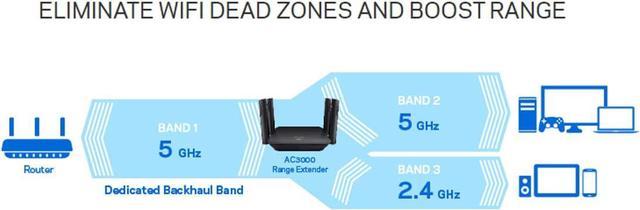
Tri-band WiFi extendersuse three wireless bands to improve coverage. One band connects to your router, while the other two extend signals to devices. This design allows them to support both 2.4GHz and 5GHz frequenciesat the same time.
For 2.4GHz networks, tri-band extenders boost signals over longer distances. This band works well through walls and floors but offers slower speeds. The extender keeps this frequency stable for devices like smart plugs and older phones.
The 5GHz bandsin tri-band extenders handle faster speeds and less interference. These bands cover shorter distances but provide better performance for streaming and gaming. The extender uses one 5GHz band to connect to the router and another to connect to devices, reducing signal loss.
Setup And Configuration
Connect the tri-band WiFi extender to your existing router using the WPS button or manual setup. Use the extender’s app or web page to enter your router’s WiFi name and password. This helps the extender link with both the 2.4 GHz and 5 GHz bands of your router.
Choosing the right frequency band is important. The 2.4 GHz band covers larger areas but is slower. The 5 GHz band is faster but covers less distance. Use 2.4 GHz for far rooms and 5 GHz for close devices.
Place the extender where the WiFi signal is still strong. Avoid walls and metal objects. The best spot is halfway between the router and the area with weak signal. This helps the extender spread the signal better.
Performance Factors
Tri-band WiFi extenderssupport both 2.4 GHzand 5 GHzbands, helping improve speed and reduce latency. The extra band allows for better distribution of traffic, lowering congestion and delays.
These extenders can handle multiple devicesmore efficiently. One band can connect to the router, while the others serve devices. This setup keeps the network faster and smoother even with many users.
Interference affects signal strength. The 2.4 GHz band is more prone to interference from household devices like microwaves and cordless phones. The 5 GHz band faces less interference but has a shorter range. Tri-band extenders can switch between bands to keep the best signal.
Troubleshooting Common Issues
Connection dropson 2.4GHz or 5GHz bands often happen due to interferenceor weak signal strength. Check the placement of your tri-band extender. Avoid walls and metal objects that block signals. Restart the extender and router to refresh connections. Make sure devices are within range of the extender.
Slow speeds can occur even with a tri-band setup if the extender is overloaded. Too many devices can reduce performance. Try to connect fewer devices or use the 5GHz band for faster speed. Check for any background apps using bandwidth.
| Firmware Update | Why It Matters | What to Do |
|---|---|---|
| Keep updated | Fixes bugs and improves compatibility | Check manufacturer website regularly |
| Check compatibility | Ensures extender works with your router | Verify model and firmware versions |
Comparing Tri Band Extenders To Alternatives
Dual Band Extenderswork with both 2.4 GHz and 5 GHz bands. They are simple and cost-effective. These extenders boost WiFi signals but may slow down speed when rebroadcasting.
Mesh Wifi Systemsuse multiple units to cover large areas. They provide seamless connectionand handle many devices well. Mesh is great for bigger homes but can be pricier.
Wired Access Pointsconnect via Ethernet cables. They offer stable and fast connections. Wired points are reliable but need more setup and cables around the house.
Choosing The Right Tri Band Extender
Tri Band WiFi extenderssupport 2.4 GHzand 5 GHzbands together. They offer better speed and less interference. Look for easy setupand strong signal strength. Check if it supports your router’s bands. Some models give one 2.4 GHz and two 5 GHz bands. This helps reduce congestion and improve device connections.
Budget is important. More expensive extenders usually have better range and faster speeds. But good options exist at lower prices. Balance your needs with what you can spend. Avoid very cheap models that lack features.
| Brand | Model | Key Features | Price Range |
|---|---|---|---|
| Netgear | EX7700 | Fast speeds, tri-band, easy setup | High |
| TP-Link | RE650 | Good range, tri-band, budget friendly | Medium |
| Linksys | RE9000 | Strong signal, tri-band, smart roaming | High |
Credit: www.newegg.com
Credit: www.bestbuy.com
Frequently Asked Questions
Does Tri-band Wifi Extender Support 2.4 Ghz Frequency?
Yes, tri-band WiFi extenders support the 2. 4 GHz band. They extend coverage for devices using this frequency, improving signal strength and stability in larger areas.
Can Tri-band Extenders Improve 5 Ghz Wifi Range?
Tri-band extenders enhance 5 GHz WiFi range by adding a dedicated band for backhaul. This reduces congestion and boosts overall network speed and reliability.
How Does Tri-band Extender Differ From Dual-band Extenders?
Tri-band extenders offer an extra 5 GHz band for better performance. This allows simultaneous device connections and reduces interference compared to dual-band extenders.
Will A Tri-band Extender Work With My Existing Router?
Yes, tri-band extenders are compatible with most routers. They connect to 2. 4 GHz and 5 GHz networks, expanding your WiFi coverage seamlessly.
Conclusion
Tri-band WiFi extenders work well with both 2. 4 GHz and 5 GHz bands. They help improve your internet speed and reduce dead zones. This makes your connection more stable and faster in different areas. You can connect many devices without losing performance.
Choosing the right extender depends on your home size and devices. Overall, tri-band extenders offer better coverage and smoother internet. They are a good option to boost your WiFi signal.


