Have you ever noticed your long-range WiFi extender acting up when the weather changes? Maybe your connection slows down during a rainstorm or cuts out completely on windy days.
You’re not imagining things—weather can play a big role in how well your WiFi extender performs. Understanding this can help you keep your internet strong no matter what’s happening outside. Keep reading to discover how weather affects your long-range WiFi extender and what you can do to stay connected all year round.
Weather And Wifi Signals
Weathercan change how well your long-range wifi extender works. Rain and snow add water droplets in the air. These droplets can block or weakenwifi signals. Strong winds may also move obstacles like trees, causing signal disruption.
Cloudy weather and fog create moisture in the air. This moisture can slow downwifi waves. Dry and clear days are usually best for strong signals.
- Rain:Water absorbs and scatters signals, causing signal loss.
- Snow:Similar to rain, snowflakes weaken signals by blocking waves.
- Fog:Moisture reduces signal range.
- Wind:Moves physical obstacles that may interferewith signals.
- Sunshine:Usually helps maintain strong signals.
| Weather Condition | Effect on Wifi Signal | Reason |
|---|---|---|
| Rain | Signal weakens | Water droplets absorb waves |
| Snow | Signal loss | Snowflakes block signals |
| Fog | Reduced range | High moisture in air |
| Wind | Intermittent disruption | Moving obstacles |
Credit: www.newegg.com
Long Range Wifi Extender Basics
Long range WiFi extenders help boost internet signals far from the router. They have key componentslike antennas, amplifiers, and radios. These parts work together to catch and send signals over long distances.
Extenders use two main frequency bands: 2.4 GHz and 5 GHz. The 2.4 GHz band covers a longer range but is slower. The 5 GHz band is faster but works best in shorter distances.
Signal travel faces many challenges. Walls, trees, and weather can block or weaken signals. Rain, fog, and snow can cause the signal to lose strength. Metal objects and thick walls also reduce how far the signal reaches.
Effects Of Specific Weather Conditions
Rain and humiditycan weaken wifi signals. Water droplets absorb and scatter signals. This leads to slower speedsand shorter range. Humidity also affects signal strength by creating a moist environment that reduces transmission efficiency.
Winditself does not harm signals, but it can move trees or objects. These objects may block or reflect signals, causing interruptions. Physical obstructions like walls, buildings, and trees are the main barriers for wifi signals. Thick or dense objects cause more signal loss.
Temperature changesaffect the electronics inside extenders. Very hot or cold weather may reduce device performance or cause failures. Electronic parts work best at moderate temperatures, so extreme heat or cold can lower signal qualityor cause disconnects.
Indoor Vs Outdoor Extenders
Indoor extenders are shielded from rain, wind, and snow. This protects their performancebetter than outdoor units.
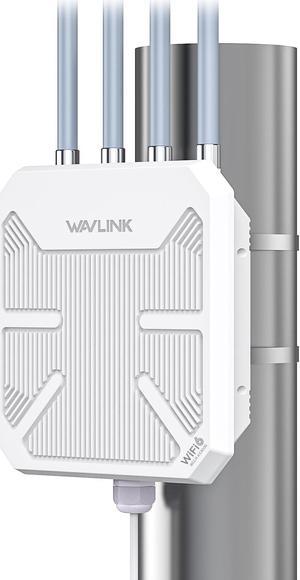
Outdoor extenders face direct weather exposure. This can cause signal lossand hardware damage.
Weather Exposure Differences
- Indoor devices avoid moisture and temperature swings.
- Outdoor devices must handle sun, rain, wind, and cold.
- Extreme weather can reduce outdoor device life and range.
Protective Measures For Outdoor Devices
- Use weatherproof casings or enclosures.
- Seal all cable connections against water.
- Place devices under eaves or sheltered spots.
Installation Tips For Weather Resistance
- Mount devices high to avoid flooding risks.
- Check that antennas point clear of obstacles.
- Use surge protectors to prevent lightning damage.
Optimizing Performance In Bad Weather
Choosing the right wifi extendermakes a big difference in bad weather. Devices with weather-resistantfeatures work better outdoors. Look for models with strong signalsand stable connections. Some extenders have higher powerto send signals farther, even in rain or fog.
Placement matters a lot. Put the extender where it has clear line of sightto your main router and devices. Avoid thick walls, trees, or metal objects that block signals. Placing it higher upcan help avoid ground-level interference.
Regular maintenancekeeps your extender working well. Check for dirt, dust, or damage on the device. Monitor the signal strength often to spot problems early. Reset or update the extender’s software to fix bugs and improve performance.

Credit: www.amazon.com
Myths About Weather And Wifi
Many people think weather always harms long range wifi signals. Rain, snow, and fog are often blamed for weak connections. While bad weather can cause some signal loss, the effect is usually small. Walls, trees, and buildings block wifi more than weather does.
Strong wind does not affect wifi signals much. Thunderstorms might cause brief interference but don’t stop wifi. Wifi signals mostly travel through the air and are affected by obstacles and distance.
Here are some facts:
- Rain and snowslightly weaken signals, but usually not enough to notice.
- Fog and humidityhave little to no effect on wifi strength.
- Walls and objectsblock wifi much more than weather.
- Distancefrom the router or extender is the biggest factor.
Many wifi issues blamed on weather are actually caused by other problems. These include poor placement of devices or interference from other electronics.

Credit: www.amazon.com
Frequently Asked Questions
Does Weather Impact Long Range Wifi Extender Signals?
Yes, weather conditions like rain, snow, and fog can weaken WiFi signals. Moisture absorbs and scatters radio waves, reducing signal strength and range.
How Does Rain Affect Wifi Extender Performance?
Rain causes signal attenuation by absorbing radio waves. Heavy rain can disrupt long-range WiFi, leading to slower speeds and intermittent connections.
Can Wind Influence Wifi Extender Signal Quality?
Strong wind alone doesn’t directly affect signals but can misalign outdoor antennas. Misalignment lowers signal strength and disrupts connectivity.
Do Temperature Changes Affect Wifi Extender Reliability?
Extreme temperatures can impact hardware performance. High heat may cause overheating, while cold can affect battery life and electronic components.
Conclusion
Weather can impact long range WiFi extender performance. Rain, fog, and wind cause signal issues. Clear weather often provides better connectivity. Regularly check and adjust your extender for best results. Place it in a high, open spot. Avoid walls and metal objects nearby.
Consider weather-resistant models for outdoor use. Regular maintenance helps maintain signal strength. Keep firmware updated for optimal performance. Understanding weather effects can improve your WiFi experience. Stay informed and enjoy a more reliable connection.


