Are you tired of slow Wi-Fi and dead zones in your home? Choosing the right mesh Wi-Fi system can change the way you connect online.
Two top contenders are Eero Mesh Wi-Fi and Google Nest. But which one is the best fit for your needs? You’ll discover the key differences, benefits, and drawbacks of each system. By the end, you’ll have a clear idea of which mesh Wi-Fi will keep your devices running fast and smooth.
Keep reading to find out which one deserves a spot in your home.

Credit: www.reddit.com
Eero Mesh Wifi Features
Eero Mesh Wifi offers a wireless network system for homes. It aims to provide strong and consistent internet coverage.
This article explains the main features of Eero Mesh Wifi. Learn how it performs in different areas.
Design And Hardware
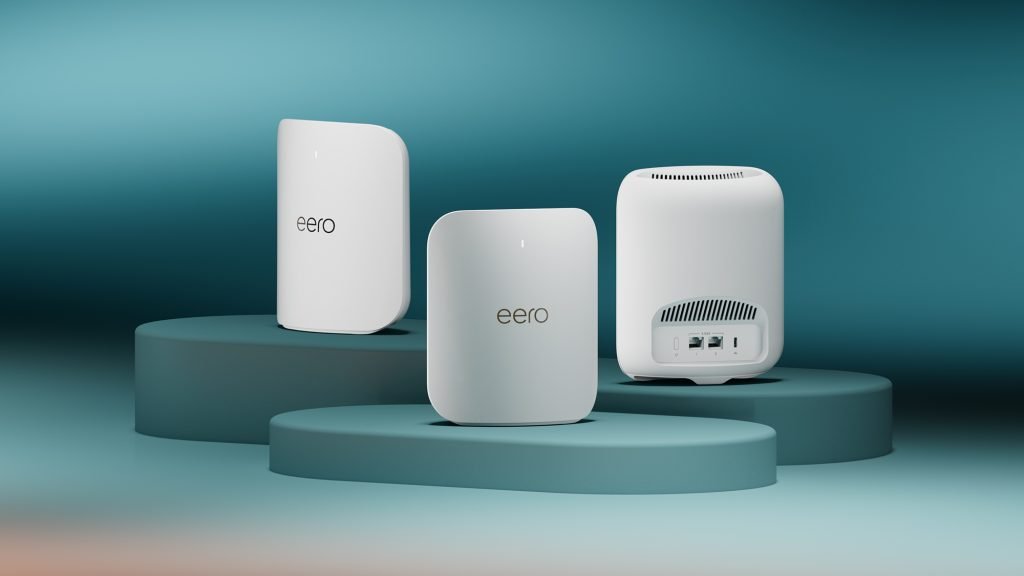
Eero devices have a simple, small, and modern look. They fit well in most home spaces. The hardware is designed to blend with home decor.
Setup Process
Setting up Eero Mesh Wifi is quick and user-friendly. The system guides users through each step using an app.
- Plug in the main Eero unit
- Download and open the Eero app
- Follow app instructions to connect to the internet
- Add additional Eero units to expand coverage
Coverage And Range
Eero Mesh Wifi covers a large area with strong signals. Each unit works together to reduce dead zones. Users can add more units for bigger homes.
Speed And Performance
The system supports fast internet speeds and can handle many devices. It uses advanced technology to keep connections stable.
| Feature | Details |
| Wi-Fi Standard | Wi-Fi 5 (802.11ac) or Wi-Fi 6 (802.11ax) |
| Max Speed | Up to 1 Gbps |
| Device Support | Over 50 devices |
| Band | Dual-band or Tri-band |
Security Features
Eero protects your network with strong security tools. It offers automatic updates and encryption to keep data safe.
App And User Interface
The Eero app is easy to use. It shows network status and lets users control settings. The interface works well for beginners and experienced users.
Google Nest Wifi Features
Google Nest Wifi is a popular mesh Wi-Fi system. It helps create strong Wi-Fi signals across large areas.
This system is easy to set up and offers good speed and security. It works well for homes and small offices.
Design And Hardware
Google Nest Wifi has a simple, round design that fits in any room. Each unit is small and looks like a smart speaker.
The hardware includes a main router and one or more points. Points also work as smart speakers with Google Assistant.
- Main router has two Ethernet ports
- Points connect wirelessly to the router
- Each device has LED lights for status
- Available in white and light colors
Setup Process
Setting up Google Nest Wifi is quick and easy. The process uses the Google Home app on your phone.
You follow simple steps in the app to connect the router and points. The app guides you through each step.
- Plug in the router and connect to modem
- Use Google Home app to find the router
- Add points by placing them around your home
- App checks connection and updates devices
Coverage And Range
Google Nest Wifi provides coverage up to 2200 square feet per router. Adding points increases coverage.
The mesh system helps eliminate dead zones. It keeps Wi-Fi strong in large or multi-floor homes.
- One router covers about 2200 square feet
- Each point adds up to 1600 square feet
- Devices connect to the strongest signal
- Supports multiple devices at once
Speed And Performance
Google Nest Wifi offers good speeds for streaming and gaming. It supports dual-band Wi-Fi 5 (802.11ac).
The system manages network traffic to keep devices fast. It can handle many devices without slowing down.
- Dual-band Wi-Fi 5 support
- Speeds up to 1200 Mbps on 5 GHz band
- Automatic band steering for best speed
- Handles multiple devices smoothly
Security Features
Google Nest Wifi includes strong security to protect your network. It gets regular updates to fix vulnerabilities.
Features include WPA3 encryption and automatic threat detection. You can pause Wi-Fi on certain devices for control.
- WPA3 encryption for better security
- Automatic software updates
- Threat detection and blocking
- Parental controls and device pause
App And User Interface
The Google Home app controls Google Nest Wifi. It shows network status and device details clearly.
You can set up guest networks, check speed tests, and pause Wi-Fi for specific devices. The app is easy to use.
- Simple setup and network management
- View connected devices and usage
- Create guest Wi-Fi networks
- Control parental settings and schedules
Performance Comparison
Eero Mesh Wifi and Google Nest are popular systems for home internet. They both offer mesh Wi-Fi to cover large areas.
This comparison looks at their speed, coverage, device handling, and reliability.
Speed Tests
Eero Mesh Wifi and Google Nest show strong speeds in tests. Both deliver fast internet in close range.
Google Nest keeps stable speed at longer distances. Eero may slow down slightly but stays reliable.
- Google Nest offers steady speeds over distance
- Eero has high peak speeds nearby
- Both support fast Wi-Fi standards
Coverage Efficiency
Google Nest covers larger areas with fewer devices. It is good for big homes or offices.
Eero needs more units for the same coverage. It works well in medium-sized spaces.
- Google Nest covers up to 2200 square feet per unit
- Eero covers about 1500 square feet per unit
- Both systems allow adding more units easily
Device Handling Capacity
Google Nest supports up to 200 devices at once. It handles many connections well.
Eero supports around 75 devices per unit. It is ideal for average household use.
- Google Nest suits large families or small offices
- Eero fits typical home setups
- Both manage smart home devices effectively
Reliability And Stability
Eero Mesh Wifi is known for stable connections and quick recovery. It rarely drops signals.
Google Nest also offers solid reliability. It adapts well to network changes and interference.
- Eero recovers fast from interruptions
- Google Nest adjusts automatically to maintain signal
- Both provide consistent Wi-Fi performance

Credit: www.pcmag.com
Ease Of Use And Setup
Choosing between Eero Mesh Wifi and Google Nest depends on how easy they are to use and set up. Both systems aim to provide good coverage and simple control.
This section compares their installation, app navigation, parental controls, and network management features.
Installation Experience
Eero Mesh Wifi offers a quick installation process with clear instructions. The app guides users step-by-step to connect devices.
Google Nest also provides an easy setup using the Google Home app. It scans the network and helps place mesh points effectively.
- Eero uses a dedicated app for setup.
- Google Nest setup is done through Google Home app.
- Both systems give tips on optimal device placement.
App Navigation
The Eero app has a simple layout with main features on the home screen. Users can check device status and network health easily.
Google Nest app focuses on smart home integration. It shows network devices and settings but may require more taps to access some features.
- Eero app is direct and focused on wifi settings.
- Google Nest app combines wifi and smart home controls.
- Eero’s interface suits users wanting quick access.
Parental Controls
Eero provides easy parental controls. Users can pause internet for specific devices and set schedules with a few taps.
Google Nest offers parental controls through the Family Wi-Fi feature. It allows filtering content and pausing internet access for kids.
- Eero allows device-by-device internet pause.
- Google Nest filters content and sets time limits.
- Both apps notify when controls are active.
Network Management
Eero app shows real-time network status and connected devices clearly. It also suggests speed tests and troubleshooting tips.
Google Nest app integrates network management with other Google services. It offers device priority and guest network controls.
- Eero highlights network health and device info.
- Google Nest supports device prioritization.
- Both allow easy guest network setup.
Pricing And Value
Choosing between Eero Mesh WiFi and Google Nest depends partly on price. Both systems offer strong performance but differ in cost.
This guide breaks down the pricing and value of each system. It covers starter kits, extra units, subscriptions, and long-term worth.
Cost Of Starter Kits
Eero and Google Nest both sell starter kits that include multiple devices. These kits are for setting up home WiFi quickly.
| System | Starter Kit Options | Price Range |
| Eero | 2-pack, 3-pack | $150 – $300 |
| Google Nest | 2-pack, 3-pack | $200 – $350 |
Additional Units Pricing
If you need to cover a larger area, you can add more units. Pricing for these extra devices varies.
- Eero extra units cost about $100 each.
- Google Nest additional units range from $120 to $150.
- Both support easy expansion without complex setup.
Subscription Requirements
Eero offers a subscription for advanced features. Google Nest includes some services for free but also has optional plans.
| Feature | Eero | Google Nest |
| Basic Usage | No subscription needed | No subscription needed |
| Advanced Security | Subscription required | Free with some devices |
| Parental Controls | Subscription required | Included |
Long-term Value
Consider these points for long-term value:
- Eero has a lower upfront cost but may add subscription fees later.
- Google Nest costs more initially but offers some free features.
- Both brands provide reliable coverage and easy upgrades.
- Choosing depends on your budget and feature needs.
Compatibility And Integration
Choosing the right mesh WiFi system is important for your smart home. Eero Mesh WiFi and Google Nest are popular options.
They offer different features for compatibility and integration with other devices. Let’s explore how they integrate into your home network.
Smart Home Integration
Smart home integration is a key factor when selecting a WiFi system. Eero and Google Nest both offer robust options.
- Eero works seamlessly with Amazon Alexa.
- Google Nest integrates well with Google Assistant.
- Both support Apple HomeKit for added security.
Device Compatibility
Device compatibility ensures your WiFi system works with various gadgets. Both Eero and Google Nest support many devices.
| Device | Eero | Google Nest |
| Smart TVs | Compatible | Compatible |
| Smartphones | Compatible | Compatible |
| Laptops | Compatible | Compatible |
Third-party Support
Third-party support is crucial for expanding your smart home system. Eero and Google Nest provide excellent support options.
Pros And Cons
Choosing the right mesh WiFi system is essential for smooth internet at home. Eero and Google Nest are popular options. Here, we explore their pros and cons.
Understanding the advantages and drawbacks can help you make an informed decision. Let’s dive into the details of each system.
Eero Advantages
Eero mesh WiFi offers several benefits that enhance your internet experience.
- Easy to set up with a user-friendly app
- Seamless coverage throughout the home
- Automatic updates for improved security
Eero Drawbacks
While Eero has advantages, there are some downsides to consider.
Some users find the subscription model for advanced features costly. The system may also lack advanced customization options.
Google Nest Advantages
Google Nest WiFi provides benefits that make it a strong contender in the mesh network space.
| Feature | Benefit |
| Integrated Google Assistant | Voice control for smart devices |
| High-speed coverage | Fast internet in every room |
| Guest network | Secure access for visitors |
Google Nest Drawbacks
Despite its advantages, Google Nest WiFi has some limitations.
Limited Ethernet ports can be a concern for wired connections. The system may require frequent reboots for optimal performance.
Credit: www.t3.com
Which One Fits Your Home?
Choosing the right mesh WiFi system can improve internet speed and coverage. Eero Mesh Wifi and Google Nest are popular choices.
Each system works best in different homes. Let’s see which one fits your needs.
Best For Large Homes
Eero Mesh Wifi covers large spaces well. It uses multiple units to spread WiFi evenly.
Google Nest also covers big homes but may need more units. Eero offers easy expansion and strong signals.
- Eero has fast coverage for many rooms
- Google Nest fits homes with many floors
- Eero supports adding more devices quickly
Best For Tech Beginners
Google Nest is simple to set up. It has an easy app and clear instructions for new users.
Eero also offers a user-friendly app but may have more settings. Google Nest works well for those new to WiFi systems.
- Google Nest app is easy to use
- Step-by-step guides help beginners
- Eero has more options but still simple
Best For Smart Home Enthusiasts
Google Nest fits well with other Google smart devices. It connects easily with smart lights and speakers.
Eero supports many smart home brands. It works well if you want wide device compatibility.
- Google Nest integrates with Google Assistant
- Eero supports Alexa and other systems
- Both offer features for smart homes
Best Budget Option
Eero offers affordable starter kits with good coverage. It is a solid choice if you want quality on a budget.
Google Nest tends to be pricier but adds smart features. For strict budgets, Eero gives more value.
- Eero has low-cost options
- Google Nest costs more upfront
- Eero balances price and performance
Frequently Asked Questions
What Are The Main Differences Between Eero And Google Nest Wifi?
Eero offers simpler setup and better mesh coverage. Google Nest provides smart home integration and superior design. Both support fast speeds, but Nest excels in smart assistant features. Choose based on your priority: ease of use or smart home ecosystem.
Which Mesh Wifi System Has Better Coverage, Eero Or Nest?
Eero provides excellent coverage with its TrueMesh technology. Google Nest WiFi also offers strong coverage with scalable nodes. Both systems cover large homes well, but Eero’s advanced routing can enhance performance in challenging spaces.
How Do Eero And Google Nest Compare In Speed Performance?
Both Eero and Google Nest deliver high-speed WiFi suitable for streaming and gaming. Eero supports WiFi 6 on newer models for faster speeds. Google Nest offers reliable performance but lacks WiFi 6 on some models. Speed depends on your internet plan too.
Is Eero Or Google Nest Wifi Easier To Set Up?
Eero is known for its user-friendly app and quick setup process. Google Nest also offers straightforward setup with Google Home app integration. Both are beginner-friendly, but Eero’s guided steps can be more intuitive for less tech-savvy users.
Conclusion
Both Eero Mesh Wifi and Google Nest offer strong home wifi options. Eero is easy to set up and covers large areas well. Google Nest integrates smoothly with smart home devices and has a sleek design. Each system has unique features that suit different needs.
Consider your home size, device use, and budget before choosing. Either choice will improve your wifi experience and reduce dead zones. In the end, pick the one that feels right for your home and lifestyle.


