Are you tired of slow internet and dead zones in your home? The Google Nest Mesh Wifi promises to fix those frustrating black spots and keep your devices connected seamlessly.
But does it really deliver on its promise? In this review, you’ll discover how the Nest Mesh Wifi works, what makes it stand out, and whether it’s the right choice for your home. Keep reading to find out if this system can finally give you the fast, reliable internet you deserve.
Google Nest Mesh Wifi Design
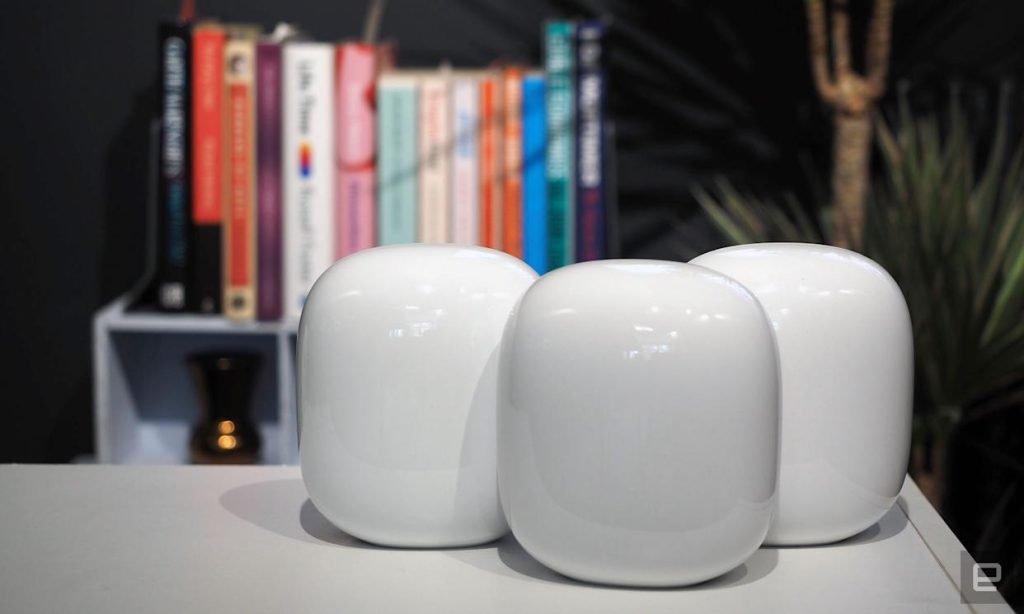
The Google Nest Mesh Wifi system has a modern look that fits well in most homes. It is made to blend with your room decor quietly.
The design focuses on simplicity and ease of use while offering strong wifi coverage across spaces.
Physical Appearance
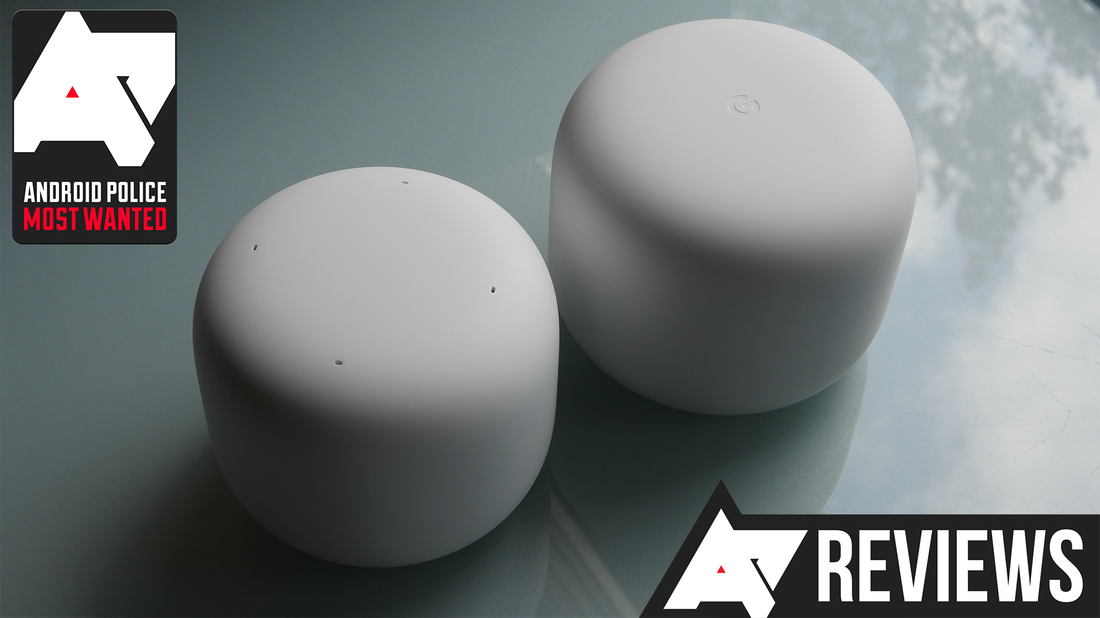
Each Nest Wifi point looks like a small, rounded cylinder. It is about the size of a soda can, making it easy to place on shelves or tables.
- White or light gray color options
- Soft matte finish to reduce fingerprints
- Minimal light indicators that do not distract
- Compact size fits in small spaces
Build Quality
The Nest Wifi units are made of sturdy plastic that feels solid. The base has a rubber ring to keep it from slipping on smooth surfaces.
| Feature | Description |
| Material | High-quality matte plastic |
| Weight | About 340 grams per unit |
| Dimensions | 4.33 x 4.33 x 3.78 inches |
| Stability | Rubber base prevents sliding |
Setup Process
Setting up the Nest Wifi is simple and user-friendly. The Google Home app guides you through the process with clear instructions.
- Plug in the primary Nest Wifi router to your modem.
- Open the Google Home app on your phone.
- Follow prompts to connect the router to your network.
- Place additional Nest Wifi points in other rooms.
- Use the app to add each point to your mesh network.
- Check the app for signal strength and device status.
Coverage And Range
The Google Nest Mesh Wifi system aims to provide a strong wireless signal throughout your home. It works by using multiple access points to extend coverage.
This review focuses on how well the system covers different spaces and the quality of its signal in various home layouts.
Signal Strength Across Spaces
The mesh system keeps a steady signal in most rooms, even at some distance from the main router. Walls and furniture cause some signal loss but not enough to disrupt daily use.
- Strong signal in living rooms and kitchens
- Good connection in bedrooms
- Minor drops in basements or far corners
Performance In Large Homes
Large homes benefit from adding extra Nest Wifi points. Each unit extends the network to new areas, improving overall reach and speed.
| Number of Units | Approximate Coverage Area | Expected Signal Quality |
| 1 Unit | Up to 1,500 sq ft | Good |
| 2 Units | Up to 3,000 sq ft | Very Good |
| 3 Units | Up to 4,500 sq ft | Excellent |
Multi-story Coverage
The mesh system handles multiple floors well. It uses a strong backhaul connection between units to keep signal steady across levels.
Tips for better multi-story coverage:
- Place one unit on each floor for best results
- Keep units away from thick walls and metal objects
- Use the Nest app to find optimal placement
Speed And Performance
Google Nest Mesh Wifi provides a solid internet connection across your home. It is designed to deliver good speed and reliable performance.
This review focuses on how well the system handles connection speeds, multiple devices, and latency.
Connection Speeds
The Nest Mesh Wifi offers fast connection speeds that suit everyday use. It supports high-speed internet plans up to 2.2 Gbps.
The system uses multiple access points to keep strong signals in every room. This helps reduce dead zones.
Handling Multiple Devices
Many homes have many devices connected at once. The Nest Mesh Wifi handles this well without slowing down.
It supports up to 100 connected devices. This makes it a good choice for smart homes and busy networks.
- Smartphones and tablets
- Smart TVs and streaming devices
- Smart home gadgets like cameras and lights
- Laptops and gaming consoles
Latency And Stability
Low latency is important for video calls and online games. Nest Mesh Wifi keeps latency low and stable.
The system uses intelligent routing to avoid interference. This keeps the connection steady and smooth.
Credit: www.engadget.com
Features And Functionality
The Google Nest Mesh Wifi system offers a strong and steady wireless connection. It spreads wifi evenly across your whole home.
This system is easy to set up and works well with many devices. It helps keep your internet fast and reliable.
Parental Controls
Parental controls let you manage your children’s internet use. You can pause wifi on certain devices anytime.
Set schedules to limit screen time. Block websites that are not suitable for kids.
- Pause internet for specific devices
- Create internet schedules
- Block harmful websites
- View activity reports
Network Management App
The Google Home app controls the Nest Mesh Wifi. It shows connected devices and signal strength.
You can run speed tests and set up guest networks. The app sends alerts if there are network problems.
- Monitor device connections
- Run wifi speed tests
- Create and manage guest networks
- Receive network alerts
Integration With Google Ecosystem
The Nest Mesh Wifi works well with Google smart home devices. It connects smoothly with Google Assistant.
You can control your wifi using voice commands. It fits into the Google ecosystem for easy device management.
- Works with Google Assistant
- Easy voice control for wifi
- Connects with Google smart devices
- Unified management in Google Home app
Installation And User Experience
Setting up Google Nest Mesh Wifi can be a breeze. The user-friendly design ensures a smooth installation process.
Experience seamless internet connectivity across your home with Google Nest Mesh Wifi. Let’s explore its setup and user interface.
Ease Of Setup
Google Nest Mesh Wifi offers an easy setup process. The setup is guided through the Google Home app.
- Download the Google Home app on your smartphone.
- Plug in your Nest Wifi router and point.
- Follow the app instructions to connect to your internet.
User Interface
The user interface of Google Nest Mesh Wifi is simple. The app provides clear instructions and useful settings.
| Feature | Function |
| Network Check | Test your connection speed |
| Guest Network | Provide access to visitors |
| Parental Controls | Manage screen time for kids |
Troubleshooting Tips
Even the best tech can face issues. Here are some troubleshooting tips for Google Nest Mesh Wifi.
If your internet is slow, try repositioning the mesh points closer.
Ensure all devices are updated to the latest firmware version.
Pricing And Value
The Google Nest Mesh Wifi offers a reliable internet connection. It’s important to consider its pricing and overall value.
This review will help you decide if it’s the right choice for your home. We will look at how its cost compares to competitors, its long-term value, and any extra costs.
Cost Compared To Competitors
The Google Nest Mesh Wifi is priced reasonably in the market. It competes with other well-known brands.
Here is a simple comparison of prices:
| Google Nest Mesh Wifi | $299 |
| Brand A Mesh Wifi | $349 |
| Brand B Mesh Wifi | $279 |
Long-term Value
Investing in a Google Nest Mesh Wifi can pay off over time. It provides strong and consistent internet coverage.
This device can handle multiple devices without slowing down. It’s built to last, reducing the need for frequent replacements.
Subscription Or Additional Costs
There are no mandatory subscriptions with the Google Nest Mesh Wifi. This makes it a cost-effective choice for many users.
However, there might be optional services that come with extra costs. It’s important to check if you need any of these additional features.
- Optional cloud storage
- Enhanced security features
- Parental controls
Pros And Cons
The Google Nest Mesh Wifi is a popular choice for home internet coverage. It aims to provide strong and steady wifi signals throughout the house.
This review will look at the main strengths and weaknesses of the system. It helps to understand what works well and what may cause issues.
Strengths
The Google Nest Mesh Wifi offers several benefits that make it a solid option for many users.
- Easy setup with the Google Home app
- Good coverage for medium to large homes
- Supports multiple devices at once without slowdowns
- Automatic updates improve security and performance
- Modern, compact design fits well in most rooms
Weaknesses
Some drawbacks exist that may affect certain users depending on their needs.
| Weakness | Description |
| No support for advanced network controls | Limited options for managing network settings |
| Relies on Google account | Setup and control require a Google account |
| Price higher than some competitors | Costs more than similar mesh wifi systems |
| Not ideal for very large homes | May need extra units for full coverage in big houses |

Credit: www.pcmag.com
Final Thoughts On Google Nest Mesh Wifi
The Google Nest Mesh Wifi offers a simple way to improve home internet coverage. It blends well into most spaces and is easy to set up. This makes it a popular choice for many users.
Here, we look at who benefits most from this system and how it performs overall. These points help decide if it fits your needs.
Ideal User Scenarios
The Google Nest Mesh Wifi suits a variety of home setups and user types. It works best for people who need steady coverage in multiple rooms or floors.
- Families with several devices connected at once
- Users living in medium to large homes
- People who want easy setup and minimal maintenance
- Those who prefer a clean, modern design for their tech gear
- Users who use smart home devices needing stable Wi-Fi
Overall Performance Summary
The system performs well in speed, range, and reliability. It handles multiple devices without much lag. The user interface is simple and clear, which helps in managing the network.
| Feature | Performance |
| Wi-Fi Speed | Consistent and fast for most tasks |
| Coverage | Strong signal across large areas |
| Device Handling | Supports many devices smoothly |
| Setup | Quick and user-friendly |
| Design | Compact and blends with home decor |
Credit: www.androidpolice.com
Frequently Asked Questions
What Is Google Nest Mesh Wifi And How Does It Work?
Google Nest Mesh Wifi is a smart wireless system that extends Wi-Fi coverage across your home. It uses multiple nodes to create a seamless, strong network, eliminating dead zones and improving connectivity for all devices.
How Fast Is The Google Nest Mesh Wifi System?
Google Nest Mesh Wifi offers speeds up to 2. 2 Gbps with Wi-Fi 5 technology. It adapts to your internet plan and ensures stable, high-speed connections throughout your home.
Can Google Nest Mesh Wifi Handle Multiple Devices?
Yes, it supports multiple devices simultaneously with minimal lag. Its smart routing prioritizes traffic, making it ideal for homes with many connected gadgets.
Is Google Nest Mesh Wifi Easy To Set Up?
Setup is simple using the Google Home app. It guides you step-by-step, allowing quick installation and easy network management from your smartphone.
Conclusion
The Google Nest Mesh Wifi offers strong, reliable internet across your home. Setup is simple and takes only minutes. The design fits well in any room without standing out. It keeps your devices connected with good speed and coverage. Small homes and larger spaces both benefit from its mesh system.
For steady internet without complex tech, it is a solid choice. Enjoy smooth streaming, gaming, and browsing with fewer drops. Overall, this mesh wifi system meets everyday needs with ease.


