Are you tired of slow Wi-Fi and dead zones in your townhouse? You’re not alone.
Getting the right number of mesh Wi-Fi nodes can make all the difference in creating a strong, reliable connection throughout your home. But how many nodes do you actually need? If you’ve ever wondered how to set up your mesh network for the best coverage without wasting money or effort, this article is for you.
Keep reading to discover exactly what works for townhouses like yours, so you can enjoy fast, seamless internet in every corner.
Factors Affecting Mesh Wifi Coverage
Mesh wifi systems help spread wifi signals across your home. The number of nodes you need depends on several things. These factors can change how well your wifi works in a townhouse.
Understanding these factors can help you place your mesh nodes better. This will give you strong wifi in every room.
Townhouse Size And Layout
The size of your townhouse affects how many mesh nodes you need. Larger homes need more nodes to cover all areas. The layout also matters. Open plans let wifi travel easier than many small rooms.
- Number of floors: More floors need more nodes.
- Room count: More rooms can block wifi signals.
- Open or closed spaces: Open spaces improve coverage.
- Hallways and corners: These can weaken signals.
Building Materials And Obstacles
Some building materials block wifi signals more than others. Thick walls and metal objects can stop signals. Furniture and appliances can also cause weak spots.
| Material | Effect on Wifi |
| Concrete | Strongly blocks signals |
| Brick | Moderate blockage |
| Drywall | Minimal blockage |
| Metal | Blocks and reflects signals |
| Glass | Usually lets signals pass |
Internet Speed And Bandwidth Needs
Your internet speed affects how many devices can connect well. More devices or high use needs more bandwidth. This can mean adding more mesh nodes for better wifi sharing.
- Number of users in the home
- Types of activities like streaming or gaming
- Speed of your internet plan
- Quality of each mesh node
Credit: caspianprimesolutions.com
Determining The Number Of Mesh Nodes
Choosing the right number of mesh wifi nodes is important for good internet coverage. Townhouses have unique layouts that affect signal strength.
This guide helps you find the right number of nodes for your townhouse. It covers size, range, and placement tips.
Square Footage Guidelines
The size of your townhouse affects how many mesh nodes you need. Larger homes need more nodes for full coverage.
On average, one mesh node covers about 1,500 to 2,000 square feet. Divide your home’s total square feet by this number to estimate nodes.
- Up to 1,500 sq ft: 1 node may work
- 1,500 to 3,000 sq ft: 2 nodes recommended
- Over 3,000 sq ft: 3 or more nodes needed
Typical Node Range
Each mesh node has a range that depends on obstacles like walls and floors. Typical indoor range is about 1,500 feet without barriers.
Strong materials like concrete reduce the range. Wooden or drywall barriers allow better signal travel. Plan nodes to keep signals strong.
- Open space range: up to 1,500 feet
- With walls: 500 to 1,000 feet
- Multiple floors reduce range further
Node Placement Tips
Good node placement improves wifi performance. Place nodes where signals face few obstacles and cover high-usage areas.
Avoid placing nodes near thick walls or metal objects. Keep nodes in open spaces and at central locations for better coverage.
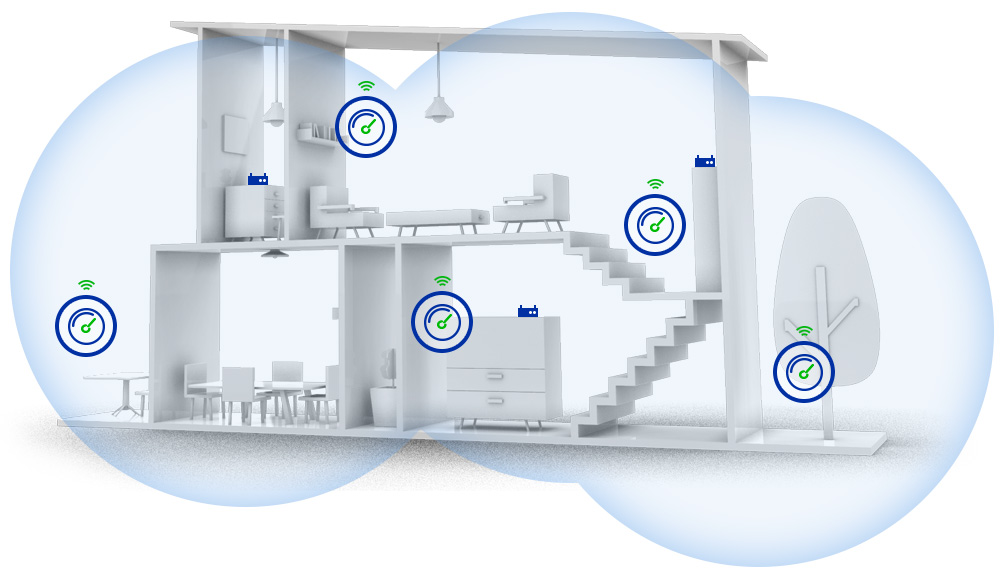
- Place nodes on each floor of the townhouse
- Keep nodes visible, not inside cabinets
- Space nodes evenly for balanced coverage
- Avoid corners and behind large furniture
Optimizing Mesh Network Performance
Mesh wifi systems help cover large homes with strong signals. Townhouses need the right number of nodes for full coverage.
Optimizing the mesh network improves speed and reduces dead spots. Good setup makes your internet reliable everywhere.
Ideal Node Placement Strategies
Place nodes where signals can travel freely. Avoid putting them behind walls or inside cabinets. Keep nodes in open spaces.
- Put the main router near the center of the townhouse.
- Place additional nodes on each floor for even coverage.
- Keep nodes within 30 feet of each other for strong links.
- Avoid placing nodes near metal objects or thick walls.
Avoiding Interference
Interference lowers wifi speed and causes drops. Many devices can create interference, so keep your nodes clear from them.
| Source of Interference | How to Reduce It |
| Microwaves | Keep nodes away from kitchen areas |
| Wireless phones | Place nodes far from cordless phone bases |
| Bluetooth devices | Limit active Bluetooth devices near nodes |
| Thick walls | Use additional nodes to bypass walls |
Firmware And Software Updates
Keep your mesh system updated. Firmware updates fix bugs and improve network performance. Check updates regularly.
- Enable automatic updates in your mesh system app.
- Restart your nodes after updates to apply changes.
- Check the manufacturer website for new software versions.
Popular Mesh Wifi Systems For Townhouses
Mesh wifi systems help cover large homes with strong internet. Townhouses often need more than one node for full coverage.
Choosing the right system depends on brands, features, and budget. Here are some popular options.
Top Brands And Models
Some brands stand out for townhouse mesh wifi systems. They offer good speed and easy setup.
- Google Nest Wifi: Easy to use and reliable.
- Netgear Orbi: Strong signal and wide coverage.
- TP-Link Deco: Affordable with good features.
- Amazon Eero: Simple app and good performance.
- Linksys Velop: Flexible and fast connections.
Features To Look For
Townhouses need features that ensure steady wifi in every room. Look for these key points.
| Feature | Why It Matters |
| Coverage Area | Covers all floors and rooms without dead zones. |
| Number of Nodes | More nodes mean better signal spread. |
| Speed Support | Supports your internet plan speed for smooth streaming. |
| Easy Setup | Simplifies installation with apps or guides. |
| Device Capacity | Handles many devices without slowdowns. |
Budget-friendly Options
You can find mesh wifi systems that fit a budget and still cover a townhouse well.
- TP-Link Deco M4: Affordable and reliable for small to medium homes.
- Amazon Eero 6: Good price with easy setup and decent speed.
- Google Nest Wifi (single unit): Good start for smaller townhouses.
- Tenda Nova MW6: Budget-friendly with solid coverage.
Troubleshooting Common Mesh Network Issues
Mesh wifi systems help cover large homes with strong internet. Townhouses often need multiple nodes for full coverage.
Sometimes issues like weak signals or slow speeds happen. Fixing these problems improves your wifi experience.
Weak Signal Areas
Weak signals occur when nodes are too far apart or blocked by walls. Metal and thick walls reduce signal strength.
Place nodes in open spaces and avoid hiding them in cabinets. Keep nodes away from large appliances or mirrors.
- Move nodes closer to weak signal spots
- Place nodes on higher shelves or tables
- Remove physical barriers between nodes
- Use additional nodes for better coverage
Connection Drops
Connection drops happen when nodes lose sync or face interference. Wireless devices and neighbors’ wifi can cause problems.
Restart nodes and your router regularly. Change the wifi channel to avoid crowded frequencies.
- Keep nodes updated with latest firmware
- Reduce interference from other electronics
- Place nodes away from microwaves and cordless phones
- Check for overlapping wifi networks nearby
Speed Fluctuations
Speed changes can happen due to network congestion or node placement. Too many devices may slow the network.
Limit the number of connected devices or prioritize important ones. Position nodes to reduce distance and obstacles.
- Place nodes in central spots of the townhouse
- Use wired backhaul if possible for faster links
- Disconnect unused devices from the network
- Run speed tests to monitor performance regularly

Credit: www.reddit.com

Credit: www.amazon.ca
Frequently Asked Questions
How Many Mesh Wifi Nodes Are Ideal For A Townhouse?
Typically, 2 to 3 mesh WiFi nodes cover a standard townhouse effectively. This ensures strong, consistent signal throughout all rooms and floors. The exact number depends on the townhouse size and building materials.
Can One Mesh Node Cover A Small Townhouse?
One mesh node may cover a small townhouse, but signal strength might weaken in distant rooms. Adding at least one more node improves coverage and eliminates dead zones.
Does Townhouse Layout Affect Mesh Wifi Node Count?
Yes, the layout and wall materials impact signal reach. Multiple floors and thick walls often require more nodes for seamless connectivity across all areas.
Are Mesh Wifi Nodes Better Than Range Extenders For Townhouses?
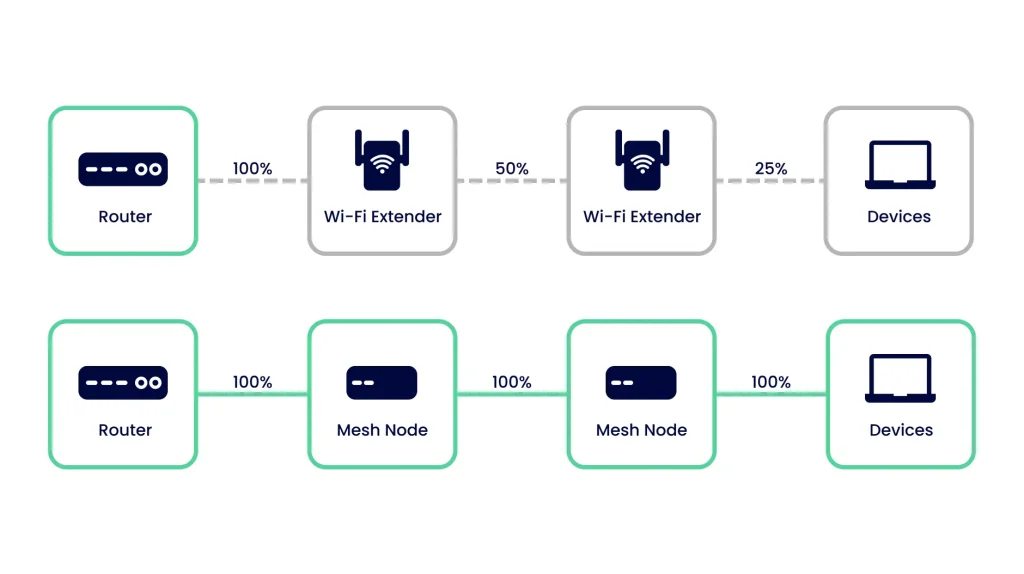
Mesh WiFi nodes offer better coverage, seamless roaming, and faster speeds compared to range extenders. They create a single network, ideal for townhouse environments.
Conclusion
Choosing the right number of mesh WiFi nodes improves your townhouse’s internet. Usually, two to three nodes cover most townhouses well. Place nodes where the signal feels weak or slow. This setup helps avoid dead zones and keeps connection strong.
Remember, walls and floors can block WiFi signals. Test your network and adjust node placement for best results. Good WiFi makes work, streaming, and browsing much easier at home. Simple steps bring better internet to every corner of your space.


