Are you struggling with slow WiFi in your 2000 sq ft home? You might be wondering how many WiFi 6 mesh nodes you actually need to get fast, reliable coverage everywhere.
Choosing the right number of nodes can make a huge difference in your internet speed and overall experience. Too few, and you’ll face dead zones; too many, and you’ll waste money. You’ll discover the perfect balance to power up your home network without overspending.
Keep reading to find out exactly how to set up your WiFi 6 mesh system for seamless connectivity in every corner of your home.
Credit: inseego.com
Wifi 6 Mesh Basics
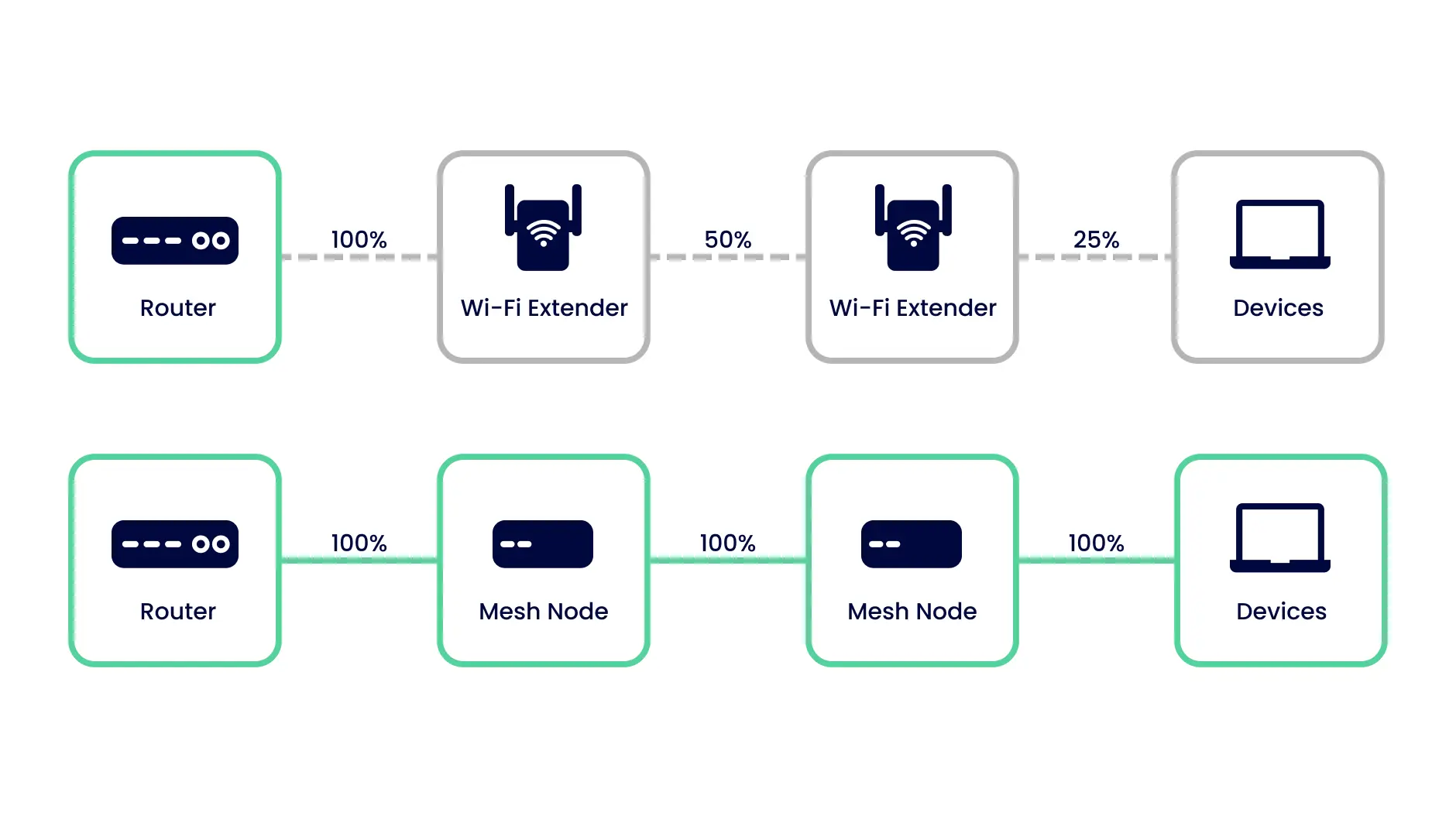
Wifi 6 Mesh systems help cover large homes with strong internet signals. They use multiple nodes to spread wifi evenly.
For a 2000 sq ft home, choosing the right number of nodes is important. It keeps your internet fast and reliable in every room.
Key Features
Wifi 6 Mesh uses several nodes that work together. Each node sends and receives data to make wifi coverage better.
These systems support many devices at once. They reduce dead zones and keep speeds high even with many users.
- Multiple nodes extend wifi range
- Supports many devices without slowing down
- Improves signal in hard-to-reach areas
- Easy to set up and manage
Benefits Over Previous Wifi
Wifi 6 Mesh is faster and handles more devices than older wifi systems. It also uses less power and has lower delays.
This system works well in bigger homes by linking nodes. It gives better coverage than one router alone.
- Higher speed and capacity
- Better coverage with multiple nodes
- Lower latency for smoother connections
- More energy efficient devices
Factors Influencing Node Count
Choosing the right number of WiFi 6 mesh nodes for a 2000 sq ft home depends on many factors. These factors affect how well the mesh network covers the entire space.
Understanding these factors helps to decide how many nodes are enough. This prevents weak signals and improves internet speed everywhere in your home.
Home Layout
The shape and size of your home affect how WiFi signals travel. Open floor plans allow signals to move freely. Multiple floors or many rooms can block signals.
Homes with lots of walls and corners may need more nodes to cover dead zones. Long hallways or separated areas also need extra nodes.
- Open layouts need fewer nodes
- Multiple floors may require one node per floor
- Many small rooms increase node count
Wall Materials
Wall materials can block or weaken WiFi signals. Thick walls or metal structures reduce signal strength. Materials like concrete and brick absorb signals more than wood.
Homes with dense or metal walls need more nodes. Light materials like drywall allow signals to pass easier, so fewer nodes are needed.
- Concrete walls block signals strongly
- Metal surfaces reflect or absorb signals
- Wood and drywall are easier for signals
Device Density
The number of devices using WiFi affects how many nodes you need. More devices cause more network traffic, which can slow down speeds.
Homes with many smartphones, laptops, and smart devices need more nodes. This spreads the load and keeps speeds steady for all devices.
- Few devices need fewer nodes
- Many devices need more nodes
- High traffic areas may need extra nodes
Estimating Nodes For 2000 Sq Ft
Setting up a WiFi 6 mesh system in a 2000 sq ft home needs careful planning. The number of nodes depends on various factors like coverage and interference.
This guide breaks down how to estimate the right number of nodes for good WiFi coverage in your space.
Typical Coverage Per Node
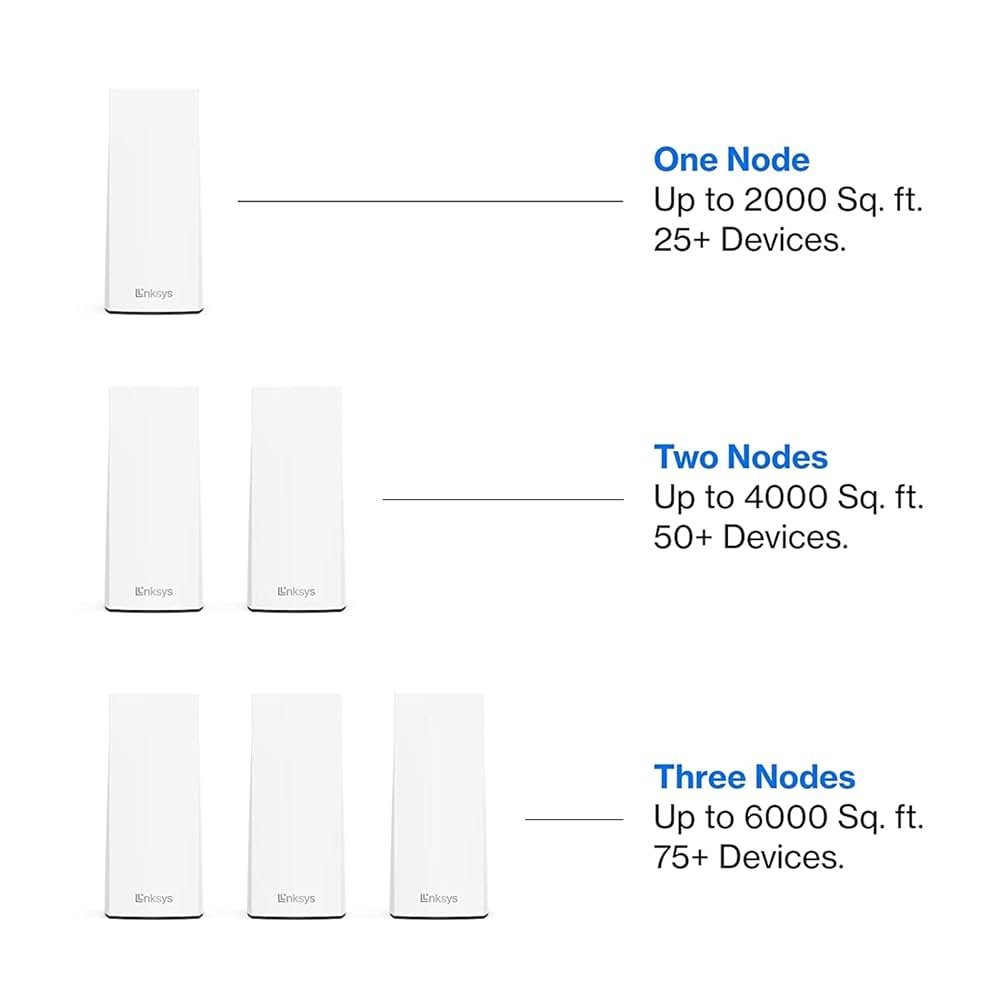
A single WiFi 6 mesh node usually covers about 1000 to 1500 sq ft under ideal conditions. This range varies with the node’s power and antenna design.
- One node can cover a small to medium living area.
- Two nodes can cover 2000 to 3000 sq ft, enough for many homes.
- Adding more nodes expands coverage and improves speed.
Adjusting For Interference
Interference from walls, furniture, and appliances reduces WiFi range. Thick walls or metal objects block signals, needing extra nodes.
| Interference Type | Effect on Signal | Node Adjustment |
| Drywall | Moderate | None or slight increase |
| Brick or Concrete | High | Add 1 node |
| Metal Surfaces | Very High | Add 1-2 nodes |
| Appliances (Microwave) | Medium | Place nodes away |
Room-by-room Analysis
Each room’s size and purpose affect how many nodes you need. High-use rooms need better signal strength.
- Living Room:Large and central, place one node here.
- Bedrooms:Medium size, one node may cover two rooms.
- Kitchen:May need a node if there are many appliances.
- Home Office:Needs strong signal, consider a dedicated node.

Credit: www.amazon.ca
Placement Tips For Optimal Coverage
Setting up a WiFi 6 mesh in a 2000 sq ft home needs good node placement. Proper placement helps cover every corner with a strong signal. This guide shares tips to place your nodes well.
Follow these tips to avoid weak spots and enjoy fast, stable internet throughout your home.
Central Location
Place your main WiFi node in a central spot in your home. This helps the signal reach all rooms evenly. Avoid putting it near outside walls or corners.
- Choose a room near the middle of your house.
- Keep the main node away from windows to reduce signal loss.
- Place nodes so they can communicate with each other easily.
Avoiding Obstructions
Walls, furniture, and metal objects block WiFi signals. Avoid placing nodes behind thick walls or large objects. Clear line of sight helps signals travel better.
| Obstacle | Effect on Signal |
| Concrete Wall | Very High Signal Loss |
| Wooden Door | Moderate Signal Loss |
| Metal Furniture | High Signal Loss |
| Glass Window | Low Signal Loss |
Height And Orientation
Place nodes at a medium height, like on a shelf or table. Keep antennas or device fronts facing open areas. Avoid placing nodes on the floor or inside cabinets.
- Set nodes about 3 to 5 feet above the floor.
- Face nodes toward the center of rooms.
- Keep nodes away from electronics that cause interference.
Choosing The Right Wifi 6 Mesh System
Choosing the right Wifi 6 mesh system can improve your home internet. It helps cover a 2000 sq ft home with strong signals everywhere.
Wifi 6 mesh systems use multiple nodes to spread Wi-Fi signals. Knowing how many nodes to use depends on your home layout and needs.
Popular Models
Many Wifi 6 mesh models fit a 2000 sq ft home. Some are simple, others come with advanced features.
- Netgear Orbi Wifi 6: Known for strong coverage and easy setup.
- Google Nest Wifi Pro: Good for smart home integration.
- Asus ZenWiFi AX: Offers fast speeds and good security.
- Eero Pro 6: Simple design with solid performance.
Features To Consider
Look at features that affect speed, coverage, and ease of use. Choose based on what matters most for your home.
| Feature | Why It Matters |
| Number of Nodes | More nodes cover larger areas and reduce dead zones. |
| Speed | Wifi 6 offers faster speeds for multiple devices. |
| Security | Look for WPA3 support to keep your network safe. |
| Setup Ease | Simple apps and guides make installation easier. |
| Device Limit | Check how many devices can connect without slowing down. |
Budget Vs Performance
Decide how much to spend based on your internet needs. Higher price often means better performance and features.
- Basic models fit small to medium homes with moderate use.
- Mid-range models add faster speeds and more nodes.
- High-end models support many devices and offer top security.
- Balance your budget with the features you need most.
Troubleshooting And Fine-tuning
Setting up a Wifi 6 mesh network in a 2000 sq ft home can be tricky. Proper setup ensures strong signals in every room.
This guide helps you troubleshoot and fine-tune your mesh system for the best performance.
Signal Testing Tools
Signal testing tools help identify weak spots in your network. Use them to measure the strength of your Wifi signal.
- Install a Wi-Fi analyzer app on your smartphone.
- Walk around your home to test different areas.
- Note any areas with low signal strength.
Adjusting Node Positions
The position of each node affects your mesh network. Proper placement ensures better coverage and speed.
| Node Position | Signal Strength |
| Living Room | Strong |
| Bedroom | Moderate |
| Basement | Weak |
Firmware Updates
Keeping your nodes updated ensures optimal performance. Firmware updates can fix bugs and improve security.

Credit: dongknows.com
Frequently Asked Questions
How Many Wifi 6 Mesh Nodes Cover 2000 Sq Ft?
Typically, 2 to 3 Wifi 6 mesh nodes efficiently cover a 2000 sq ft home. This ensures strong, consistent signal strength throughout your space without dead zones.
Does Home Layout Affect Wifi 6 Mesh Node Count?
Yes, home layout impacts node count. Open floor plans may need fewer nodes, while multiple walls or floors require more for optimal coverage.
Can One Wifi 6 Node Cover 2000 Sq Ft?
One node rarely covers 2000 sq ft effectively. Multiple nodes improve speed and reduce interference, providing seamless connectivity across all rooms.
Is A Dual-band Or Tri-band Mesh Better For 2000 Sq Ft?
Tri-band mesh systems perform better in 2000 sq ft homes. They handle more devices and reduce network congestion, offering faster, stable connections.
Conclusion
A 2000 sq ft home usually needs two or three Wifi 6 mesh nodes. This setup helps cover every corner with a strong signal. Placing nodes in open areas improves connection quality. Avoid walls and large furniture blocking the signal.
Keep in mind, every home is different. Testing your network can show if you need more nodes. Good placement and the right number of nodes keep your internet fast and steady. Simple steps like these make Wifi 6 mesh work best for your home.


