Are you tired of lagging games and slow internet ruining your online experience? Your gaming modem holds the key to a stronger, faster WiFi signal that can change the way you play.
Imagine streaming, downloading, and gaming without constant interruptions. You’ll discover simple and effective ways to boost your WiFi signal using your gaming modem. Stay with me, and you’ll unlock smoother gameplay and faster connections that keep you ahead of the competition.
Credit: www.tp-link.com
Choosing The Right Gaming Modem
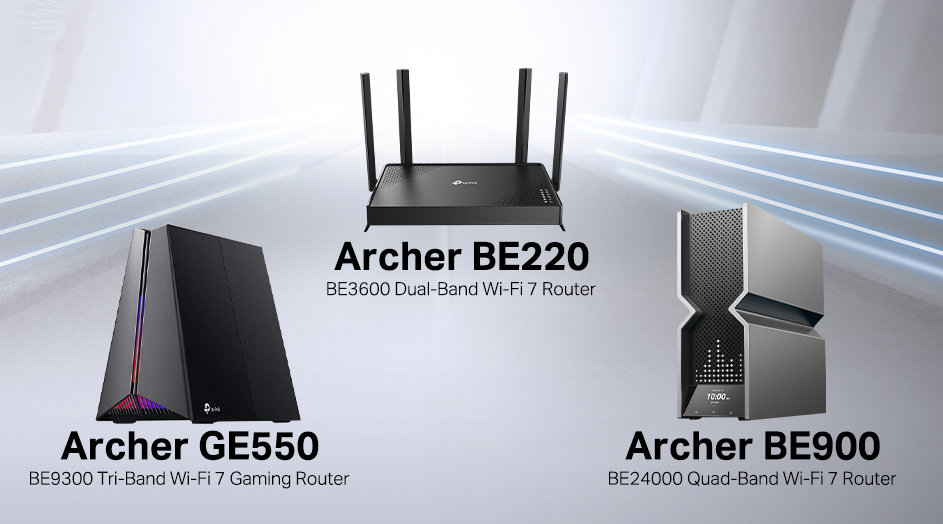
Choosing the right gaming modem plays a crucial role in improving your WiFi signal. A good modem ensures stable connections and reduces lag during gaming sessions. It helps maintain high speeds and lowers interruptions.
Not all modems work the same way. Some are built specifically for gaming, offering features that support faster and more reliable internet. Picking the right one depends on your needs and setup.
Key Features To Look For
- High-speed data transfer rates for smooth gaming
- Low latency to reduce lag and delays
- Quality of Service (QoS) to prioritize gaming traffic
- Multiple antennas for better signal coverage
- Dual-band or tri-band support for less interference
- Easy setup and user-friendly interface
Compatibility With Internet Service
Check if the modem matches your internet provider’s requirements. Some providers only support certain modem types or brands. Confirm the modem supports your internet speed plan. Using an incompatible modem can cause slow speeds or connection drops.
Also, consider the type of internet connection you have: cable, fiber, or DSL. Make sure the modem supports that technology to avoid any issues.
Best Brands For Gaming
- Netgear – known for strong performance and gaming features
- Asus – offers modems with gaming-specific optimizations
- TP-Link – affordable options with reliable speeds
- Linksys – good for stable connections and ease of use
- D-Link – solid choice for budget-friendly gaming modems
Optimizing Modem Placement
Optimizing the placement of your gaming modem can dramatically improve your WiFi signal. Even the best modem will struggle if it’s tucked away in a corner or blocked by walls. Moving it to a better spot can reduce lag and keep your gaming sessions smooth.
Ideal Locations For Signal Strength
Place your modem in a central spot within your home. This helps the signal reach all areas more evenly. Avoid putting it near windows or outside walls where the signal might escape.
Open spaces work best, such as a living room or a hallway. Avoid enclosed cabinets or behind large furniture. I once moved my modem from a cluttered desk to a shelf in the middle of the room, and the difference was instant.
Avoiding Interference
Many devices interfere with WiFi signals. Keep your modem away from microwaves, cordless phones, and baby monitors. These gadgets operate on similar frequencies and cause signal drops.
Also, thick walls and metal objects can block or reflect signals. Don’t place your modem near metal filing cabinets or thick concrete walls. Ask yourself, what electronics or obstacles could be cutting your signal?
Using Elevation To Your Advantage
Elevating your modem can improve its range. Signals spread out and downwards, so placing your modem higher often works better than on the floor. A shelf or top of a bookcase can be a great spot.
Try to avoid placing it directly on the ground or behind low furniture. When I raised my modem from the floor to a desk, the WiFi reached my gaming room without a hitch. How high can you safely place your modem in your space?
Configuring Modem Settings
Configuring your gaming modem settings can improve your WiFi signal strength and stability. Small changes in the settings help reduce lag and keep your connection steady. Adjusting these settings tailors the modem to your gaming needs. This makes your online games smoother and more enjoyable.
Enabling Quality Of Service (qos)
Quality of Service (QoS) lets your modem prioritize gaming traffic over other data. This means your game gets more bandwidth and less delay. Turn on QoS in your modem settings to focus on gaming packets. You may also set priority levels for specific devices or applications. This reduces interruptions during gameplay caused by downloads or streaming.
Channel Selection Tips
WiFi channels can overlap and cause interference. Choosing the right channel improves signal quality and speed. Use a WiFi analyzer app to find less crowded channels near you. Set your modem to use the channel with the least interference. For 2.4 GHz bands, channels 1, 6, and 11 are often best. On 5 GHz bands, many channels are available; pick one with low traffic.
Firmware Updates And Security
Keeping your modem’s firmware up to date fixes bugs and adds new features. Updated firmware can improve signal performance and security. Check the modem’s admin page regularly for updates. Apply updates as soon as they are available. Strong security settings protect your network from unauthorized access. Use a strong password and enable WPA3 or WPA2 encryption for better protection.
Enhancing Signal With Additional Hardware
Improving your WiFi signal often needs more than just a good gaming modem. Additional hardware can help extend your network’s reach and strength. These devices work by boosting or spreading your WiFi signal to cover dead zones. They make your internet connection stable and fast, especially during gaming sessions. Let’s explore some popular hardware options that enhance your WiFi signal effectively.
Using Wifi Extenders And Mesh Systems
WiFi extenders catch your router’s signal and repeat it to farther areas. They work well for small to medium homes with weak spots. Place extenders between your modem and the dead zone for best results.
Mesh systems use several devices to form a single, strong network. Each device talks to others, creating seamless coverage. Mesh works great for larger homes or buildings with many rooms. You get stable WiFi without switching networks manually.
High-gain Antennas For Better Coverage
High-gain antennas focus the WiFi signal in one direction. This increases the range and strength of the signal. Swapping out your modem’s standard antenna with a high-gain one is simple. This upgrade helps reach distant corners or outside areas better.
They come in various shapes, like directional or omnidirectional antennas. Directional antennas target specific spots, while omnidirectional ones spread the signal evenly. Choose based on your home layout and needs.
Powerline Adapters As Alternatives
Powerline adapters send internet through your home’s electrical wiring. They connect your modem to an adapter plugged into a wall socket. Another adapter plugs in where you need internet access.
This method avoids WiFi interference and walls blocking signals. Powerline adapters offer a stable connection for gaming or streaming. They are easy to set up and work well in homes with thick walls.
Reducing Network Congestion
Network congestion slows down your WiFi signal and affects gaming performance. It happens when many devices use the same internet connection. Reducing congestion helps improve speed and lowers lag. A gaming modem offers tools to manage traffic and keep your connection smooth.
Limiting Device Connections
Too many devices connected at once share the bandwidth. This causes slower speeds for everyone. Limit connections by disconnecting devices not in use. Use your gaming modem’s settings to block unknown devices. This keeps your network clean and focused on gaming.
Scheduling Bandwidth-heavy Activities
Activities like streaming or downloads use a lot of bandwidth. Schedule these tasks for times when you are not gaming. Your modem may have options to set time limits for heavy usage. This reduces strain during peak gaming hours and keeps your connection stable.
Prioritizing Gaming Traffic
Gaming modems can prioritize gaming data over other traffic. This means your game packets move faster through the network. Enable Quality of Service (QoS) settings in your modem’s interface. Assign higher priority to your gaming devices for better responsiveness and less lag.
Credit: www.boltontechnical.co.za
Advanced Troubleshooting Techniques
Advanced troubleshooting techniques help improve WiFi signal and gaming performance. These steps go beyond basic setup and solve hidden issues. They ensure your gaming modem works at its best.
Check your signal strength and speed to know the real connection quality. Restarting your modem can clear glitches and refresh the network. Sometimes, the problem is with your internet provider. Knowing when to contact them saves time and hassle.
Testing Signal Strength And Speed
Use apps or built-in modem tools to measure WiFi signal strength. Look for values above -70 dBm for stable connections. Test download and upload speeds on websites like Speedtest.net.
- Check different rooms to find weak spots.
- Compare wired and wireless speeds.
- Note any large drops or slow speeds during gaming.
These tests show if your modem needs repositioning or upgrades.
Resetting And Rebooting Methods
Power off your modem for 30 seconds before turning it on again. This clears temporary bugs and refreshes connections.
- Use the reset button only if rebooting fails.
- Back up your modem settings before a full reset.
- Regularly reboot your modem to keep it stable.
Resetting can fix slow speeds and dropped signals.
When To Contact Your Isp
Contact your internet provider if speed tests show consistent low speeds. Also reach out if your modem loses connection often without reason.
- Ask about outages or maintenance work in your area.
- Request help if you suspect hardware issues.
- Check if your plan supports your gaming needs.
They can provide solutions or replace faulty equipment.

Credit: device.report
Frequently Asked Questions
How Can A Gaming Modem Improve Wifi Signal Strength?
A gaming modem optimizes data flow and reduces interference. It prioritizes gaming traffic for stable, faster connections. This improves overall Wifi signal reliability and speed, enhancing your gaming experience.
What Settings Boost Wifi Signal On A Gaming Modem?
Adjust QoS settings to prioritize gaming devices. Change the Wifi channel to a less congested one. Enable beamforming for targeted signal strength. These tweaks enhance Wifi performance for gaming.
Can Firmware Updates Enhance Gaming Modem Wifi Signals?
Yes, firmware updates often fix bugs and improve performance. They optimize signal handling and security. Regularly updating your modem ensures it runs efficiently and boosts Wifi signal quality.
Does Modem Placement Affect Gaming Wifi Signal?
Absolutely, placing the modem centrally and elevated reduces obstacles. Avoid walls and electronic interference for stronger Wifi signals. Proper placement ensures the modem broadcasts the best signal possible.
Conclusion
Boosting your WiFi with a gaming modem can enhance your experience. Stronger signals mean smoother gaming and streaming. Start by placing the modem centrally. Avoid walls and electronic interference. Use dual-band settings for better performance. Regularly update your firmware. These steps ensure optimal WiFi strength.
Troubleshooting tips can quickly solve minor issues. With consistent effort, your home network will improve. This means less lag and more enjoyment. An improved WiFi signal makes online activities more seamless. Enjoy a better, faster internet connection today.


