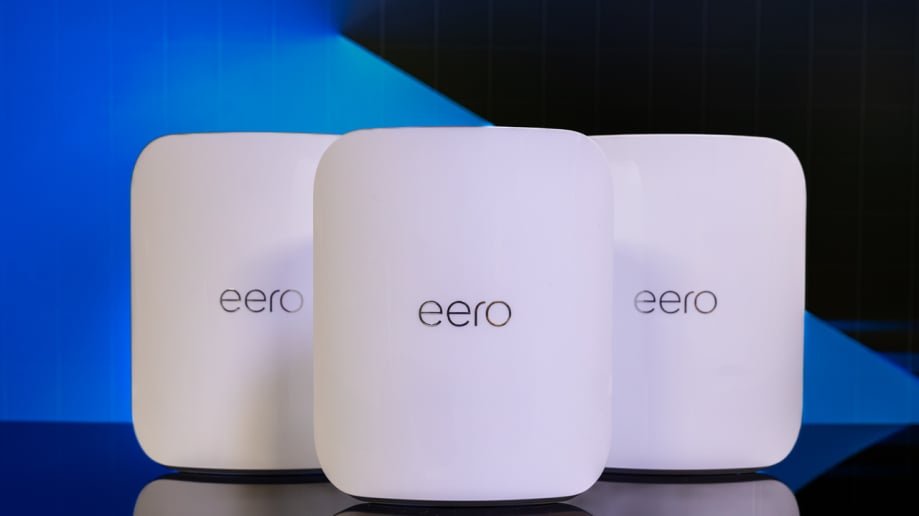
Are you tired of slow internet and dead zones in your home? Choosing the right budget mesh WiFi can change everything.
It’s not just about saving money—it’s about getting fast, reliable coverage everywhere you need it. But with so many options out there, how do you pick the best one for your home and your wallet? This guide will help you make a smart choice, so you get the best value without any guesswork.
Keep reading to find out exactly what to look for and how to avoid common mistakes. Your perfect WiFi setup is closer than you think.
Benefits Of Mesh Wifi
Mesh Wifi systems help improve your internet experience at home or office. They use multiple devices to spread Wi-Fi signal evenly.
This setup is good for large spaces or buildings with many rooms. It fixes common Wi-Fi problems like weak signals and dead zones.
Improved Coverage
Mesh Wifi covers every corner of your space. It uses several units that work together to send a strong signal everywhere.
- Eliminates dead zones
- Works well in large homes or offices
- Provides stable signal in multiple rooms
- Penetrates walls better than single routers
Seamless Connectivity
Mesh Wifi lets your devices switch smoothly from one unit to another. This keeps your connection fast and steady as you move.
| Feature | Benefit |
| Automatic Device Handoff | Devices connect to the strongest signal |
| Single Network Name | No need to switch Wi-Fi networks manually |
| Consistent Speed | Better streaming and video calls |
| Low Latency | Improved online gaming and browsing |
Easy Expansion
Adding more mesh units is simple. You can grow your network as your space or needs increase.
Reasons to expand your mesh network:
- Cover new rooms or floors
- Improve speed in busy areas
- Support more devices without slowing down
- Flexible setup without extra wiring

Credit: dongknows.com
Budget Mesh Wifi Types
Choosing the right mesh wifi system can improve your home internet. Budget mesh wifi offers different types to suit various needs.
Understanding the types helps you pick the best system for your space and devices.
Single-band Systems
Single-band systems use one wifi frequency band. They usually operate on the 2.4 GHz band.
These systems work well for small homes with few devices. They are the most affordable option but may be slower.
- Good for simple internet use like browsing
- Lower speed and less capacity
- Best for small areas with fewer devices
Dual-band Systems
Dual-band systems use two frequency bands: 2.4 GHz and 5 GHz. This gives better speed and less interference.
These systems suit medium-sized homes and more devices. They balance cost and performance well for most users.
- Offers faster speeds on 5 GHz band
- Handles more devices than single-band
- Good for streaming and online gaming
Tri-band Systems
Tri-band systems add an extra 5 GHz band. This helps manage many devices and keeps speeds high.
These systems are best for large homes or heavy internet use. They cost more but provide the best performance.
- Two 5 GHz bands reduce traffic and interference
- Supports many devices without slowing down
- Ideal for smart homes and multiple users
Key Features To Consider
Choosing a budget mesh WiFi system can be tricky. You want the best features without spending too much.
Look at important factors before buying. They will help you get good WiFi for your home.
Speed And Performance
Speed is how fast your internet works through the mesh system. Good performance means less lag.
Check the maximum speed the system offers. This should match or exceed your internet plan speed.
- Look for WiFi 5 or WiFi 6 standards for better speeds
- Dual-band or tri-band can reduce slowdowns
- Processor power affects how well the system handles many devices
Coverage Area
Coverage area shows how much space the mesh system can cover with WiFi.
Choose a system that covers your whole home or office. Bigger areas need more coverage.
- Check the square footage the system supports
- Walls and floors can reduce coverage
- Place nodes in open spaces for best signals
Number Of Nodes
Nodes are the units that spread WiFi in your home. More nodes cover bigger areas.
Think about how many rooms or floors you want to cover before choosing nodes.
- One node covers a small area or single room
- Two or three nodes cover most homes
- More nodes help with very large or multi-story houses
Security Features
Security features protect your network from hackers and unwanted access.
Look for mesh systems with strong encryption and easy password setup.
- WPA3 encryption is the latest and safest
- Guest network support keeps visitors separate from your devices
- Automatic updates help fix security problems quickly
Compatibility And Setup
Choosing a budget mesh WiFi system requires checking its compatibility with your devices. Setup should be easy for quick use.
This guide covers device compatibility, installation steps, and management tools for mesh WiFi.
Device Compatibility
Make sure the mesh WiFi supports your gadgets. It should work with phones, laptops, smart TVs, and other devices.
- Check if the mesh supports WiFi standards like 802.11ac or 802.11ax.
- Verify compatibility with your internet provider’s modem or router.
- Ensure the mesh works well with your home size and layout.
- Look for devices that support both 2.4 GHz and 5 GHz bands.
Installation Process
Setting up mesh WiFi should be simple and fast. Most systems need minimal tools and steps.
| Step | Action | Tip |
| 1 | Connect the main unit to your modem | Use the Ethernet cable provided |
| 2 | Place satellite units around the home | Keep them within range of the main unit |
| 3 | Power on all units | Wait for indicator lights to show connection |
| 4 | Follow on-screen setup instructions | Use a smartphone or computer |
App And Management Tools
Most mesh WiFi systems come with an app to manage the network. The app lets you control settings and check status.
- Use the app to create guest networks and set parental controls.
- Monitor device connections and data usage.
- Receive notifications about updates or issues.
- Adjust network settings remotely.
Top Budget Mesh Wifi Brands
Choosing the right mesh wifi system can improve your internet at home. Budget mesh wifi brands offer good value without high costs.
This guide looks at top brands with affordable options, reliable performance, and good customer support.
Affordable Options
Many brands offer mesh wifi systems at low prices. These options fit small budgets and still provide decent coverage.
Brands like TP-Link, Tenda, and Netgear have budget models that suit basic home needs.
- TP-Link Deco M4
- Tenda Nova MW3
- Netgear Orbi RBK13
Reliable Performance
Reliable performance means steady internet without many drops. Top budget brands balance speed and coverage well.
Look for mesh systems with dual-band support and good range to ensure consistent connections.
- ASUS Lyra Trio
- Google Nest Wifi (older models)
- Linksys Velop AC1200
Customer Support
Good customer support helps solve problems quickly. Budget brands with strong support save time and stress.
Check if the brand offers easy setup guides, online help, and quick response times.
- TP-Link: Online chat and forums
- Netgear: Phone and online support
- ASUS: Knowledge base and warranty
Common Mistakes To Avoid
Choosing a budget mesh Wi-Fi system can be tricky. Avoiding common mistakes helps you make a better choice.
Understanding what to watch out for saves time and money. Let’s explore some common pitfalls.
Ignoring Coverage Needs
Many people overlook their home’s coverage needs. This can lead to dead zones where Wi-Fi is weak.
- Consider the size of your home
- Think about wall materials
- Account for multiple floors
Overpaying For Features
Some mesh Wi-Fi systems come with features you may not need. These can increase costs unnecessarily.
| Feature | Consideration |
| Parental Controls | Needed for families |
| Guest Network | Useful for hosting |
| Advanced Security | Good for businesses |
Neglecting Security
Security is crucial in a Wi-Fi network. Ignoring it can lead to breaches and data loss.
Regular updates are also important for maintaining security.
Tips For Smart Buying
Choosing a budget mesh WiFi system can be overwhelming. With so many options, it’s vital to make informed decisions.
Follow these tips to find a mesh WiFi system that suits your needs without breaking the bank.
Assess Your Needs
Understanding your specific requirements is crucial before purchasing a mesh WiFi system. Consider factors such as the size of your home and the number of devices you need to connect.
- Determine the square footage of the area you need coverage for.
- Count the number of devices that will connect to the network.
- Identify areas in your home where the signal is weak.
Compare Prices And Reviews
Checking prices and reviews helps you find the best value mesh WiFi systems. Look for reputable sources that compare various models.
| Model | Price | Rating |
| Brand A Mesh | $150 | 4.5 stars |
| Brand B Mesh | $120 | 4 stars |
| Brand C Mesh | $100 | 3.5 stars |
Look For Deals And Warranties
Deals and warranties can save you money and provide peace of mind. Check for discounts and comprehensive warranty offers.
Visit www.exampledeals.comfor the latest discounts on mesh WiFi systems.

Credit: www.tomsguide.com

Credit: www.reddit.com
Frequently Asked Questions
What Factors Matter When Choosing Budget Mesh Wifi?
Consider coverage area, speed, and device capacity. Check ease of setup, compatibility, and security features. Balance cost with performance to get the best value for your money.
How To Ensure Good Coverage With Budget Mesh Wifi?
Look for multiple nodes to cover your home size. Place nodes strategically for minimal dead zones. Consider mesh systems that support seamless roaming for consistent coverage.
Are Budget Mesh Wifi Systems Reliable For Streaming?
Yes, many budget mesh WiFi units support HD streaming. Ensure the system offers stable speeds and low latency. Check user reviews for real-world streaming performance before buying.
Can Budget Mesh Wifi Support Multiple Devices Simultaneously?
Most budget mesh systems handle multiple devices well. Prioritize those with good bandwidth management and MU-MIMO technology. This ensures smooth connections without slowdowns during heavy usage.
Conclusion
Choosing the right budget mesh WiFi helps improve your internet at home. Think about your space size and device number first. Check the speed and coverage to match your needs. Look for easy setup and good customer support. A smart choice saves money and keeps you connected.
Take your time to compare options carefully. Good WiFi makes daily tasks and fun online easier. Your home deserves steady, fast internet without high costs.


