Are you tired of lag ruining your gaming moments? Choosing the right gaming modem can make all the difference between victory and defeat.
Your modem controls how fast and stable your connection is, which directly affects your in-game performance. But with so many options out there, how do you find the one that truly boosts your competitive edge? Keep reading, and you’ll discover exactly what to look for to make sure your setup delivers the speed and reliability you need to stay ahead of the competition.
Key Features For Gaming Modems
Choosing the right gaming modem is crucial for competitive gaming success. Not all modems are designed to handle the intense demands of fast-paced games. Understanding the key features that make a modem suitable for gaming can help you gain a clear advantage over your opponents.
Low Latency Importance
Latency, or ping, measures the delay between your command and the game server’s response. Even a few milliseconds can affect your gameplay, especially in shooter or real-time strategy games. A gaming modem with low latency ensures your actions register instantly, giving you that split-second edge.
I once switched to a modem optimized for low latency and noticed my reaction times improved noticeably. This tiny difference made clutch plays more consistent, proving that reducing lag is not just a technical benefit but a competitive necessity.
High-speed Connectivity
Speed matters, but it’s not just about downloading games faster. High-speed connectivity allows smooth streaming, quick updates, and stable multiplayer sessions. Look for modems supporting the latest standards like DOCSIS 3.1 or Wi-Fi 6 to maximize your internet speed potential.
Think about how frustrating it is when your game freezes during a critical moment because your connection can’t keep up. With the right modem, you minimize these interruptions, ensuring your gameplay stays fluid and uninterrupted.
Reliable Signal Strength
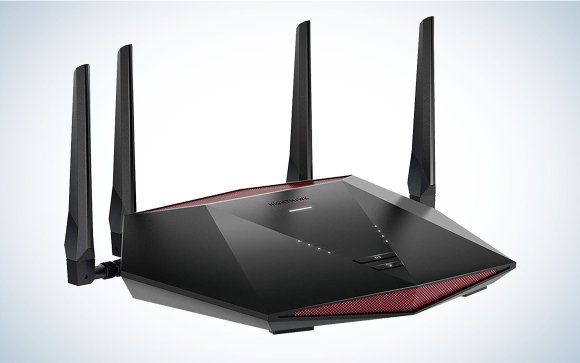
A strong and stable signal prevents sudden drops or fluctuations during intense gaming sessions. Modems with enhanced antennas or beamforming technology focus the signal directly to your gaming device, reducing dead zones and interference.
Imagine being in the middle of a ranked match and suddenly losing connection because your modem can’t maintain a steady signal. Investing in a modem with reliable signal strength keeps you connected when it matters most.
Advanced Qos Settings
Quality of Service (QoS) lets you prioritize gaming traffic over other data on your network. This means your game packets get top priority, reducing lag caused by other devices like streaming or downloads. Look for modems that offer customizable QoS settings to tailor your network for peak gaming performance.
Have you noticed how your ping spikes when others start streaming videos at home? With advanced QoS, you can set your gaming traffic to always come first, maintaining consistent performance no matter what others are doing online.
Types Of Gaming Modems
Choosing the right gaming modem is key to fast and stable internet. Different types of modems offer various features that affect your gaming experience. Knowing the types helps pick the best one for competitive gaming. Below are common modem types you will find for gaming setups.
Cable Vs Dsl Modems
Cable modems connect through your TV cable line. They offer fast speeds and low latency. Many gamers prefer cable modems for smooth online play. DSL modems use phone lines to provide internet. They are slower than cable but can work well in some areas. Cable modems usually handle higher speeds and more data. DSL modems might be cheaper but may lag under heavy use.
Fiber-optic Modems
Fiber-optic modems use light signals for internet. They provide the fastest and most stable connections. Fiber modems reduce lag and offer consistent speeds. They are perfect for competitive gaming where every millisecond counts. Not all areas have fiber internet available. Installing fiber modems may need professional setup. Fiber modems support very high bandwidth for future-proof gaming.
Modem-router Combos
Modem-router combos combine two devices into one box. They save space and reduce cable clutter. These combos are easy to install and manage. Some combos offer gaming-specific features like QoS and low latency modes. They may not be as powerful as separate modem and router setups. Combos are ideal for gamers wanting simple, all-in-one solutions. Make sure the combo supports your internet speed and gaming needs.
Compatibility With Internet Service Providers
Ensuring your gaming modem works well with your Internet Service Provider (ISP) is vital. Compatibility affects connection speed, stability, and overall gaming performance. A modem not supported by your ISP may cause frequent disconnections or slow speeds. Verifying compatibility helps avoid frustration and lag during competitive gaming sessions.
Checking Isp Support
Start by checking if the modem supports your ISP. Visit your ISP’s website for a list of approved modems. Choose a modem that appears on this list to guarantee smooth setup and operation. Contact your ISP’s customer service if you cannot find this list. Some ISPs require specific modem models or firmware versions.
Firmware Updates
Firmware keeps your modem secure and efficient. ISPs often release updates to improve performance or fix bugs. Confirm your modem can receive these updates automatically or manually. Regular updates ensure compatibility with your ISP’s network changes. Outdated firmware might cause slow speeds or connection drops during gaming.
Network Standards
Check the modem’s supported network standards. Common standards include DOCSIS 3.0 and DOCSIS 3.1. DOCSIS 3.1 offers faster speeds and better reliability. Your ISP’s network must support the modem’s standards for optimal performance. Knowing these standards helps you pick a modem that fully uses your internet plan’s speed.

Credit: www.ign.com
Security Features To Consider
Choosing a gaming modem requires careful thought about security features. Protecting your connection keeps your gameplay smooth and safe from attacks. A secure modem guards your data and blocks unwanted access.
Prioritize modems with strong security traits. These prevent hackers from slowing your game or stealing information. Below are key security features to focus on for competitive gaming.
Built-in Firewalls
Firewalls act as a shield against harmful traffic. A modem with a built-in firewall blocks suspicious connections automatically. It stops hackers from accessing your network during gameplay.
This feature helps maintain stable, lag-free gaming sessions. The firewall filters data packets, allowing only safe ones through. It reduces the risk of attacks like DDoS that disrupt your game.
Encryption Protocols
Encryption scrambles your data to keep it private. Look for modems supporting strong encryption standards like WPA3. This protects your wireless signals from interception.
Encrypted connections prevent outsiders from spying on your online activities. It is vital for secure game downloads and voice chats. Better encryption means safer, more reliable gaming.
Regular Security Patches
Security patches fix vulnerabilities in modem software. Choose brands that provide frequent updates to their devices. Patches close gaps hackers could exploit to break in.
Updated firmware improves modem performance and security. Regular patches ensure your modem defends against the latest threats. This keeps your gaming environment safe over time.
Budgeting For A Gaming Modem
Choosing the right gaming modem means planning your budget carefully. A good modem improves your gaming experience but does not have to break the bank. Understanding how to balance cost and features helps find the best value. Consider your current and future gaming needs to make a smart choice.
Balancing Cost And Performance
Focus on modems that offer steady speed and low lag. Avoid paying extra for features you do not need. Look for models that support your internet plan’s maximum speed. Check user reviews to see real-world performance. Sometimes mid-range modems give you the best balance of price and quality.
Long-term Investment Value
Think about how long the modem will serve your gaming needs. Choose devices with the latest technology to avoid early upgrades. Modems that support future internet standards save money over time. Buying a reliable modem now can avoid frequent replacements. This saves both time and extra expenses later.
Warranty And Customer Support
Pick a modem with a solid warranty for peace of mind. A longer warranty period often means better product quality. Good customer support helps solve issues quickly. Check if the manufacturer offers easy returns or replacements. This support reduces stress and protects your investment.
Credit: www.popsci.com
Setup Tips For Optimal Performance
Setting up your gaming modem correctly is key for smooth gameplay. Small changes in setup can reduce lag and improve connection stability. Focus on placement, firmware settings, and network tweaks to get the best results. These tips help create a strong and steady internet link for competitive gaming.
Proper Placement
Place your modem in an open area. Avoid corners or behind furniture. Keep it away from walls and metal objects. Higher spots often give better signal strength. Distance from other electronics reduces interference. This helps maintain a stable connection during intense gaming sessions.
Firmware Configuration
Check for the latest firmware updates regularly. Updates fix bugs and improve performance. Access the modem’s settings through its web interface. Enable Quality of Service (QoS) to prioritize gaming traffic. Disable unused features that may slow down your connection. A well-configured modem runs smoother and faster.
Network Optimization Tricks
- Use a wired Ethernet connection instead of Wi-Fi when possible.
- Set your modem to use less crowded frequency channels.
- Limit the number of devices connected during gaming.
- Restart your modem regularly to clear temporary issues.
- Test your ping and speed before gaming sessions.
These simple tricks help reduce lag and keep your gameplay responsive.

Credit: medium.com
Frequently Asked Questions
What Features Make A Modem Ideal For Competitive Gaming?
A gaming modem should have low latency, high-speed support, and stable connections. Prioritize modems with QoS for traffic management. Compatibility with your ISP and gaming devices is essential for smooth gameplay.
How Does Modem Speed Affect Online Gaming Performance?
Higher modem speeds reduce lag and improve response times. Fast download and upload rates ensure quick data exchange. This results in smoother multiplayer experiences and less frustration during competitive matches.
Why Is Low Latency Important In A Gaming Modem?
Low latency means minimal delay between your actions and the game server’s response. This is crucial for real-time games requiring quick reactions. A modem with low ping ensures competitive advantage and better gameplay.
Can Modem Compatibility Impact My Gaming Experience?
Yes, modem compatibility with your ISP and router affects connection quality. Using an incompatible modem can cause instability and slow speeds. Always check ISP recommendations before purchasing a gaming modem.
Conclusion
Choosing the right gaming modem is crucial for competitive play. It ensures stable connections. Look for low latency and high speed. Compatibility with your system is key. Check for features like dual-band support. Consider the modem’s security features. Reliable customer support can be a lifesaver.
Read reviews from trusted sources before buying. A good modem can enhance your gaming experience. Make an informed choice for better play. A little research goes a long way. Happy gaming!