Is your smart home struggling with slow or spotty WiFi? Choosing the right mesh WiFi system can change everything.
Imagine seamless internet in every corner of your house, powering all your smart devices without interruptions. But with so many options out there, how do you pick the one that fits your needs perfectly? This guide will help you cut through the noise and find the best mesh WiFi for your smart home, so you can enjoy fast, reliable connections where it matters most.
Keep reading to discover simple tips that make a big difference.
Benefits Of Mesh Wifi
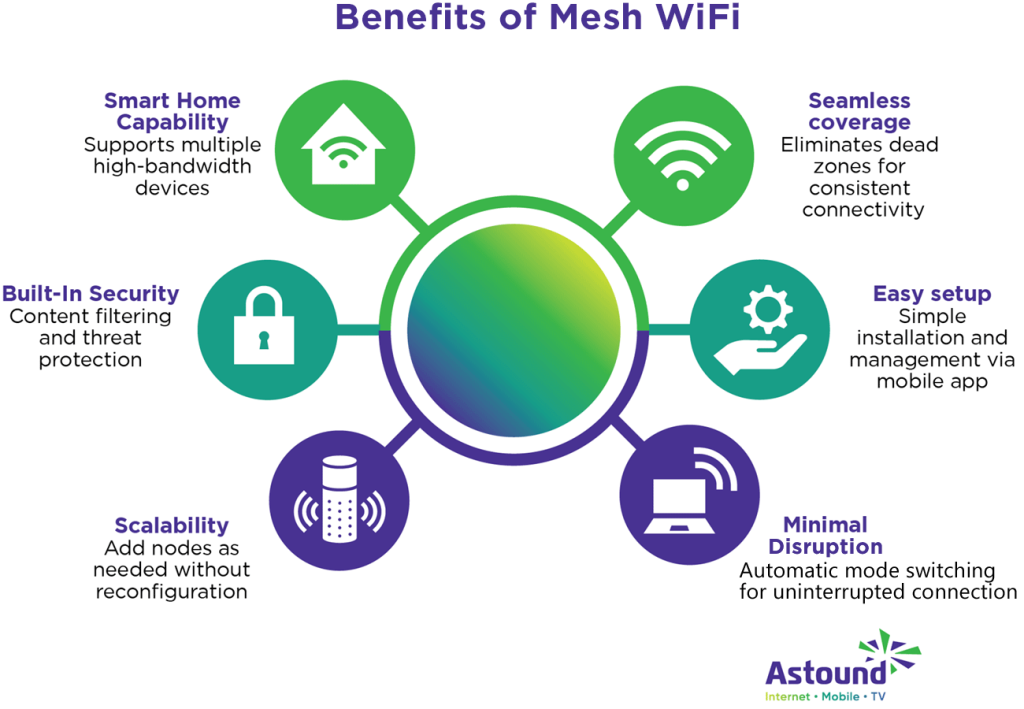
Mesh Wifi systems help improve internet connections at home. They use multiple devices to spread the signal evenly.
These systems are great for smart homes with many devices. They keep your network strong and easy to manage.
Seamless Coverage
Mesh Wifi creates a large, continuous network area. You can move around your home without losing connection.
Each mesh point works together to cover dead zones. This means no more weak signals or dropped connections.
- Eliminates WiFi dead spots
- Provides strong signals in every room
- Supports many smart devices smoothly
Easy Scalability
You can add more mesh devices to increase coverage. This flexibility fits any home size or layout.
Adding new units is simple and does not require rewiring. Your network grows as your smart home needs grow.
- Add nodes without technical help
- Expand network room by room
- Adjust setup as devices increase
Improved Network Reliability
Mesh Wifi uses multiple paths to send data. If one path fails, another takes over quickly.
This creates a more stable and reliable internet connection. Your smart devices stay online without interruptions.
- Automatic rerouting of data
- Less downtime or connection loss
- Better performance for smart devices

Credit: www.reddit.com
Key Features To Consider
Choosing the right mesh WiFi for your smart home is important. It helps all devices connect smoothly.
Look at some key features to find the best mesh WiFi system that fits your needs.
Coverage Area
Coverage area means how much space the WiFi can cover. Large homes need bigger coverage.
Check the square feet the system can handle. This helps avoid dead spots in your house.
- Measure your home size before buying
- Choose a system with extra coverage for future needs
- Consider walls and floors that can block signals
Speed And Bandwidth
Speed is how fast the WiFi can send data. Bandwidth is the amount of data it can handle.
High speed and bandwidth are needed for streaming and gaming on many devices.
- Look for WiFi systems with dual or tri-band support
- Higher Mbps rates give better performance
- Check if the system supports the latest WiFi standards like WiFi 6
Device Capacity
Device capacity means how many devices can connect at once. Smart homes have many devices.
Choose a mesh WiFi that supports all your gadgets without slowing down.
- Count all smart devices in your home
- Pick systems designed for many connections
- Check if the WiFi can handle future devices too
Security Features
Security keeps your smart home safe from hackers and viruses. This is very important.
Look for mesh WiFi with strong security tools to protect your data and devices.
- Choose systems with WPA3 encryption
- Look for built-in firewall and malware protection
- Check for easy parental controls and guest network options
Compatibility With Smart Devices
Choosing a mesh WiFi system for your smart home requires careful consideration. It must work smoothly with your smart devices for optimal performance.
Understanding its compatibility with smart home hubs, IoT devices, and voice assistants is crucial. This ensures seamless integration and ease of use.
Integration With Smart Home Hubs
Your mesh WiFi should connect easily with popular smart home hubs. This allows you to control your devices from one central point.
- Check compatibility with hubs like SmartThings, Wink, and Apple HomeKit.
- Ensure seamless integration for centralized control.
- Verify updates to support new devices.
Support For Iot Devices
Internet of Things (IoT) devices enhance your smart home experience. Your mesh WiFi should support a wide range of these devices.
| Device Type | Examples |
| Smart Lights | Philips Hue, LIFX |
| Smart Thermostats | Nest, Ecobee |
| Smart Locks | August, Schlage |
Voice Assistant Compatibility
Voice assistants make controlling your smart home easy. Ensure your mesh WiFi works well with popular voice assistants.
Consider compatibility with:
- Amazon Alexa
- Google Assistant
- Apple Siri

Credit: www.techlidar.com
Installation And Setup
Setting up mesh WiFi for your smart home can improve internet coverage. Easy installation helps you connect devices faster.
Good setup means less trouble with connections. Follow simple steps to get your mesh WiFi working well.
User-friendly Apps
Most mesh WiFi systems come with apps to help with setup. These apps guide you through connecting your devices step by step.
- Easy network setup with clear instructions
- Monitor connected devices from your phone
- Run speed tests to check connection quality
- Get notifications for network issues
Placement Tips
Correct placement of mesh nodes improves WiFi coverage. Place nodes where the signal can reach most areas of your home.
| Location | Reason |
| Central area | Best signal spread |
| Near smart devices | Faster device connection |
| Avoid thick walls | Reduces signal loss |
| Elevated spots | Better signal reach |
Network Management Tools
Network tools help you control and fix your WiFi. Use them to manage device access and check network health.
- Set up guest networks for visitors
- Pause internet on specific devices
- View real-time data usage
- Update firmware easily
Budget And Brand Options
Choosing the right mesh WiFi for your smart home depends on your budget and brand choices. Good options exist for all price ranges.
Understanding the difference between models and brands helps you pick the best fit for your home and devices.
Affordable Vs Premium Models
Affordable mesh WiFi systems work well in small to medium homes. They offer basic coverage and features at a lower price.
Premium models provide faster speeds and wider coverage. They include extra features like advanced security and better device management.
- Affordable models suit limited budgets and smaller spaces
- Premium models fit larger homes and heavy internet users
- Consider your internet speed and smart devices before deciding
Top Brands To Consider
Many brands offer reliable mesh WiFi systems. Pick one with good reviews and solid technology.
Brands with strong customer support and regular updates provide better long-term value.
- Google Nest Wifi
- Netgear Orbi
- TP-Link Deco
- Amazon eero
- Asus ZenWiFi
Warranty And Support
Check the warranty length before buying. Longer warranties give more protection for your investment.
Good customer support helps solve issues quickly. Look for brands with easy access to help and clear instructions.
- Standard warranty lasts 1 to 3 years
- Some brands offer extended warranty options
- Look for phone, chat, or email support
- User forums and online guides add extra help

Credit: www.pcmag.com
Troubleshooting And Maintenance
Mesh WiFi systems help keep smart homes connected smoothly. Regular care and fixing problems fast keeps devices working well.
Learn how to spot issues, update your system, and improve performance. These tips make managing your mesh WiFi easier.
Common Issues
Some frequent problems with mesh WiFi include weak signals, slow speeds, and device disconnections. These can happen from interference or wrong placement.
- Check if nodes are too far apart or blocked by walls.
- Restart nodes to fix temporary glitches.
- Ensure devices connect to the strongest node.
- Look for interference from microwaves or cordless phones.
Firmware Updates
Firmware keeps your mesh WiFi secure and running well. Updates fix bugs and add new features.
- Open your mesh WiFi app or web interface.
- Check for available firmware updates.
- Download and install updates promptly.
- Restart the system after updating.
Optimizing Performance
Good settings and placement keep your mesh WiFi fast and stable. Adjust channels and node locations to avoid slowdowns.
| Tip | Why It Helps |
| Place nodes in open areas | Reduces signal blockages |
| Use wired backhaul if possible | Improves speed between nodes |
| Change WiFi channels | Avoids interference from neighbors |
| Limit connected devices per node | Keeps bandwidth steady |
Frequently Asked Questions
What Is Mesh Wifi And Why Is It Good For Smart Homes?
Mesh WiFi uses multiple devices to create one seamless network. It improves coverage and reduces dead zones in smart homes. This ensures all smart devices stay connected with stable, fast internet throughout your house.
How Many Mesh Wifi Nodes Do I Need?
The number of nodes depends on your home size and layout. Generally, 2-3 nodes cover 2,000 to 3,000 square feet. Larger homes may need more nodes to maintain strong, reliable WiFi signals everywhere.
Which Features Matter Most In Mesh Wifi For Smart Homes?
Look for easy setup, strong coverage, fast speeds, and device capacity. Prioritize security features like WPA3 encryption. Also, choose systems compatible with your smart devices for seamless control and automation.
Can Mesh Wifi Improve Smart Device Performance?
Yes, mesh WiFi reduces signal drops and latency. It provides stable connections to multiple smart devices simultaneously. This improves responsiveness and reliability for streaming, voice commands, and automation tasks.
Conclusion
Choosing the right mesh WiFi makes your smart home work better. A strong signal keeps all devices connected without interruptions. Think about your home size, device number, and budget first. Easy setup and good coverage save time and stress. Trust brands with good reviews and support.
A reliable mesh WiFi system helps your smart home run smoothly every day. Simple steps lead to better internet for everyone at home.


