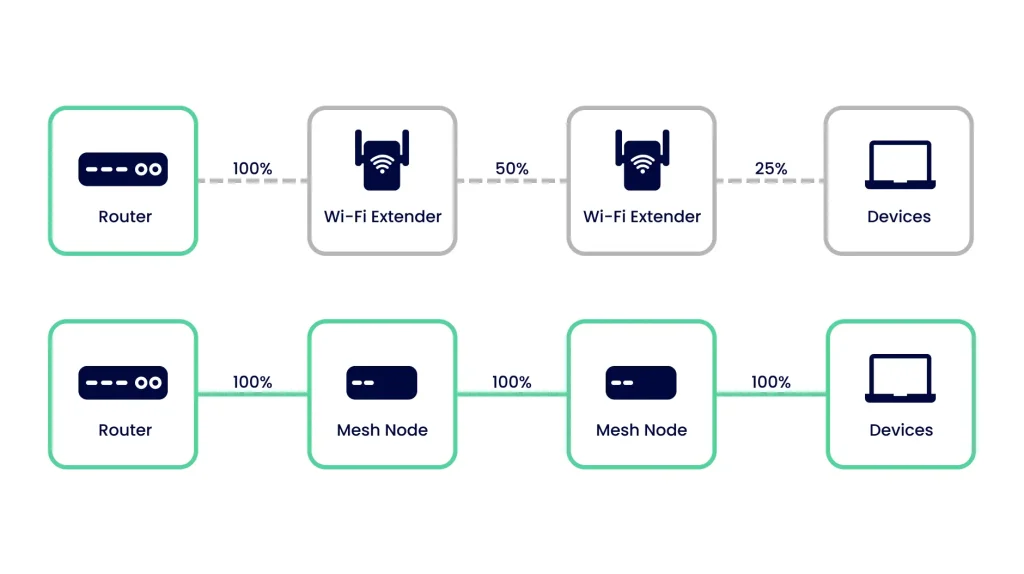
Are you tired of dead zones and slow WiFi in parts of your home? Expanding your budget mesh WiFi coverage doesn’t have to be complicated or expensive.
Imagine enjoying fast, reliable internet in every corner without breaking the bank. You’ll discover simple and effective ways to boost your mesh network’s reach, so you can stream, work, and browse with ease anywhere in your space. Keep reading to unlock the secrets to better WiFi coverage that fits your budget perfectly.

Credit: www.cnet.com
Budget Mesh Wifi Basics
Mesh wifi systems help spread wifi signals evenly in your home. Budget mesh wifi offers an affordable way to get better coverage.
These systems use multiple devices to create one large network. This reduces dead zones and improves connection speed.
What Is Mesh Wifi
Mesh wifi uses several small routers called nodes. Each node talks to the others to share internet signals. This way, your wifi covers more space without losing strength.
- Nodes connect wirelessly or by cable
- Devices switch automatically to the strongest node
- Easy to add more nodes for bigger coverage
- One network name for all nodes
Benefits Of Budget Mesh Systems
Budget mesh systems give many advantages at a low price. They are simple to set up and improve your wifi without extra costs.
| Benefit | Description |
| Cost | Affordable compared to high-end mesh systems |
| Coverage | Covers large areas with fewer dead spots |
| Ease of Use | Simple installation and management apps |
| Scalability | Add more nodes to expand the network |
| Performance | Improves wifi speed and stability |

Credit: www.reddit.com
Spotting Weak Coverage Areas
Finding weak WiFi spots helps improve your mesh network. These areas have low or no signal.
Knowing where the signal drops lets you add devices in the right places. This makes your coverage better.
Using Wifi Analyzer Tools
Wifi analyzer apps show how strong your signal is in different rooms. They help find weak spots quickly.
These tools display signal strength on a map or list. You can see where the signal is strong or weak.
- Check signal bars or numbers for strength
- Look for areas with low or no signal
- Compare signal in different rooms or floors
- Use results to place mesh nodes better
Identifying Dead Zones
Dead zones are places with no WiFi signal. Devices there cannot connect or have slow speeds.
Walk around your home with a phone or laptop. Note where the internet stops working well.
- Try loading websites in each room
- Check download speeds using speed test apps
- Mark spots with no connection
- Use this info to move or add mesh points
Optimal Router Placement
Good router placement helps expand budget mesh WiFi coverage. The right spot lets signals reach more areas clearly.
This guide covers key tips to place your router for better WiFi performance.
Centralizing Your Router
Place your router near the center of your home. This helps the signal spread evenly to all rooms.
- Pick a high, open spot like a shelf or table.
- Keep the router away from walls and corners.
- Try not to place it near windows facing outside.
- Check if the router has antennas and point them properly.
Avoiding Signal Blockers
Objects and materials can block WiFi signals. Avoid placing your router near these items for better coverage.
| Common Signal Blockers | Effect on WiFi |
| Thick Walls (Concrete, Brick) | Greatly reduce signal strength |
| Metal Objects (Appliances, Shelves) | Reflect and block signals |
| Mirrors | Cause signal reflection and loss |
| Large Fish Tanks | Absorb signals and weaken coverage |
| Microwave Ovens | Interfere with WiFi frequencies |
Adding More Mesh Nodes
Expanding your mesh WiFi coverage is easy by adding more nodes. Extra nodes help spread the signal over a larger area.
This method works well for big homes or places with weak spots. Adding nodes improves connection quality and reduces dead zones.
Choosing Compatible Nodes
Choose nodes that work with your current mesh system. Using the same brand or model ensures better performance.
Check if new nodes support the same WiFi standards and security features. This helps keep your network stable and secure.
- Use nodes from the same manufacturer
- Match WiFi standards like WiFi 5 or WiFi 6
- Ensure the new nodes support your mesh app or controls
- Avoid mixing very old and new nodes
Strategic Node Placement
Place nodes where the WiFi signal is weak but still reachable. Avoid walls or metal objects that block signals.
Keep nodes in open spaces and spread evenly across your home. This helps maintain strong connections between all nodes.
- Place nodes halfway between your router and dead zones
- Keep nodes away from thick walls and large metal appliances
- Elevate nodes off the floor for better signal
- Test signal strength after placing each node
Using Wifi Extenders And Repeaters
Budget mesh wifi systems sometimes do not cover large areas well. Wifi extenders and repeaters help expand the coverage. They boost the signal to reach far rooms and corners.
These devices are easy to install and can improve your home or office wifi. Using them correctly helps avoid weak signals and dead zones.
When To Use Extenders
Use wifi extenders when your main router cannot reach some parts of your space. Extenders pick up the signal and spread it further. This works well in big homes or buildings with thick walls.
Extenders are best if you see slow wifi or no signal in certain rooms. They help fill gaps without changing your main router.
- Large homes with many rooms
- Areas with thick walls blocking signals
- Spaces with wifi dead zones
- When you want to avoid running cables
Setting Up Repeaters Properly
Place repeaters where the wifi signal is still strong. If placed too far, they cannot catch the signal well. Find a spot halfway between the router and the weak area.
Connect the repeater to your main wifi network. Follow device instructions for setup. Avoid placing repeaters near thick metal or electronic devices that block signals.
- Place repeater within good signal range
- Use the same network name (SSID) if possible
- Avoid walls and metal objects nearby
- Test signal strength after setup
- Adjust repeater location if needed

Credit: cybernews.com
Upgrading Antennas And Hardware
Expanding your mesh WiFi coverage can improve your internet experience. Upgrading antennas and hardware is a great way to do this.
With the right upgrades, your WiFi will cover more areas in your home. This means fewer dead zones and better connectivity.
High-gain Antennas
High-gain antennas can boost your WiFi signal strength. They help your router send signals further and clearer.
These antennas are a simple and effective way to improve coverage. They work well for large homes and spaces with thick walls.
- Look for antennas with at least 5dBi gain
- Ensure compatibility with your current router
- Place them at an elevated position for best results
Firmware Updates
Updating your router’s firmware can improve performance and coverage. Manufacturers release updates to fix bugs and enhance features.
Regular updates ensure your hardware runs smoothly. They can also add new capabilities to your existing devices.
- Check the router manufacturer’s website for updates
- Follow instructions carefully to avoid issues
- Consider setting automatic updates if available
Managing Network Traffic
Mesh WiFi systems help cover large areas. They sometimes face traffic issues. Managing network traffic is key to improving performance.
Network traffic management can ensure smooth internet access. It helps avoid congestion and slow speeds.
Prioritizing Devices
Some devices need more bandwidth than others. Prioritizing them can improve the overall experience. Streaming devices and gaming consoles are examples.
To prioritize, use your router’s settings. Assign higher priority to essential devices. This ensures they get the bandwidth they need.
- Access router settings via a web browser
- Find the Quality of Service (QoS) settings
- Select devices to prioritize
- Save the changes
Limiting Bandwidth Hogs
Some devices or applications consume a lot of bandwidth. Limiting these can help maintain a balanced network.
Identify devices or apps that use too much data. Set limits on their usage. This helps ensure fair distribution of bandwidth.
- Identify heavy bandwidth users
- Limit their data usage in settings
- Monitor network performance
- Adjust limits as needed
Alternative Solutions
Expanding mesh WiFi coverage on a budget can be done with alternative solutions. These options improve signal strength without costly upgrades.
Using devices that work with your current setup helps cover dead zones and keeps speeds stable.
Powerline Adapters
Powerline adapters use your home’s electrical wiring to carry internet signals. They connect your router to distant rooms without extra cables.
These adapters are easy to install and often cost less than adding more mesh nodes. They provide a wired-like connection through power outlets.
- Plug one adapter near your router and connect with Ethernet.
- Plug the second adapter in the room needing better WiFi.
- Connect a device or a mesh node to the second adapter via Ethernet.
- Powerline speed depends on your home’s wiring quality.
Wired Backhaul Options
Wired backhaul means connecting mesh units with Ethernet cables. This keeps the WiFi signal strong and fast between nodes.
This option reduces signal loss and interference from walls or distance. It works well in homes where running cables is possible.
- Use Ethernet cables to link mesh units together.
- Connect cables through walls, floors, or ceilings if needed.
- Wired backhaul improves speed and reliability.
- This method needs some planning but can save money on extra devices.
Maintaining Strong Signal
Strong signal is important for good mesh WiFi coverage. It helps keep your internet fast and reliable in every corner of your home.
Simple actions can keep your mesh network working well. Two key areas to focus on are testing your speed regularly and clearing interference sources.
Regular Speed Tests
Speed tests show how well your mesh WiFi performs. Run tests at different locations to find weak spots in coverage. This helps you decide where to place nodes for best signal.
- Use a reliable speed test app or website.
- Test near each mesh node and in far rooms.
- Record download and upload speeds.
- Compare results to your internet plan.
- Move nodes if speeds are low in some areas.
Clearing Interference Sources
Interference can block your mesh WiFi signal. Common sources are other electronics and physical barriers. Removing or moving these can improve your network.
| Interference Source | Effect on Signal | How to Reduce |
| Microwaves | Blocks WiFi waves | Keep mesh nodes away from kitchen |
| Thick Walls | Weakens signal strength | Place nodes in open areas |
| Bluetooth Devices | Cause signal overlap | Turn off or move devices |
| Baby Monitors | Interfere with WiFi channels | Use different channels or distance |
Frequently Asked Questions
How Can I Improve Budget Mesh Wifi Coverage At Home?
Place mesh nodes centrally and avoid obstructions like walls. Update firmware regularly. Use Ethernet backhaul if possible to enhance speed and reliability.
What Is The Best Placement For Mesh Wifi Nodes?
Place nodes in open spaces, away from metal objects and appliances. Ensure nodes are within range but not too close to avoid interference.
Can Adding More Nodes Expand Budget Mesh Wifi Coverage?
Yes, adding more nodes can increase coverage. However, too many nodes may cause interference and reduce network performance.
How Does Ethernet Backhaul Improve Mesh Wifi?
Ethernet backhaul connects nodes via cables, reducing wireless interference. It boosts stability and speeds, especially in large or multi-story homes.
Conclusion
Expanding your budget mesh WiFi coverage takes simple steps. Place nodes where signals are weak or lost. Avoid obstacles like walls and large furniture. Use extra nodes to fill dead zones. Regularly update your device software for best performance. Test your network after changes to check coverage.
Small changes make a big difference in WiFi reach. Stay patient and adjust as needed. This way, you keep your internet fast and stable at home.


