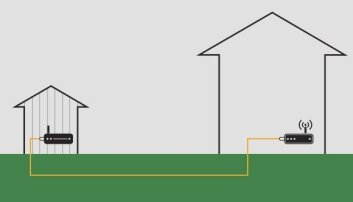
Are you tired of losing WiFi signal the moment you step into your backyard? Imagine enjoying seamless internet while hosting a barbecue, working outside, or streaming your favorite show under the open sky.
Extending your mesh WiFi to cover your backyard isn’t just a luxury—it’s something you can achieve easily with the right approach. You’ll discover simple, effective ways to boost your mesh network so your outdoor space stays connected and fast. Keep reading, and get ready to transform your backyard into a strong WiFi zone you’ll love.

Credit: simplewifi.com
Choosing The Right Mesh System
Extending your mesh WiFi to the backyard needs careful planning. Picking the right system helps keep the connection strong outside your home.
Many mesh systems work well indoors but may not suit outdoor use. You need to know what features make a system fit for your backyard.
Features To Look For
Good mesh systems for outdoor use have specific features. These features ensure stable and fast WiFi in open spaces.
- Strong signal range to cover large outdoor areas
- Easy setup and management through an app
- Automatic band steering for better speed
- Multiple units to add for wider coverage
- Low latency for smooth video calls and gaming
Compatibility With Outdoor Use
Not all mesh systems can handle outdoor conditions. Look for systems designed to resist weather and temperature changes.
| Feature | Importance for Outdoors |
| Weatherproof Rating | Protects devices from rain and dust |
| Temperature Range | Works well in hot and cold climates |
| UV Resistance | Prevents sun damage to plastic parts |
| Power Options | Supports outdoor power sources like PoE |
| Mounting Hardware | Allows secure installation on walls or poles |
Assessing Your Backyard Layout
Extending your mesh wifi to the backyard starts with a good plan. You need to understand the layout of your outdoor space.
Knowing the shape and size of your backyard helps place the mesh nodes for the best coverage.
Identifying Signal Weak Spots
Walk around your backyard with a wifi signal app or device. Check for areas where the signal is low or drops completely.
- Look near fences and walls where signals may be blocked.
- Check corners and edges farthest from your house.
- Note spots under dense trees or large bushes.
- Test during different times of the day for changes.
Measuring Distance And Obstacles
Measure the distance from your house to the weak signal spots in your backyard. Note any objects that might block the wifi signal.
| Obstacle | Effect on Signal | Distance Impact |
| Wooden Fence | Low to Medium | Blocks some signals at over 15 feet |
| Brick Wall | High | Strongly blocks signals beyond 10 feet |
| Trees and Bushes | Medium | Reduces signal strength at variable distances |
| Metal Objects | Very High | Can reflect or block signals in close range |
Optimal Placement Of Mesh Nodes
Extending your mesh WiFi to the backyard needs careful node placement. Proper positioning helps keep a strong signal outdoors.
Understanding where to place indoor and outdoor nodes improves coverage. Elevation also plays a key role in signal strength.
Indoor Vs Outdoor Nodes
Indoor nodes work well near windows or doors facing the backyard. They send signals through walls but may weaken outdoors.
Outdoor nodes are designed to resist weather and cover open spaces better. Place them in shaded, dry areas for best results.
- Indoor nodes suit covered patios or sunrooms
- Outdoor nodes fit well on exterior walls or poles
- Keep outdoor nodes away from metal objects and thick trees
- Use waterproof enclosures if not built for outdoors
Elevating Nodes For Better Coverage
Raising mesh nodes reduces obstacles and improves signal reach. Height helps avoid ground interference and boosts line of sight.
| Elevation Height | Benefits |
| 1-2 feet above ground | Basic outdoor coverage |
| 5-7 feet high | Better signal over fences and bushes |
| 10 feet or more | Strong coverage across large yards |
Use poles or mounts to elevate nodes safely. Avoid placing them near metal roofs or thick tree branches.
Using Outdoor Mesh Satellites
Extending your mesh WiFi to the backyard improves your outdoor internet access. Outdoor mesh satellites help spread strong signals over larger areas. They connect wirelessly to your main router.
These devices work well in open spaces but need careful setup. Choosing the right satellite and placement ensures better coverage and reliability.
Weatherproofing And Durability
Outdoor mesh satellites face harsh weather like rain, wind, and sun. Good weatherproofing keeps the device safe and working well. Look for satellites with strong casing and seals.
- Water-resistant or waterproof design
- UV protection to avoid sun damage
- Shock-resistant materials for drops or impacts
- Rust-proof and corrosion-resistant coatings
- Proper mounting brackets to hold steady in wind
Power Options And Connectivity
Outdoor mesh satellites need reliable power and strong connections. You can power them in different ways depending on your setup.
| Power Method | Details | Pros | Cons |
|---|---|---|---|
| Power over Ethernet (PoE) | Uses a single Ethernet cable for power and data | Simple setup, reliable connection | Requires PoE injector or switch |
| Battery-Powered | Runs on rechargeable or replaceable batteries | Flexible placement, no wires | Needs frequent charging or battery changes |
| Solar Power | Uses solar panels to charge batteries | Eco-friendly, low maintenance | Depends on sunlight availability |
Extending Range With Wired Backhaul
Extending your mesh WiFi to the backyard improves internet access outdoors. Using a wired backhaul connection can boost speed and reliability. This guide covers two main ways to use wired backhaul effectively.
A wired backhaul uses cables to link mesh nodes. This method avoids signal loss seen in wireless connections. You can choose between Ethernet and powerline adapters for your setup.
Ethernet Vs Powerline Adapters
Ethernet cables and powerline adapters both carry internet signals through physical wires. Ethernet uses dedicated network cables. Powerline adapters send data through your home’s electrical wiring.
| Feature | Ethernet | Powerline Adapters |
| Speed | Up to 10 Gbps | Up to 1 Gbps |
| Reliability | Very stable | Depends on wiring quality |
| Installation | Requires cables | Plug and play |
| Cost | Moderate | Usually lower |
| Best Use | Long distances and outdoor | Indoor or short distances |
Ethernet cables offer faster speeds and more stable connections. Powerline adapters are easier to install but may slow down with old wiring. For backyard mesh nodes, Ethernet is usually the better choice.
Setting Up Outdoor Ethernet Cables
Installing Ethernet cables outdoors needs care. Use cables rated for outdoor use. Protect cables from weather and damage. Plan the cable route before installation.
- Choose outdoor-rated Cat6 or Cat7 cables
- Run cables through conduit for protection
- Avoid sharp bends and heavy foot traffic areas
- Seal entry points to prevent water leaks
- Use waterproof connectors at joints
- Test cable connections before final setup
Proper setup ensures your mesh WiFi works well in the backyard. A wired backhaul delivers consistent speeds and low latency. Follow these steps for a reliable outdoor network extension.

Credit: www.youtube.com
Configuring Your Network Settings
Setting up a mesh WiFi system in your backyard can enhance your internet experience. Proper configuration is essential for a reliable connection.
Adjusting network settings ensures seamless connectivity. You can enjoy uninterrupted internet access outdoors.
Optimizing Channels And Bands
Channels and bands can affect your WiFi performance. Choosing the right settings is crucial for strong signals.
Use a WiFi analyzer app to find less crowded channels. This reduces interference and improves speed.
- 2.4 GHz for longer range but slower speed
- 5 GHz for faster speed but shorter range
- Select channels with minimal interference
Enabling Guest Networks For Security
Guest networks add an extra layer of security. They keep your main network safe from unauthorized access.
Set up a separate guest network for visitors. This allows them to use the internet without accessing your private data.
- Create a different password for the guest network
- Limit bandwidth to prevent overuse
- Disable file sharing on the guest network
Troubleshooting Common Issues
Extending your mesh WiFi to the backyard can bring challenges. Understanding common issues helps in resolving them effectively.
Interference and signal strength are often the main problems. Let’s look at how to deal with these issues.
Dealing With Interference
Interference can disrupt your WiFi signal. This can be caused by various sources around the house.
Devices like microwaves and Bluetooth speakers interfere with WiFi. Avoid placing routers near such devices.
- Keep routers away from metal objects
- Place routers in open spaces
- Use different WiFi channels
Improving Signal Strength
Weak signals limit WiFi reach in your backyard. Improving signal strength is crucial for better coverage.
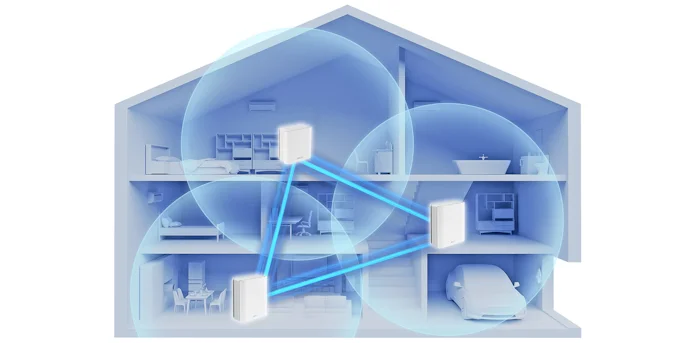
Place additional nodes strategically to cover more area. This helps in strengthening the overall WiFi network.
- Place nodes at equal distances
- Ensure nodes are in line of sight
- Use WiFi extenders if needed
Credit: edgeup.asus.com
Additional Tips For Backyard Coverage
Extending your mesh WiFi to the backyard helps you enjoy internet outdoors. Good coverage means no dead spots outside your home.
There are simple ways to improve WiFi signals in your backyard. Using the right devices and care keeps your network strong.
Using Wifi Extenders Vs Mesh Nodes
WiFi extenders boost your existing signal by repeating it. They are easy to install but may reduce speed.
Mesh nodes create a single network with many points. They give better coverage and steady speeds in large areas.
- Extenders can cause slower connections in some spots
- Mesh nodes work well for bigger yards
- Mesh systems manage traffic better between devices
- Extenders are usually cheaper and simpler
- Choose mesh for seamless roaming outdoors
Maintaining Your Outdoor Equipment
Keep your outdoor WiFi devices clean and dry. Dirt and water can damage them and reduce performance.
Check your equipment regularly for signs of wear. Replace batteries or parts as needed to keep signals strong.
- Use weatherproof covers for protection
- Clear debris from around the devices
- Inspect cables for cracks or damage
- Reboot devices occasionally to refresh connections
- Position devices away from direct sunlight if possible
Frequently Asked Questions
How Can I Extend Mesh Wifi To My Backyard?
To extend mesh WiFi to your backyard, place a mesh node near a window or door facing outside. Ensure it has a strong connection to your main router. Use outdoor-rated mesh nodes for better durability and signal coverage in open spaces.
What Is The Best Location For Outdoor Mesh Wifi Nodes?
Place outdoor mesh nodes in shaded, elevated areas near your home. Avoid placing them behind thick walls or metal objects. This positioning helps maximize signal range and strength, ensuring better WiFi coverage in your backyard.
Can I Use Mesh Wifi With Existing Outdoor Routers?
Yes, you can integrate mesh WiFi with some outdoor routers if they support mesh technology. Check compatibility before setup. Using mesh-compatible outdoor routers enhances seamless coverage between your indoor and outdoor networks.
How Do Weather Conditions Affect Mesh Wifi Outdoors?
Weather like rain, snow, and extreme heat can impact mesh WiFi performance. Use weather-resistant mesh nodes designed for outdoor use. Proper placement under cover also helps protect devices and maintain consistent signal strength.
Conclusion
Extending your mesh WiFi to the backyard improves your outdoor experience. Strong signals mean fewer drops and faster speeds outside. Place nodes carefully for best coverage and less interference. Test the connection in different spots to find the best setup.
Remember, simple steps can make a big difference. Enjoy seamless internet while relaxing or working outdoors. Keep your network secure and updated for smooth performance. Your backyard can become a connected, comfortable space with good WiFi.


