
Imagine setting up your outdoor office and realizing your WiFi just doesn’t reach. Frustrating, right?
You need a strong, reliable connection to stay productive without running back inside every few minutes. But don’t worry — extending your WiFi outdoors is easier than you think. You’ll discover simple, effective ways to boost your signal and enjoy seamless internet right where you work outside.
Keep reading, and you’ll have your outdoor office connected in no time.
Assess Current Wifi Coverage
Check the wifi signal strengthin the outdoor office area. Use a smartphone or laptop to test connection speed and quality. Walk around the space to find where the signal is strong or weak.
Identify dead zoneswhere the wifi signal is very low or absent. These spots may need extra equipment like a wifi extender or a stronger antenna.
Analyze sources of interferencethat can block the wifi signal. Common sources include walls, large metal objects, and other electronic devices. Trees and weather can also affect the signal outdoors.
Choose The Right Equipment
Outdoor Wifi Extendershelp boost the wifi signal outside your home. They catch the indoor signal and send it far. Place them where the signal is strong. This helps cover your outdoor office with good wifi.
Mesh Wifi Systemsuse many small devices spread around your area. They work together to give steady wifi everywhere, even outside. They are easy to set up and great for big spaces.
High-Gain Antennasincrease the wifi signal range. They send and receive signals farther than regular antennas. Use them to point the signal toward your outdoor office for better connection.
Optimal Router Placement
Elevate your routerto a higher spot. It helps the signal reach further. Walls, furniture, and floors can block WiFi signals. Avoid placing the router near thick walls or metal objects. Metal and concrete reduce signal strength a lot.
Keep the router in a central locationinside your home. This lets the signal spread evenly outside. Try to place it near windows or doors facing your outdoor office.
- Place the router at least 3 feet off the ground.
- Keep it away from microwaves and cordless phones.
- Choose a spot without many walls between the router and office.
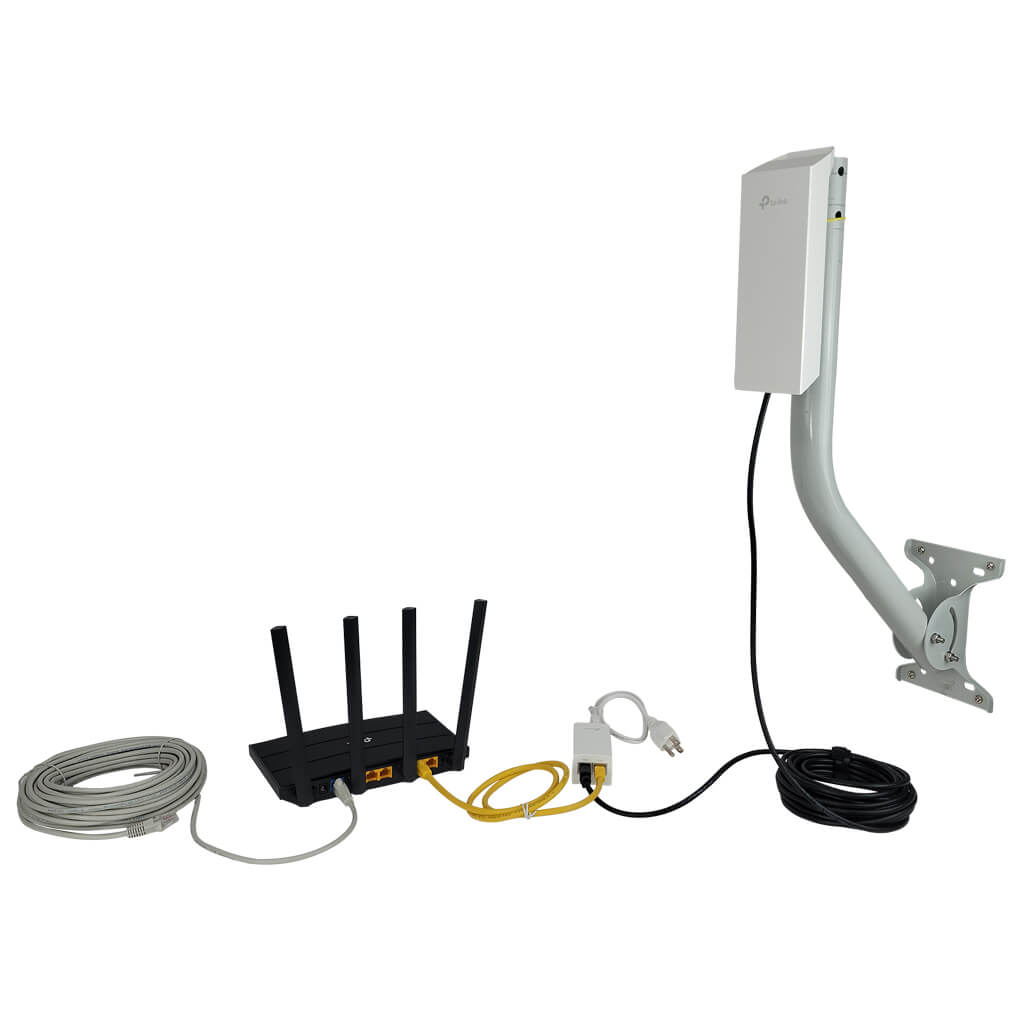
Credit: simplewifi.com
Set Up Outdoor Access Points
Choosing between wiredand wireless access pointsdepends on your setup. Wired access points offer stableand fast connections. They need cables, which can be tricky outdoors. Wireless access points are easier to install but may face interferenceor signal drops.
Outdoor devices must be weatherproof. Look for access points with water-resistantand dustproofratings. Strong casings help protect against rain, wind, and sunlight.
| Power Supply Option | Details | Pros | Cons |
|---|---|---|---|
| Power over Ethernet (PoE) | Power and data through one cable | Easy setup, less clutter | Needs PoE switch or injector |
| Battery Powered | Runs on rechargeable batteries | Flexible placement | Needs regular charging |
| Solar Powered | Uses solar panels for energy | Eco-friendly, no wires | Depends on sunlight |
Use Wifi Range Extenders
Place the WiFi range extender where the indoor signal is still strong. Avoid walls or metal objects that block the signal. A spot halfway between the router and the outdoor office often works best. Try different locations to find the strongest signal.
| Feature | Dual-Band | Single-Band |
|---|---|---|
| Frequency | 2.4 GHz and 5 GHz | Only 2.4 GHz |
| Speed | Faster, less interference | Slower, more interference |
| Range | Good for large areas | Better for short range |
| Cost | Usually higher | Usually lower |
- Use antennas to aim the signal toward the office.
- Keep the extender away from other electronics.
- Update extender firmware for better performance.
- Use a WiFi analyzer app to find the best channel.

Credit: www.reddit.com
Employ Powerline Adapters
Powerline adapters send internet signals through the electrical wiring in a building. This means the internet can reach places where WiFi is weak or unavailable.
They help extend the connection to an outdoor office without needing long cables or extra WiFi boosters. The setup is simple: one adapter connects to your router, and the other plugs into a power outlet near your outdoor office.
| Benefits for Outdoor Offices | Installation Guidelines |
|---|---|
|
|
Optimize Network Settings
Choosing the best WiFi channelhelps avoid interference from nearby networks. Use tools or apps to scan for the least crowded channel. This improves signal strength and speed.
Keep your router’s firmware updated. Updates fix bugs and improve performance. Regular updates help maintain a stable and secure connection.
Protect your outdoor WiFi by using a strong password. Enable WPA3 or WPA2 encryption. Disable WPS and hide your network name if possible. This keeps unwanted users away.
Manage Environmental Factors
Many electronic devices cause WiFi interference. Keep the outdoor office away from microwaves, cordless phones, and Bluetooth gadgets. This helps clear signal reception.
Obstructionslike walls, trees, and metal fences block WiFi signals. Use clear paths for your WiFi signal. Place the router and outdoor office in spots with fewer obstacles.
Weather can affect WiFi strength. Rain, snow, and strong winds may weaken signals. Use weatherproof devices and protective covers to keep equipment safe and working well.
Test And Monitor Signal Strength
Test and monitor your WiFi signal strength outdoors to find weak spots. Use a signal meter or app to check coverage around your office space. This helps decide where to place extenders or access points for better connection.
Use Wifi Analyzer Tools
Wifi analyzer tools help find the best spots for your signal. They show signal strength and interference. Use these tools to check where the signal is weak. It helps to place your router or extender better. Many free apps work well on phones and computers.
Regular Speed Tests
Speed tests measure how fast your internet is outside. Run tests at different times and places around your office. Keep track of results to spot slow areas. This helps to know if your setup needs changes.
Adjust Setup As Needed
Move devices or change antenna directions if the signal is weak. Try raising routers higher or away from metal objects. Sometimes, adding another extender improves coverage. Keep testing after each change to see if it gets better.

Credit: www.cranegardenbuildings.co.uk
Frequently Asked Questions
How Can I Boost Wifi Signal To Outdoor Office?
Use a high-gain outdoor antenna or WiFi extender. Position devices to avoid obstructions like walls and trees. Also, upgrade your router for better coverage. These steps improve signal strength and reliability for your outdoor workspace.
What Equipment Is Needed For Outdoor Wifi Extension?
You need a weatherproof outdoor access point, a WiFi range extender, or a mesh WiFi system. Additionally, use Ethernet cables for stable connections. Proper mounting hardware and power sources are essential for outdoor setups.
How Do I Protect Outdoor Wifi Devices From Weather?
Use weatherproof enclosures and covers to shield devices from rain and dust. Ensure cables and connectors are waterproof. Regularly inspect equipment for damage. Proper protection extends device life and maintains WiFi performance outdoors.
Can Mesh Wifi Systems Improve Outdoor Office Coverage?
Yes, mesh WiFi systems provide seamless coverage by using multiple nodes. Place nodes strategically around your outdoor office. This setup reduces dead zones and maintains strong, consistent WiFi signals across larger areas.
Conclusion
Extending your WiFi outdoors can boost productivity. It’s more than just convenience. A stable connection in your outdoor office is essential. Follow the steps outlined for a seamless experience. Use quality equipment. Place your router strategically. Ensure security with proper settings.
Test your connection regularly to avoid disruptions. These simple strategies help maintain a strong signal. Enjoy working outside with reliable WiFi. Embrace the freedom of an outdoor workspace. It enhances creativity and focus. Your office without walls awaits. Stay connected, stay productive, and enjoy the fresh air.


