Are you tired of experiencing lag during your favorite game? Does your screen freeze right at the moment you’re about to win?
You’re not alone. Many gamers face the same frustration. But what if there was a way to enhance your gaming experience? Improving your gaming modem performance might just be the key. Imagine smoother gameplay, faster downloads, and the competitive edge that comes with a stable connection.
It’s time to say goodbye to buffering and hello to seamless gaming. Stay with us as we explore easy steps that can boost your modem’s performance and transform your gaming sessions.
Optimize Router Placement
Optimizing router placement is key to better gaming modem performance. The router’s position affects signal strength and speed. Poor placement can cause lag and dropped connections. A good spot helps maintain stable, fast connections. Follow simple tips to improve your gaming setup.
Choose Central Location
Place your router near the center of your home. This helps the signal reach all rooms evenly. Avoid putting it in a corner or behind thick walls. A central spot reduces dead zones where the signal is weak. It gives your gaming devices a stronger connection.
Avoid Interference
Keep your router away from devices that cause interference. Microwaves, cordless phones, and baby monitors can weaken signals. Metal objects and thick walls also block Wi-Fi waves. Choose a clear area with few electronic devices nearby. This reduces interruptions and improves speed.
Elevate The Router
Place the router on a high shelf or mount it on a wall. Signals spread better from an elevated position. Avoid placing the router on the floor or under furniture. Height gives a clearer line of sight to your gaming devices. This simple move boosts connection quality and reduces lag.
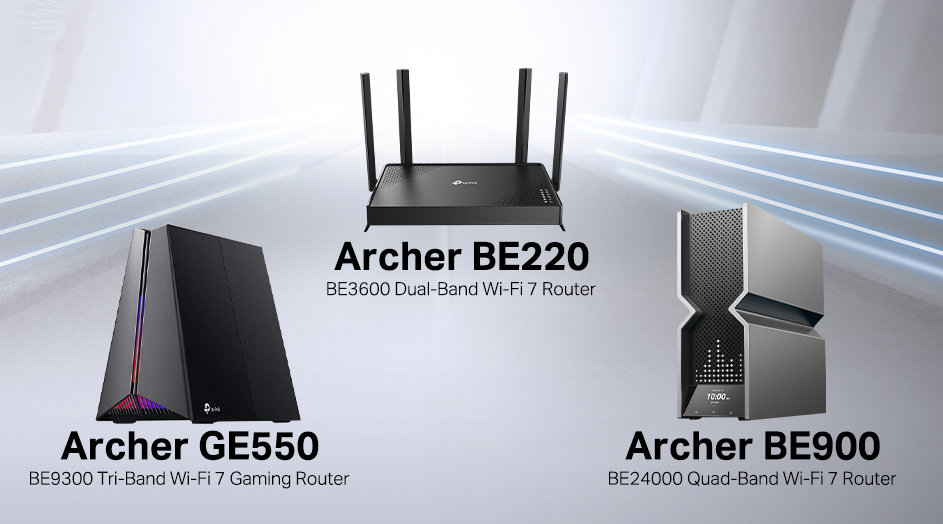
Credit: www.tp-link.com
Update Firmware Regularly
Keeping your gaming modem’s firmware up to date is one of the easiest ways to boost performance and fix hidden issues. Firmware updates are released by manufacturers to improve stability, patch security holes, and add new features. Ignoring these updates can leave your connection vulnerable and slower than it should be.
I remember once ignoring a firmware update for months. Suddenly, my connection started dropping during critical gaming moments. After updating, the drops stopped, and latency improved noticeably. That experience taught me how important regular updates are for smooth gameplay.
How To Check For Firmware Updates
Start by logging into your modem’s web interface using the IP address provided in the manual. Look for a section labeled “Firmware” or “Software Update.” Some modems even offer an option to check for updates automatically.
Don’t worry if you’re not tech-savvy; manufacturers usually provide clear instructions on their websites. Keeping a bookmark of your modem’s support page can save you time when updates are released.
Benefits Of Updating Firmware
- Improved stability:Updates fix bugs that cause crashes or connection drops.
- Enhanced security:Patches protect your network from vulnerabilities and attacks.
- Better speed and latency:Optimizations help reduce lag and improve data handling.
- New features:Some updates add options for QoS or traffic prioritization, which can boost your gaming experience.
Tips To Update Firmware Safely
- Ensure your modem is connected to a reliable power source to avoid interruptions.
- Read the update notes to understand what changes or improvements are included.
- Back up your current settings if possible, so you can restore them if needed.
- Don’t interrupt the update process once it starts; let it finish fully before using your modem again.
How Often Should You Update?
Check for updates at least once every few months. Some manufacturers release updates more frequently, especially if new security threats emerge. Setting a reminder to check quarterly can keep your modem running optimally without much effort.
Have you noticed better connection quality after updating your modem? If not, it might be time to give your firmware a check and see what improvements await.
Use Quality Of Service (qos)
Using Quality of Service (QoS) on your gaming modem helps manage internet traffic. It ensures important gaming data moves faster and smoother. QoS reduces lag and improves connection stability during gameplay. Many modems have built-in QoS settings you can adjust for better gaming performance.
Prioritize Gaming Traffic
Set your modem to give priority to gaming data packets. This makes sure your game gets the fastest route through the network. Prioritizing gaming traffic cuts down delays and packet loss. You can usually do this by selecting your gaming device or game in the QoS settings.
Look for options to assign higher priority to:
- Online games
- Gaming consoles and PCs
- Specific game ports
This focus keeps your gaming experience smooth even if other devices use the internet.
Limit Background Usage
Background apps and downloads can slow your gaming connection. QoS lets you limit bandwidth for less important devices and apps. This stops them from using too much internet during gaming sessions.
Control background usage by:
- Reducing bandwidth for streaming and downloads
- Blocking automatic updates temporarily
- Setting limits on other connected devices
Limiting background traffic frees up speed for your game. This helps reduce lag spikes and keeps your connection steady.
Select The Best Wi-fi Channel
Selecting the best Wi-Fi channel is a simple yet powerful way to boost your gaming modem’s performance. Wi-Fi channels can get crowded, especially in densely populated areas, leading to lag and dropped connections during critical gaming moments. Choosing the right channel helps your modem communicate more clearly with your devices, reducing interference and improving speed.
Scan For Congested Channels
Start by checking which Wi-Fi channels are overcrowded around you. You can use free apps like Wi-Fi Analyzer on your phone or software on your PC to scan nearby networks. These tools display which channels have the most traffic, helping you avoid those packed frequencies.
Think about your last gaming session—did you notice sudden lag spikes or slower response times? It might be due to many neighbors using the same channel as you. Scanning gives you real data, so you’re not just guessing why your connection struggles.
Switch To Less Crowded Frequencies
Once you identify less crowded channels, change your modem’s Wi-Fi settings to use one of those channels. Most modern gaming modems allow you to pick channels from the admin panel easily. Opt for channels with the fewest devices to reduce interference.
Don’t forget to check both 2.4 GHz and 5 GHz bands. The 5 GHz band usually has more channels and less interference, but it covers a smaller area. If your modem supports it, switch gaming devices to 5 GHz on a clear channel for the best experience.
Have you ever tried switching channels and noticed immediate improvements? It’s one of the quickest fixes to a frustrating connection without spending money on new hardware. Try it and see how your gaming feels smoother and more responsive.
Upgrade To Gaming-specific Modems
Upgrading to a gaming-specific modem can dramatically boost your gaming experience. These modems are built with features that prioritize gaming traffic, reduce lag, and provide a more stable connection. If you’ve ever felt frustrated by sudden spikes in ping or unexpected disconnects during a crucial match, switching to a gaming modem might be the solution you need.
Features To Look For
- Low Latency Optimization:Gaming modems often include technology designed to minimize latency, which directly impacts your reaction time in online games.
- Quality of Service (QoS) Controls:This lets you prioritize gaming traffic over other types of internet use, ensuring your game data gets through first.
- Advanced Security:Built-in firewalls and DDoS protection guard your connection against attacks that can cause interruptions.
- High-Speed Compatibility:Look for modems that support the latest standards (like DOCSIS 3.1) to handle faster internet plans and reduce bottlenecks.
- Multiple Antennas and Beamforming:These improve Wi-Fi signal strength and focus, which is crucial if you game wirelessly.
Benefits Over Standard Modems
Standard modems serve general internet needs but lack gaming-specific enhancements. Gaming modems offer stable connections that reduce jitter and packet loss, issues that can ruin your gaming session.
They also provide better bandwidth management, so your game doesn’t have to compete with background downloads or streaming. From my own experience, upgrading to a gaming modem eliminated sudden spikes in ping that used to cost me matches.
Are you ready to stop blaming your internet for your in-game failures? Investing in a gaming modem could be the edge you need to stay competitive and enjoy smoother gameplay every time.
Enable Wired Connections
Enabling wired connections can greatly improve your gaming modem’s performance. Wired connections reduce lag and provide a stable network link. This stability helps avoid sudden disconnections or slowdowns during gameplay. For serious gamers, switching from Wi-Fi to Ethernet is a smart move.
Benefits Of Ethernet
- Provides faster and consistent internet speeds
- Reduces latency and lag spikes
- Offers a more stable connection than wireless
- Less interference from other devices or walls
- Improves game response time and accuracy
Setting Up A Wired Network
Start by connecting an Ethernet cable from your modem or router to your gaming device. Use a high-quality Cat5e or Cat6 cable for better speed and reliability. Avoid long cables that can weaken the signal. Make sure your modem ports are free and functional.
Next, check your device’s network settings. Enable the wired network adapter and disable Wi-Fi to prevent conflicts. Restart your device to let it recognize the wired connection. Test the connection speed with online tools to confirm improvements.
Adjust Modem And Router Settings
Adjusting your modem and router settings can make a big difference in your gaming experience. These tweaks help reduce lag, improve connection stability, and give you faster response times. You don’t need to be a tech expert to make these changes—small adjustments can have a big impact.
Change Dns Servers
Your modem and router usually use the default DNS servers provided by your internet service provider, but these aren’t always the fastest. Switching to a faster, more reliable DNS server can speed up how quickly your games connect to servers.
Try public DNS options like Google DNS (8.8.8.8 and 8.8.4.4) or Cloudflare DNS (1.1.1.1 and 1.0.0.1). Changing these settings is often as simple as logging into your router’s admin panel and updating the DNS fields.
Have you noticed delays when loading game lobbies or matchmaking? Changing DNS servers might be the fix that gets you into the action faster. Plus, some DNS servers offer better security and less downtime.
Disable Unnecessary Features
Your router often comes with features designed for general use but can slow down your gaming connection. Disabling functions like QoS (Quality of Service) if not properly configured, firewall settings that interfere with game ports, or bandwidth-heavy services like guest networks can free up resources.
Turn off features like UPnP (Universal Plug and Play) if you manually open ports for your games, or disable parental controls when not needed. These steps reduce background processing and avoid connection interruptions.
Think about the features you truly need. Does your router’s firewall block your favorite game? Are guest devices eating bandwidth? Simplifying your router’s workload can give your gaming modem more power to focus on what matters: your gameplay.
Monitor Network Traffic
Monitoring network traffic is crucial for improving gaming modem performance. It helps reveal how data moves through your connection. Understanding traffic patterns can reduce lag and improve speed. Keeping an eye on your network stops unwanted interruptions during gameplay.
Watching network traffic lets you spot devices or apps that use too much bandwidth. This insight helps you manage your network better. It also shows if any background downloads or updates slow your gaming experience.
Identify Bandwidth Hogs
Bandwidth hogs are devices or apps that use excessive data. They cause slow connections and increased lag. Common bandwidth hogs include streaming services, file downloads, and cloud backups. Identifying these helps prioritize gaming traffic.
Check which devices are active on your network. Look for apps running in the background on your computer or smartphone. Pause or limit their use to free up bandwidth for gaming.
Use Monitoring Tools
Network monitoring tools track data flow and bandwidth use. They provide real-time stats and detailed reports. Many tools show which devices or apps consume the most data.
- Router’s built-in monitoring features
- Third-party apps like GlassWire or NetWorx
- Network management software from your ISP
Use these tools to set alerts for unusual data spikes. Regular checks help maintain steady gaming performance. Choose tools that are easy to understand and fit your needs.
Reduce Network Latency
Reducing network latency is key to getting the most out of your gaming modem. Lower latency means faster response times, which can make the difference between winning and losing in fast-paced games. Small changes in how you manage your network can significantly improve your gaming experience.
Close Background Apps
Apps running in the background often consume bandwidth and processing power without you noticing. Closing these apps frees up resources for your game, reducing delays and lag.
Check your task manager or activity monitor for programs using the internet, like streaming services, cloud backups, or software updates. Shutting these down while gaming can lead to smoother gameplay.
Have you ever felt your connection suddenly slow during a critical moment? It’s likely a background app eating up your bandwidth. Keeping your system lean helps your modem focus on delivering game data quickly.
Choose Nearby Servers
Connecting to game servers closer to your location cuts down the distance data has to travel. This often results in lower ping times and a more responsive gaming experience.
Most games allow you to select servers manually. Pick one geographically near you rather than the default or a far-off option.
If your game doesn’t offer a choice, look for regions or matchmaking options that favor local servers. It’s worth checking your ping to different servers before starting a match.
Have you tried switching servers and noticed a big difference in performance? This simple step can dramatically reduce lag and improve your overall gameplay.

Credit: www.ign.com

Credit: www.privateinternetaccess.com
Frequently Asked Questions
How Can I Boost My Gaming Modem Speed?
To boost your gaming modem speed, update firmware regularly, optimize router placement, and use a wired connection. Also, reduce connected devices and enable Quality of Service (QoS) for gaming traffic priority.
What Settings Improve Gaming Modem Performance?
Adjust QoS settings to prioritize gaming packets. Disable unused features like guest networks. Enable UPnP for smoother connections, and ensure the modem firmware is up to date for best results.
Does A Wired Connection Improve Gaming Modem Stability?
Yes, wired connections reduce latency and interference. They provide stable and faster speeds compared to Wi-Fi. Using Ethernet cables ensures consistent performance for online gaming sessions.
How Often Should I Update My Gaming Modem Firmware?
Update your gaming modem firmware every few months or when notified by the manufacturer. Firmware updates fix bugs, improve security, and enhance overall performance for smoother gaming.
Conclusion
Improving your gaming modem performance takes simple steps. Keep your firmware updated for better speed. Place your modem in an open, central spot. Use wired connections to reduce lag and delay. Limit other devices using the internet during play. Adjust settings like QoS for smoother gameplay.
Regularly restart your modem to clear errors. These tips help create a better gaming experience. Enjoy faster, more stable connections every time you play. Small changes lead to big improvements in your game. Stay patient and test different options for best results.