Are you tired of slow Wi-Fi and dead zones in your smart home? Choosing the right mesh Wi-Fi system can change everything.
It ensures every device, from your smart fridge to security cameras, stays connected without interruption. But with so many options out there, how do you pick the best one for your needs? Keep reading, and you’ll discover simple tips to find the perfect mesh Wi-Fi that keeps your smart home running smoothly and your devices happy.
Credit: www.t-mobile.com
Benefits Of Mesh Wifi For Smart Homes
Mesh Wifi systems improve internet connection in your home. They work by using multiple devices called nodes.
This setup creates a strong and steady network that covers every corner of your house.
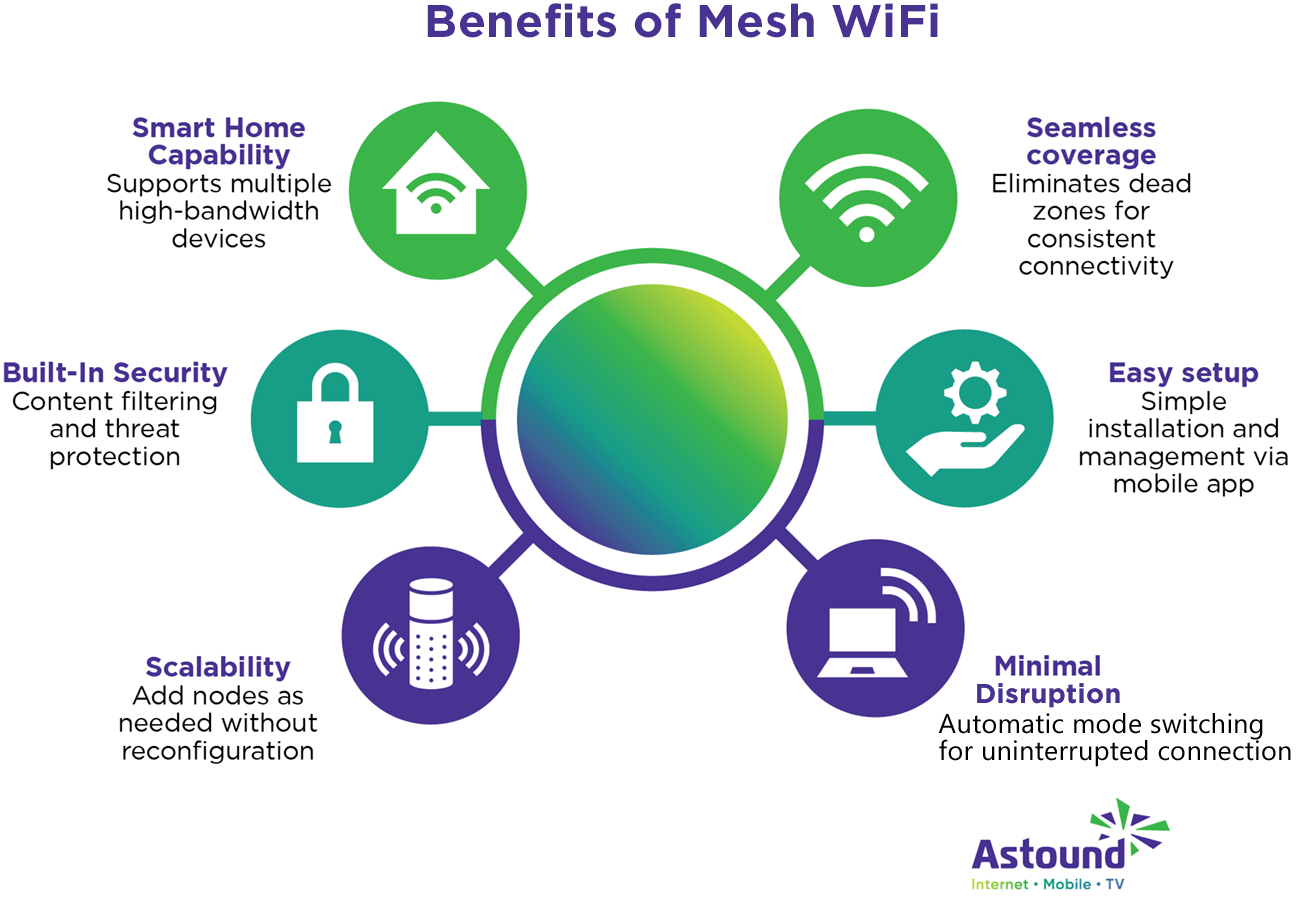
Seamless Coverage
Mesh Wifi spreads the signal evenly. This stops dead zones and weak signals in large or multi-story homes.
- Nodes placed in different rooms extend coverage
- Devices stay connected while moving around
- Strong signal reaches outdoor areas like patios
Improved Device Connectivity
Smart homes have many devices. Mesh Wifi lets all gadgets connect smoothly without dropping signals.
| Device Type | Benefit of Mesh Wifi |
| Smart Lights | Stable control from anywhere |
| Security Cameras | Continuous video streaming |
| Smart Thermostats | Reliable temperature updates |
| Voice Assistants | Clear voice commands |
Easy Network Management
Mesh Wifi systems come with simple apps. You can check your network and control devices with a few taps.
- Set up guest networks
- Pause internet for certain devices
- Run speed tests
- Receive alerts about network issues

Credit: www.pcmag.com
Key Features To Consider
Choosing the right mesh WiFi system for your smart home is important. It helps all your devices stay connected smoothly.
Focus on key features that match your home size and device needs. This guide covers the main points to check.
Coverage Area
Look for a mesh WiFi that covers your entire home. Large homes need wider coverage to avoid dead zones.
Check the product details for the maximum square footage it supports. Some systems allow expanding coverage with extra nodes.
Number Of Nodes
Nodes are the units that spread WiFi signals in your home. More nodes mean better coverage and connection.
- Small homes may need 2-3 nodes
- Larger homes or multi-story houses may need 4 or more nodes
- Extra nodes can be added if needed
Speed And Bandwidth
Speed shows how fast your data moves. Bandwidth is the amount of data your network can handle.
| Feature | Why It Matters |
| Speed (Mbps) | Faster downloads and streaming |
| Bandwidth (GHz) | Handles many devices at once |
| Dual-Band or Tri-Band | Reduces network traffic and interference |
Security Features
Strong security protects your smart home from hackers. Look for features like encryption and regular updates.
- WPA3 encryption for better protection
- Automatic firmware updates
- Guest network options
- Parental controls
Compatibility With Smart Devices
Make sure the mesh WiFi works well with your smart home devices. It should support common brands and standards.
Check if it supports voice assistants and IoT protocols like Zigbee or Z-Wave. This helps devices connect easily.
Types Of Mesh Wifi Systems
Mesh wifi systems help cover your entire home with internet. They use multiple devices to create one big network. This makes smart home devices work better everywhere.
Choosing the right mesh system depends on your needs. Different types offer various speeds and coverage. Let’s look at the main types of mesh wifi systems.
Single-band Vs Dual-band
Single-band mesh systems use one wifi frequency. They are usually cheaper but slower. They work well for small homes with few devices.
Dual-band systems use two wifi frequencies: one for devices and one for communication between mesh units. This helps keep the network fast and stable. Dual-band is good for medium-sized homes.
- Single-band: one frequency, simpler, lower cost
- Dual-band: two frequencies, better speed and range
- Dual-band is better for more devices and bigger homes
Tri-band Systems
Tri-band mesh systems use three wifi frequencies. One frequency is for devices, and two are for communication between nodes. This setup reduces traffic jams in your network.
Tri-band systems work well in large homes with many smart devices. They provide faster speeds and better coverage than single- or dual-band systems.
- Three frequencies: one for devices, two for mesh communication
- Best for large homes and many connected devices
- More expensive but higher performance
Dedicated Backhaul
A dedicated backhaul is a separate wifi band for mesh units to talk. It does not share bandwidth with your devices. This keeps your internet fast and reliable.
Systems with dedicated backhaul handle more devices and heavy internet use. This is important for smart homes with many connected gadgets working at once.
- Backhaul is a special channel for mesh units to communicate
- Does not reduce bandwidth for your devices
- Improves speed and stability in busy networks
Credit: www.astound.com
Installation And Setup Tips
Setting up a mesh WiFi system for your smart home can improve your internet coverage. It helps all your devices stay connected with a strong signal.
This guide gives simple tips on installing and setting up your mesh WiFi. Follow these to get the best performance.
Optimal Node Placement
Place mesh nodes where the WiFi signal is weak. Avoid walls and large metal objects between nodes.
Try to keep nodes in open spaces and near the center of your home for better coverage.
- Place the main node near your modem
- Space other nodes evenly throughout your home
- Keep nodes away from thick walls and electronics
- Try to place nodes in open, elevated areas
App-based Configuration
Use the mesh WiFi app to set up your network quickly. The app guides you through steps and helps connect nodes.
The app allows you to name your network, set passwords, and check node status easily.
- Download the official app for your mesh system
- Follow the app’s setup instructions step-by-step
- Use the app to add or move nodes as needed
- Check network strength and connected devices in the app
Firmware Updates
Keep your mesh WiFi firmware updated for better security and performance. Updates fix bugs and add new features.
Most mesh systems update automatically, but check the app to confirm updates are installed.
- Open the mesh WiFi app regularly
- Check for available firmware updates
- Install updates as soon as possible
- Restart your mesh system if needed after updates
Popular Mesh Wifi Brands For 2025
Choosing the right mesh wifi system is key for a smart home. Good wifi helps all devices work well.
This guide covers popular mesh wifi brands for 2025. It highlights options for different needs and budgets.
High-end Options
High-end mesh wifi brands offer strong signals and fast speeds. They suit smart homes with many devices.
- Netgear Orbi: Known for excellent range and easy setup.
- Asus ZenWiFi: Provides robust security features and fast wifi.
- Google Nest Wifi Pro: Works well with smart home assistants.
Budget-friendly Choices
Budget-friendly brands offer good wifi without a high price. They fit smaller homes or light internet users.
| Brand | Price Range | Key Feature |
| TP-Link Deco | $$ | Simple app control |
| Amazon Eero | $$ | Easy setup and updates |
| Tenda Nova | $ | Affordable with basic coverage |
Best For Large Homes
Large homes need mesh wifi with wide coverage. These brands excel in covering big spaces without slowdowns.
- Linksys Velop: Strong signals reach multiple floors.
- Ubiquiti AmpliFi: Offers fast speeds over large areas.
- Netgear Orbi RBK853: Covers up to 7500 sq. ft.
Troubleshooting Common Issues
Setting up a mesh WiFi system can greatly improve your smart home connectivity. Yet, users often face issues that need troubleshooting.
Here, we will explore common problems like connectivity drops, slow speeds, and interference issues.
Connectivity Drops
Connectivity drops can disrupt your smart home devices. These interruptions can happen due to weak signals or outdated firmware.
- Check router placement to ensure even coverage.
- Update the firmware for all mesh nodes.
- Restart your router to refresh the network.
Slow Speeds
Slow speeds can be frustrating, especially when streaming or during video calls. This may occur due to bandwidth congestion or poor device connection.
To improve speeds:
- Disconnect unused devices to free up bandwidth.
- Use an Ethernet cable for stationary devices.
- Access Quality of Service (QoS) settings to prioritize traffic.
Interference Problems
Interference from other electronic devices can weaken your WiFi signal. Common sources include microwaves and cordless phones.
| Source of Interference | Solution |
| Microwaves | Place router away from kitchen appliances. |
| Cordless Phones | Use phones with different frequency bands. |
| Neighboring WiFi | Change your WiFi channel settings. |
Future Trends In Mesh Wifi
Mesh WiFi is changing how we connect in smart homes. New trends are making it faster and more reliable.
Understanding these trends can help you choose the right system for your home. Let’s explore some key advancements.
Wi-fi 6e And Beyond
Wi-Fi 6E is the latest update in wireless technology. It offers more speed and less interference.
This technology uses the 6 GHz band, which means more bandwidth for all your devices.
- Faster internet speeds
- Better performance in crowded areas
- More efficient for multiple devices
Integration With Iot Devices
Smart homes have many IoT devices. Mesh WiFi integrates them smoothly.
This integration ensures devices like smart lights and thermostats work without interruption.
- Seamless connectivity for IoT devices
- Reduced lag and faster response times
- Centralized control through apps
Ai-driven Network Optimization
AI is now part of mesh WiFi systems. It optimizes network performance automatically.
AI can prioritize important data, ensuring smooth streaming and gaming experiences.
| Feature | Benefit |
| Automatic adjustments | Better network performance |
| Data prioritization | Improved streaming quality |
Frequently Asked Questions
What Is Mesh Wifi And How Does It Work?
Mesh WiFi uses multiple devices to create one seamless network. It improves coverage by eliminating dead zones in your home. Each unit communicates with others, ensuring strong, consistent signals for all smart home devices.
Why Is Mesh Wifi Best For Smart Homes?
Mesh WiFi supports multiple devices simultaneously with stable connections. It handles smart home traffic efficiently, reducing lag or dropouts. This system adapts to your home layout, offering reliable coverage for smart lights, cameras, and more.
How Do I Choose The Right Mesh Wifi System?
Consider coverage area, number of devices, and speed needs. Check compatibility with your smart home gadgets. Look for easy setup, security features, and scalability to expand coverage as your smart home grows.
Can Mesh Wifi Improve Smart Home Security?
Yes, many mesh systems include built-in security features like encryption and malware protection. They isolate smart devices in secure networks, reducing hacking risks. Regular updates keep your smart home defenses strong.
Conclusion
Choosing the right mesh WiFi for your smart home improves connection everywhere. Consider coverage, speed, and device capacity before buying. A good system keeps your gadgets connected without drops. Easy setup and strong security protect your network and privacy. Small steps in choosing make a big difference at home.
Enjoy smoother streaming, smarter devices, and fewer interruptions. Your smart home deserves reliable WiFi that fits your needs well. Keep these tips in mind for better internet today.


