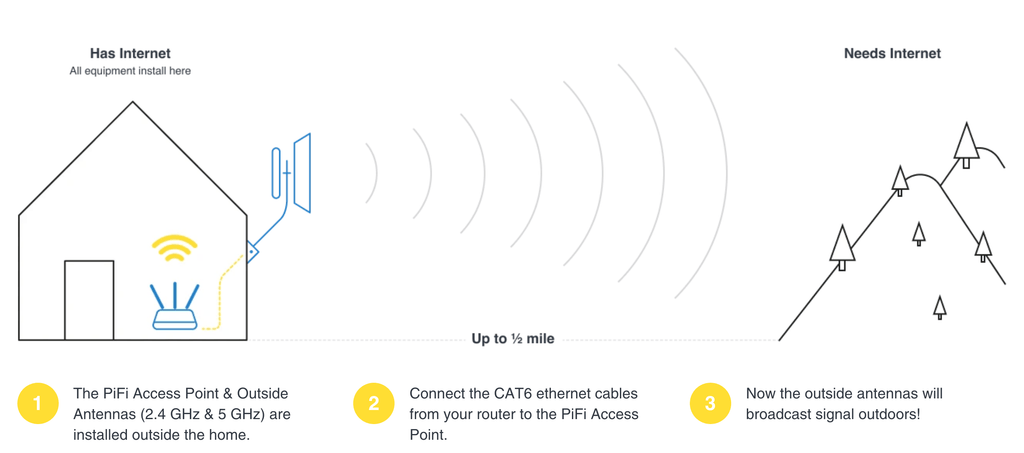
Are you tired of weak WiFi signals when you’re outside your home? You’re not alone.
Struggling with slow internet in your garden, patio, or backyard can be frustrating. But there’s a simple fix—placing your outdoor WiFi extender in the right spot. The secret to strong, reliable WiFi outdoors isn’t just about buying the best device; it’s all about where you put it.
Keep reading, and you’ll discover easy, practical tips to boost your WiFi range and enjoy seamless internet wherever you are outside. Your perfect connection is closer than you think!

Credit: simplewifi.com
Choosing The Right Extender
Outdoor WiFi extenders come in different types. Some plug into power outlets, while others are standalone units. Choose one that fits your outdoor space and power source.
| Type | Description |
|---|---|
| Plug-in Extenders | Easy to install, use nearby power outlets. |
| Standalone Units | More powerful, placed anywhere with power. |
| Mesh Systems | Cover large areas by linking multiple devices. |
- Range:Choose extenders with wide coverage.
- Weatherproof:Must work in rain and sun.
- Speed:Pick one that supports fast connections.
- Easy Setup:Should be simple to install and manage.
Check if the extender works with your current WiFi router. Most extenders support common WiFi standards like 802.11ac or 802.11n. Matching standards ensures smooth connection and better performance.

Credit: www.youtube.com
Optimal Placement Strategies
Place the WiFi extender at a height of about 5 to 7 feet. This helps the signal travel without many blocks. Avoid placing it on the floor or too high near the ceiling.
Keep the extender in an open space. Walls, metal objects, and trees can block the signal. Clear paths help the WiFi reach farther.
Balance the distance between your main router and the area needing coverage. Too far means a weak signal; too close wastes the extender’s power. A good spot is where the router’s signal is still strong but reaches areas that need better coverage.
Environmental Factors Affecting Signal
Wallsand foliagecan block or weaken WiFi signals. Thick walls like concrete or brick reduce signal strength more than thin walls. Trees and plants absorb or scatter signals, especially when wet. Placing an outdoor WiFi extender near open spaces helps the signal travel farther.
Weather plays a key role. Rainand snowabsorb some signal energy, lowering range. Wind itself does not affect signals much, but heavy storms might cause brief drops in performance.
Other devices can cause interference. Microwaves, cordless phones, and baby monitors often share the same frequency as WiFi. Keeping the extender away from these devices reduces signal noise and improves connection stability.

Credit: m.youtube.com
Setup And Configuration Tips
Connect the wifi extender to your router using a strong cable or WiFi link. Place the extender where the router signal is still strong. Avoid walls or large objects that block signals. Use signal strength appsto find the best spot. These apps show where the signal is strongest and weakest.
Keep the extender’s firmware up to date. Updates fix bugs and improve security. Check the extender settings often and update the software when needed. Use a strong password to protect your network from unauthorized access.
| Tip | Why it Helps |
|---|---|
| Place extender halfway between router and far area | Ensures good signal from router and extends range |
| Use signal strength apps | Finds the best location for the extender |
| Update firmware regularly | Keeps the extender secure and working well |
| Set a strong password | Protects your network from outsiders |
Testing And Adjusting Placement
Use a WiFi signal app to measure the strength in different spots. Walk around your yard or outdoor area and check the signal bars. Look for the place where the signal is strongest but still covers your desired space.
Move the extender a few feet at a time to find the best spot. Try higher places like walls or poles for better range. Avoid obstacles like thick walls or metal objects that block signals.
Check the device’s lights or status to confirm it connects well. If the signal drops, try moving the extender closer to the main router. Keep adjusting until the signal is stable and strong.
| Problem | Cause | Fix |
|---|---|---|
| Weak signal | Too far from router | Move extender closer |
| No connection | Wrong setup | Reconfigure extender |
| Slow speed | Interference | Avoid devices like microwaves |
Frequently Asked Questions
Where Is The Best Location For Outdoor Wifi Extenders?
Place your outdoor WiFi extender halfway between your router and the area needing coverage. Ensure it’s elevated and free from obstructions for maximum range and signal strength.
How High Should I Mount My Outdoor Wifi Extender?
Mount your WiFi extender at least 7-10 feet above ground. Height reduces interference from objects and improves line-of-sight signal transmission for better coverage.
Can Weather Affect My Outdoor Wifi Extender’s Performance?
Yes, rain, snow, and extreme temperatures can impact signal strength. Use weatherproof extenders and place them in sheltered areas for consistent performance.
Should My Outdoor Wifi Extender Be Wired Or Wireless?
Wired extenders offer more stable connections but need Ethernet cables. Wireless extenders are easier to install but may face interference. Choose based on your setup needs.
Conclusion
Placing your outdoor WiFi extender right is essential. It boosts your signal strength. Start by choosing a central spot. Avoid metal and thick walls. These can block the signal. Mount it high for better coverage. Keep it away from direct sunlight and rain.
Test your setup and adjust if needed. Your devices will connect smoothly. Enjoy seamless internet outdoors. Consistent placement checks ensure lasting performance. Stay connected everywhere in your yard.


