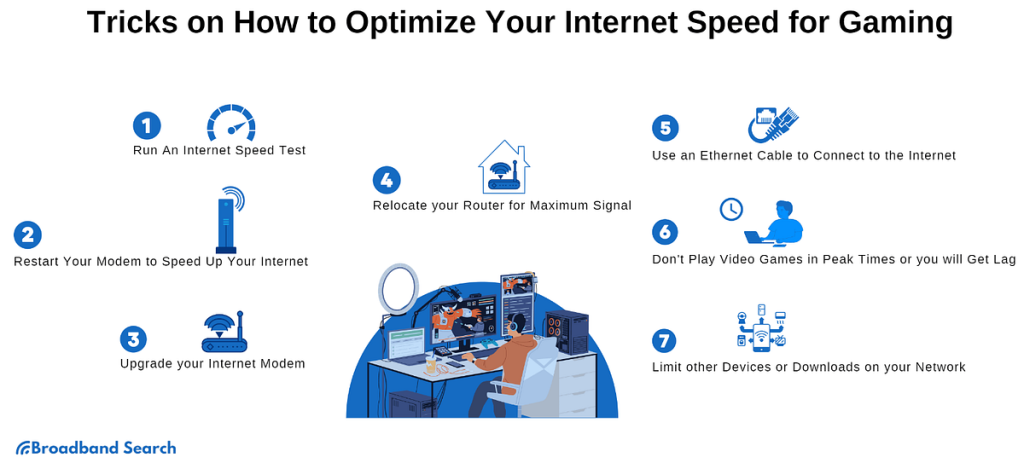
Have you ever found yourself in the middle of an intense gaming session, only to experience frustrating lag at the worst possible moment? It’s a common issue that many gamers face, and the culprit is often high latency.
Latency, or the delay before a transfer of data begins following an instruction, can make or break your gaming experience. If you’ve ever wondered how to test your gaming modem’s latency, you’re in the right place. Understanding and optimizing latency can be the key to smoother, more responsive gameplay.
You’ll discover easy and effective ways to test your modem’s latency. Imagine enjoying lag-free gaming and gaining the competitive edge you’ve been dreaming of. Keep reading, and let’s turn that dream into reality.
Choosing The Right Tools
Choosing the right tools is essential to test gaming modem latency accurately. The tools help measure the delay between your device and the game server. Accurate tools give clear insights into your network performance. This knowledge helps improve your gaming experience by reducing lag and delays.
Different tools serve unique purposes. Some check simple response times, while others analyze complex network paths. Knowing the right tool makes testing efficient and reliable.
Ping Test Apps
Ping test apps send small packets to a server and measure the time it takes to return. They show the latency in milliseconds, indicating the connection speed. These apps are simple and quick to use. Gamers can easily check if their modem causes delays. Popular ping apps include PingPlotter and Ping Test Live.
Traceroute Utilities
Traceroute utilities track the path data takes from your device to the game server. They reveal each step and the delay at each point. This helps find where slowdowns occur. Traceroute tools identify whether the modem, ISP, or server causes lag. Tools like WinMTR and PathPing are widely used.
Network Analyzers
Network analyzers provide detailed information about your entire connection. They monitor traffic, packet loss, and jitter, which affect gaming quality. These tools are more advanced and show deep insights. Examples include Wireshark and NetSpot. Using a network analyzer helps diagnose complex latency issues.

Credit: hone.gg
Preparing Your Setup
Preparing your setup is essential before testing gaming modem latency. A clean and optimized environment ensures accurate results. Taking simple steps helps reduce delays and interference. Focus on creating a stable connection and minimizing distractions on your device. The following tips will improve your setup for better latency testing.
Wired Vs Wireless Connection
Use a wired connection for the most reliable test results. Ethernet cables provide stable and fast data transfer. Wireless connections can have interference from walls or other devices. This interference causes higher latency and packet loss. If using Wi-Fi, connect to the 5 GHz band to reduce lag. Wired connections are best for serious latency tests.
Closing Background Apps
Close all apps running in the background before testing. Background apps consume bandwidth and slow your connection. Streaming, downloads, or updates can cause spikes in latency. Check your task manager and end unnecessary programs. This frees up resources and ensures your test focuses on the modem’s performance.
Optimizing Router Placement
Place your router in an open and central location. Avoid placing it near metal objects or microwaves. Walls and furniture can weaken wireless signals and increase latency. Elevate the router to avoid signal blockage. Good placement improves signal strength and reduces delays during testing.
Performing Latency Tests
Performing latency tests is essential to understand how your gaming modem handles data transmission. It helps you identify delays that could be ruining your gaming experience. By measuring latency accurately, you get a clearer picture of your network’s performance and can make informed adjustments.
Running Ping Tests
Ping tests are the simplest way to check latency. You send small data packets to a server and measure the time it takes for them to return. Lower ping times mean faster responses, which is crucial for real-time gaming.
To run a ping test, open your command prompt or terminal and type ping [server address]. Look for the average time in milliseconds. If you notice spikes or consistently high values, your connection might be unstable.
Try pinging different servers, including game servers close to your location. This helps you see if the issue is with your modem or the route your data takes.
Using Traceroute For Path Analysis
Traceroute shows the path your data travels from your device to the game server. Each step is called a “hop,” and it reveals where delays occur along the route. This tool is valuable for spotting bottlenecks outside your modem.
Run tracert [server address]on Windows or traceroute [server address]on macOS/Linux. You’ll see a list of IP addresses and the time taken for each hop. Look for any hops with unusually high latency or timeouts.
Noticing a consistent delay at a specific hop can indicate issues with your ISP or the server’s network. It’s a clue for where to focus troubleshooting efforts.
Measuring Jitter And Packet Loss
Jitter measures how much your latency varies over time. High jitter can cause lag spikes and erratic gameplay. Packet loss happens when data packets fail to reach their destination, leading to choppy connections.
You can check jitter and packet loss using specialized tools like PingPlotteror Wireshark. These tools provide detailed reports that help you spot instability in your connection.
Try monitoring your connection during peak gaming hours. If jitter or packet loss increases, your network might be congested. Understanding these metrics helps you communicate effectively with your ISP or decide if your modem needs an upgrade.
Interpreting Test Results
Interpreting the results of your gaming modem latency test is key to understanding your connection’s true performance. Test numbers alone don’t tell the full story unless you know how to read them correctly. Let’s break down what those figures mean for your gaming experience and how you can spot issues that affect your play.
Understanding Ping Times
Ping time measures the delay between your device sending a request and receiving a response from the server. Lower ping times generally mean a smoother gaming experience with less lag. If you see ping times consistently above 100 ms, your gameplay might start feeling sluggish, especially in fast-paced games.
Look at both the average ping and the minimum ping. A wide gap between these numbers can indicate unstable connection quality. Ask yourself: are these ping spikes happening at specific times or randomly? Pinpointing patterns can help you troubleshoot effectively.
Identifying Network Bottlenecks
Sometimes high latency isn’t about your modem alone but about chokepoints in your network. Test results showing sudden spikes or prolonged delays might signal issues like router overload, Wi-Fi interference, or ISP throttling. Have you checked if other devices on your network are hogging bandwidth during your tests?
Use tools like traceroute to see where delays occur along the path to the game server. If a particular hop shows excessive delay, that’s a bottleneck to investigate. This insight can guide you on whether to adjust your modem settings, switch channels, or talk to your provider.
Assessing Stability And Consistency
Latency stability is just as important as low ping. Frequent fluctuations can cause jitter, making your connection unpredictable during crucial gaming moments. A test result with low average ping but high variance often leads to frustrating micro-lags.
Look for consistency in your test results across multiple runs and times of day. Stable latency means your modem handles traffic well and your connection is reliable. If your results vary wildly, try resetting your modem or updating its firmware to improve consistency.
Improving Modem Latency
Improving modem latency is key to a smoother gaming experience. Lower latency means faster response times, which can give you a real edge in competitive play. Let’s look at practical steps you can take to reduce lag and keep your connection sharp.
Firmware Updates
Keeping your modem’s firmware up to date is often overlooked but crucial. Manufacturers release updates that fix bugs and improve performance, including latency improvements.
Check your modem’s admin panel regularly for available updates or sign up for notifications. I once ignored firmware updates for months and noticed random spikes in latency. After updating, those spikes disappeared, making gameplay more consistent.
Quality Of Service Settings
Quality of Service (QoS) settings allow your modem to prioritize gaming traffic over other activities like streaming or downloads. This helps reduce delay during crucial moments.
Access your modem’s QoS settings and assign higher priority to your gaming device or specific gaming ports. You don’t need to be a tech expert—many routers offer simple presets labeled “Gaming” or “Low Latency.”
- Prioritize your gaming console or PC.
- Limit bandwidth for background apps.
- Test latency before and after changes to see impact.
Choosing The Best Server
Latency isn’t just about your modem; the game server you connect to matters a lot. Selecting a server closer to your location reduces the distance data travels, cutting down delay.
Most multiplayer games let you pick servers manually. Experiment with different options and use in-game tools or third-party apps to check ping times. You might find a server slightly farther away offers better stability, so test what works best.
Have you ever switched servers mid-game and felt the connection improve? That’s a clear sign server choice impacts latency just as much as your hardware settings.
Credit: helpdeskgeek.com
Advanced Testing Techniques
Advanced testing techniques help measure gaming modem latency with high accuracy. These methods go beyond basic ping tests and reveal true network performance under gaming conditions. Testing latency with real gaming servers and diverse internet providers gives a clearer picture of your connection quality.
Simulating real-world gaming scenarios adds depth to latency analysis. These approaches show how your modem handles traffic spikes, multiplayer sessions, and long gaming hours. Understanding these factors helps gamers optimize settings for smoother gameplay.
Using Dedicated Gaming Servers
Testing latency on dedicated gaming servers provides precise data. These servers are optimized for gaming traffic and reduce external interference. Connect your modem to servers used by popular games to measure real-time response.
Track latency over several minutes to observe fluctuations. Stable low latency means your modem handles gaming well. High spikes or frequent drops may require tweaking your network setup.
Testing With Different Isps
Try testing latency through various internet service providers (ISPs). Different ISPs use different routing and infrastructure, affecting latency. This test helps identify which provider offers the best gaming experience in your area.
Use a VPN or internet sharing to switch ISPs easily. Compare latency results from each ISP on the same gaming server. Choose the ISP that consistently delivers lower and stable latency.
Simulating Real-world Gaming Scenarios
Simulate gaming conditions like multiple players, voice chat, and downloads. These factors create network load similar to actual gameplay. Monitor how your modem latency changes under these conditions.
Use tools to generate network traffic or run games with friends. Note any lag spikes or packet loss during heavy network use. This method reveals how well your modem performs in typical gaming sessions.

Credit: softwareg.com.au
Frequently Asked Questions
What Is Gaming Modem Latency?
Gaming modem latency is the delay between your device and the game server. It affects online gaming speed and responsiveness, impacting gameplay quality. Lower latency means smoother and faster game performance.
How Do I Test My Gaming Modem Latency?
You can test latency using online speed tests or ping commands. These tools measure response time between your modem and servers, helping identify connection delays affecting gaming.
Why Is Low Latency Important For Gaming?
Low latency ensures quick communication with game servers, reducing lag. It improves reaction times and overall gaming experience, especially in fast-paced multiplayer games.
Can Modem Settings Affect Latency?
Yes, improper modem settings can increase latency. Optimizing configurations like QoS and firmware updates can help reduce delay and enhance gaming performance.
Conclusion
Testing your gaming modem’s latency helps improve your gaming experience. It shows how fast your connection reacts. Lower latency means less lag and smoother gameplay. Use simple tools to check your modem’s delay. Run tests at different times for accuracy.
Fix problems by restarting or updating your modem. Good latency makes online games more fun. Keep testing regularly to stay ahead of issues. Now, enjoy better gaming with a stable connection.


