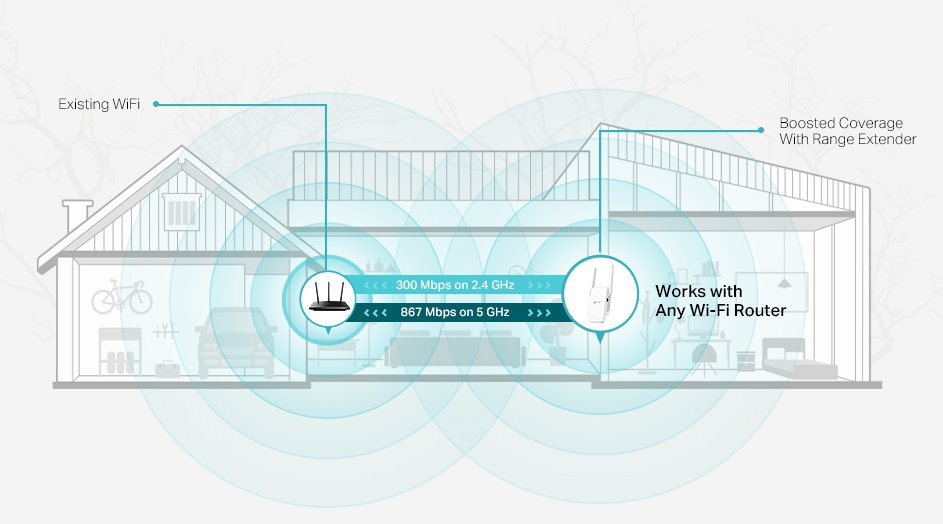
Are you frustrated with weak Wi-Fi signals in certain areas of your home or office? Struggling with dead zones that disrupt your online activities?
A long-range Wi-Fi extender might be just what you need. But how can you be sure it’s performing to its full potential? You’ll discover simple and effective methods to test the range of your Wi-Fi extender. We’ll guide you through the process, ensuring you get the coverage you deserve.
By the end, you’ll know exactly how to optimize your extender’s placement and settings, ensuring a seamless internet experience. Ready to unlock the full potential of your Wi-Fi network? Let’s dive in!

Credit: www.youtube.com
Preparing Your Wifi Extender
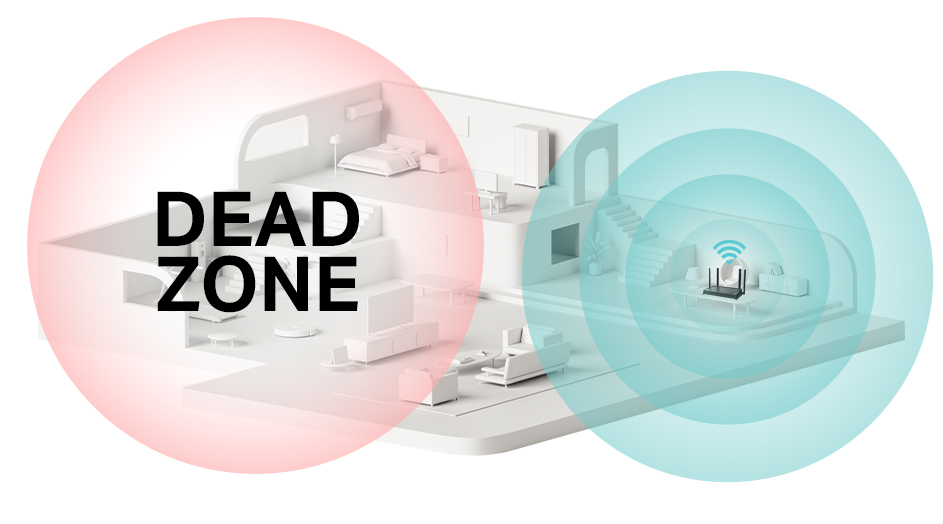
Choose a place for your WiFi extender that is open and centralbetween your router and the area needing coverage. Avoid walls, metal objects, and microwaves that can block signals. A higher spot often works better than the floor.
Plug in your extender and follow the setup guide carefully. Connect it to your main router using WiFi or an Ethernet cable. Make sure the extender’s indicator lights show a strong connection. Reset and try again if lights are red or blinking.
- Check if your device connects to the extender’s network.
- Test internet speed on the device to confirm connection quality.
- Move the extender slightly if the connection is weak.
Credit: www.tp-link.com
Measuring Signal Strength
Signal meter apps help to check the strength of WiFi signals. They show numbers or colors that tell how strong the signal is. Use these apps by moving around with your phone or tablet. Watch the signal level change as you walk to different places.
Manual signal indicators on the extender or device also help. Look for LED lights or barsthat show the signal. Green or many bars mean strong signal, red or fewer bars mean weak signal. Check these lights in several spots to find the best place for the extender.
Try different spots in your home or office. Compare signal readings from the app and the manual indicator. Choose the spot with the strongest and most stable signal. Testing many places helps find the best coverage area for your long range WiFi extender.
Testing Data Speed
Use speed test toolslike Ookla Speedtest or Fast.com to check your WiFi extender. They show download and upload speedsclearly. Test several times at different distances from the extender for best results.
Check both upload and download speeds. Download speed affects streaming and browsing. Upload speed matters for video calls and file sharing. Record these speeds to see if the extender works well.
Note any speed changesas you move farther from the extender. Speeds usually drop with distance. Writing down the speeds helps find the maximum effective range. This data guides you to place the extender in the best spot.
Evaluating Connection Stability
Monitoring dropouts helps check how often the connection breaks. Watch for moments when the WiFi signal disappears or weakens. These dropouts can affect video calls or streaming. Testing in different rooms shows how far the extender works well. Try moving around to see if the signal stays strong.
Latency and ping tests show how fast the connection responds. Use simple tools to send small data packets and measure delay times. Lower ping means a quicker response, which is better for online activities. High latency can cause slow loading or lag in games.
Long-term usage helps find consistent problems. Use the extender for hours or days to see if the signal stays steady. Notice if the connection drops more at certain times or places. This helps understand real-life performance, not just quick tests.
Extending Testing Range
Test the long range WiFi extenderboth outdoors and indoors. Outdoors, place the extender far from the router. Walk around to check signal strengthat different spots. Indoors, test in rooms with walls and furniture to see how obstacles affect the signal.
Obstacles like walls, doors, and furniture can block or weakenthe WiFi signal. Test near these barriers to find weak spots. Use a WiFi app to measure signal strengthand speed through obstacles.
| Obstacle | Effect on Signal | Testing Tip |
|---|---|---|
| Concrete Wall | Strongly reduces signal | Test on both sides |
| Wooden Door | Moderate reduction | Check signal with door open and closed |
| Furniture | Mild interference | Measure signal near and far |
To maximize coverage, place the extender where the signal is still strong. Avoid thick walls and metal objects. Adjust the height and direction of antennas for better reach. Test often to find the best spot.
Troubleshooting Common Issues
Interference sourcescan weaken your long range wifi signal. Common culprits include walls, microwaves, cordless phones, and other wireless devices. Move the extender away from these items to see better performance. Metal objects also block signals.
Firmware updateskeep your device working well. Check the manufacturer’s website for the latest version. Updating can fix bugs and improve range. Follow simple steps in the manual to update safely.
Resetting and repositioningoften helps if the extender acts strange. Reset the device to factory settings. Place the extender halfway between your router and the area with poor signal. Try different spots for the best coverage.

Credit: www.youtube.com
Frequently Asked Questions
How Do I Measure The Range Of A Long Range Wifi Extender?
Use a WiFi analyzer app to check signal strength at different distances. Walk away from the extender while monitoring signal drops. This helps identify the maximum effective range where the connection remains stable and strong.
What Tools Are Best For Testing Wifi Extender Range?
WiFi analyzer apps like NetSpot, WiFi Analyzer, or inSSIDer are ideal. They provide real-time signal strength, channel interference, and coverage maps. These tools make it easy to evaluate the extender’s performance accurately.
How Far Should A Long Range Wifi Extender Reach?
A good long range WiFi extender typically covers 100-300 feet indoors. Outdoor ranges can be longer depending on obstacles and interference. Check the product specifications for exact range details to match your needs.
Can Obstacles Affect Wifi Extender Range?
Yes, walls, floors, and furniture reduce WiFi signals. Metal objects and microwaves cause interference too. Testing range in your actual environment gives realistic performance expectations.
Conclusion
Testing the range of your long-range WiFi extender helps ensure strong signals. You can easily check connection speed and coverage in different spots. Use simple tools and apps to measure signal strength. This helps find weak areas and improve your setup.
Regular testing keeps your WiFi working well and saves frustration. A steady, wide WiFi range means better internet for everyone at home or work. Keep testing to enjoy smooth, reliable connections every day.


