
Are you thinking about upgrading your internet setup and wondering if a modem router combo is the right choice for your Xfinity service? Choosing the best device can feel confusing, especially with so many options out there.
What if there was a simpler way to get fast, reliable internet without juggling multiple gadgets? You’ll discover whether a modem router combo fits your needs, saves you money, and boosts your home network. Keep reading to find out how to make the smartest choice for your Xfinity connection.
Credit: bestcapital.in
Modem Router Combo Basics
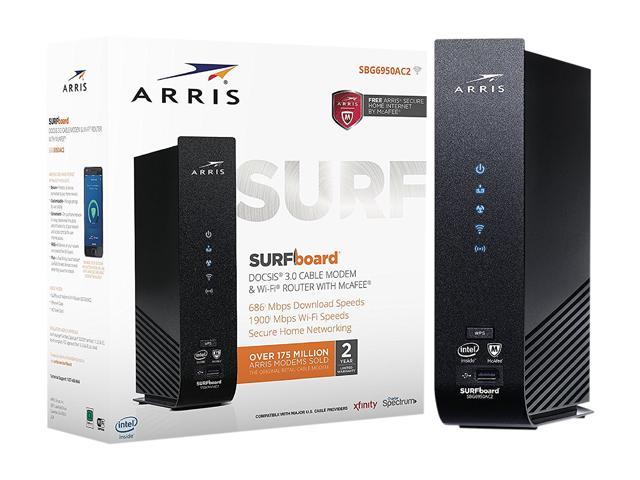
A modem router combois a single device that acts as both a modem and a router. It connects to the internet and shares the connection wirelessly or through cables.
Separate devices are two different pieces of equipment. A modemconnects to your internet service provider. A routershares the connection with your devices.
| Feature | Modem Router Combo | Separate Devices |
|---|---|---|
| Number of Devices | One device | Two devices |
| Setup | Simple and quick | More steps needed |
| Flexibility | Less flexible | More flexible for upgrades |
| Cost | Usually cheaper upfront | May cost more |
Benefits For Xfinity Users
A modem router combo offers a simple setupby combining two devices into one. This saves spaceand reduces clutter in your home.
It can save moneyover time by lowering rental fees from Xfinity. Owning one device means fewer bills monthly.
Network management becomes easier with one unit. You can control your Wi-Fi settings and monitor connections from a single place.
Potential Drawbacks
Modem router comboscan limit your ability to upgrade parts separately. If your internet plan changes, you might need new equipment. With a combo, replacing only the modem or router is not possible.
These devices may have performance limits. They often do not handle high speeds or many devices as well as separate units. This can cause slow internet or weak Wi-Fi signals in larger homes.
Troubleshooting can be harder. Problems with the combo are harder to identify. You cannot test the modem and router separately. Fixing issues may take more time or require replacing the whole device.
Compatibility With Xfinity Plans
Xfinity supports many modem router combos, but only certain models work well. Always check the Xfinity Approved Deviceslist before buying. Using a device on this list helps avoid connectivity problems and ensures proper service.
Speed and bandwidth are key for good internet. Modem router combos must match your Xfinity plan’s speeds. For example, a plan with 200 Mbps needs a device that supports at least this speed. Otherwise, your internet will be slower than expected.
| Xfinity Plan Speed | Minimum Modem Router Combo Speed |
|---|---|
| Up to 100 Mbps | 100 Mbps |
| Up to 300 Mbps | 300 Mbps |
| Up to 1000 Mbps | 1000 Mbps (Gigabit) |
Top Modem Router Combos For Xfinity 2025
Modem router combos can simplify your Xfinity setup by combining two devices into one. They save space and reduce cable clutter while providing reliable internet connections. Choosing the right combo ensures good speed and easy management for home use.
High-speed Options
High-speed modem router combosoffer fast internet for streaming and gaming. They support speeds above 1 Gbps. These devices have the latest Wi-Fi 6 technology. This means stronger connections and less lag. Great for users with many devices.
Budget-friendly Picks
Budget models work well for basic internet needs. They support speeds up to 300 Mbps. Ideal for small homes or apartments. Easy to set up and use. Save money without losing reliability.
Best For Large Homes
| Feature | Why It Matters |
|---|---|
| Mesh Wi-Fi Support | Extends Wi-Fi coverage across large areas. |
| Multiple Antennas | Improves signal strength in every room. |
| High Device Capacity | Handles many devices at once without slowing. |

Credit: deepticlasses.com
Setup Tips For Optimal Performance
Choosing the right spot for your modem router combo improves Xfinity’s signal strength. Keep it away from walls and electronic devices for steady connections. Regularly update the device firmware to maintain fast and reliable internet speeds.
Placement And Signal Optimization
Placethe modem router combo in a central location. This helps spread the signal evenly. Keep it away from walls and metal objects. These can block signals. Elevate the device on a shelf for better range. Avoid placing it near a microwave or cordless phone. These can cause interference.Firmware Updates
Regular firmware updatesare important for performance. Check for updates monthly. Manufacturers release updates to fix issues. Updating is usually simple. Use the device’s settings page. Follow the instructions provided. Ensure your modem router combo stays current.Security Best Practices
Change the default passwordimmediately. Use a strong password for safety. Enable WPA2 encryption on your network. This keeps your data safe. Turn off remote access when not needed. Regularly check connected devices. Remove unknown devices quickly. This prevents unauthorized access. `Alternatives To Modem Router Combos
Choosing separate modem and router devices can offer better performance and flexibility for Xfinity users. Many find dedicated devices provide stronger signals and easier upgrades compared to modem router combos. This approach helps customize your home network to fit specific needs.
Separate Modem And Router Benefits
Using a separate modem and routercan be a great choice. This setup offers more flexibilityand control. You can upgrade each device separately. This can save money in the long run. Choose a modem with the best speedfor your area. Then, pick a router with the featuresyou need. This can include better Wi-Fi rangeand more security options. It is also easier to troubleshootproblems. If one device breaks, only replace that one. Separate devices often perform better. This means faster internet for you.
Using Xfinity Gateway Devices
Xfinity offers its own gateway devices. These combine a modem and router in one. They are easy to set up. Just plug them in and follow the instructions. Xfinity gateways are optimizedfor their internet service. They come with built-in securityfeatures. You might pay a monthly rental fee. Check if buying your own equipment is cheaper. Xfinity gateways often get automatic updates. This keeps your network secureand efficient. They may not have as many features as separate devices. Consider what works best for your needs.

Credit: deepticlasses.com
User Experiences And Reviews
Many users find modem router combos convenient for Xfinity, offering easy setup and decent speeds. Some reviews mention occasional connectivity issues but overall satisfaction is common. Experiences vary based on home size and internet needs.
Common Praise
Many users find the modem router comboeasy to set up and use. It saves space by combining two devices into one. Customers like the stable internet connectionit provides for everyday tasks. The device often offers good speedfor streaming and gaming. People appreciate not needing to buy separate modem and router. The combo often fits well with Xfinity plans, reducing extra fees.
Frequent Complaints
Some users report signal issuesin bigger homes. The device may have limited rangecompared to separate routers. Others face slow speedsduring peak hours. A few mention the combo overheatsafter long use. Troubleshooting can be tricky for beginners. Some find the device less durablethan standalone options. Firmware updates are sometimes slow or missing, causing security concerns.
Frequently Asked Questions
Is A Modem Router Combo Compatible With Xfinity?
Yes, many modem router combos are compatible with Xfinity. Always check Xfinity’s approved device list before purchasing. Compatibility ensures reliable internet speeds and service.
Does A Modem Router Combo Save Space For Xfinity Users?
Absolutely. A modem router combo combines two devices into one, reducing clutter. It’s ideal for users seeking a simple and clean setup.
Can A Modem Router Combo Improve Xfinity Internet Speed?
A good modem router combo supports high-speed internet. However, speed depends on the model and your Xfinity plan. Choose a device matching your speed requirements.
Is A Modem Router Combo Cost-effective For Xfinity Customers?
Yes, it often saves money by avoiding rental fees. Buying a combo device is a one-time expense, offering long-term savings compared to renting.
Conclusion
Choosing a modem router combo for Xfinity can save space and reduce clutter. It offers easy setup and fewer devices to manage. Speeds generally meet everyday internet needs well. Some models may limit advanced features or future upgrades. Consider your budget and internet use before buying.
A combo device works best for simple home networks. Separate modem and router might suit heavy users more. Think about what fits your internet habits and home size. This helps ensure smooth and reliable internet service.


