Are you tired of slow internet and dead zones in your multi-story home? Your smart devices deserve a strong, reliable connection no matter where you are.
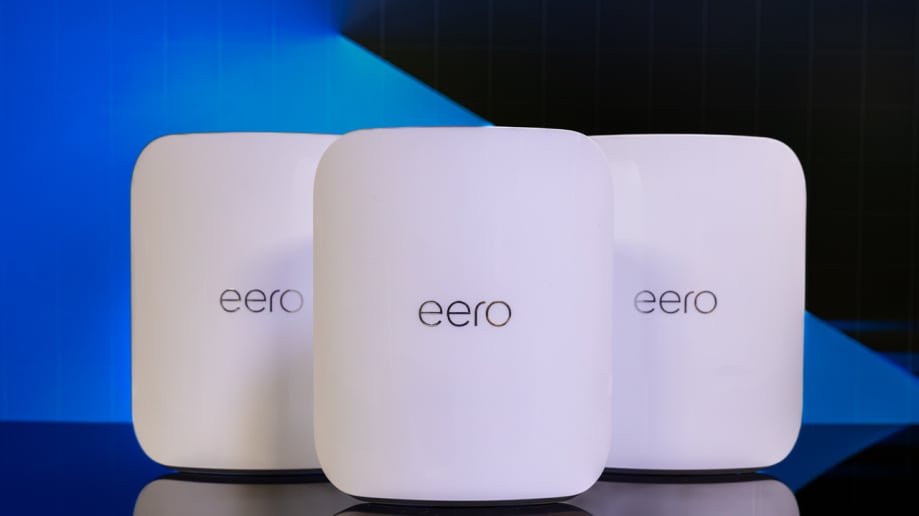
Mesh WiFi for multiple floors is the solution that can transform your smart home experience. Imagine seamless streaming, smooth video calls, and instant control over your gadgets from any room. You’ll discover how mesh WiFi works, why it’s perfect for homes with several floors, and how it can make your life easier.
Keep reading to unlock the full potential of your smart home network!
Why Mesh Wifi Matters
Mesh wifi helps improve internet coverage in homes with many rooms. It spreads wifi signals evenly across large areas.
Traditional routers often struggle to cover multiple floors well. Mesh wifi fixes this problem for better connections.
Limitations Of Traditional Routers
Traditional routers send signals from one point. This can cause weak spots far from the router.
- Signal strength drops with distance.
- Walls and floors block signals.
- Many devices cause slow speeds.
- Single router can’t cover large homes well.
Benefits For Multi-story Homes
Mesh wifi uses several devices to cover every floor. It creates a strong, continuous network throughout the home.
| Benefit | Explanation |
| Better Coverage | Devices placed on each floor extend wifi signals. |
| Stronger Signal | Mesh units talk to each other to avoid weak spots. |
| Easy Expansion | Add more units if the home grows or changes. |
| Simple Setup | Mesh systems often have easy apps for management. |

Credit: www.pcmag.com
Key Features Of Mesh Systems
Mesh WiFi systems are ideal for smart homes with multiple floors. They improve internet coverage and connection quality. These systems use several devices to create a strong wireless network throughout the house.
Understanding the main features of mesh systems helps you choose the right setup. These features ensure smooth internet use on every floor and in every room.
Seamless Roaming
Seamless roaming lets your devices move from one mesh node to another without losing connection. This means you can walk around your home without WiFi dropping or needing to reconnect.
Devices automatically connect to the strongest signal. This feature is useful in large homes with many rooms and floors.
Unified Network Name
A mesh system uses one network name, or SSID, for the entire home. You do not need to switch networks when moving between floors. This makes using the internet simple and stress-free.
- One SSID for all mesh nodes
- No need to select different networks
- Easy for guests to connect
- Consistent network experience everywhere
Self-healing Capabilities
Mesh systems can detect problems in the network. If one node fails, the system reroutes traffic through other nodes. This keeps your internet working without interruptions.
| Feature | Description |
| Automatic Detection | Finds weak or down nodes quickly |
| Traffic Rerouting | Redirects data through other nodes |
| Network Stability | Keeps WiFi active during issues |
Choosing The Right Mesh System
Setting up a mesh wifi system can improve your home’s internet. Choosing the right system depends on your needs.
This guide helps you pick a mesh system for multiple floors and smart devices.
Coverage Area And Node Count
Check how much space the mesh system covers. More floors need more nodes to keep signal strong.
- Large homes need more nodes for full coverage
- Place nodes on different floors for best results
- Look for systems with easy node addition
Speed And Bandwidth
Choose a mesh system that matches your internet speed. High bandwidth helps many devices work at once.
| Internet Speed | Recommended Mesh System Speed | Best for |
| Up to 100 Mbps | AC1200 or higher | Basic streaming and browsing |
| 100-500 Mbps | AC2200 or higher | HD streaming and gaming |
| 500 Mbps and above | AX3000 or higher | 4K streaming and many devices |
Compatibility With Smart Devices
Make sure the mesh system works with your smart home gadgets. Some systems support many device types.
- Check if the system supports voice assistants
- Look for compatibility with smart lights and cameras
- Ensure it supports the latest wifi standards for better device connection
Placement Tips For Multiple Floors
Setting up a mesh WiFi system in a multi-floor home can be tricky. Proper placement of nodes is key for optimal performance.
Understanding where to place each node helps improve coverage and connectivity across all floors.
Optimal Node Locations
Nodes should be spread evenly to cover all areas. Consider placing nodes in the center of each floor.
| Floor | Suggested Node Location |
| Basement | Near staircase |
| First Floor | Living room center |
| Second Floor | Near hallway |
Avoiding Interference
Interference can weaken your WiFi signal. Avoid placing nodes near electronic devices like microwaves and cordless phones.
- Keep nodes away from metal objects
- Avoid placing nodes behind large furniture
- Minimize walls between nodes
Balancing Signal Strength
Signal strength should be balanced to cover the entire home. Check signal strength in different areas to find weak spots.
Setting Up Your Mesh Network
Setting up a mesh WiFi system helps cover multiple floors in your smart home. This guide explains key steps for a smooth setup.
Follow these instructions to connect devices, manage your network, and keep it secure.
Initial Configuration Steps
Start by placing your main mesh router near your modem. Connect them with an Ethernet cable. Then, plug in the router to power.
- Power on your main router and wait until the LED shows it is ready.
- Place additional mesh nodes on other floors for better coverage.
- Power on each node and wait for the connection light.
- Check that all nodes connect to the main router for a full network.
Mobile App Management
Use the mesh system’s mobile app to control your network. The app guides you through setup and lets you monitor devices.
- Download the app from your device’s app store.
- Create an account or log in if you have one.
- Follow the app’s setup wizard to add your mesh nodes.
- Use the app to check signal strength and device connections.
- Adjust settings like parental controls or guest networks easily.
Security Settings
Secure your mesh WiFi by changing default settings and enabling protections. This prevents unauthorized access.
| Security Feature | Why It Matters |
| Change default admin password | Blocks easy hacker access |
| Enable WPA3 encryption | Protects your WiFi data better |
| Turn on automatic firmware updates | Keeps the system up-to-date |
| Use guest network for visitors | Keeps main network safe |
Troubleshooting Common Issues
Mesh WiFi helps cover multiple floors in your smart home. Sometimes, it can have issues. This guide shows easy fixes for common problems.
Follow these tips to keep your connection steady and fast. Also, learn how to solve device compatibility problems.
Connection Drops
Connection drops happen when the mesh nodes lose contact. This can cause your internet to cut out suddenly.
- Place mesh nodes in open areas away from thick walls.
- Keep nodes within the recommended range of each other.
- Restart your mesh router and nodes regularly.
- Update the firmware of all mesh devices.
- Limit interference from other wireless devices nearby.
Slow Speeds
Slow speeds may make streaming or browsing frustrating. These causes are common:
| Cause | Fix |
|---|---|
| Too many devices connected | Disconnect unused devices from the network |
| Distance from mesh nodes | Move closer to the nearest mesh node |
| Old firmware or hardware | Update firmware or upgrade devices |
| Interference from other electronics | Keep mesh nodes away from microwaves and cordless phones |
Device Compatibility Problems
Some devices may not connect well to the mesh network. This can cause slow or no internet access.
To fix device compatibility issues:
- Check if your device supports the mesh WiFi standards (like WiFi 5 or WiFi 6).
- Restart the device and try reconnecting to the network.
- Forget the network on your device and add it again.
- Ensure your mesh system’s security settings match your device’s capabilities.
- Update your device’s network drivers or operating system.
Enhancing Smart Home Integration
Mesh WiFi systems are key in connecting smart devices across multiple floors in a home. They ensure strong signals and smooth operation for all your smart gadgets.
With a well-integrated smart home, you can manage everything from lights to security with ease. Let’s explore how mesh WiFi enhances this experience.
Connecting Iot Devices
IoT devices rely on WiFi to function. A mesh network provides consistent coverage, preventing dead zones in your home.
- Smart thermostats adjust temperature based on your habits.
- Security cameras monitor activities with no interruption.
- Smart locks allow entry from anywhere.
Voice Assistant Compatibility
Voice assistants like Alexa and Google Home connect seamlessly with a mesh network. They control your devices through simple voice commands.
For example, you can say, “Hey Google, turn off the lights,” and the command will reach your devices without delay.
Automation And Scheduling
Mesh WiFi supports automation by ensuring all devices are always online. You can set schedules for lights, thermostats, and more.
| Device | Automation Example |
| Lights | Turn on at sunset |
| Thermostat | Adjust temperature at night |
| Sprinklers | Water garden every morning |
Credit: www.engadget.com
Future-proofing Your Network
Setting up a mesh Wi-Fi system for a smart home with many floors is smart. It keeps your network strong in all rooms. Future-proofing your network means planning for new technology and more devices.
Good planning helps your mesh Wi-Fi last for years. This saves money and avoids slow internet later.
Wi-fi 6 And Beyond
Wi-Fi 6 is a newer Wi-Fi standard. It offers faster speeds and better performance with many devices. Choosing mesh Wi-Fi systems that support Wi-Fi 6 prepares your home for future needs.
Newer Wi-Fi versions will keep improving speed and reliability. Systems ready for future standards make upgrades easier.
Expandable Mesh Systems
Expandable mesh systems let you add more units as needed. This is great for multiple floors or larger homes. You can start small and grow your network over time.
Adding units keeps your Wi-Fi strong everywhere. It also helps when you add more smart devices later.
- Start with main router unit
- Add satellite units for more floors
- Place units for best coverage
- Control all units from one app
Regular Firmware Updates
Firmware updates improve your mesh system’s security and performance. They fix bugs and add new features. Regular updates help your network stay safe from threats.
Check for updates often and install them. This keeps your smart home network working well for many years.

Credit: www.amazon.ca
Frequently Asked Questions
What Is Mesh Wifi For Multiple Floors?
Mesh WiFi uses multiple nodes to provide seamless coverage across floors. It eliminates dead zones and improves smart home connectivity. Mesh systems create a single network that ensures strong signals everywhere in your multi-story home.
How Does Mesh Wifi Benefit A Smart Home?
Mesh WiFi offers reliable, consistent internet for all smart devices. It supports high-speed connections, reducing lag in automation and streaming. This system enhances device communication and coverage in large or multi-level homes.
Can Mesh Wifi Replace Traditional Routers For Multi-floor Homes?
Yes, mesh WiFi is better than traditional routers for multi-floor homes. It spreads signals evenly across floors, avoiding weak spots. Traditional routers often struggle with range and walls, while mesh ensures seamless connectivity throughout.
How Many Mesh Nodes Are Needed For Multiple Floors?
Typically, 2-3 mesh nodes cover a 2-3 story house effectively. The exact number depends on floor size and building materials. More nodes improve coverage and signal strength in larger or denser homes.
Conclusion
Mesh wifi systems cover every floor of your smart home easily. They give strong, steady internet in every room. No more dead zones or slow connections. Setup is simple and works with many devices. Your smart home runs smoothly with good wifi.
Choose mesh wifi for a better online experience at home. It keeps all your gadgets connected without trouble. A smart choice for any multi-floor house.


