Are you struggling with slow or spotty WiFi when connecting your smart home devices? Imagine a network that blankets every corner of your home with strong, reliable internet.
That’s exactly what mesh WiFi offers—seamless coverage that keeps all your smart gadgets working smoothly together. If you want your smart home devices to respond instantly and stay connected without interruptions, understanding mesh WiFi is key. Keep reading to discover how this technology can transform your smart home experience and make your life easier.

Credit: www.smarthome.com.au
Benefits Of Mesh Wifi For Smart Homes
Mesh Wifi systems improve the way your smart home devices connect. They help all devices work better together at home.
Using mesh Wifi creates a stronger, wider network. This helps smart devices stay online without interruptions.
Seamless Coverage Across Rooms
Mesh Wifi covers every corner of your home. It sends Wifi signals through many points, not just one router.
This means no dead spots where devices lose connection. You get steady Wifi in all rooms and floors.
- Wifi signals reach distant rooms easily
- No need to move closer to the router
- Good for large houses with many walls
Improved Device Connectivity
Mesh Wifi lets many smart devices connect at once. It manages traffic to keep each device working well.
Devices like smart lights, cameras, and speakers stay linked without lag or dropouts.
- Supports many devices at the same time
- Reduces WiFi slowdowns during heavy use
- Works well with smart home hubs and sensors
Enhanced Network Reliability
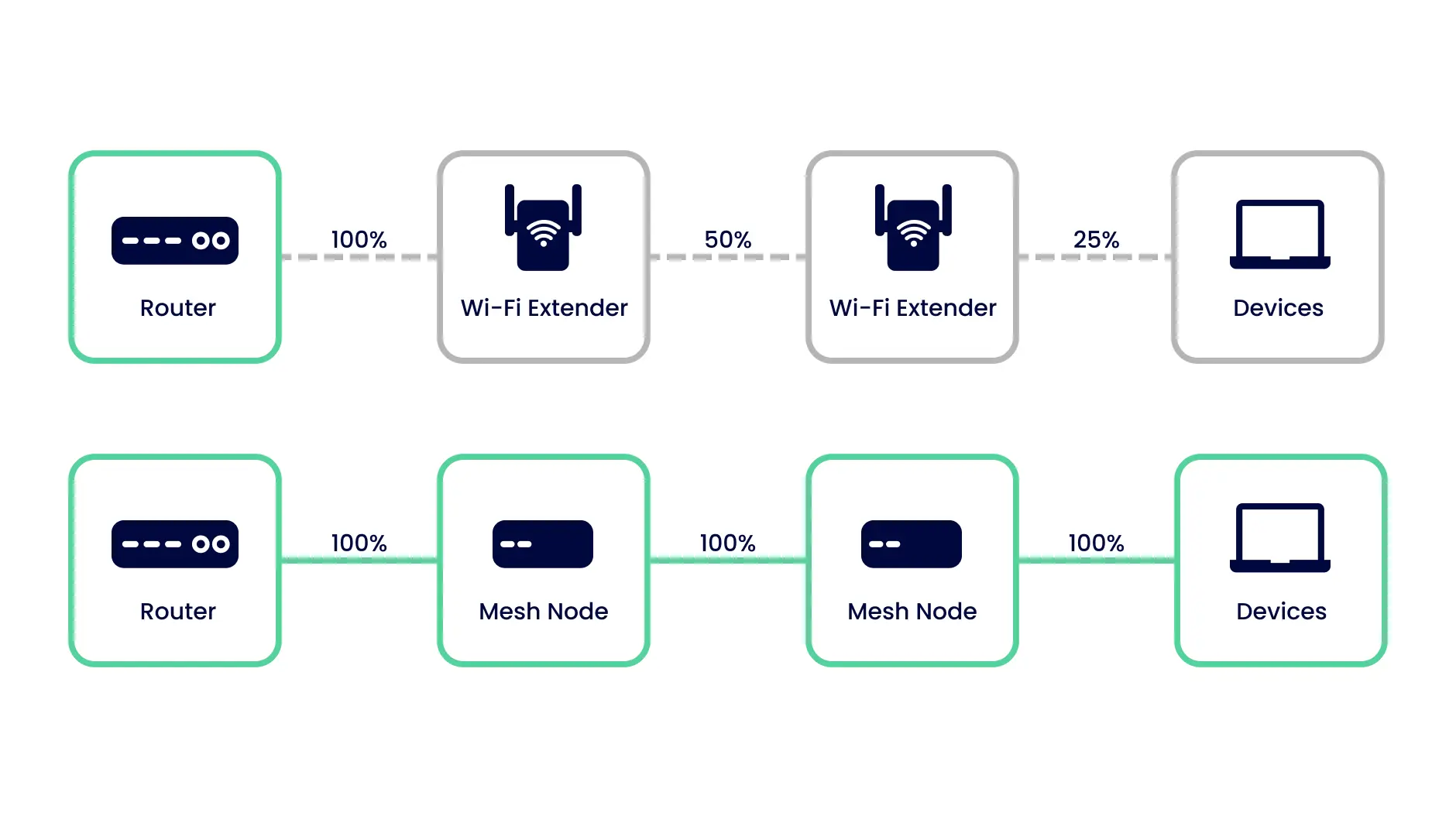
Mesh Wifi adapts if one point fails. Other points take over to keep your network online.
This makes your smart home stable. Devices stay connected even if one part of the system has issues.
- Automatic rerouting of Wifi signals
- Less chance of network interruptions
- Continuous connection for security devices

Credit: www.amazon.ca
Key Features To Look For
Mesh WiFi helps smart home devices stay connected all the time. It spreads WiFi across your home to avoid weak signals.
Choosing the right mesh system means checking important features. These features improve your smart home experience.
Dual-band Vs Tri-band Systems
Dual-band mesh systems use two WiFi bands: one for devices and one for backhaul. Backhaul is the link between mesh units.
Tri-band systems add a third band dedicated to backhaul. This reduces traffic and keeps speeds higher for devices.
- Dual-band systems are usually less expensive.
- Tri-band systems handle more devices better.
- Tri-band can give faster speeds in busy networks.
Built-in Security Options
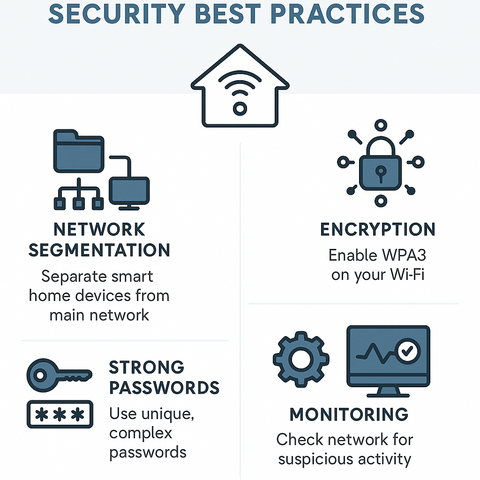
Security is key for smart homes. Mesh WiFi should protect your devices and data from hackers.
Look for features like automatic updates and strong encryption. Some systems offer parental controls and guest networks too.
- WPA3 encryption for stronger protection
- Automatic software updates
- Guest network for visitors
- Parental controls to limit device access
Device Capacity And Speed
Smart homes use many devices at once. A mesh system must support many devices without slowing down.
Check how many devices a system supports and its max speed. Faster speeds help with video calls, streaming, and gaming.
- Supports 50+ devices for large smart homes
- Speeds of 1 Gbps or higher for fast internet
- Good signal range for full home coverage
Setting Up Mesh Wifi For Smart Devices
Mesh wifi helps connect many smart home devices easily. It creates a strong network with many nodes.
Setting up mesh wifi needs good planning. This guide covers placing nodes, network settings, and device integration.
Placement Strategies For Nodes
Place mesh nodes carefully to avoid dead spots. Good placement means better coverage for all smart devices.
- Put the main node near your internet source.
- Place other nodes in open areas, not inside cabinets.
- Keep nodes away from thick walls and metal objects.
- Place nodes at equal distance to cover your home evenly.
- Avoid placing nodes near microwaves or cordless phones.
Configuring Network Settings
Adjust your network settings for better speed and security. Proper settings help smart devices connect smoothly.
| Setting | Recommended Value | Reason |
| SSID | Unique and simple | Easy to identify your network |
| Password | Strong and secure | Protects your devices |
| Frequency Band | 2.4 GHz and 5 GHz | Supports all smart devices |
| DHCP Range | Wide enough | Allows many devices to connect |
| Firmware | Updated | Improves performance and security |
Optimizing For Device Integration
Make sure your smart devices work well with the mesh network. Check compatibility and connection quality.
Tips to optimize device integration:
- Connect devices to the 2.4 GHz band if they do not support 5 GHz.
- Assign static IP addresses to important devices.
- Use device grouping features in your mesh app for easy control.
- Restart the mesh network if devices lose connection.
- Keep devices close to a node for stable signals.
Troubleshooting Common Issues
Mesh WiFi helps smart home devices stay connected easily. Sometimes, issues can happen with the network.
Knowing how to fix common problems keeps your devices working well. This guide covers key troubleshooting tips.
Dealing With Connectivity Drops
Smart devices may lose connection from time to time. This can cause delays or failures in device response.
Check if the mesh nodes are too far apart or blocked by walls. Restarting the router or nodes often helps.
- Place mesh nodes closer for better coverage
- Restart your mesh WiFi system regularly
- Remove obstacles like large furniture or metal objects
- Check device settings for network issues
Interference And Signal Strength
Other electronics can cause interference with your mesh WiFi signal. This lowers signal strength and speed.
Microwaves, cordless phones, and baby monitors are common causes. Keep your mesh devices away from these items.
- Use 5 GHz band for less interference
- Avoid placing nodes near other wireless devices
- Check signal strength with WiFi analyzer apps
- Reposition nodes to find better signal spots
Firmware Updates And Maintenance
Firmware updates improve mesh WiFi performance and fix bugs. Keep your system updated for best results.
Set your mesh system to update automatically or check for updates often. Regular maintenance keeps your network stable.
- Check the mesh app for firmware updates
- Restart devices after updates to apply changes
- Clear cache or reset if problems persist
- Schedule regular checks for system health
Popular Mesh Wifi Systems For Smart Homes
Mesh wifi systems help smart home devices work better. They spread wifi signals evenly in your house.
Good mesh wifi makes sure smart lights, cameras, and speakers stay connected all the time.
Top Models And Their Features
Many mesh wifi models fit smart home needs. Some focus on speed, others on coverage or ease of use.
- Google Nest Wifi:Easy setup, good coverage, built-in smart speaker.
- Netgear Orbi:Strong signal, high speed, covers large homes.
- Amazon Eero:Simple app, reliable connection, works well with Alexa.
- TP-Link Deco:Affordable, parental controls, good security features.
- Asus ZenWiFi:Fast wifi 6 support, strong signal, advanced settings.
Comparing Price And Performance
Prices vary from budget to high-end models. Performance depends on home size and device count.
| Model | Price Range | Speed | Coverage Area |
|---|---|---|---|
| Google Nest Wifi | $$$ | Up to 2.2 Gbps | Up to 4400 sq ft |
| Netgear Orbi | $$$$ | Up to 3 Gbps | Up to 5000 sq ft |
| Amazon Eero | $$ | Up to 1 Gbps | Up to 3500 sq ft |
| TP-Link Deco | $ | Up to 1.2 Gbps | Up to 4000 sq ft |
| Asus ZenWiFi | $$$$ | Up to 6 Gbps | Up to 5500 sq ft |
User Reviews And Ratings
Users like mesh wifi that is easy to set up and has stable connections. Speed and coverage get high marks.
- Google Nest Wifi: praised for simple setup and smart speaker.
- Netgear Orbi: liked for fast speeds and wide coverage.
- Amazon Eero: users find it reliable and easy to use.
- TP-Link Deco: popular for value and good security.
- Asus ZenWiFi: rated highly for speed and advanced options.
Future Trends In Smart Home Connectivity
Smart homes are changing how we live. Mesh WiFi helps connect all our devices. It makes sure everything works together smoothly.
Let’s explore what the future holds for smart home connectivity. We’ll look at new WiFi technology, how devices talk to each other, and smart ways to manage networks.
Wi-fi 6 And Beyond
Wi-Fi 6 is faster and supports more devices. It helps reduce delays. This is great for homes with many smart gadgets.
Future WiFi versions will be even better. They will handle more data and connect more devices. This means smoother streaming and quick responses from smart devices.
- Wi-Fi 6 boosts speed and efficiency.
- Newer versions will support more gadgets.
- Better connections mean less lag.
Integration With Iot Protocols
Smart devices need to talk to each other. IoT protocols help them do this. They make sure devices understand each other.
Protocols like Zigbee and Z-Wave are popular. They help connect smart lights, locks, and more. Future protocols will connect more devices, making smart homes even smarter.
| Zigbee | Used for smart lights |
| Z-Wave | Popular for smart locks |
| Future Protocols | More device integration |
Ai-powered Network Management
AI can manage networks better than humans. It can spot problems and fix them fast. This means fewer interruptions.
AI learns from data. It makes smart homes more efficient. Future AI tools will help networks run smoothly without human help.
- AI detects network issues quickly.
- It improves smart home efficiency.
- Future AI tools will automate fixes.
Credit: inseego.com
Frequently Asked Questions
What Is Mesh Wifi And How Does It Work?
Mesh WiFi uses multiple devices to create a seamless wireless network. It eliminates dead zones and improves coverage. Each node communicates to provide strong, consistent signals. This setup benefits smart homes by connecting devices reliably across all rooms.
Why Choose Mesh Wifi For Smart Home Devices?
Mesh WiFi offers stable, wide coverage, perfect for smart homes. It supports many devices without slowing down the network. Mesh systems adapt to your home layout, ensuring all smart gadgets stay connected and responsive.
Can Mesh Wifi Improve Smart Device Integration?
Yes, mesh WiFi enhances device integration by providing consistent connectivity. It reduces interruptions, allowing smart devices to communicate smoothly. This leads to better automation and control of your smart home ecosystem.
How To Set Up Mesh Wifi For Smart Homes?
Set up mesh WiFi by placing nodes evenly throughout your home. Connect the primary node to your modem and sync others. Use the app for configuration and managing device connections easily.
Conclusion
Mesh WiFi makes smart home devices work smoothly together. It spreads strong signals in every corner of your home. Devices stay connected without interruptions or delays. Setting up mesh networks is simple and quick. Enjoy better control over lights, cameras, and more.
A reliable WiFi network supports your smart home’s growth. Choose mesh WiFi for a seamless smart home experience. No dead spots. Just steady, fast internet for all devices. Easy, smart, and effective.


