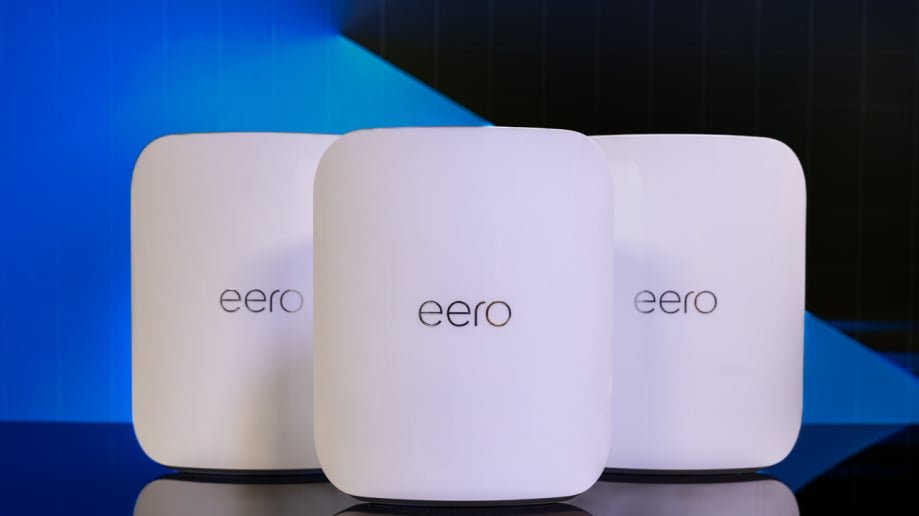
Are you tired of slow internet and dead zones in your smart home? Your devices deserve a strong, reliable connection to work seamlessly.
That’s where mesh WiFi comes in. Imagine every corner of your home covered with fast, steady internet, so your smart lights, cameras, and speakers respond instantly. You’ll discover how mesh WiFi can transform your smart home experience and make your life easier.
Keep reading to unlock the secret to a truly connected home.

Credit: www.amazon.ca
Benefits Of Mesh Wifi For Smart Homes
Mesh wifi systems improve internet coverage in smart homes. They use multiple devices to create one strong network.
This helps smart devices stay connected without interruptions or slowdowns.
Eliminating Dead Zones
Mesh wifi covers all areas of your home. It removes spots where wifi does not reach well.
- Places with weak signals get a strong connection.
- Devices switch smoothly between nodes without losing signal.
- Better coverage helps smart lights, cameras, and assistants work well.
Consistent Speeds Across Devices
Mesh networks balance internet speeds for many devices. Everyone in your home gets steady wifi.
| Device Type | Benefit of Mesh Wifi |
| Smart TVs | Smooth streaming without buffering |
| Smartphones | Fast downloads and video calls |
| Security Cameras | Reliable live feeds and alerts |
| Smart Speakers | Quick voice command response |
Scalability For Growing Networks
Mesh wifi grows with your home and devices. Add more nodes to cover new rooms or floors.
Reasons to expand your mesh network:
- Adding smart devices like thermostats and locks
- Increasing home size or remodeling
- Improving wifi in outdoor spaces

Credit: www.pcmag.com
Key Features To Look For
Mesh WiFi systems help connect all smart home devices easily. They spread WiFi signals evenly across your home.
Choosing the right features ensures your smart home runs smoothly. Focus on coverage, device support, and security.
Coverage Area And Expansion Options
Check how much space the mesh system covers. Larger homes need wider coverage for all devices.
Look for easy ways to add more units. Expansion options let you grow your network as needed.
- Wide coverage avoids WiFi dead zones
- Expandable units let you add more points
- Simple setup for adding new nodes
- Supports multiple floors or large rooms
Device Compatibility
Your mesh WiFi must work with many smart home gadgets. This includes phones, cameras, and voice assistants.
Check if the system supports common smart home protocols. This helps all devices connect without issues.
- Works with WiFi-enabled devices
- Supports smart hubs and assistants
- Compatible with IoT devices
- Handles many devices at once
Security Protocols
Security keeps your smart home data safe. Choose mesh systems with strong encryption methods.
Look for features like automatic updates and guest network options. These protect your network from threats.
- Supports WPA3 or WPA2 encryption
- Automatic security updates
- Guest network for visitors
- Parental controls and access management
Setting Up Mesh Wifi Systems
Mesh wifi systems help spread internet signals evenly in your home. They create a strong network for all your smart devices.
Setting up a mesh system needs some planning. Proper setup makes your smart home run smoothly and without interruptions.
Choosing Optimal Node Placement
Place mesh nodes where wifi signals can reach every corner of your home. Avoid thick walls and metal objects that block signals.
- Put the main node near your internet modem.
- Space other nodes evenly throughout your house.
- Keep nodes in open areas, not inside cabinets.
- Avoid placing nodes near microwaves or cordless phones.
- Try to keep nodes within range of each other for a strong link.
Connecting To Smart Home Hubs
Connect your mesh wifi to smart home hubs to control devices easily. This link lets your smart devices talk to each other fast.
| Smart Hub | Connection Tip |
|---|---|
| Amazon Echo | Connect via wifi settings in the Alexa app |
| Google Nest | Use Google Home app to add your mesh network |
| Apple HomeKit | Ensure mesh supports WPA2 for secure connection |
| Samsung SmartThings | Link through SmartThings app network setup |
Configuring Network Settings
Adjust network settings to improve performance and security. Set a strong password and separate guest networks from your smart devices.
- Open the mesh system app or web portal.
- Change the default network name (SSID) to something unique.
- Create a strong password with letters, numbers, and symbols.
- Enable automatic updates to keep your system secure.
- Set up a guest network for visitors to keep your main network safe.
- Check device connections and signal strength regularly.

Credit: www.pcmag.com
Integrating Mesh Wifi With Smart Devices
Mesh wifi helps connect all your smart devices smoothly at home. It spreads wifi signals evenly in every room.
With mesh networks, your smart devices stay online without interruptions or weak signals.
Voice Assistants And Mesh Networks
Voice assistants like Alexa or Google Home need strong wifi to work well. Mesh wifi covers your whole house with good signals.
This means you can use voice commands from any room without delay or dropped connections.
Smart Lighting And Thermostats
Smart lights and thermostats rely on steady wifi to respond fast. Mesh wifi keeps them connected even far from the router.
You can control lights and temperature easily through apps or voice, no matter where you are in your home.
Surveillance And Security Cameras
Security cameras need constant wifi to send video feeds without lag. Mesh wifi reduces dead zones to keep cameras online.
This helps you watch your home live from anywhere without losing connection or quality.
Troubleshooting Common Issues
Mesh WiFi helps connect all your smart home devices. Sometimes, problems can happen. Troubleshooting these issues keeps your home running smoothly.
Knowing how to fix common problems saves time and frustration. This guide covers simple fixes for network interference, firmware updates, and device drops.
Network Interference Solutions
Network interference can slow down or block WiFi signals. Common causes include walls, microwaves, and other electronics. Moving your mesh nodes helps reduce interference.
Try placing mesh devices away from thick walls and metal objects. Keep them clear of microwaves and cordless phones for better signal strength.
- Move nodes to open spaces
- Avoid placing near microwaves or cordless phones
- Keep nodes away from thick walls or metal objects
- Use 5 GHz band for less interference
Firmware Updates And Maintenance
Firmware updates fix bugs and improve mesh WiFi performance. Check for updates regularly in your router’s app or admin panel. Updating keeps your network secure and stable.
Restart your mesh devices after updates. This helps the changes take effect. Regular maintenance also includes checking cables and power sources.
- Check for firmware updates monthly
- Restart devices after updates
- Inspect cables and power connections
- Reset devices if problems persist
Handling Device Connectivity Drops
Devices may lose connection to the mesh network sometimes. This can happen if the device moves too far or if the signal is weak. Bring devices closer to mesh nodes to improve connection.
Check device settings to ensure WiFi is on. Restart the device if needed. You can also reboot the mesh node nearest to the device to restore connection.
- Move device closer to mesh nodes
- Make sure WiFi is enabled on the device
- Restart the device to refresh connection
- Reboot the nearest mesh node if needed
Future Trends In Mesh Wifi Technology
Mesh Wifi systems are changing how we connect at home. They offer seamless coverage and enhanced speed.
As technology advances, mesh wifi is becoming smarter and more efficient. Let’s explore what’s coming next.
Wi-fi 6 And Beyond
Wi-Fi 6 is the latest standard in wireless technology. It provides faster speeds and better performance.
- Increased data rates for faster downloads
- Improved efficiency in crowded networks
- Enhanced battery life for connected devices
Ai-powered Network Management
AI is making mesh wifi smarter. It helps manage the network efficiently and resolves issues quickly.
Imagine a network that adjusts itself without human intervention. AI can optimize connections based on usage patterns.
Enhanced Iot Device Support
The Internet of Things is growing. Mesh wifi is improving to support more devices at once.
| Feature | Benefit |
| Device prioritization | Ensures critical devices get bandwidth |
| Seamless connectivity | Reduces drop-offs and lag |
| Scalability | Supports more devices without slowing down |
Frequently Asked Questions
What Is Mesh Wifi For Smart Home Integration?
Mesh WiFi is a system of interconnected routers. It provides seamless, strong WiFi coverage for smart homes. This helps all smart devices stay connected without interruptions.
How Does Mesh Wifi Improve Smart Home Device Performance?
Mesh WiFi eliminates dead zones by spreading coverage evenly. It reduces lag and connection drops. This ensures smart devices respond quickly and work reliably.
Can Mesh Wifi Support Multiple Smart Devices Simultaneously?
Yes, mesh WiFi handles many devices at once. It balances traffic efficiently to prevent network congestion. This is ideal for homes with many smart gadgets.
Is Mesh Wifi Easy To Set Up For Smart Homes?
Most mesh WiFi systems offer simple, app-based setup. They guide you through installation step-by-step. This makes smart home integration faster and hassle-free.
Conclusion
Mesh WiFi makes smart home devices work better together. It covers your entire home with strong signals. No more dead zones or slow connections. Devices stay connected, so you control them easily. Setup is simple and fits any home size.
Good WiFi helps your smart home run smoothly. Choose mesh WiFi for reliable and fast internet. Enjoy a smarter, connected home every day.


