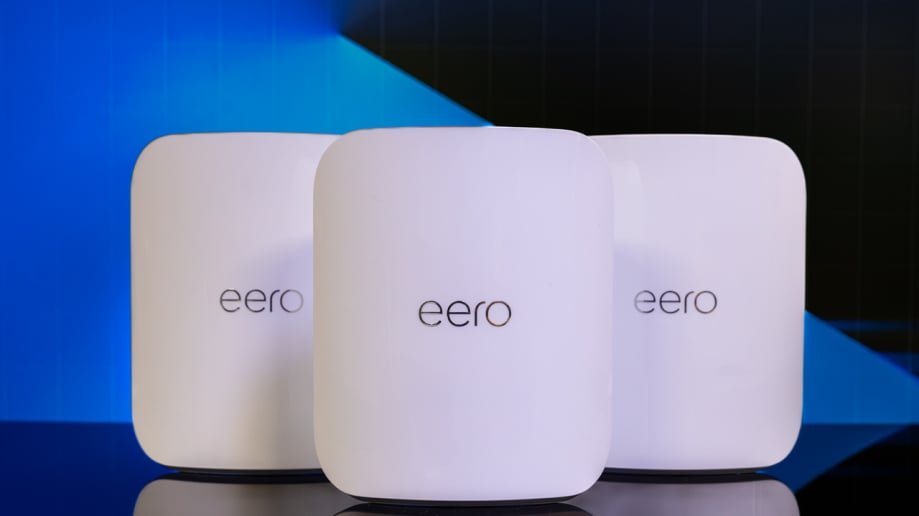
Are you tired of your smart plugs and lights cutting out just when you need them most? A weak WiFi signal can turn your smart home into a source of frustration.
Imagine controlling every light and device smoothly, without delays or dropouts. That’s exactly what mesh WiFi can do for you. You’ll discover how mesh WiFi systems create a strong, reliable network that keeps your smart devices connected no matter where they are in your home.
Keep reading to find out how to make your smart home smarter and hassle-free.

Credit: www.amazon.com
Mesh Wifi Basics
Mesh wifi improves wireless coverage inside homes or offices. It uses multiple devices called nodes to spread the signal evenly.
This system works well for smart plugs and lights that need steady internet connections to work properly.
How Mesh Wifi Works
Mesh wifi systems have several nodes placed around a building. Each node acts like a small router sending wifi signals.
- One node connects to the main internet source.
- Other nodes link wirelessly to the main node.
- Nodes create a single, strong wifi network.
- Devices automatically connect to the closest node.
- This reduces dead spots and improves speed.
Benefits Over Traditional Wifi
| Feature | Traditional Wifi | Mesh Wifi |
| Coverage | Limited to one router | Wide, whole-home coverage |
| Signal Strength | Weak in far rooms | Strong everywhere |
| Device Handoff | Manual switching needed | Automatic seamless switching |
| Setup | Simple but limited | Easy and expandable |
| Smart Device Support | Can struggle with many devices | Handles many smart devices well |
Smart Plugs And Lights
Smart plugs and lights make homes more convenient and energy-efficient. They let you control devices and lighting from your phone or voice assistant.
Using a mesh WiFi system helps keep these devices connected without interruptions. Mesh WiFi spreads the signal evenly across your home.
Types Of Smart Devices
Smart plugs let you control regular devices remotely. They work with lamps, fans, and small appliances.
Smart lights come in many forms. You can find bulbs, strips, and fixtures that change color and brightness.
- Smart plugs turn devices on or off remotely
- Smart bulbs adjust color and brightness
- Light strips provide customizable lighting effects
- Smart switches control whole circuits
Common Connectivity Needs
Smart plugs and lights need strong, stable WiFi to work well. Mesh WiFi covers all areas, reducing dead zones.
Devices often use WiFi or other protocols like Zigbee and Bluetooth. A mesh system can support these connections smoothly.
- Reliable WiFi coverage throughout the home
- Support for multiple device connections at once
- Low latency to respond quickly to commands
- Compatibility with Zigbee or Bluetooth hubs
Why Mesh Wifi Suits Smart Homes
Mesh Wifi systems are ideal for smart homes. They provide consistent internet coverage across all areas. This ensures your smart plugs and lights work smoothly.
With mesh Wifi, every device in your home connects easily. This creates a seamless smart home experience.
Improved Coverage And Reliability
Mesh Wifi covers your entire home evenly. It eliminates dead zones where devices can’t connect. This means your smart plugs and lights work in every room.
Traditional routers can’t reach every corner. Mesh Wifi uses multiple nodes to blanket your home. This boosts reliability for all smart devices.
- Better signal in all rooms
- No dropped connections
- Consistent performance for devices
Seamless Device Switching
Mesh Wifi lets devices switch nodes without disconnecting. This is crucial for smart lights and plugs. They need to stay connected as you move around.
When a device moves, it automatically connects to the closest node. This seamless switching keeps your smart home running smoothly.
- Automatic connection to nearest node
- No manual switching needed
- Continuous operation of smart devices
Setting Up Mesh Wifi For Smart Devices
Mesh wifi helps smart plugs and lights work well across your home. It spreads wifi signals evenly to avoid weak spots.
Good wifi is important for smart devices to respond fast and stay connected.
Choosing The Right Mesh System
Pick a mesh system that covers your whole home size. Some systems work better with many devices at once.
Look for systems with easy setup and strong security features to keep your devices safe.
- Check the coverage area of the system
- Choose a system that supports many devices
- Look for easy-to-use apps for setup
- Make sure it has good security options
Placement Tips For Best Signal
Place mesh nodes in open areas for better wifi spread. Avoid walls and metal objects that block signals.
Keep nodes close enough to talk to each other, but far enough to cover different rooms.
- Place the main node near your modem
- Put nodes on shelves or high spots
- Keep nodes away from thick walls and electronics
- Use more nodes for large or multi-story homes
Configuring Smart Plugs And Lights
Connect smart plugs and lights to your mesh wifi using their app. Follow app instructions to find your wifi network.
Make sure each device is close to a mesh node during setup. This helps the device connect without issues.
- Open the smart device app
- Select your mesh wifi network
- Enter the wifi password
- Place devices where you want them after setup
- Test devices to check connection quality
Troubleshooting Connectivity Issues
Mesh WiFi helps smart plugs and lights stay connected throughout your home. Sometimes, devices lose connection or work slowly. This guide covers common problems and ways to fix them.
Understanding how to optimize your network can improve device performance and reduce disruptions. Use these tips to keep your smart home running smoothly.
Common Problems And Fixes
Smart plugs and lights may face connection drops, slow response, or failure to connect. Checking settings and network strength often solves these issues.
- Device not connecting:Restart the smart device and your mesh router.
- Slow response:Move the device closer to a mesh node or reduce wireless interference.
- Frequent disconnections:Update the firmware of your mesh system and smart devices.
- Network overload:Limit the number of devices connected at once or upgrade bandwidth.
Optimizing Network Performance
Good network setup boosts connection stability and speed for smart plugs and lights. Placement and settings matter a lot.
| Tip | Description |
| Place nodes evenly | Keep mesh nodes spaced to cover all areas without overlap. |
| Use wired backhaul | Connect nodes with Ethernet cables to reduce wireless traffic. |
| Change WiFi channels | Switch to less crowded channels to avoid interference. |
| Limit heavy use | Reduce streaming or downloads during critical device use. |
| Update software | Keep all devices’ software current for best performance. |
Advanced Features To Explore
Mesh WiFi systems offer seamless connectivity for smart plugs and lights. These systems come with advanced features that enhance their functionality.
Explore features like parental controls and voice assistant integration to make your home smarter and more efficient.
Parental Controls And Scheduling
Parental controls let you manage internet usage for your family. You can limit access to certain websites or set browsing times.
- Block inappropriate content
- Set time limits for internet usage
- Monitor online activities
Integration With Voice Assistants
Mesh WiFi supports integration with voice assistants like Alexa and Google Assistant. This allows you to control smart plugs and lights using voice commands.
Imagine saying, “Turn off the lights,” and it happens instantly. This makes controlling devices effortless and fun.
| Voice Assistant | Functionality |
| Alexa | Control devices with voice |
| Google Assistant | Manage schedules |
Future Trends In Smart Home Connectivity
Smart homes grow smarter with better connections. Mesh wifi helps devices talk well and fast.
Smart plugs and lights need strong signals to work right. New tech brings better speed and range.
Evolving Mesh Technologies
Mesh wifi systems now use new tech for stronger links. They cover larger homes without weak spots.
- Wi-Fi 6 and Wi-Fi 6E give faster speeds and less delay.
- Self-healing networks fix problems without help.
- AI helps mesh learn home patterns to save power.
- Easy setup apps guide users step-by-step.
New Smart Device Innovations
Smart plugs and lights become smarter with new features. They save energy and add comfort.
| Feature | Benefit |
| Voice Control | Hands-free operation |
| Energy Monitoring | Track power use easily |
| Adaptive Lighting | Lights change with time |
| Remote Access | Control from anywhere |

Credit: www.amazon.com

Credit: www.pcmag.com
Frequently Asked Questions
What Is Mesh Wifi For Smart Plugs And Lights?
Mesh WiFi is a network system using multiple devices to spread WiFi evenly. It ensures smart plugs and lights get strong, reliable signals everywhere in your home for seamless control.
How Does Mesh Wifi Improve Smart Home Device Performance?
Mesh WiFi reduces dead zones and signal drops. It provides stable connections to smart plugs and lights, improving response times and preventing disconnections during use.
Can Mesh Wifi Handle Many Smart Devices Simultaneously?
Yes, mesh WiFi supports multiple smart devices at once. It balances traffic efficiently, preventing network congestion and ensuring all smart plugs and lights work smoothly.
Is Mesh Wifi Better Than Traditional Routers For Smart Homes?
Mesh WiFi offers wider coverage and consistent speeds. It is more reliable for smart homes with many plugs and lights, compared to single traditional routers.
Conclusion
Mesh WiFi helps smart plugs and lights work smoothly in every room. It spreads WiFi signals evenly, so devices stay connected without interruptions. This means your smart home runs better and feels more reliable. Setting up mesh WiFi is simple and fits most home sizes.
Enjoy easy control of your lights and plugs anytime, anywhere. A strong WiFi network makes smart devices more useful and fun. Choose mesh WiFi to keep your smart home connected and comfortable.


