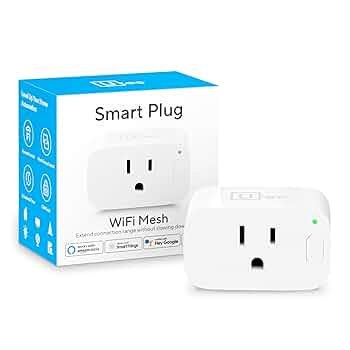
Are your smart plugs acting up, cutting off when you least expect it? The root cause might be your WiFi coverage.
Imagine a home where every smart plug connects seamlessly, no matter where it is. That’s where mesh WiFi steps in. It’s not just about faster internet—it’s about making your smart devices work smarter for you. Keep reading to discover how mesh WiFi can transform your smart plug experience and bring true convenience to your fingertips.
Benefits Of Mesh Wifi For Smart Plugs
Mesh Wifi improves how smart plugs work in your home. It helps connect many devices without losing signal.
Using mesh Wifi makes smart plugs more reliable and easier to control from anywhere in your house.
Enhanced Coverage
Mesh Wifi spreads the signal evenly across your home. It reaches rooms far from the main router.
- Smart plugs work in every room
- No dead zones where devices lose connection
- Better control of devices in large houses
Stable Connections
Mesh networks keep a strong link between your smart plugs and router. This reduces dropouts and lag.
| Feature | Benefit |
| Multiple nodes | Consistent signal strength |
| Self-healing network | Automatic fixing of broken links |
| Load balancing | Even data flow to all devices |
Easy Expansion
You can add new Wifi nodes to cover more rooms. This helps when you add more smart plugs later.
Benefits of adding more nodes:
- Expand coverage without new cables
- Improve speed and reduce interference
- Keep all smart plugs connected smoothly

Credit: www.pcmag.com
Choosing The Right Mesh System
Mesh WiFi systems help improve internet coverage in your home. They are useful when you use smart plugs that rely on a strong connection.
Picking the right mesh system ensures your smart plugs work well and your network runs smoothly.
Compatibility With Smart Plugs
Check if the mesh system supports the smart plug brands you have. Some plugs work better with certain routers.
- Look for mesh systems that support your smart plug’s frequency band (2.4 GHz or 5 GHz).
- Confirm the mesh system allows enough connected devices without slowing down.
- See if the system’s app integrates with your smart plugs for easier control.
Speed And Performance
Faster mesh systems handle many devices better. This keeps smart plugs responsive and avoids delays.
| Feature | Why It Matters |
| WiFi Standard (e.g., WiFi 5, WiFi 6) | Higher standards offer faster speeds and better range. |
| Number of Nodes | More nodes cover larger areas and reduce dead spots. |
| Backhaul Options | Wired backhaul improves stability between nodes. |
Budget Considerations
Mesh systems come in many price ranges. Pick one that fits your budget but still meets your needs.
- Basic systems cost less but may have limited range or speed.
- Mid-range systems balance cost and features well.
- High-end systems offer best performance but cost more.
Setting Up Mesh Wifi For Smart Plugs
Mesh WiFi systems help smart plugs work better by spreading the signal. They cover your home with strong WiFi.
Setting up mesh WiFi for smart plugs is simple. You need to place the devices well, configure the network, and connect the plugs.
Placement Tips
Place mesh WiFi nodes where the signal can reach all smart plugs. Avoid walls and metal objects that block WiFi.
- Put nodes in open spaces, not inside cabinets
- Keep nodes at a medium height, like on a shelf
- Space nodes evenly to cover large areas
- Avoid placing nodes near microwaves or cordless phones
Configuring The Network
Set up your mesh WiFi using the app or website from the maker. Name your network and set a strong password.
| Setting | Recommendation |
| Network Name (SSID) | Use a simple, easy-to-remember name |
| Password | Use at least 12 characters with letters and numbers |
| Frequency Band | Use 2.4 GHz for smart plugs for better range |
| Firmware | Keep it updated for best performance |
Connecting Smart Plugs
Connect smart plugs to your mesh WiFi by following the plug’s app instructions. Make sure the plugs are near a strong signal.
- Plug in the smart plug and power it on
- Open the smart plug app and start the setup process
- Select your mesh WiFi network and enter the password
- Wait for the plug to connect and confirm in the app
- Repeat for each smart plug in your home

Credit: www.pcmag.com
Troubleshooting Connectivity Issues
Mesh WiFi systems help smart plugs work better by spreading signal evenly. Sometimes, smart plugs may lose connection. Fixing these issues helps your devices run smoothly.
This guide covers common problems, how to reset devices, and update firmware. Use these tips to keep your smart plugs connected.
Common Problems
Smart plugs can face issues like weak signals, interference, or setup errors. These problems stop them from responding or working properly.
- Signal drop when far from mesh WiFi nodes
- Interference from walls or electronic devices
- Power supply or plug socket issues
- Incorrect network settings or passwords
Resetting Devices
Resetting your smart plug and mesh WiFi can fix many connection problems. This clears errors and refreshes the network link.
- Unplug the smart plug and wait 10 seconds.
- Plug it back in and wait for the light to blink.
- Press and hold the reset button for 5 seconds.
- Restart your mesh WiFi nodes by unplugging and plugging them back in.
- Try reconnecting the smart plug to the network.
Firmware Updates
Firmware updates fix bugs and improve device performance. Keep your smart plugs and mesh WiFi updated for best results.
| Device | How to Check | Update Method |
|---|---|---|
| Smart Plug | Open app and check device settings | Follow app prompts to download and install |
| Mesh WiFi | Access router web page or app | Use update option in admin panel |
Optimizing Smart Plug Performance
Smart plugs need a strong and stable WiFi connection to work well. Mesh WiFi systems help by spreading WiFi signals evenly in your home.
Using mesh WiFi with smart plugs can improve their response time and reduce connection drops. Let’s look at how to optimize this setup.
Network Prioritization
Network prioritization lets you give smart plugs higher WiFi priority. This helps smart plugs get faster data and avoid delays.
Most mesh WiFi systems let you set priorities for devices. Assign your smart plugs higher priority to ensure they work smoothly.
- Open your mesh WiFi app
- Find device settings or network priorities
- Select your smart plugs
- Set their priority to high or preferred
Managing Interference
Other electronic devices can cause WiFi interference. This weakens the connection to your smart plugs.
Keep smart plugs and mesh nodes away from microwaves, cordless phones, and thick walls. This reduces signal problems.
- Place mesh nodes in open areas
- Avoid physical barriers like metal or concrete
- Reduce nearby devices using the same WiFi channel
- Use 5 GHz band for less interference if possible
Regular Maintenance
Keep your mesh WiFi and smart plugs updated. Updates fix bugs and improve performance.
Restart your mesh system and smart plugs occasionally. This helps clear errors and refresh connections.
- Check for firmware updates monthly
- Restart your mesh WiFi system every few weeks
- Unplug and plug smart plugs if they act slow
- Monitor WiFi performance with your mesh app
Future Trends In Mesh Wifi And Smart Devices
Mesh Wifi is becoming vital for smart homes. It supports multiple devices at the same time. Smart plugs are one of these devices. They are used to control appliances remotely.
The future of mesh Wifi and smart devices is exciting. They will offer better integration and security. New technologies will make them more efficient.
Integration With Iot
Mesh Wifi will connect more with IoT devices. This means smart plugs will work smoothly with other smart gadgets. Homes will become smarter and more automated.
Devices will talk to each other better. They will share data quickly and make life easier. Integration with IoT will improve energy management too.
- Seamless connection between devices
- Better energy efficiency
- Enhanced automation in homes
Improved Security Features
Security is crucial for smart devices. Future mesh Wifi will have better security features. This will protect smart plugs from hackers.
Encryption will be stronger, keeping data safe. Users will have more control over their devices’ security settings.
- Stronger encryption methods
- User-friendly security settings
- Protection against cyber threats
Advancements In Mesh Technology
Mesh technology is improving fast. It will offer faster and more reliable internet connections. This benefits smart plugs and other devices.
Future mesh systems will cover larger areas. They will reduce dead zones and provide stable connections. This ensures all smart devices work efficiently.
- Faster internet speeds
- Wider coverage areas
- Reduced dead zones

Credit: www.pcmag.com
Frequently Asked Questions
What Is Mesh Wifi For Smart Plugs?
Mesh WiFi is a network system that uses multiple devices to extend coverage. It ensures smart plugs have a strong, stable internet connection throughout your home.
How Does Mesh Wifi Improve Smart Plug Performance?
Mesh WiFi reduces dead zones and interference. This provides reliable connectivity, enabling smart plugs to respond quickly and work without interruptions.
Can Mesh Wifi Support Multiple Smart Plugs?
Yes, mesh WiFi handles many devices simultaneously. It efficiently manages traffic, maintaining fast and stable connections for all smart plugs in your home.
Is Mesh Wifi Better Than Traditional Routers For Smart Plugs?
Mesh WiFi offers wider coverage and fewer dead zones. This leads to consistent performance for smart plugs, unlike traditional routers that may have limited range.
Conclusion
Mesh WiFi helps smart plugs work better and stay connected. It covers your whole home with strong WiFi signals. This means your smart plugs respond quickly and without interruptions. You can control your devices from anywhere with ease. A good mesh system makes your smart home more reliable.
It also saves you time and frustration. Choose the right mesh WiFi to enjoy smooth smart plug use daily. Simple, steady, and smart—just what your home needs.


