
Are you struggling with slow WiFi or dead zones in your home? Orbi Mesh WiFi promises strong, seamless internet coverage, but you might be wondering if it works with your internet service provider (ISP).
Understanding Orbi’s compatibility with different ISPs can save you time, money, and frustration. You’ll discover which ISPs support Orbi Mesh WiFi and how to make sure your setup runs smoothly. Keep reading to find out how to get the most reliable connection for your home network.

Credit: www.amazon.ca
Orbi Mesh Wifi Basics
Orbi Mesh Wifi helps spread internet all over your home. It uses multiple devices to create a strong network.
This system works well with many internet providers. It gives you steady and wide wifi coverage.
Core Features
Orbi Mesh Wifi has several important features that improve your internet experience.
- Multiple units work together to cover large areas
- Easy to set up and manage with an app
- Strong wifi signals with fast speeds
- Works with most internet service providers (ISPs)
- Supports many devices connected at once
How Mesh Wifi Works
Mesh wifi uses several devices called nodes. These nodes talk to each other to share internet.
| Component | Function |
| Main Router | Connects to your ISP modem |
| Satellite Node | Extends wifi range to far areas |
| Backhaul | Connects nodes for fast data transfer |
| Wifi Clients | Devices like phones and laptops |
Isp Compatibility Factors
Orbi Mesh WiFi works with many internet providers. It is important to know what makes it compatible.
Understanding these factors helps you set up Orbi with your ISP smoothly.
Supported Connection Types
Orbi supports various internet connection types from ISPs. This lets you use it with most services.
Common supported connection types include:
- Cable
- DSL
- Fiber
- Satellite
- Fixed Wireless
Modem Requirements
Orbi needs a modem to connect to your ISP. The modem must be compatible with your internet type.
Most cable and DSL modems work well with Orbi. The modem must support bridge mode for best results.
- Modem must be compatible with your ISP
- Bridge mode is needed to avoid double NAT
- Some ISPs provide modem/router combos
- Using your own modem may require ISP approval
Top Isps Compatible With Orbi
The Orbi Mesh WiFi system works well with many internet service providers (ISPs). This makes it a popular choice for reliable home WiFi.
Knowing which ISPs work best with Orbi can help you set up your network easily. Here are some top providers that are compatible.
Major Us Providers
Orbi supports most major US internet providers. It works with cable, fiber, and DSL connections.
Here are some well-known US ISPs that work smoothly with Orbi:
- Comcast Xfinity
- AT&T Internet
- Verizon Fios
- Cox Communications
- Charter Spectrum
- CenturyLink
- Frontier Communications
Orbi connects easily to the modem or gateway from these providers. This helps deliver fast WiFi across your home.
Popular International Isps
Orbi also works with many ISPs outside the US. It supports a wide range of internet types worldwide.
Some popular international ISPs compatible with Orbi include:
- BT (British Telecom) – United Kingdom
- Deutsche Telekom – Germany
- Vodafone – Various countries
- Telstra – Australia
- Orange – France and Europe
- Rogers – Canada
- Sky Broadband – United Kingdom
These providers offer DSL, cable, or fiber internet that Orbi can connect to easily. This ensures strong WiFi coverage.
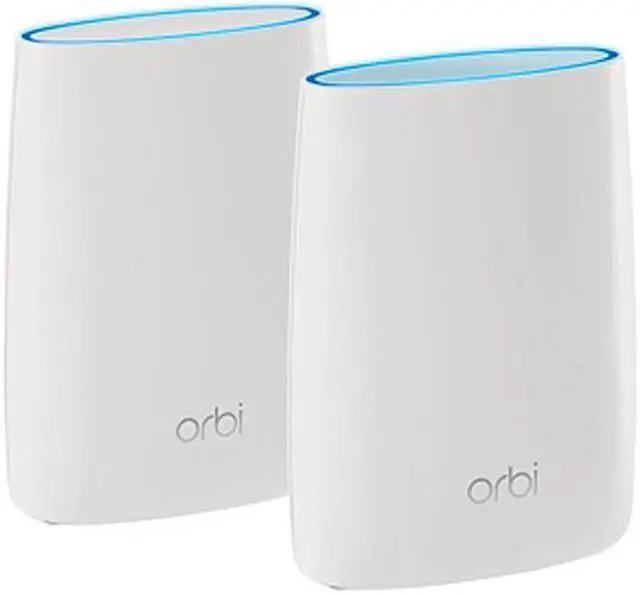
Credit: www.newegg.ca
Setup Tips For Orbi With Different Isps
Orbi mesh WiFi works with many internet service providers (ISPs). Setting it up can vary by connection type. Knowing the right steps helps avoid problems.
This guide covers setup tips for cable, fiber, and DSL ISPs. Follow these tips for a smooth Orbi installation.
Configuring With Cable Isps
Cable ISPs use a coaxial cable to deliver internet. Orbi needs to connect to the cable modem first. Make sure the modem is in bridge mode.
- Connect Orbi’s WAN port to the modem’s Ethernet port.
- Power on the modem and wait for it to fully connect.
- Power on the Orbi router and wait for it to boot up.
- Use the Orbi app to finish setup and check internet status.
- Restart the modem and Orbi if there is no internet connection.
Configuring With Fiber Isps
Fiber ISPs use an Optical Network Terminal (ONT). The ONT converts fiber signals to Ethernet. Connect Orbi to the ONT device with an Ethernet cable.
| Step | Action | Notes |
| 1 | Connect Orbi WAN port to ONT | Use the Ethernet port on the ONT device |
| 2 | Power on ONT and wait | Wait until ONT shows active connection |
| 3 | Power on Orbi router | Allow full boot before setup |
| 4 | Complete setup via Orbi app | Follow app instructions for network name and password |
Configuring With Dsl Isps
DSL ISPs use a phone line and a DSL modem. Orbi connects to the DSL modem’s Ethernet port. You may need to enter DSL settings manually.
Common DSL setup tips include:
- Set Orbi to use PPPoE if your ISP requires it.
- Enter the username and password provided by your ISP.
- Restart the DSL modem before connecting Orbi.
- Check that the DSL modem is in bridge mode if possible.
- Use the Orbi app to input all necessary login details.
Troubleshooting Common Issues
Orbi Mesh WiFi works with many internet service providers (ISPs). Sometimes, users face problems while using Orbi with their ISP. Troubleshooting these issues can help you fix your connection quickly.
This guide covers common problems like connectivity, speed, and firmware updates. Follow simple steps to improve your Orbi mesh WiFi experience.
Connectivity Problems
Connectivity issues can happen if your Orbi system does not link properly with your ISP. Check that all cables are connected firmly. Restart your modem and Orbi router to refresh the connection.
Make sure your ISP supports the type of internet service you use, like DSL or fiber. If you see no internet access, check your ISP account status for outages or billing problems.
- Check all cable connections
- Restart modem and Orbi router
- Verify ISP service type and status
- Reset Orbi to factory settings if needed
Speed And Performance
Slow internet speeds can reduce your Orbi mesh network’s performance. Place your Orbi satellites within good range of the main router for better speed. Avoid walls and metal objects that block signals.
Check your internet plan speed with your ISP. If your plan is slow, your Orbi system cannot increase speed beyond that limit. Use the Orbi app to test your network speed and find slow spots.
- Place satellites close to the router
- Avoid signal blockers like walls and metals
- Confirm your internet plan speed
- Test speed using the Orbi app
Firmware Updates
Firmware updates improve your Orbi’s compatibility and fix bugs. Check for updates regularly in the Orbi app or web interface. Install updates to keep your system running smoothly.
If updates fail, restart your Orbi device and try again. Do not turn off your router during updates. Keep your Orbi connected to the internet while updating firmware.
- Check for firmware updates often
- Use Orbi app or web interface to update
- Restart device if update fails
- Keep device powered and online during updates
Credit: www.netgear.com
Future-proofing Your Orbi Network
Orbi Mesh WiFi systems are designed to work with many ISPs. They help you stay connected as technology changes. Keeping your network up-to-date is important.
This guide shows how to ensure your Orbi network stays compatible with future tech trends. Learn how to make your network last.
2025 Technology Trends
New trends in technology can affect your Orbi network. Stay informed to keep your system current. Here are some trends to watch.
- Increased Internet of Things (IoT) usage
- Faster broadband speeds
- 5G network integration
- Advanced cybersecurity measures
Ensuring Long-term Compatibility
To ensure your Orbi network remains compatible, regular updates are key. Check for firmware updates often. This keeps your network secure and efficient.
| Task | Frequency |
| Check for firmware updates | Monthly |
| Review ISP compatibility | Yearly |
| Upgrade hardware if needed | Every 3 years |
Frequently Asked Questions
Which Isps Are Compatible With Orbi Mesh Wifi?
Orbi Mesh WiFi works with most major ISPs, including Comcast, AT&T, Verizon, and Spectrum. It supports both cable and fiber connections, making it versatile for home use. Always check your ISP’s modem compatibility for seamless integration.
Can Orbi Mesh Wifi Replace Isp Routers?
Yes, Orbi Mesh WiFi can replace your ISP’s router for better coverage. It offers improved speed and wider range. However, some ISPs require modem-router combo devices, so verify your ISP’s setup before switching.
Does Orbi Mesh Work With Fiber Internet Providers?
Orbi Mesh WiFi is compatible with fiber internet providers like Verizon Fios and AT&T Fiber. It connects through the modem provided by your ISP, enhancing WiFi coverage throughout your home without issues.
How To Set Up Orbi Mesh With My Isp Modem?
Connect your Orbi router to the ISP modem via Ethernet cable. Power both devices and follow the Orbi app instructions. This setup ensures your ISP modem handles internet while Orbi manages WiFi distribution.
Conclusion
Orbi mesh WiFi works well with most internet service providers. It helps spread strong WiFi signals across your home. Many ISPs support Orbi without extra setup. Small steps can boost your internet speed and coverage. Choosing the right mesh system matters for smooth online use.
Check your ISP’s details before buying any device. Orbi offers easy setup and reliable performance for many users. Enjoy steady WiFi in every room without hassle. This makes your home internet better and more stable. Simple and smart WiFi is within reach.


