
Are you tired of dead zones and slow internet in parts of your home? Your Tp-Link Deco Mesh Wifi system could be the answer to seamless, strong coverage everywhere you need it.
But how much area can it truly cover? Understanding the Tp-Link Deco Mesh Wifi coverage area is key to unlocking fast, reliable internet in every corner. Keep reading to discover how this system works, what to expect from its coverage, and how to get the most out of your setup.
Your perfect wifi experience starts here.

Credit: www.amazon.ca
Tp-link Deco Mesh Basics
Tp-Link Deco Mesh is a wifi system that spreads internet around your home. It uses several devices to cover large areas with strong wifi signals.
This system helps avoid weak wifi spots by linking multiple units. It creates one big network instead of many small ones.
Core Features
Deco Mesh units work together to give fast and steady wifi. They use smart technology to pick the best path for your data.
The system supports many devices at once. It also includes easy setup and parental controls to manage internet use.
- Whole-home wifi coverage
- Automatic device connection
- Easy setup with an app
- Parental controls and security
- Supports many devices at the same time
How Mesh Wifi Works
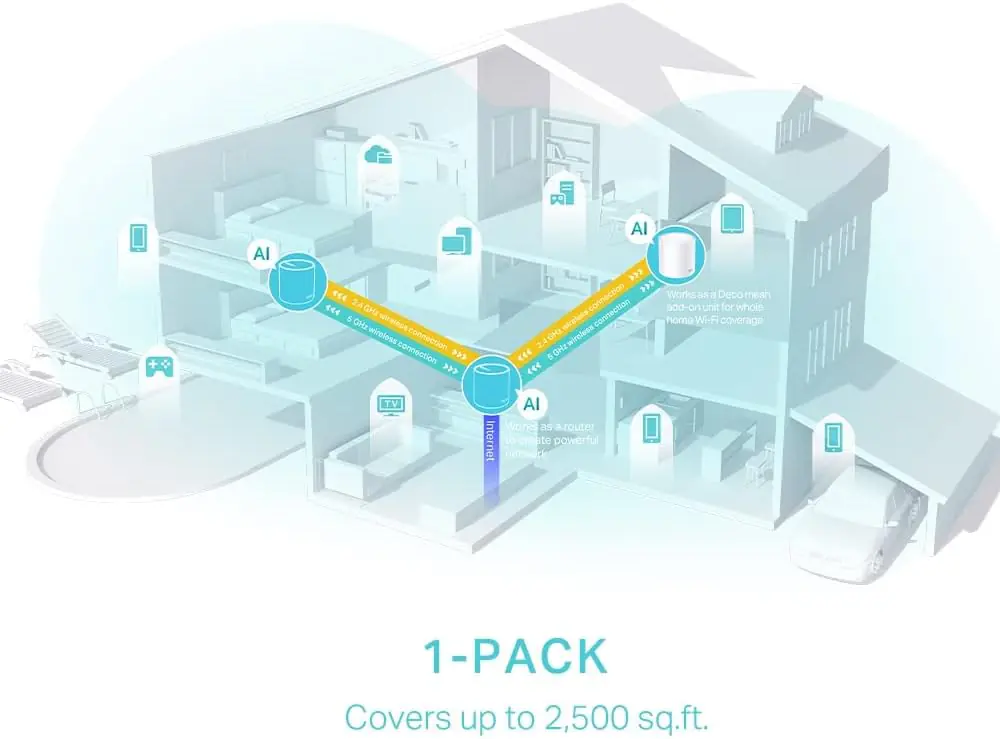
Mesh wifi uses multiple units called nodes. These nodes talk to each other to spread wifi signals evenly.
Each node acts like a small router. They work together to cover dead zones and keep your connection strong.
- One main node connects to your modem
- Other nodes connect wirelessly to the main node
- Nodes share wifi signals across your home
- Devices switch to the nearest node automatically
- The system fixes weak signals by adding more nodes
Credit: ezonelb.com
Coverage Area Factors
The coverage area of a Tp-Link Deco Mesh Wifi system depends on several important factors. These factors affect how well the signal reaches every corner of your home.
Understanding these factors helps you place the devices in the best spots for strong and steady wifi coverage.
Home Size And Layout
The size and shape of your home affect the mesh wifi coverage. Larger homes need more units to cover all areas.
- Open floor plans allow signals to travel farther without interruption.
- Multiple floors may require placing units on each level for full coverage.
- Long hallways can weaken the signal as it travels away from the main unit.
- Rooms with thick walls or many corners may need extra units to maintain strong wifi.
Obstacles And Interference
Physical obstacles and electronic interference can reduce the wifi signal strength. Common obstacles include walls, furniture, and appliances.
| Obstacle | Effect on Signal | Tip |
| Concrete Walls | Strongly weakens signal | Place units in open areas |
| Metal Objects | Reflects and blocks signal | Avoid placing units near metal |
| Microwave Ovens | Causes interference | Keep units away from kitchen appliances |
| Wireless Devices | Interference on same frequencies | Use 5 GHz band if possible |
Maximizing Coverage
The Tp-Link Deco Mesh Wifi system helps cover your home with strong internet. It uses multiple devices to spread the signal.
To get the best coverage, you need to place the Deco units in the right spots and add more units if needed. This guide explains how.
Optimal Router Placement
Place your main Deco unit near the center of your home for even coverage. Avoid putting it in a corner or near thick walls.
Keep the Deco unit away from metal objects and appliances that can block signals. Higher locations often work better than low spots.
- Center the main Deco unit in your house
- Keep away from metal and electronics
- Place on a shelf or high surface
- Avoid corners and thick walls
Using Additional Units
Add extra Deco units to cover larger homes or areas with weak signals. Each unit increases the mesh network range.
Place new units where the signal from the main Deco is still strong. This helps the network stay fast and stable.
- Use more Deco units for bigger homes
- Place new units where the signal is strong
- Keep units within range of each other
- Avoid barriers like thick walls between units
Performance Tips
Good WiFi coverage means a strong signal in every room. Tp-Link Deco mesh helps spread WiFi evenly.
Use these tips to make your Deco system work better and cover more area.
Firmware Updates
Keep your Deco devices updated with the latest firmware. Updates fix bugs and improve performance.
Check the app regularly to see if new firmware is available. Install updates as soon as you can.
- Fix security issues
- Improve device stability
- Add new features
- Enhance WiFi range and speed
Network Settings Optimization
Adjust your network settings to get better coverage and speed. Small changes can make a big difference.
Try changing the WiFi channel and band settings to reduce interference from other devices.
- Use 5 GHz band for faster speeds nearby
- Use 2.4 GHz band for longer range
- Choose less crowded WiFi channels
- Set up Quality of Service (QoS) to prioritize important devices
Troubleshooting Coverage Issues
Good WiFi coverage is important for a smooth internet experience. Sometimes, your Tp-Link Deco Mesh system may not cover all areas well.
This guide helps you find common problems and quick fixes to improve your mesh WiFi coverage.
Common Problems
Many factors can reduce your Deco Mesh WiFi coverage. Walls, furniture, and electronic devices can block signals. Too many devices on the network can slow down speeds. The placement of Deco units also affects coverage quality.
- Thick walls or floors block WiFi signals.
- Deco units placed too far apart lose connection.
- Electronic items cause interference.
- Too many devices connect at the same time.
- Old firmware may cause bugs and slowdowns.
Quick Fixes
Try these simple steps to solve coverage issues in your home or office.
- Move Deco units to open spaces and closer to each other.
- Avoid placing units near metal objects or microwaves.
- Limit the number of connected devices per Deco unit.
- Update Deco firmware using the Tp-Link app.
- Restart your Deco system to refresh connections.
| Problem | Quick Fix |
|---|---|
| Weak signal in some rooms | Place Deco units closer or add another unit. |
| Interference from electronics | Keep Deco units away from devices like microwaves. |
| Slow speeds with many devices | Disconnect unused devices or spread them across units. |
| Outdated firmware | Update firmware via the Tp-Link app regularly. |
Comparing Deco Models
Tp-Link Deco models offer various options for home Wi-Fi coverage. Each model has unique features and coverage areas. Understanding these differences helps in choosing the right model.
This comparison will highlight the coverage differences and the best choice for your home. It aims to simplify the decision-making process.
Coverage Differences
Different Deco models cover different areas. Knowing how much space each model covers is important. It helps in selecting the right option for your needs.
| Deco Model | Coverage Area |
| Deco M5 | Up to 5,500 square feet |
| Deco X20 | Up to 5,800 square feet |
| Deco X90 | Up to 6,000 square feet |
Best Choice For Your Home
Choosing the best Deco model depends on your home size. Larger homes need models with more coverage. Smaller homes can use models with less coverage.
- For small apartments, Deco M5 is suitable.
- For medium homes, consider Deco X20.
- For large homes, Deco X90 is ideal.

Credit: www.amazon.ca
Frequently Asked Questions
What Is The Coverage Area Of Tp-link Deco Mesh Wifi?
Tp-Link Deco Mesh Wifi typically covers up to 5,500 square feet with a 3-pack system. Coverage varies by model and home layout. Adding more units expands the coverage seamlessly.
How Many Deco Units Are Needed For Full Home Coverage?
A 3-pack Deco system usually covers a medium to large home. For bigger spaces, additional units can be added. This ensures strong, consistent Wifi throughout your property.
Does Tp-link Deco Support Outdoor Wifi Coverage?
Tp-Link Deco units are designed mainly for indoor use. Outdoor coverage depends on proximity to indoor units. For extended outdoor coverage, place units near exterior walls or use dedicated outdoor Wifi solutions.
How Does Deco Mesh Improve Wifi Coverage?
Deco Mesh creates a unified network with multiple nodes. It eliminates dead zones by extending signal range. This ensures smooth, reliable Wifi in every corner of your home.
Conclusion
Tp-Link Deco mesh systems cover large home areas with strong WiFi signals. They reduce dead zones and keep your connection steady. Setup is simple, and the system adapts to your needs. Different models offer various coverage sizes for any home.
Choose the right Deco to enjoy smooth internet everywhere. Reliable WiFi means better streaming, gaming, and browsing. A good mesh system makes your online time easier and more fun. Consider your space and device needs before buying. Tp-Link Deco offers solid coverage for most home setups.


