Are you wondering if a gaming router can boost your streaming experience too? You might have heard that gaming routers offer fast speeds and low lag, but does that actually help when you’re watching your favorite shows or live streams?
Choosing the right router can make a big difference in how smooth and enjoyable your streaming feels. Keep reading, and you’ll discover whether a gaming router is the smart choice for your entire home entertainment setup.
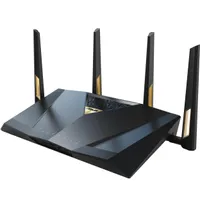
Credit: www.pcgamer.com
Gaming Routers Basics
Gaming routersare designed to provide fastand stable internetfor gaming. They offer low latencyto reduce lag during online play. These routers prioritize gaming traffic over other data for smoother gameplay.
Key Features Of Gaming Routers
- Quality of Service (QoS)to manage traffic priority.
- Dual or tri-band Wi-Fifor better connection options.
- Advanced antennasfor wider coverage.
- Powerful processorsto handle multiple devices.
- Customizable settingsfor better control.
How Gaming Routers Differ From Regular Routers
| Feature | Gaming Routers | Regular Routers |
|---|---|---|
| Traffic Prioritization | Yes, prioritizes gaming packets | No, treats all traffic equally |
| Latency | Low latency optimized | Higher latency |
| Hardware | Stronger processors and antennas | Basic hardware |
| Customization | More advanced options | Limited settings |
Streaming Needs
Gaming routers enhance streaming by reducing lag and improving connection stability. They prioritize bandwidth for smoother video playback. Ideal for high-quality streaming experiences.
Bandwidth And Speed Requirements
Streaming videos and live showsneed good internet speed. Higher bandwidthmeans better video quality without pauses. For HD streaming, at least 5 Mbpsdownload speed is needed. For 4K videos, speeds around 25 Mbpsor more work best. Upload speed matters for live streaming. A stable upload speed of 3 Mbpsor higher helps keep streams smooth.
Latency And Stability Factors
Low latencyreduces delays in live streaming and video calls. It keeps the stream close to real time. Stability means the internet connection stays strong without drops. Both latency and stability depend on your router and internet plan. Gaming routers often offer better control of these factors. They help keep streams clear and reduce buffering.
Gaming Routers For Streaming
Gaming routersoften provide strong and steady connections. This helps with streaming videos or live broadcasts without lag or buffering. Their high data speedskeep streams clear and smooth.
Quality of Service (QoS)settings let you choose which devices or apps get priority. This keeps important tasks like streaming or gaming fast and smooth even with many devices connected.
Managing many devices is easier with gaming routers. They handle multiple connections well, so your phone, computer, and smart TV can all work without slowing down.
| Feature | Benefit for Streaming |
|---|---|
| High-speed connections | Reduces buffering and lag during streams |
| QoS settings | Gives streaming apps priority over others |
| Multi-device handling | Keeps all devices connected smoothly |
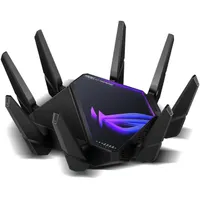
Credit: www.pcgamer.com
Comparing Alternatives
Standard routerswork fine for everyday internet tasks. They handle multiple devices but may slow down with many users. Gaming routersfocus on lower lag and faster speeds for games. They prioritize gaming traffic but can also help streaming by reducing buffering. For casual streaming, a standard router is usually enough. For heavy streaming and gaming, a gaming router can offer better performance.
Mesh networksuse several devices to cover large areas with strong Wi-Fi. They help avoid dead spots in big homes. Mesh systems provide smooth streaming by keeping strong signals everywhere. They work well with both standard and gaming routers. Mesh networks are great for many devices streaming at the same time. They give reliable internet without slowdowns.
Optimizing Your Router
Firmware updateskeep your router secure and fast. Check for updates often. They fix bugs and improve performance.
Adjusting router settingshelps streaming and gaming. Enable Quality of Service (QoS) to give priority to streaming traffic.
Place the router in a central locationto cover all devices well. Avoid walls and metal objects that block signals.
Use a wired connectionfor the best speed and stability. Ethernet cables reduce lag and interruptions.
| Network Configuration Tips | Why It Helps |
|---|---|
| Set up separate Wi-Fi bands (2.4 GHz and 5 GHz) | Reduces interference and balances device load |
| Assign static IPs for important devices | Keeps connections stable and easy to manage |
| Enable UPnP or port forwarding for streaming apps | Improves connection quality and reduces buffering |

Credit: www.ign.com
Budget Considerations
Budget plays a key role in choosing a router for both gaming and streaming. Gaming routers often cost more, so weigh if extra features suit your streaming needs. Simple routers might work fine if budget is tight.
Cost Vs Performance
Gaming routers can be pricey. They often come with advanced features. These features include better speed and stronger connections. But, higher cost doesn’t always mean better performance. Consider your streaming needs first. A basic router might work well for simple streaming. For heavy use, a more expensive router might be needed. Balance the cost with what you need.
Best Gaming Routers For Streaming Under Different Budgets
- Low Budget: TP-Link Archer C7 – Affordable and reliable.
- Mid Budget: ASUS RT-AC86U – Offers good speed and coverage.
- High Budget: Netgear Nighthawk AX12 – Excellent for high-speed streaming.
Choose a router based on your budget and streaming needs. It’s important to find the right fit for your household.
Frequently Asked Questions
Are Gaming Routers Good For Streaming Video?
Yes, gaming routers offer fast speeds and low latency, which benefits streaming video quality. Their advanced features reduce buffering and improve connection stability during high-demand streaming.
Can Gaming Routers Handle Multiple Streaming Devices?
Gaming routers are designed to manage multiple devices simultaneously. They prioritize bandwidth efficiently, ensuring smooth streaming across various devices without lag or interruptions.
Do Gaming Routers Improve Streaming Quality?
Gaming routers improve streaming quality by reducing lag and packet loss. Their superior hardware and QoS settings optimize data flow, resulting in clearer and uninterrupted streams.
Is A Gaming Router Worth It For Streaming?
A gaming router is worth it if you stream frequently or have many devices. Its enhanced speed and performance enhance streaming experience significantly compared to regular routers.
Conclusion
Gaming routers offer strong, stable connections that help streaming. They handle heavy internet use without slowing down your video. This means fewer pauses and better picture quality. Many models also reduce lag, which is great for live streams. You can enjoy gaming and streaming on one device easily.
Choosing the right router depends on your internet speed and needs. Overall, a gaming router can be a smart choice for smooth streaming. It supports both activities well without extra hassle. Perfect for those who want good performance all around.