Have you ever wondered if your portable router can connect to public WiFi? Imagine turning any café, airport, or hotel hotspot into your own secure network.
This could keep your devices safe and give you more control over your internet connection. But is it really possible, and how do you do it? You’ll discover exactly how a portable router works with public WiFi and why it might be the smart move for your online security and convenience.
Keep reading to find out how to stay connected safely wherever you go.
How Portable Routers Work
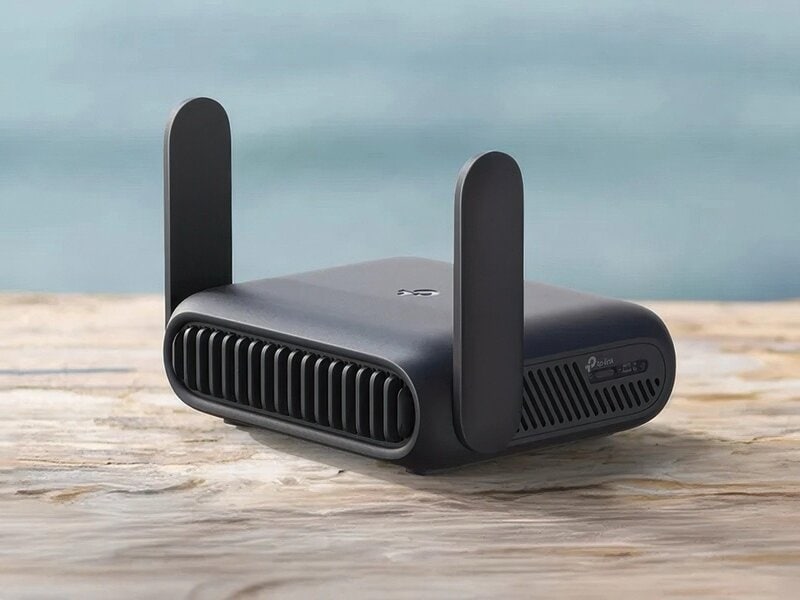
Understanding how portable routers work can change the way you connect to public WiFi. These small devices act as a bridge between your gadgets and the internet source, giving you more control over your connection. Knowing their functions helps you decide if they fit your connectivity needs, especially in places with shared networks.
Basic Functions
At its core, a portable router takes an existing internet signal and shares it with multiple devices. It can connect to public WiFi, cellular networks, or wired connections and then create a private WiFi hotspot for your devices. This means you can connect your phone, laptop, or tablet securely without each device needing to authenticate separately on the public network.
Security is a major benefit here. Since the portable router acts as a middleman, it encrypts your data, protecting it from other users on the same public WiFi. This can be especially useful if you often work from cafes or airports where networks are crowded and less secure.
Types Of Portable Routers
- Battery-Powered Routers:These are compact and designed for travel. You can use them anywhere, even without access to power outlets. Their portability makes them ideal for outdoor work or long trips.
- USB-Powered Routers:These routers draw power directly from your laptop or other USB sources. They’re convenient when you have limited space or want to reduce the number of devices you carry.
- Cellular Portable Routers:These routers use SIM cards to access mobile data networks like 4G or 5G. They’re perfect if you don’t want to rely on public WiFi at all, offering a private connection wherever there is cellular coverage.
Have you ever considered how much safer your online activity could be with a portable router on a public network? It’s not just about convenience but also about protecting your privacy every time you connect.

Credit: www.pocnetwork.net
Connecting To Public Wifi
Connecting to public WiFi with a portable router can be simple. Many users want to share one public WiFi connection across multiple devices. This section explains how to access public networks and the usual restrictions you might face.
Accessing Public Networks
Public WiFi is available in cafes, airports, hotels, and libraries. To connect a portable router, first find the WiFi network name. Open your router’s settings and scan for available networks. Select the public WiFi network and enter any required password or accept terms on a login page.
Some routers allow you to save the public WiFi credentials. This way, they reconnect automatically when in range. After connection, your router creates a private WiFi network for your devices. This helps multiple gadgets share one public WiFi link safely.
Common Restrictions
Many public networks limit how you use them. These restrictions protect the network and manage traffic. Common limits include:
- Captive portals requiring login or acceptance of terms
- Time limits on how long you can stay connected
- Device limits restricting how many devices can use the network
- Blocked services or ports to prevent certain types of traffic
Some public WiFi spots block routers to avoid sharing. Your portable router might not connect if the network detects it. In such cases, try using the router’s client mode or check for updates from the router maker.
Using A Portable Router With Public Wifi
Using a portable router with public WiFi can enhance your online experience by adding a layer of security and providing a stable connection for multiple devices. Instead of connecting each device directly to a public hotspot, your portable router acts as a bridge, managing the connection and helping protect your data. However, setting up and using a portable router with public WiFi comes with its own set of challenges and considerations.
Setup Process
Setting up a portable router with public WiFi usually starts with connecting the router to the hotspot network. You’ll need to access the router’s admin panel through a browser or app and enter the public WiFi’s network name (SSID) and password.
Once connected, the router creates a private network for your devices. This means you only connect your phone, laptop, or tablet to your portable router, not directly to the public WiFi.
Keep in mind, some public WiFi networks require additional login steps on a web page (captive portal). You might have to open a browser on one device, accept terms, or enter credentials before the router can fully access the internet.
Compatibility Issues
Not all portable routers can connect seamlessly to every public WiFi. Some routers struggle with networks that use captive portals or require device-specific authentication.
Additionally, some public hotspots limit the number of devices connected or restrict router use entirely. If the hotspot detects multiple devices coming from one router, it might block the connection.
Before buying or using a portable router, check if it supports the specific authentication methods used by the public WiFi you plan to connect to. Also, consider routers with built-in VPN options for extra security, especially on unsecured public networks.
Security Considerations
Connecting a portable router to public WiFi can be convenient, but it also brings security challenges you need to understand. Public networks are often less secure, and using your portable router in these environments requires extra caution. Let’s look closely at the risks and how you can protect your connection effectively.
Risks Of Public Wifi
Public WiFi networks are often open and lack strong encryption, making it easier for hackers to intercept your data.
- Data interception:Attackers can capture sensitive information like passwords or credit card numbers.
- Man-in-the-middle attacks:Hackers position themselves between you and the internet to steal or alter your data.
- Malware distribution:Public networks can be a breeding ground for malware that infects connected devices.
You might think your portable router adds a layer of protection, but if it connects to an unsecured public WiFi, it inherits these risks. Have you ever wondered how safe your data really is when using free WiFi at cafes or airports?
Protecting Your Connection
Taking a few simple steps can significantly boost your security when using a portable router on public WiFi.
- Use a VPN:A Virtual Private Network encrypts your internet traffic, making it unreadable to outsiders.
- Enable router firewall:Most portable routers come with a built-in firewall—make sure it’s activated to block unwanted access.
- Keep firmware updated:Regularly update your router’s software to patch security vulnerabilities.
- Use strong passwords:Set unique, complex passwords for your router and WiFi network to prevent unauthorized access.
During a recent trip, I relied on a portable router connected to public WiFi. Activating a VPN and updating the router’s firmware made a noticeable difference in how secure I felt online. What simple security steps can you add today to protect your portable router connection?
Benefits Of Using Portable Routers
Using a portable router to connect to public WiFi offers several advantages that can improve your online experience. It gives you more control over your connection and helps keep your data safe. If you’ve ever struggled with spotty public WiFi or worried about security risks, a portable router could be the solution you didn’t realize you needed.
Improved Security
Public WiFi networks are often unsecured, making it easy for hackers to intercept your data. A portable router creates a private network, adding a layer of encryption to your connection. This means your passwords, emails, and sensitive information stay protected from prying eyes.
Think about how many times you’ve avoided online banking or shopping on public WiFi. With a portable router, you can confidently perform these tasks without fear of data theft. It acts as a shield, reducing risks significantly.
Multiple Device Support
One portable router can connect several devices at once. Whether you have a phone, laptop, tablet, or even smart gadgets, you don’t need separate connections for each. This not only saves data but also simplifies managing your network.
Imagine traveling with friends or family and sharing one secure internet source. It’s more convenient than relying on unstable or overcrowded public hotspots. Plus, you can prioritize which devices get bandwidth, ensuring smooth streaming or video calls.

Credit: www.amazon.com
Troubleshooting Common Problems
Portable routers offer flexibility by connecting to public WiFi networks. Still, some common problems can stop the connection or slow it down. Troubleshooting these issues can help keep your internet stable and fast.
Connection Failures
Connection failures happen when the portable router cannot join the public WiFi. Check if the WiFi network requires a password or a login page. Some public WiFi needs you to accept terms before connecting.
Make sure your router is in range of the WiFi signal. Walls and distance reduce signal strength. Restart the router to clear temporary errors. Also, check if the public WiFi has a device limit. Too many devices can block new connections.
Slow Speeds
Slow speeds occur when many users share the same public WiFi. This overloads the network and reduces speed for everyone. Try moving closer to the WiFi source to get a stronger signal.
Close apps or devices that use much data. Streaming or downloads can slow your connection. Restart the router to refresh the link. Some public WiFi has speed limits. In such cases, only basic browsing might work smoothly.
Best Practices For Public Wifi Use
Using public WiFi can be convenient but risky. Protecting your data is crucial when connecting to these networks. There are best practices you should follow to ensure your safety online.
Safe Browsing Tips
Always connect to secure websites. Look for “https” in the URL. This indicates a secure connection. Avoid websites without this prefix. They might not encrypt your data. This leaves you vulnerable to hackers.
Update your browser regularly. New updates fix security issues. An outdated browser can expose you to threats. Use a reliable antivirus program. It provides an extra layer of protection. This helps to block malicious sites.
Avoiding Data Theft
Do not share sensitive information on public WiFi. This includes passwords and banking details. Hackers can easily intercept this data. Turn off sharing features on your device. This prevents unauthorized access.
Use a Virtual Private Network (VPN). It encrypts your connection. This makes it harder for attackers to see your activity. Regularly check your device for updates. Updates often include security patches. Keeping your device current reduces risks.
Credit: www.trendhunter.com
Frequently Asked Questions
Can A Portable Router Connect To Public Wifi Networks?
Yes, a portable router can connect to public WiFi by using its WAN port or wireless repeater mode. It captures the public signal and shares it securely with your devices, enhancing privacy and connection stability.
How Secure Is Using Public Wifi With A Portable Router?
Using a portable router adds a security layer by creating a private network. It encrypts data between your devices and the router, reducing risks from hackers on public WiFi hotspots.
Does A Portable Router Improve Public Wifi Speed?
A portable router can optimize speed by managing multiple devices and reducing interference. However, it cannot increase the original public WiFi bandwidth, which depends on the hotspot provider.
Can I Use A Portable Router For Multiple Devices On Public Wifi?
Yes, portable routers allow multiple devices to connect simultaneously to a single public WiFi source. This makes sharing internet access convenient for groups or families.
Conclusion
A portable router can connect to public WiFi and share the internet. It helps protect your devices by creating a private network. Using one can improve your connection speed and stability. Always stay cautious on public networks to avoid risks.
Portable routers offer a handy way to stay online safely. They are simple tools for better internet access anywhere. Consider a portable router for secure and easy WiFi sharing.