Have you ever found yourself stuck with a slow or unreliable Wi-Fi connection while traveling? Maybe you have a strong Ethernet cable nearby but no way to share it with your devices.
What if there was a simple tool that could turn that wired connection into a wireless signal you and your devices can use anywhere? That’s exactly where a travel router comes in. But can a travel router share an Ethernet connection effectively?
Keep reading to find out how this small gadget can change the way you stay connected on the go—and why it might be the perfect travel companion you didn’t know you needed.
How Travel Routers Work
Understanding how travel routers work can help you decide if they fit your connectivity needs on the go. These compact devices create a mini network, allowing multiple gadgets to share one internet source. Whether you’re in a hotel room or a coffee shop, a travel router can turn a simple wired or wireless connection into a reliable Wi-Fi hotspot for all your devices.
Basic Functions
At its core, a travel router acts like a bridge between your internet source and your devices. It receives internet either through an Ethernet cable or a Wi-Fi signal and then shares it by creating its own Wi-Fi network.
Travel routers often come with features like:
- Network security:Protects your connection with passwords and encryption.
- Multiple device support:Allows smartphones, laptops, and tablets to connect simultaneously.
- Portability:Compact size and low power consumption make it perfect for travel.
Think about the last time you struggled with weak hotel Wi-Fi. A travel router can boost that connection, making streaming or video calls smoother and more reliable.
Types Of Connections Supported
Travel routers are flexible when it comes to the types of connections they support. They typically accept:
- Ethernet:Plug in a wired connection from a modem or hotel Ethernet port to share stable internet.
- Wi-Fi:Connect to existing wireless networks and rebroadcast the signal to your devices.
- USB Tethering:Some models allow you to share mobile data from your smartphone via USB.
Can a travel router share an Ethernet connection? Absolutely. This is one of their most useful features, especially when Wi-Fi is either unavailable or unreliable.
Next time you’re in a spot with just a single Ethernet jack, ask yourself if your travel router is ready to turn that wired connection into a personal Wi-Fi zone. It might just save your workday or keep your entertainment flowing without interruptions.
Ethernet Sharing Capabilities
Travel routers often come with Ethernet sharing capabilities that expand network options. These devices can link wired internet to multiple wireless devices. This is useful in hotels, conference rooms, or any place with a wired connection but no Wi-Fi.
Ethernet sharing allows a travel router to act as a bridge. It connects a wired Ethernet line and creates a wireless network for other devices. This setup provides better internet access and improves connectivity in remote areas.
Connecting Via Ethernet
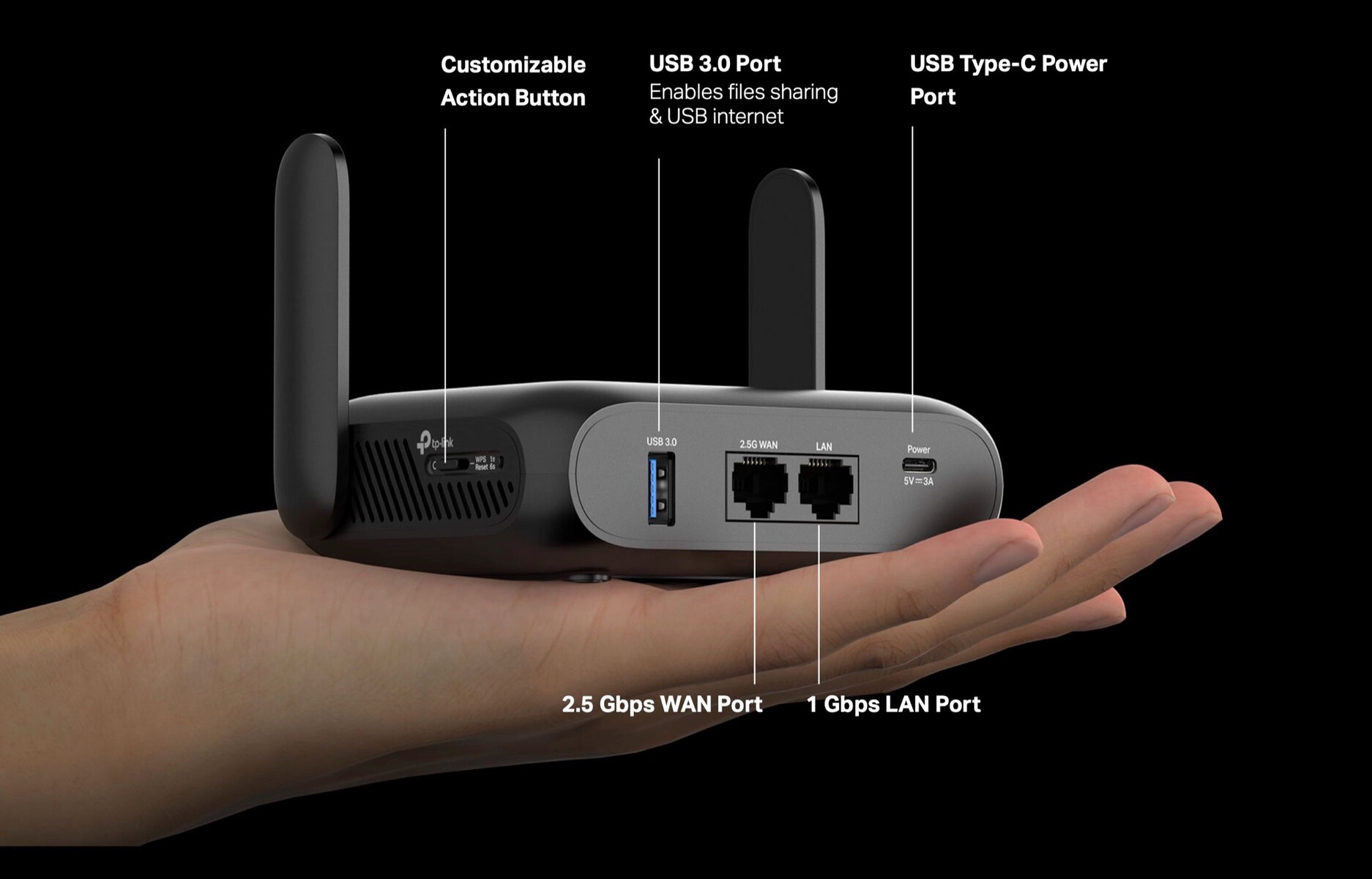
Plug the Ethernet cable into the travel router’s WAN port. This port receives the wired internet signal from the hotel or office network. The router then shares this connection across its wireless network.
Some travel routers have multiple Ethernet ports. These allow users to connect other wired devices, like laptops or gaming consoles. The router acts as a switch, distributing the internet through Ethernet and Wi-Fi.
Converting Wired To Wireless
The main function of a travel router is to convert wired internet to wireless. It creates a private Wi-Fi hotspot from the Ethernet connection. Devices like phones, tablets, and laptops can join this network easily.
This conversion helps avoid public Wi-Fi risks. It offers a secure and stable connection for travelers. Also, it supports multiple devices sharing one wired connection at the same time.
Benefits Of Using A Travel Router
Using a travel router can change the way you stay connected during your trips. It’s not just about having internet access—it’s about making that connection better, safer, and more flexible. Let’s look at some of the key benefits you can gain by adding a travel router to your travel gear.
Enhanced Wifi Coverage
A travel router can boost WiFi signals in places where coverage is weak or inconsistent. Instead of struggling with spotty hotel WiFi, you can create a strong and stable network around you. This means fewer interruptions during video calls or streaming, making your experience much smoother.
Have you ever been frustrated by a dead zone in your hotel room? A travel router can solve that by extending the signal, so you can work or relax anywhere in the space.
Multiple Device Connectivity
Travel routers allow you to connect several devices simultaneously without losing speed. Whether you’re using a laptop, smartphone, tablet, or even a gaming console, everyone in your group can stay online. This is especially useful if you’re traveling with family or friends, ensuring everyone stays connected.
Think about how much easier it is to share information or stream entertainment when all your devices link to one reliable network. It saves you from juggling multiple hotspot connections or paying extra for multiple devices.
Improved Security Features
Public WiFi networks often have weak security, leaving your data exposed. A travel router adds a layer of protection by creating a private network for your devices. It can include features like WPA3 encryption, firewalls, and VPN compatibility to keep your information safe.
Have you ever hesitated to enter sensitive information on public WiFi? Using a travel router can give you peace of mind by shielding your connection from hackers and snoopers.

Credit: www.theverge.com
Setting Up Ethernet Sharing
Setting up a travel router to share an Ethernet connection turns a wired network into a wireless hotspot. This setup is handy in hotels or offices with Ethernet ports but no Wi-Fi. It allows multiple devices to connect wirelessly using one wired connection.
The process requires some basic equipment and a few simple configuration steps. Follow the instructions carefully to ensure a stable and secure connection.
Required Equipment
- A travel router with Ethernet port support
- An Ethernet cable to connect the router to the wired network
- A power source for the travel router (USB or power adapter)
- A device (laptop, smartphone) to access the router’s settings
Step-by-step Configuration
- Connect the Ethernet cable from the wall port to the travel router’s WAN or Ethernet input.
- Power on the travel router and wait until it boots up completely.
- Use your device to connect to the router’s default Wi-Fi network or via a USB cable if supported.
- Open a web browser and enter the router’s default IP address to access the admin panel.
- Log in using the default username and password found in the router’s manual.
- Locate the network or Internet settings section in the admin panel.
- Set the Internet connection type to DHCP or automatic to get an IP address from the Ethernet line.
- Configure the wireless network name (SSID) and password for security.
- Save the settings and restart the router if prompted.
- Test the connection by connecting your devices to the new Wi-Fi network.
Common Use Cases
Travel routers have become indispensable gadgets for those who frequently find themselves on the road. They offer the flexibility of sharing a single Ethernet connection among multiple devices, transforming connectivity experiences in various scenarios. Whether you’re in a hotel, navigating business travel, or working remotely, a travel router can become your best travel companion.
Hotels And Public Networks
Staying in hotels often means relying on less-than-stellar Wi-Fi, which can be a headache. A travel router can turn that single Ethernet port in your hotel room into a secure, private network for all your devices. Imagine streaming your favorite show without buffering or catching up on emails without constant disconnects.
Public networks, like those in cafes or airports, can be risky. By using a travel router, you create a secure shield around your devices, reducing the risk of hacking. It’s like having your own private Wi-Fi bubble in a sea of public chaos.
Business Travel
Business travelers know the importance of staying connected and productive. A travel router ensures you can hold video conferences and access work files without interruption. It’s especially useful when multiple colleagues are on the same trip, allowing everyone to connect without hogging the hotel’s limited bandwidth.
Consider those late-night work sessions in unfamiliar cities—having a reliable network can make all the difference. You focus on your tasks while your travel router handles the connectivity.
Remote Work Scenarios
Remote work isn’t confined to home offices; sometimes, the best inspiration comes from a change of scenery. Whether you’re working from a mountain cabin or a beachside villa, a travel router ensures you stay connected to your team. It’s the bridge that keeps you tethered to your responsibilities while enjoying the perks of remote work.
Think about the convenience of setting up a mini office wherever you go. The flexibility of a travel router allows you to turn any location with an Ethernet connection into a productive workspace. Wouldn’t that make your work-life balance more enjoyable?
In short, a travel router not only enhances your internet experience but also offers peace of mind. Where will your travel router take you next?

Credit: mashable.com
Choosing The Right Travel Router
Choosing the right travel router can change how you connect on the go. A good router shares your Ethernet connection easily and keeps your devices safe. It should be small, reliable, and fast enough for your needs. Not all travel routers are the same. Some offer extra features that help in hotels or busy airports. Picking one with the right features ensures smooth internet access wherever you travel.
Key Features To Look For
- Ethernet Port: Must have at least one Ethernet port for wired connection sharing.
- Wi-Fi Standards: Look for routers supporting Wi-Fi 5 (802.11ac) or Wi-Fi 6 for speed.
- Security: WPA3 encryption and guest network options protect your data.
- Battery Life: A built-in battery helps if power outlets are scarce.
- Size and Weight: Compact and lightweight for easy packing and travel.
- Setup Ease: Simple setup with clear instructions saves time.
- Multiple Device Support: Supports many devices without slowing down the network.
Top Models On The Market
| Model | Ethernet Ports | Wi-Fi Standard | Battery | Price |
|---|---|---|---|---|
| TP-Link TL-WR902AC | 1 | Wi-Fi 5 (802.11ac) | No | Budget-friendly |
| GL.iNet GL-MT300N-V2 | 1 | Wi-Fi 4 (802.11n) | Yes, 3000mAh | Affordable |
| Netgear Nighthawk M1 | 1 | Wi-Fi 5 (802.11ac) | Yes, 5040mAh | Premium |
| Asus RT-AC53 | 1 | Wi-Fi 5 (802.11ac) | No | Mid-range |
Troubleshooting Tips
Having a travel router share an Ethernet connection can be a game-changer for staying connected on the go. Yet, it’s not always smooth sailing. If you hit a snag, knowing how to troubleshoot can save you time and frustration.
Connection Issues
If your travel router isn’t sharing the Ethernet connection properly, start by checking the physical setup. Ensure the Ethernet cable is fully plugged into the correct port on both the router and the source device.
Sometimes, the router’s settings might block the connection. Access the router’s admin page and verify that the WAN port is set to receive the Ethernet connection. If DHCP is disabled, enable it to assign IP addresses automatically.
Have you tried rebooting the router? A simple restart often clears temporary glitches. Also, check if your Ethernet source has any restrictions, like MAC address filtering, that might prevent new devices from connecting.
Performance Optimization
Sharing an Ethernet connection can sometimes lead to slower speeds or unstable signals. To boost performance, place your travel router in an open area, away from walls or electronic interference.
Adjust the router’s wireless channel to one with less traffic. Apps like Wi-Fi Analyzer can help you find the best channel. You might notice a significant improvement just by switching to a less crowded frequency.
Consider the number of devices connected. Too many users can overload the router. Limiting connected devices or setting up Quality of Service (QoS) rules ensures your most important devices get priority bandwidth.
Credit: www.notebookcheck.net
Frequently Asked Questions
Can A Travel Router Share An Ethernet Connection?
Yes, a travel router can share an Ethernet connection by converting it into a Wi-Fi network. It allows multiple devices to connect wirelessly using one Ethernet source, ideal for travel or remote locations without Wi-Fi.
How Do I Set Up A Travel Router With Ethernet?
To set up, connect the Ethernet cable to the travel router’s WAN port. Power on the router, then configure settings via its web interface or app to create a wireless network.
Can Travel Routers Improve Ethernet Connection Speed?
Travel routers generally do not improve Ethernet speed. They share the existing connection but may introduce slight overhead, sometimes reducing speed due to wireless transmission limits.
Are Travel Routers Compatible With All Ethernet Connections?
Most travel routers support standard Ethernet connections, including DSL and cable modems. Check the router’s specifications to ensure compatibility with your specific Ethernet service.
Conclusion
A travel router can share an Ethernet connection easily. It helps create a wireless network from a wired source. This is useful in hotels or places with only Ethernet ports. Setting up is simple and takes just minutes. It allows multiple devices to connect at once.
Travel routers are small and easy to carry. They improve internet access on the go. Sharing Ethernet through a travel router is practical and smart. It makes traveling with many devices much easier. A good choice for staying connected anywhere.