Are you wondering if a budget router can handle your Xbox gaming needs? You want smooth gameplay, fast downloads, and zero lag, but you don’t want to break the bank.
The truth is, not all routers are created equal, and choosing the right one can make or break your gaming experience. You’ll discover whether a budget router is really enough for your Xbox and what to look out for before making a decision.
Keep reading to make sure your next gaming session is as seamless as possible.
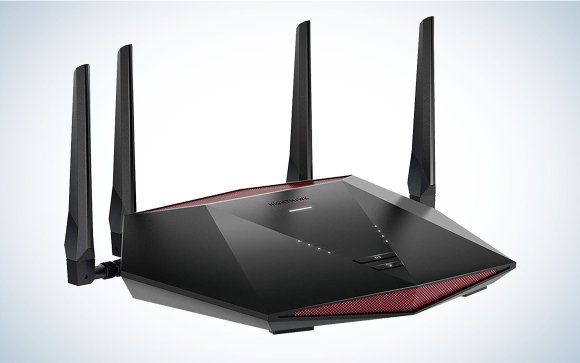
Credit: www.popsci.com
Choosing Budget Routers For Gaming
Choosing a budget router for gaming requires careful thought. A router affects your Xbox’s connection speed and stability. Picking the right one can improve your online play without spending too much.
Budget routers can offer good performance but have limits. Knowing what features matter helps avoid common issues. Focus on what supports smooth gaming and reliable connections.
Key Features To Look For
- Dual-band support for less Wi-Fi interference
- Gigabit Ethernet ports for stable wired connections
- Quality of Service (QoS) to prioritize gaming traffic
- Good Wi-Fi range to cover your gaming area
- Fast processor to handle multiple devices smoothly
Common Limitations Of Budget Models
- Lower maximum speeds than high-end routers
- Less advanced QoS settings and fewer customization options
- Weaker signal strength and shorter range
- Limited number of Ethernet ports for wired devices
- Possible slower updates and firmware support

Credit: www.ign.com
Setting Up Your Router For Xbox
Setting up your router for Xbox is key for smooth online gaming. A well-configured router helps reduce lag and connection drops. Budget routers can work well if set up correctly. Focus on network settings and port forwarding to improve your gaming experience. These adjustments make your Xbox communicate better with game servers.
Optimizing Network Settings
Adjust your router’s settings to prioritize Xbox traffic. Enable Quality of Service (QoS) to give gaming packets higher priority. This reduces lag during gameplay. Set your Xbox to use a static IP address. This helps keep your connection stable and consistent. Use the 5 GHz Wi-Fi band if your router supports it. It offers faster speeds and less interference than 2.4 GHz.
- Enable QoS and prioritize Xbox traffic
- Assign a static IP address to your Xbox
- Choose 5 GHz Wi-Fi for better speed
- Update your router firmware for best performance
Port Forwarding Essentials
Port forwarding opens specific paths in your router for Xbox data. It improves connection quality and matchmaking speed. Forward these Xbox Live ports:
| Port | Type | Purpose |
|---|---|---|
| 88 | UDP | Xbox Live Services |
| 3074 | UDP & TCP | Multiplayer Gaming |
| 53 | UDP & TCP | DNS Requests |
| 80 | TCP | HTTP Traffic |
| 500 | UDP | IPsec VPN |
| 3544 | UDP | Teredo Tunneling |
| 4500 | UDP | IPsec NAT Traversal |
Access your router’s control panel to add these ports. Use your Xbox’s static IP address for forwarding rules. This ensures the right device receives the data. Port forwarding reduces NAT type issues and connection errors.
Improving Connection Stability
Improving connection stability is key for smooth Xbox gaming. A stable connection reduces lag, disconnections, and improves gameplay. Budget routers can support stable connections with the right setup. Understanding wired and wireless options helps maximize performance. Managing interference also plays a vital role in keeping your gaming steady.
Wired Vs Wireless Connections
Wired connections use Ethernet cables directly from the router to Xbox. This method offers lower latency and fewer interruptions. Wired setups avoid common wireless problems like signal drops.
Wireless connections provide flexibility and easier setup. But signals can weaken due to distance or obstacles. Budget routers may have weaker wireless signals, affecting stability. Use wired connections for the best and most stable experience.
Reducing Interference And Lag
Wireless signals face interference from many devices. Microwaves, cordless phones, and other Wi-Fi networks cause lag. Budget routers often have fewer features to reduce interference.
Place your router away from other electronics. Use the 5 GHz band if your router supports it. This band is less crowded and offers faster speeds. Change the Wi-Fi channel to avoid overlapping with neighbors.
- Keep the router in an open space
- Limit the number of devices connected
- Update router firmware regularly
- Avoid physical barriers like walls and metal objects
These steps help improve connection stability even on budget routers.

Credit: www.popsci.com
Performance Expectations
When considering a budget router for your Xbox gaming experience, performance expectations are crucial. While budget routers might not boast the high-end specs of their pricier counterparts, they can still offer a satisfactory gaming experience if selected wisely. Understanding the key performance aspects can help you make an informed decision and enhance your gaming sessions.
Latency And Speed Considerations
Latency is a critical factor in gaming. It can be the difference between victory and defeat in fast-paced games. With a budget router, you may face higher latency compared to premium models, but many budget routers today support adequate speeds for casual gaming. Ensure your router supports at least 802.11ac or Wi-Fi 5 technology for better speed performance.
Speed is equally important. While your internet speed depends largely on your ISP, a router that can’t handle high speeds will bottleneck your connection. Look for routers with dual-band capabilities to manage your Xbox gaming without compromising on speed.
Handling Multiple Devices
In most households, multiple devices are connected to the network at any given time. This can strain a budget router. However, many modern budget routers come with features like MU-MIMO, which helps manage multiple connections efficiently.
Consider the number of devices that will be connected simultaneously. If your family streams videos while you game, opt for a router that can handle congestion without dropping performance. A personal experience I had was upgrading to a budget router with QoS settings, which prioritized my Xbox traffic, significantly improving my gaming sessions.
Have you ever wondered how your router affects your gaming experience? By understanding these performance expectations, you can make a smarter choice without breaking the bank. Invest in a budget router wisely, and it might just surprise you with its capabilities.
Advanced Tips For Gaming Success
Even if you’re using a budget router for your Xbox, there are smart ways to boost your gaming experience. Advanced tweaks can help reduce lag, improve connection stability, and prioritize your gameplay traffic. These tips focus on practical steps that you can apply today without needing expensive equipment.
Qos Configuration
Quality of Service (QoS) settings let you tell your router to prioritize Xbox traffic over other internet use. This means your game data gets the fastest lane, reducing lag during intense matches.
Most budget routers include a basic QoS feature. You just need to:
- Access your router’s admin panel, usually via a web browser.
- Find the QoS section and enable it.
- Set your Xbox’s IP address or MAC address as the highest priority device.
By doing this, your downloads or streaming won’t slow down your gaming. Have you noticed your connection improve after prioritizing your Xbox?
Firmware Updates And Security
Keeping your router’s firmware updated can make a big difference. Updates often fix bugs and improve performance, which directly affects your gaming quality.
Check your router’s settings regularly for updates. If your budget router doesn’t have automatic updates, visit the manufacturer’s website every few months.
Also, securing your network is crucial. A strong password prevents others from using your bandwidth and causing lag. Are you sure no one else is slowing down your connection right now?
Frequently Asked Questions
Can Budget Routers Handle Xbox Online Gaming?
Yes, budget routers can support Xbox gaming, but may offer slower speeds and higher latency. For smooth gameplay, prioritize routers with stable connections and minimal lag.
Are Budget Routers Compatible With Xbox Live Services?
Most budget routers work with Xbox Live, but some may struggle under heavy network load. Ensure your router supports necessary ports and offers steady performance for optimal Xbox Live use.
Will A Budget Router Affect Xbox Download Speeds?
Budget routers can limit download speeds compared to high-end models. However, a good budget router with strong Wi-Fi can still provide decent download rates for game updates and content.
Should I Choose A Wired Or Wireless Budget Router For Xbox?
Wired connections generally offer lower latency and more stable performance for Xbox gaming. If using a budget router, a wired setup is often preferable to avoid wireless interference.
Conclusion
Budget routers can work for Xbox, but with some limits. Speed and connection quality might not be the best. For casual gaming, they are often enough. Serious gamers may notice lag or slow downloads. Setting up the router right helps improve performance.
Choosing a budget router with good reviews is smart. Remember, a better router can make gaming more fun. It all depends on your gaming needs and budget.