Are you wondering if your dual band router can keep your home network safe from hackers and unwanted access? You might already know that a router connects your devices to the internet, but can it also protect your data with a built-in firewall?
Understanding this could save you from security risks and help you make smarter choices for your Wi-Fi setup. Keep reading to find out how dual band routers handle security and whether a built-in firewall is part of the package. This knowledge could change the way you protect your online world.
Dual Band Router Basics
Understanding the basics of a dual band router helps you grasp its features and benefits. These routers can send signals over two frequency bands. This offers better wireless performance and less interference.
What Is A Dual Band Router
A dual band router uses two separate frequency bands: 2.4 GHz and 5 GHz. The 2.4 GHz band covers a larger area but offers slower speeds. The 5 GHz band provides faster speeds but has a shorter range. Devices can connect to either band depending on their needs. This improves network stability and speed for multiple devices.
Benefits Of Dual Band Connectivity
- Less interference from other wireless devices
- Faster internet speeds on the 5 GHz band
- Better coverage with the 2.4 GHz band
- Supports more devices simultaneously without slowing down
- Improved performance for streaming, gaming, and video calls
Using both bands together balances speed and coverage. This makes dual band routers ideal for homes with many devices.
Credit: blog.grandstream.com
Firewall Functions In Routers
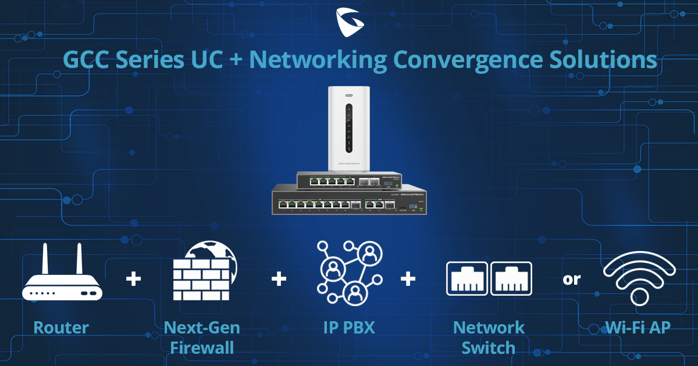
Understanding the firewall functions in routers is key to securing your home or office network. A dual band router with a built-in firewall can protect your devices from unwanted access and cyber threats. Knowing how these firewalls work helps you decide whether your router offers enough security or if you need additional protection.
Role Of Firewalls In Network Security
Firewalls act as gatekeepers for your network. They monitor incoming and outgoing traffic to block harmful data packets while allowing safe ones through. This helps prevent hackers and malware from accessing your personal information.
Think about the last time you connected a new device to your Wi-Fi. Without a firewall, your network could be wide open to risks. But with a firewall, suspicious activity is caught early, stopping threats before they spread.
Firewalls also help you control which devices or applications can communicate over the network. This is especially useful if you want to restrict access for kids or guests. Do you know what is allowed to enter or leave your network right now?
Types Of Firewalls Used In Routers
Routers typically use one or more of these firewall types:
- Packet Filtering Firewall:Checks data packets against a set of rules. It’s fast but basic, mainly blocking traffic based on IP addresses and ports.
- Stateful Inspection Firewall:Tracks active connections and decides which packets to allow based on the context of the traffic. This offers better security than simple packet filtering.
- Proxy Firewall:Acts as an intermediary between your network and the internet. It hides your IP address and can block harmful content.
Many dual band routers combine these firewall types to provide layered protection. This approach helps catch different kinds of threats more effectively. Have you checked which firewall type your router uses?
Built-in Firewall In Dual Band Routers
Dual band routers often come with built-in firewalls. These firewalls add a layer of security to your home or office network. They help control incoming and outgoing traffic based on security rules. This feature is essential for protecting devices from unauthorized access and cyber threats.
Having a firewall within your dual band router means fewer devices to manage. It simplifies network security while maintaining fast and stable connections on both frequency bands. This combination makes dual band routers a popular choice for secure and efficient internet use.
Common Firewall Features Included
- Packet filtering to block harmful data packets
- Stateful inspection to monitor active connections
- Network address translation (NAT) to hide device IPs
- Access control lists (ACLs) to allow or deny traffic
- Intrusion detection to spot suspicious activities
- DoS (Denial of Service) attack prevention
How Firewalls Protect Your Network
Firewalls act as a barrier between your network and the internet. They check data before it enters or leaves your network. Suspicious or harmful data gets blocked instantly. This stops hackers and malware from reaching your devices.
Firewalls also control which devices can connect to your network. They block unauthorized users, keeping your information safe. By filtering traffic, firewalls reduce the risk of cyber attacks and data breaches. This helps maintain a secure and reliable internet experience.
Security Advantages Of Built-in Firewalls
Security advantages of built-in firewalls in dual band routers are significant. These firewalls enhance network safety by acting as a barrier. They protect against various online threats. This section explores how built-in firewalls enhance security.
Preventing Unauthorized Access
Built-in firewalls help stop unauthorized users from entering your network. They monitor incoming and outgoing data. This ensures only trusted traffic gets through. By doing so, they guard sensitive information against hackers. This reduces the risk of data breaches significantly.
Blocking Malicious Traffic
Firewalls in dual band routers block harmful traffic. They detect suspicious activities and stop them instantly. This keeps your devices safe from viruses and malware. By filtering traffic, firewalls maintain a secure browsing environment. Users experience fewer disruptions and safer internet access.
Limitations And Considerations
Dual band routers often come with built-in firewalls to protect your network. These firewalls provide basic security by filtering incoming and outgoing traffic. Yet, they have limits that users need to understand. Knowing these limits helps in keeping your network safer and more reliable.
When Built-in Firewalls May Fall Short
Built-in firewalls in dual band routers usually handle simple tasks. They block common attacks and restrict unwanted access. Still, they may miss advanced threats like:
- Zero-day exploits
- Complex malware
- Phishing attacks
- Intrusion attempts from inside the network
These firewalls lack deep packet inspection and advanced filtering features. They also may not update frequently to address new threats. Relying on them alone can leave gaps in your security.
Need For Additional Security Measures
Extra layers of security help protect your network better. Consider using:
- Standalone hardware firewalls
- Security software on devices
- Regular firmware updates for your router
- Strong passwords and encryption
- Network monitoring tools
Combining these steps with your router’s firewall creates a stronger defense. It reduces risks and keeps your data safer from cyber attacks.
Choosing A Secure Dual Band Router
Choosing a secure dual band router is essential for protecting your home network. A router with a built-in firewall helps block unauthorized access. It keeps your devices safe from hackers and malware. Not all dual band routers have strong security features. Knowing what to check can help you pick the right one.
Key Firewall Features To Look For
- Stateful Packet Inspection (SPI) to monitor data packets
- Intrusion Detection System (IDS) to spot suspicious activity
- Automatic firmware updates for latest security patches
- Customizable firewall rules to control traffic
- VPN support for encrypted remote access
Recommended Security Settings
- Enable WPA3 encryption for Wi-Fi security
- Turn on the router’s firewall by default
- Disable WPS to prevent easy access points for hackers
- Use strong, unique passwords for router login
- Regularly check for and install firmware updates
Maintaining Router Security
Maintaining router security is key to protecting your home or office network. A secure router keeps hackers out and safeguards your data. Dual band routers often come with built-in firewalls, but security depends on proper management. Regular attention to updates and settings can improve protection significantly.
Regular Firmware Updates
Firmware is the software that runs your router. Updating it fixes bugs and closes security gaps. Manufacturers release updates to enhance features and block new threats. Without updates, your router becomes vulnerable to attacks.
Check for updates regularly. Many routers allow automatic updates, which save time and effort. Always download firmware from the official website or router interface. Avoid third-party sources to prevent malware risks.
Configuring Firewall Rules Effectively
The built-in firewall acts as a barrier between your network and the internet. Setting firewall rules controls what data enters and leaves your network. Proper rules block harmful traffic and allow safe connections.
Start by disabling unused services and ports. Only open ports needed for your devices or applications. Use the router’s interface to create rules that match your security needs.
- Block incoming connections by default
- Allow trusted devices and applications
- Monitor logs for suspicious activity
Regularly review and adjust firewall rules. Network needs change, and your settings should keep up. A well-configured firewall reduces risks and strengthens overall security.
Credit: www.newegg.ca

Credit: www.reddit.com
Frequently Asked Questions
Can A Dual Band Router Include A Built-in Firewall?
Yes, many dual band routers come with built-in firewalls. These firewalls protect your network by blocking unauthorized access and filtering traffic. They enhance security without needing extra devices. Always check the router’s specifications to confirm firewall features before buying.
How Does A Built-in Firewall Work In Dual Band Routers?
A built-in firewall monitors incoming and outgoing data packets. It blocks suspicious or harmful traffic based on predefined security rules. This helps prevent cyber attacks and unauthorized access on both 2. 4 GHz and 5 GHz bands.
Does A Dual Band Router’s Firewall Improve Network Security?
Yes, the firewall adds a crucial layer of protection. It prevents hackers from accessing your home network. It also protects connected devices from malware and intrusions, making your dual band router more secure.
Are All Dual Band Routers Equipped With Firewalls?
Not all dual band routers have built-in firewalls. Lower-end models might lack this feature. It’s important to verify firewall presence in product details to ensure your router offers this essential security function.
Conclusion
Dual band routers can include built-in firewalls for extra protection. This feature helps block unwanted access and keeps your network safe. Not all models have this, so check before buying. Using a router with a firewall adds a strong security layer.
It works alongside other safety tools like antivirus software. Choosing the right router improves your home internet security. Stay aware and protect your devices from online threats. Simple steps make a big difference in internet safety.