Are you tired of constant buffering ruining your favorite shows or important video calls? You’re not alone.
Slow internet and interruptions can be incredibly frustrating. But what if the solution is as simple as upgrading your router? A dual band router might be exactly what your home network needs. You’ll discover how a dual band router works and whether it can truly reduce buffering for you.
Keep reading to find out how to get smoother, faster internet without the endless waiting.
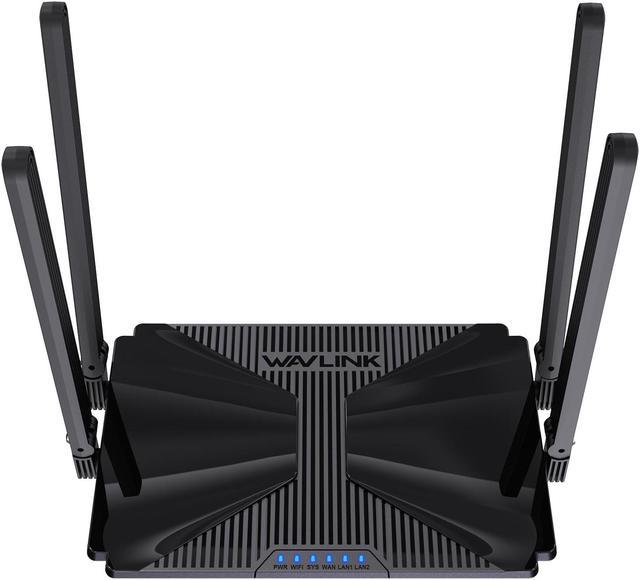
Credit: www.newegg.ca
How Dual Band Routers Work
Dual band routers play a crucial role in managing your internet connection and reducing buffering. They operate by transmitting signals over two different frequency bands, allowing devices to connect more efficiently. This setup helps balance network traffic, so your streaming or gaming sessions face fewer interruptions.
Differences Between 2.4 Ghz And 5 Ghz
The 2.4 GHz band offers a longer range but slower speeds. It can pass through walls and obstacles better, making it ideal for devices far from the router.
On the other hand, the 5 GHz band provides faster speeds but covers a smaller area. It’s perfect for high-bandwidth activities like HD streaming or online gaming, especially when you’re close to the router.
Think about your own home setup: if your laptop is in the same room as the router, connecting via 5 GHz can significantly reduce buffering. Meanwhile, smart devices in distant rooms might work better on 2.4 GHz.
Benefits Of Using Two Bands
- Less Interference:2.4 GHz is often crowded with other devices like microwaves and cordless phones. The 5 GHz band faces less interference, ensuring smoother connections.
- Better Device Management:You can connect older devices to 2.4 GHz and newer ones to 5 GHz, optimizing overall network performance.
- Reduced Buffering:By spreading devices across two bands, your router prevents overcrowding on a single frequency, which cuts down lag and buffering.
Have you noticed how buffering spikes when multiple devices stream simultaneously? Assigning them to different bands can ease this problem without needing a faster internet plan.

Credit: cyberraiden.wordpress.com
Causes Of Buffering Issues
Buffering issues can be frustrating, especially when you’re trying to enjoy your favorite shows or join an important video call. Understanding what causes these interruptions is the first step to fixing them. Let’s look at the main reasons why buffering happens and how they might be affecting your internet experience.
Network Congestion
Network congestion occurs when too many devices try to use the internet at the same time. This overload slows down the connection for everyone. Have you noticed slower speeds during peak hours like evenings? That’s a classic sign of congestion.
Think about your neighborhood or apartment building where dozens of people share the same internet line. During busy times, the available bandwidth is stretched thin, causing your videos to pause and buffer.
Interference And Range Limitations
Wireless signals can weaken or get interrupted by walls, furniture, and other electronic devices. If your router is far from your device or separated by thick walls, the signal strength drops.
Have you ever moved closer to your router and seen an immediate improvement in streaming quality? That’s because distance and interference play a big role in buffering issues.
Device Overload
Each device connected to your network uses some of the available bandwidth. If too many devices are active at the same time—streaming, gaming, or downloading—the network struggles to keep up.
Imagine your router is like a highway. If too many cars enter at once, traffic jams occur. Are you aware of how many devices are connected in your home right now?
Dual Band Impact On Buffering
Dual band routers use two separate frequency bands to manage wireless traffic. This setup helps reduce buffering during online activities. By splitting devices across bands, these routers improve overall network performance. Understanding how dual band technology impacts buffering helps users get smoother streaming and faster downloads.
Reducing Interference With 5 Ghz
The 5 GHz band offers a cleaner signal with less interference. Many devices still use the crowded 2.4 GHz band. This causes signal overlap and slows down connections. Using 5 GHz reduces interference from other electronics and networks. This leads to faster speeds and fewer pauses during video streaming.
Balancing Traffic Across Bands
Dual band routers spread devices between 2.4 GHz and 5 GHz bands. This prevents overload on a single frequency. When many devices connect to one band, speed drops and buffering increases. Balancing traffic ensures each device gets enough bandwidth. This helps keep videos playing smoothly without interruptions.
Improving Connection Stability
Dual band routers provide more stable connections by offering flexible options. Devices can switch to the best band based on signal strength and speed. This reduces sudden drops and lag during important tasks. Stable connections help maintain continuous streaming without annoying buffering breaks.

Credit: www.ebay.ca
Speed Boost Techniques With Dual Band Routers
Enhancing your internet experience can be as simple as optimizing the settings of your dual-band router. These devices are designed to minimize buffering and improve speed. By using both 2.4GHz and 5GHz bands, they offer flexibility and efficiency. But how can you maximize this potential? Let’s dive into practical techniques that can give you a noticeable speed boost.
Channel Selection Strategies
Choosing the right channel can dramatically impact your internet speed. Most routers default to automatic channel selection, which might not always pick the best option. Manually selecting a less crowded channel can reduce interference. Use apps or software to identify the least congested channel. You might find your connection speeds up instantly.
Quality Of Service Settings
Quality of Service (QoS) settings prioritize bandwidth for specific devices or applications. Have you ever had a video call lag because someone else is streaming a movie? Adjusting QoS can prevent this. Assign higher priority to essential applications or devices. This ensures your important tasks get the bandwidth they need, reducing buffering for critical activities.
Firmware Updates And Optimization
Firmware updates might not be the first thing you think of for speed boosts, but they are crucial. Manufacturers release updates to fix bugs, patch security vulnerabilities, and improve performance. Check your router’s settings to see if an update is available. Keeping your router updated ensures you are using the latest technology optimizations. Don’t miss out on these improvements; they can make a significant difference.
Implementing these techniques can transform your online experience. What adjustments will you try first? Dive into your router settings and unleash its full potential today!
Choosing The Right Dual Band Router
Choosing the right dual band router matters a lot for reducing buffering. It affects your internet speed and connection quality. A good router handles multiple devices without slowing down. It balances traffic on both frequency bands well. This keeps your streaming and gaming smooth. Picking the right model depends on your needs and budget.
Key Features To Look For
- Dual-band support with both 2.4 GHz and 5 GHz frequencies
- High data transfer rates for faster internet
- Strong signal range to cover your whole home
- Advanced technology like MU-MIMO for multiple devices
- Easy setup and user-friendly interface
- Security features like WPA3 encryption
Compatibility With Devices
Check if the router supports your devices well. Older devices may only work on 2.4 GHz. Newer gadgets can use the faster 5 GHz band. The router should handle smartphones, laptops, smart TVs, and more. Compatibility ensures stable and fast connections. This helps reduce buffering during video calls or streaming.
Budget Vs Performance
Balance price and features carefully. Cheaper routers may lack speed or range. Higher-end models offer better performance and reliability. Decide what matters most: speed, coverage, or extra features. Sometimes mid-range routers give the best value. Think about your home’s size and internet use before buying.
Common Myths About Dual Band Routers
Many people believe dual band routers are a magic fix for slow internet and constant buffering. However, several common myths surround these devices that can lead to unrealistic expectations. Understanding what dual band routers can and cannot do helps you make smarter choices for your home network.
Myth: 5 Ghz Is Always Faster
It’s easy to assume the 5 GHz band always delivers faster speeds because it supports higher data rates. But speed depends on more than just the frequency band. The 5 GHz signal has a shorter range and weaker ability to pass through walls compared to 2.4 GHz.
If your device is far from the router or separated by thick walls, the 5 GHz band may actually perform worse. So, relying solely on 5 GHz might not improve your connection everywhere in your home. Have you tested both bands in different rooms to see which works better for you?
Myth: Dual Band Eliminates All Buffering
Dual band routers can reduce buffering by offering more connection options, but they don’t guarantee a buffering-free experience. Buffering depends on many factors like your internet speed, network congestion, and the quality of your streaming service.
Even with a dual band router, heavy traffic on your network or a slow internet plan can cause buffering. Think about how many devices are active at once and what activities they’re doing. Simply having a dual band router won’t fix these issues on its own.
Tips To Maximize Router Performance
Maximizing your router’s performance helps reduce buffering and improves your internet speed. Small changes in how you use your router can make a big difference. Follow these tips to get the best from your dual band router.
Optimal Router Placement
Place your router in a central location in your home. Keep it high up and free from obstructions like walls and furniture. Avoid placing it near metal objects or microwaves, which can cause interference. Open spaces allow signals to travel better.
Regular Maintenance Practices
Restart your router regularly to clear its memory and improve speed. Update the router’s firmware to fix bugs and add new features. Change your Wi-Fi password often to keep your network secure. Remove devices not in use to reduce traffic.
Using Extenders And Mesh Systems
Use Wi-Fi extenders to boost signals in weak areas. Place extenders halfway between your router and the dead zone. Consider a mesh system for large homes with many rooms. Mesh systems create a single, strong network to reduce buffering.
Frequently Asked Questions
Does A Dual Band Router Improve Streaming Quality?
Yes, a dual band router reduces interference by using 5GHz and 2. 4GHz bands. This improves streaming quality and lowers buffering issues effectively.
How Does Dual Band Reduce Buffering On Wi-fi?
Dual band routers separate devices across two frequencies, reducing congestion. This leads to faster speeds and less buffering during video playback or gaming.
Can Dual Band Routers Handle Multiple Devices Better?
Yes, dual band routers distribute traffic more efficiently across bands. This prevents network overload and reduces buffering when many devices are connected.
Is 5ghz Band Better Than 2.4ghz For Streaming?
5GHz offers faster speeds and less interference, ideal for streaming. However, its range is shorter than 2. 4GHz, affecting coverage in larger areas.
Conclusion
A dual band router can help reduce buffering by managing traffic better. It sends devices to different frequencies, easing network congestion. This means smoother videos and faster downloads for everyone. Not all routers perform the same, so choose one with good reviews.
Remember, a strong internet plan also matters. Simple changes like upgrading your router can improve your online experience. No more waiting for videos to load. A dual band router often makes internet use more enjoyable and less frustrating. Worth trying for better streaming and gaming.