Are you tired of lag ruining your gaming sessions, especially when you want to stream 4K videos at the same time? You might wonder if your gaming router can handle both without slowing down.
Imagine playing your favorite game smoothly while watching crystal-clear 4K content—all without interruptions. You’ll discover how gaming routers manage these heavy tasks and what you can do to get the best experience. Keep reading to find out if your current setup can keep up or if it’s time for an upgrade.

Credit: www.digitalcitizen.life
Gaming Router Basics
Understanding the basics of gaming routers is essential if you want a smooth experience with 4K streaming while gaming. These routers are designed specifically to handle the heavy demands of online games and high-definition video without lag or interruptions. Knowing what sets them apart will help you decide if your current setup can manage both tasks simultaneously or if an upgrade is necessary.
Key Features Of Gaming Routers
Gaming routers come with several features tailored to improve your internet experience during intense gaming sessions and streaming.
- Quality of Service (QoS):This feature prioritizes gaming traffic over other types, reducing lag and buffering.
- High-speed Wi-Fi standards:Support for Wi-Fi 6 or Wi-Fi 6E offers faster speeds and better handling of multiple devices.
- Multiple antennas and beamforming:These improve signal strength and coverage, which matters when you’re streaming 4K content and gaming at the same time.
- Advanced hardware:Powerful processors and more RAM help the router manage heavy data loads without dropping packets.
These features aren’t just technical jargon; they translate into smoother gameplay and crystal-clear streams for you.
How Gaming Routers Differ From Regular Routers
Not all routers are built the same, especially when it comes to handling the demands of gaming and 4K streaming.
Regular routers often treat all data equally, which can cause delays when multiple devices are streaming or gaming at once. Gaming routers, however, use smart traffic management to keep your game’s connection fast and stable.
Think about a time when your video call dropped while someone else was downloading a large file. A gaming router minimizes such conflicts by prioritizing critical data packets.
Also, gaming routers usually have better heat management and durable components, so they perform consistently over long periods, which is crucial during extended gaming and streaming sessions.
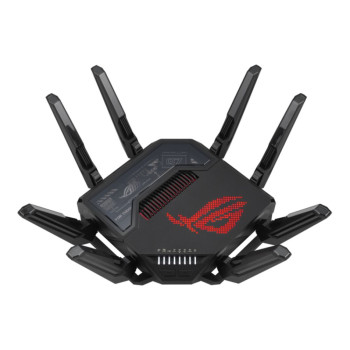
Credit: box.co.uk
4k Streaming Requirements
Streaming 4K content while gaming demands specific network conditions. The router must support high data rates and maintain smooth connections. Understanding the requirements helps assess if a gaming router can handle both tasks efficiently.
Bandwidth Needs For 4k Streaming
4K streaming requires a stable and fast internet connection. Typically, it needs at least 25 Mbps download speed for smooth playback. Higher bitrates improve quality but increase bandwidth use. Streaming and gaming together need enough bandwidth to avoid slowdowns.
- 4K video streams can use 15 to 30 Mbps.
- Online games usually need 3 to 6 Mbps.
- Total bandwidth should exceed 40 Mbps for both activities.
Ensure your internet plan and router support these speeds. Otherwise, buffering or lag may occur.
Latency And Stability Factors
Latency affects online gaming more than streaming. Low latency means faster response times in games. Streaming requires steady data flow without interruption. A router must manage both low latency and stable connections.
- Gaming needs latency under 50 milliseconds for smooth play.
- Streaming needs consistent data without drops or spikes.
- Router quality impacts both latency and connection stability.
Choose a router with features like Quality of Service (QoS). This helps prioritize gaming traffic while keeping streaming smooth.
Gaming While Streaming
Gaming while streaming has become a common scenario for many players who want to share their gameplay or enjoy 4K video content simultaneously. Balancing both activities challenges your network and device capabilities. Understanding how a gaming router handles these demands can help you avoid frustrating lag and buffering.
Network Demands Of Online Gaming
Online gaming requires a stable and low-latency internet connection. Your router must manage quick data exchanges to keep your gameplay smooth and responsive.
Games like first-person shooters or battle royales send and receive small packets rapidly to sync your actions with the server. Any delay or packet loss can cause noticeable lag, ruining your experience.
Besides speed, routers need to prioritize gaming traffic. Quality of Service (QoS) features help by giving gaming data higher priority over other types of traffic on your network.
Impact Of Streaming On Gaming Performance
Streaming 4K video consumes significant bandwidth and can strain your router’s processing power. This may lead to slower response times or interruptions in your gaming connection.
Imagine you’re in a crucial gaming moment while your router struggles to handle a 4K stream on another device. The delay could mean missing a key shot or losing a match.
To avoid this, look for routers with dual or tri-band capabilities. They separate gaming and streaming traffic across different channels, reducing interference and lag.
- Enable QoS to prioritize gaming packets.
- Use wired connections for gaming devices when possible.
- Limit background downloads or updates during sessions.
Have you noticed lag spikes when streaming and gaming at the same time? Adjusting your router settings and network setup can make a big difference.
Router Performance Factors
Understanding the factors that impact router performance is key. Especially for tasks like 4K streaming while gaming. A powerful router can handle both activities smoothly. Let’s explore the crucial elements that affect router performance.
Wi-fi Standards And Speeds
Wi-Fi standards play a significant role in router performance. The most recent standard is Wi-Fi 6. It offers faster speeds and better efficiency. This can enhance streaming and gaming experiences. Check if your router supports Wi-Fi 6 for optimal performance. Wi-Fi 5 is also good but may not handle heavy tasks as well.
Quality Of Service (qos) Features
QoS features prioritize internet traffic. This ensures smooth 4K streaming and gaming simultaneously. It lets you allocate bandwidth to important tasks. This minimizes lag and buffering. QoS is essential for a seamless experience. Make sure your router has this feature.
Dual-band Vs Tri-band Routers
Dual-band routers offer two frequency bands. They help in distributing network load. Ideal for moderate use. Tri-band routers add an extra band. This is great for busy networks. They can handle more devices and activities. Consider a tri-band router for heavy streaming and gaming.
Optimizing Your Network
Optimizing your network is key to smooth 4K streaming and gaming. A well-tuned router balances bandwidth and reduces lag. This ensures both activities run without interruptions. Small tweaks can improve your experience significantly.
Setting Up Qos For Gaming And Streaming
Quality of Service (QoS) prioritizes traffic on your network. It helps games get the bandwidth they need. At the same time, it keeps 4K streams clear and steady. Most gaming routers offer easy QoS settings.
Set gaming devices as high priority. Streaming devices can have medium priority. This way, your router knows which data to send first. It reduces delays and buffering.
Reducing Interference And Improving Signal
Wireless interference can slow down your connection. Other devices and walls block signals. Place your router in a central, open spot. Avoid placing it near microwaves or cordless phones.
Use 5 GHz frequency for faster speeds and less interference. The 2.4 GHz band covers farther but is slower. Changing your Wi-Fi channel also helps reduce congestion.
Firmware Updates And Security
Router firmware updates fix bugs and improve performance. They can also add new features. Check for updates regularly on your router’s admin page.
Keep your network secure with strong passwords and encryption. This prevents unauthorized users from slowing down your internet. Secure networks keep gaming and streaming smooth.
Real-world Testing
Real-world testing reveals how a gaming router performs under heavy use. Streaming 4K videos and playing online games demand high speed and low delay. Testing shows if the router can keep up without slowing down or losing connection. This helps find out the true strength of the router beyond its specs.
Testing Router With 4k Streaming And Gaming
We tested a gaming router by running 4K streaming and gaming at the same time. The setup used a 4K video on one device and an online game on another. Both devices connected via Wi-Fi to the router. We checked the video quality and game lag during this test.
The router kept the video clear and smooth. The game showed low delay and quick response. Speed tests showed stable upload and download rates. The router handled both tasks without major drops in performance.
Common Bottlenecks And Fixes
Some routers face common problems during 4K streaming and gaming:
- Wi-Fi interference from other devices
- Slow internet speed from the provider
- Router overheating after long use
- Too many devices connected at once
Fixes are simple and effective:
- Place the router in an open space away from walls
- Limit connected devices during gaming sessions
- Use wired connections for gaming when possible
- Restart the router regularly to clear memory
Choosing The Right Router
Choosing the right router is crucial if you want smooth 4K streaming while gaming. Your router acts as the gateway for all your internet traffic, so it must handle high bandwidth demands without lag or interruption. Not all routers are built the same, and selecting one that fits your specific needs can make a noticeable difference in your gaming and streaming experience.
Budget Vs High-end Options
Not everyone needs to spend a fortune on a router to enjoy 4K streaming and gaming simultaneously. Budget routers can work well if you have a stable internet connection and a small number of devices connected. However, these routers might struggle with multiple high-bandwidth activities or large households.
High-end routers offer advanced features like Quality of Service (QoS), multiple antennas, and faster Wi-Fi standards (such as Wi-Fi 6 or Wi-Fi 6E). These features prioritize gaming traffic and keep your 4K streams smooth even when others are online. If you regularly stream 4K content while gaming, investing in a high-end router can reduce lag and buffering significantly.
Recommended Models For 4k Gaming
- ASUS ROG Rapture GT-AX11000:Known for its powerful Wi-Fi 6 support and gamer-focused QoS, this router handles multiple 4K streams and gaming with ease.
- Netgear Nighthawk XR1000:Offers excellent bandwidth management and low latency, perfect for demanding gaming and streaming setups.
- TP-Link Archer AX90:A more affordable Wi-Fi 6 option that balances strong performance with a reasonable price.
- Linksys Hydra Pro 6E:Supports Wi-Fi 6E, providing extra spectrum for less interference and better handling of 4K streaming alongside gaming.
Think about how many devices you have and what your internet speed is before picking a model. Are you streaming on multiple devices while gaming, or is it mostly just you? Your router should match how you use your network every day.

Credit: www.playstationlifestyle.net
Frequently Asked Questions
Can A Gaming Router Support 4k Streaming And Gaming Simultaneously?
Yes, a gaming router can handle 4K streaming and gaming at the same time. High-end models have advanced QoS and bandwidth management. This ensures smooth gameplay and buffer-free streaming without lag or interruptions.
What Features Make Routers Ideal For 4k Streaming And Gaming?
Routers with dual-band or tri-band support, QoS, and MU-MIMO technology excel. These features prioritize traffic, reduce latency, and maintain stable connections for both gaming and 4K streaming.
Will 4k Streaming Slow Down My Gaming On A Gaming Router?
If your router and internet speed are sufficient, 4K streaming won’t slow gaming. A gaming router manages bandwidth efficiently to prevent lag during simultaneous activities.
How Much Internet Speed Is Needed For 4k Streaming And Gaming?
You need at least 100 Mbps for smooth 4K streaming and gaming. Faster speeds improve performance and reduce buffering or lag on a gaming router.
Conclusion
A good gaming router can handle both 4K streaming and gaming smoothly. It keeps your connection fast and stable without lag. Choosing the right router helps avoid interruptions during play or video. Check for features like strong Wi-Fi signals and low latency.
This way, you enjoy clear videos and responsive games at the same time. A solid router supports your online activities well. It makes gaming and streaming more fun and less frustrating. Quality matters for the best experience at home.