Are you wondering if you can connect multiple devices to a travel router? Whether you’re on a business trip, vacation, or simply working remotely, staying connected is crucial.
Imagine having all your gadgets—smartphone, laptop, tablet—online without any hassle. The good news is, a travel router can make this possible. But how many devices can it handle at once? And will your connection stay fast and reliable? Keep reading to discover the answers and learn how to get the most out of your travel router wherever you go.
What Is A Travel Router
A travel router is a small device that creates a Wi-Fi network anywhere you go. It connects to an existing internet source, such as a hotel Ethernet port or a mobile hotspot. Then, it shares that connection with your devices wirelessly.
Travel routers are designed to be compact and portable. They help travelers enjoy secure and stable internet access on multiple devices. Many models include extra features like VPN support and guest networks.
How Does A Travel Router Work?
A travel router takes an internet signal from one source and broadcasts it as Wi-Fi. For example, it can connect to a wired network or a cellular hotspot. Then it creates a new Wi-Fi network for your phone, laptop, or tablet.
This process improves security and convenience. It allows multiple devices to connect at the same time. It also helps avoid fees for each device in hotels or public places.
- Connects multiple devices with one internet source
- Provides a secure Wi-Fi network
- Reduces connection fees in hotels
- Improves signal strength and stability
- Offers easy setup and portability
Common Uses For Travel Routers
- Business trips to connect laptops and phones
- Vacations to share internet with family
- Remote work from hotels or cafes
- Secure connections on public Wi-Fi
- Extending Wi-Fi range in large spaces
Benefits Of Using A Travel Router
Using a travel router offers several practical benefits that can make your trips smoother and more connected. It lets you share a single internet connection across multiple devices, giving you control and flexibility wherever you go. If you often find yourself juggling different gadgets, a travel router can simplify your digital life on the road.
Enhanced Connectivity For Multiple Devices
Imagine being able to connect your laptop, smartphone, tablet, and even a gaming console all at once. A travel router creates a private Wi-Fi network that supports multiple devices simultaneously. This means no more fighting over a spot or worrying about limited connections in hotels or cafes.
Improved Security And Privacy
Public Wi-Fi networks can expose your data to hackers and snoopers. A travel router adds a layer of security by creating your own encrypted network. You control who joins, keeping your personal information safer during your travels.
Consistent Internet Speed And Reliability
Sharing hotel Wi-Fi directly often results in slow speeds and dropped connections. A travel router manages network traffic better, helping maintain a steady and faster internet connection for all your devices. This can be crucial if you need to work or stream without interruptions.
Easy Setup And Portability
Travel routers are designed to be compact and user-friendly. You can set one up in minutes without needing technical skills. Carrying a lightweight device that fits in your bag means you’re always ready to connect wherever you go.
Cost-effective Internet Access
Paying for multiple Wi-Fi connections or data plans for each device can add up quickly. A travel router lets you connect all your devices through one internet source, saving money. Have you ever thought about how much you could save during a long trip?
How Many Devices Can A Travel Router Support
Wondering how many devices you can connect to a travel router? The answer depends on the router’s design and its intended use. While some travel routers handle just a few devices, others can support a surprisingly large number without losing speed.
Understanding this limit helps you plan your travel setup better. Imagine you’re on a trip with multiple gadgets—laptops, phones, tablets, even smartwatches. Knowing the capacity prevents frustration from slow connections or dropped signals.
Typical Device Limits On Travel Routers
Most travel routers support between 5 to 15 devices simultaneously. Budget-friendly models usually allow fewer connections, often around 5 to 8 devices. Mid-range and high-end travel routers can handle 10 to 15 devices, balancing size and power well.
Keep in mind, the more devices you add, the more the bandwidth gets divided. If you connect too many, your experience might slow down, especially with activities like streaming or video calls.
Factors That Affect Device Capacity
- Router hardware:Processors and antennas directly impact how many devices can connect smoothly.
- Internet speed:Even if your router supports many devices, a slow connection can bottleneck performance.
- Usage type:Browsing emails uses less bandwidth than HD video streaming, so fewer devices may perform better for heavy use.
- Network protocols:Newer standards like Wi-Fi 6 allow more devices to connect efficiently compared to older standards.
How To Maximize Your Travel Router’s Device Support
Limit background apps on your devices to free up bandwidth. Prioritize important devices by connecting them first or assigning quality of service (QoS) settings if your router supports it.
Consider dividing your devices between the travel router and direct mobile hotspots if possible. This tactic can reduce strain on a single router and keep your connections stable.
Is There A Practical Device Limit You Should Follow?
Ask yourself how many devices truly need to be online simultaneously during your trip. Often, connecting the essentials like your phone and laptop is enough for smooth surfing and work.
Adding more devices just because you can might create unnecessary slowdowns. Find the sweet spot where your travel router performs optimally, keeping your experience frustration-free and efficient.

Credit: www.channelnews.com.au
Types Of Travel Routers And Device Limits
Travel routers are essential for staying connected during trips. They enable multiple devices to access the internet seamlessly. Different types of travel routers have varying device limits and features. Understanding these differences helps in choosing the right one for your needs.
Portable Travel Routers
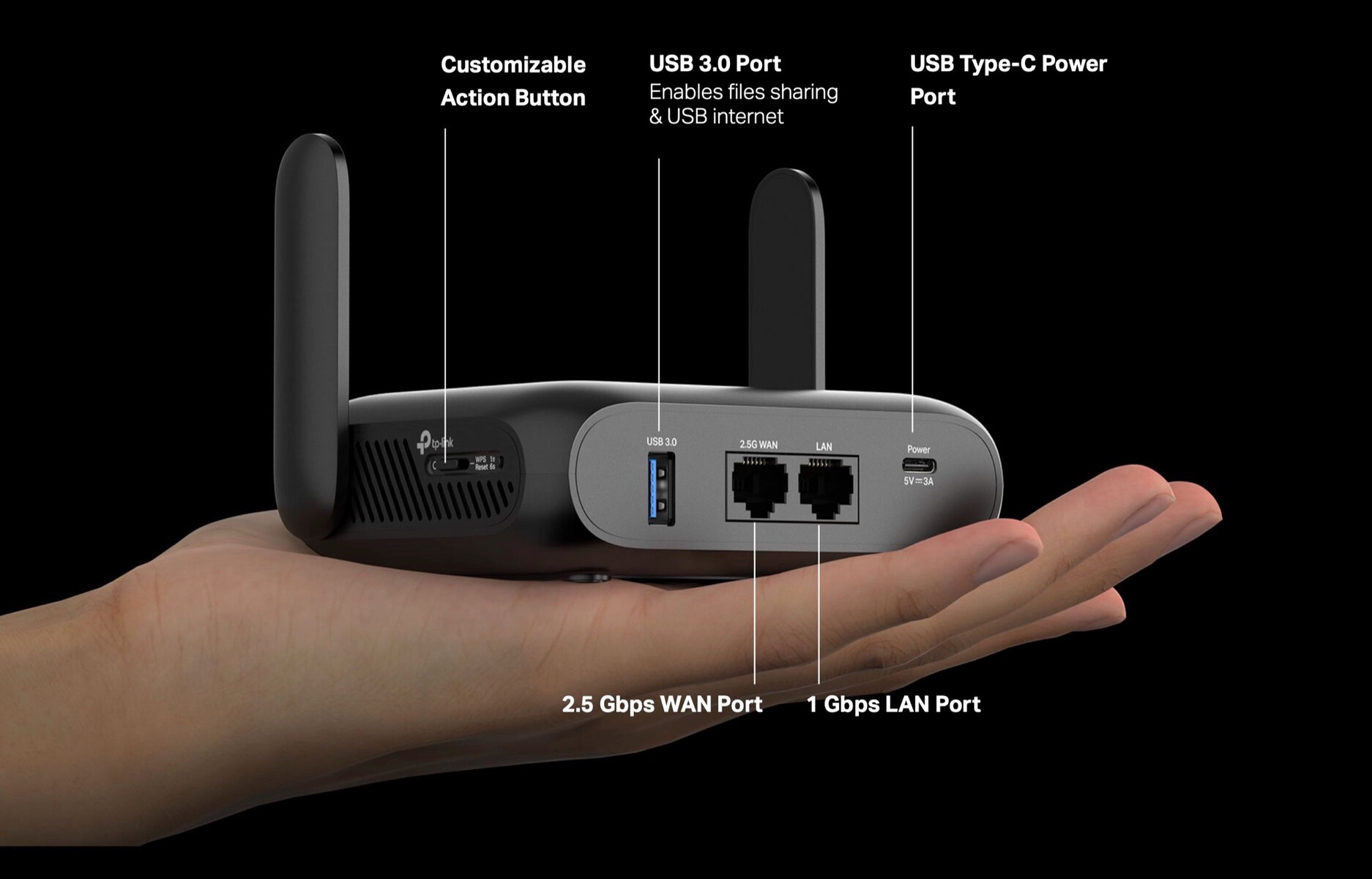
Portable travel routers are compact and easy to carry. They usually support up to 5-10 devices at once. Their small size makes them perfect for quick setups in hotel rooms. They often come with basic security features to protect your data. Some models offer USB ports to share files between devices.
Mifi Devices
MiFi devices are mobile hotspots that connect to cellular networks. They can handle around 10-15 devices depending on the model. These devices are ideal for travelers needing internet on the go. MiFi units are battery-powered, offering flexibility in remote locations. They require a SIM card for cellular connectivity.
Mobile Hotspots
Mobile hotspots provide internet access using cellular data. They support a larger number of devices, often up to 20. These are suitable for group travels or conferences. Mobile hotspots offer high-speed internet, but speeds vary by network. They come with advanced security features to ensure safe browsing.
Factors Affecting Device Connections
Connecting multiple devices to a travel router depends on several key factors. These factors determine how well the devices will perform and how stable the connection remains. Understanding these elements helps you manage expectations and get the best from your travel router.
Bandwidth And Speed
Bandwidth limits the total data your travel router can handle. More devices sharing the same bandwidth means slower speeds for each device. Streaming videos, video calls, and downloads use more bandwidth. Simple tasks like browsing or messaging use less. Choose a router with enough bandwidth for all your devices.
Router Hardware
The quality of the router’s hardware affects device connections. A stronger processor and more memory improve performance. Older or cheaper routers may struggle with many devices. Modern travel routers support multiple devices without lag. Look for routers designed for multi-device use and travel needs.
Network Environment
Network surroundings impact your travel router’s performance. Crowded Wi-Fi channels cause interference and slow speeds. Physical obstacles like walls reduce signal strength. Public places may have many competing Wi-Fi signals. Finding a clear channel and placing the router well helps maintain good connections.
Setting Up Multiple Devices
Setting up multiple devices on a travel router can turn your temporary internet spot into a fully connected hub. It’s not just about plugging in; it’s about making sure every device works smoothly without slowing down your network. Let’s break down how you can connect your smartphones, laptops, and smart devices efficiently.
Connecting Smartphones And Tablets
Your smartphones and tablets are usually the easiest devices to connect. Most travel routers support multiple Wi-Fi connections, so you can simply select the router’s network and enter the password.
Keep in mind, the number of devices your router can handle depends on its specifications. Some routers support up to 10 or more simultaneous connections, but performance may drop if too many devices are active.
Try to prioritize devices you’re actively using. Have you noticed slower speeds when everyone in your group streams videos at once? That’s a common sign you need to manage connected devices carefully.
Linking Laptops And Pcs
Laptops and PCs often require a stable and faster connection, especially if you’re working or attending virtual meetings during your travels. Plugging in via Ethernet is an option if your travel router has LAN ports, offering more reliable speeds.
For wireless setups, make sure your laptop’s Wi-Fi adapter supports the frequency bands your travel router offers. Dual-band routers (2.4 GHz and 5 GHz) provide flexibility; use 5 GHz for less interference and higher speed.
Think about how many laptops need access simultaneously. If you’re traveling with colleagues or family, coordinating usage times might help avoid network congestion.
Adding Smart Devices
Smart devices like cameras, smart speakers, or travel gadgets can also connect to your travel router. These devices often run background processes that consume bandwidth without you realizing it.
Check each device’s connectivity requirements and confirm they support the router’s network type. Some older smart devices only connect on 2.4 GHz, so your router should support both bands.
Have you ever experienced unexpected slowdowns because a smart device was updating or syncing automatically? It’s worth scheduling updates for off-peak hours to keep your network responsive.
Tips For Optimizing Multiple Connections
Connecting multiple devices to a travel router can be a game-changer during your trips, but it also demands some smart management to keep everything running smoothly. Optimizing your connections ensures each device gets enough speed without sacrificing security or stability. Here are practical tips to help you make the most out of your travel router when juggling several gadgets at once.
Managing Bandwidth Usage
Not all devices need the same amount of internet power. Prioritize essential tasks like video calls or work-related uploads over casual browsing or app updates.
- Limit high-data activities on less important devices.
- Use your router’s Quality of Service (QoS) feature to assign bandwidth priorities.
- Disconnect devices that aren’t actively in use to free up space.
I once tried streaming a live event while my phone kept downloading updates. The video kept buffering until I paused those updates. This simple step made a huge difference.
Securing Your Network
More devices mean more opportunities for security breaches. Protect your network with strong passwords and encryption settings.
- Always set a unique WPA3 or WPA2 password.
- Turn off guest access when not needed.
- Consider using a VPN for added privacy on public networks.
Think about who really needs access. Have you ever shared your Wi-Fi password and then wondered if your connection slowed down? Limiting access helps both security and speed.
Updating Firmware
Keeping your travel router’s firmware up to date is often overlooked but critical. Updates fix bugs and improve performance, especially when multiple devices connect.
- Check for updates regularly via the router’s admin panel.
- Schedule updates during downtime to avoid interruptions.
- Read release notes to understand what each update improves.
A friend ignored firmware updates and faced constant disconnects. After updating, the connection stabilized instantly. Don’t wait for issues to force you into updates.
Credit: www.notebookcheck.net
Common Issues With Multiple Devices
Using a travel router to connect multiple devices sounds like a perfect solution for staying online on the go. However, you might face some common issues that can affect your experience. Understanding these problems helps you troubleshoot faster and keep your connection steady.
Connection Drops
One of the biggest frustrations is when your connection suddenly drops. This often happens because the travel router struggles to handle many devices at once. If you notice frequent disconnections, try reducing the number of active devices or move closer to the router to improve the signal strength.
Have you ever been in a hotel where the Wi-Fi keeps cutting off? That’s usually a sign that the router is overloaded or the signal is weak. Restarting the router can sometimes help, but if the problem continues, consider upgrading to a model designed for multiple users.
Slow Internet Speeds
Connecting several gadgets to a travel router can slow down your internet speed noticeably. Each device shares the same bandwidth, so streaming a movie on your tablet while your phone updates apps can cause lag. To improve speed, prioritize important devices or pause large downloads during critical tasks.
Think about your last trip—did you get frustrated waiting for pages to load? If so, adjusting settings like Quality of Service (QoS) on your router may help by giving priority to specific devices or apps. This small tweak can make a big difference in your daily use.
Device Compatibility
Not all devices play well with travel routers. Some older gadgets may have trouble connecting or maintaining a stable link. It’s worth checking your router’s specifications to ensure it supports your devices’ Wi-Fi standards and security protocols.
Imagine trying to connect a very old laptop to a modern travel router only to find it won’t connect. This issue often comes down to compatibility, not the router’s fault. Updating your device’s network drivers or using a different frequency band (2.4 GHz vs. 5 GHz) can solve many of these problems.
Alternatives To Travel Routers For Multiple Devices
Travel routers allow multiple devices to connect, but alternatives like mobile hotspots or tethering from smartphones also work well. Sharing internet through a laptop’s Wi-Fi can support several devices on the go. These options offer flexible ways to stay connected.
When you’re on the go, staying connected is crucial, but lugging around a travel router isn’t always ideal. Fortunately, there are several alternatives that can efficiently connect multiple devices without the extra baggage. Whether you’re relying on your smartphone or portable gadgets, there are options to suit every traveler’s needs. Let’s explore these practical solutions.Using Mobile Hotspots
Mobile hotspots are a fantastic alternative, turning your smartphone into a portable Wi-Fi hub. Most modern smartphones come equipped with this feature, allowing you to share your mobile data with other devices. Imagine you’re at a café, sipping your coffee while your laptop, tablet, and friend’s phone all connect to the internet through your mobile hotspot. It’s a simple and effective solution, but be mindful of your data plan limits to avoid unexpected charges.Tethering Via Smartphones
Tethering is another excellent way to connect multiple devices. With tethering, you can link your smartphone to a laptop or tablet using a USB cable, Bluetooth, or Wi-Fi. This method is particularly useful if you’re working in a remote location with limited network access. I once found myself needing to send a crucial email while hiking in the mountains. By tethering my phone to my laptop, I was able to finish my work without missing a beat.Portable Wi-fi Extenders
Portable Wi-Fi extenders help you boost weak signals in areas with poor connectivity. These compact devices amplify existing Wi-Fi signals, allowing you to connect multiple devices with ease. For instance, during a recent hotel stay, the Wi-Fi signal in my room was weak. A portable extender strengthened the connection, enabling seamless streaming on my tablet and laptop. It’s an excellent option for ensuring stable connectivity when you need it most. Which alternative aligns best with your travel needs? Consider your usual destinations, the number of devices you use, and your data usage habits to make the right choice. Each option has its perks, so you’re sure to find one that fits your lifestyle perfectly.
Credit: www.theverge.com
Frequently Asked Questions
Can A Travel Router Support Multiple Devices Simultaneously?
Yes, most travel routers can support multiple devices at once. They allow several connections, such as phones, laptops, and tablets, ensuring seamless internet access for all users during travel.
How Many Devices Can A Travel Router Typically Connect?
Travel routers usually support between 5 to 15 devices. The exact number depends on the router’s model and bandwidth capacity, ensuring efficient performance without slowing down the network.
Will Connecting Multiple Devices Slow Down A Travel Router?
Connecting many devices may reduce speed due to bandwidth sharing. However, high-quality travel routers manage traffic well to minimize slowdowns and maintain stable connections.
Are Travel Routers Secure For Multiple Device Connections?
Yes, travel routers offer security features like WPA2 encryption. These protect your data when multiple devices connect, keeping your information safe on public or hotel Wi-Fi networks.
Conclusion
Travel routers support multiple devices easily. You can connect phones, tablets, and laptops at once. Just check the router’s device limit before use. Speed may slow down with many devices connected. Keep your router close to your devices for best signal.
Travel routers make sharing internet simple and convenient. They help you stay connected during trips without hassle. Choose one that fits your travel needs and device count. Enjoy smooth internet access wherever you go.