Are you struggling with weak WiFi signals in some parts of your home? You might be wondering if using two tri-band WiFi extenders can solve your problem.
It sounds like a smart idea—more extenders, better coverage, right? But is it really that simple? Before you spend money or set up extra devices, it’s important to understand how these extenders work together. Keep reading to discover whether using two tri-band WiFi extenders will boost your internet speed or just create more headaches.
Your perfect WiFi setup could be just a few steps away!
Credit: www.newegg.com
Benefits Of Tri Band Wifi Extenders
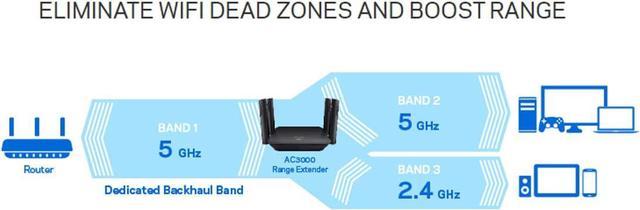
Tri-band WiFi extendersboost your internet by adding an extra band. This gives wider coverageand faster speedsin your home or office.
They help cut down network congestion. More devices can connect without slowing the internet. This means less buffering and smoother browsing.
Connecting many devices is easier with these extenders. Your phone, laptop, and smart TV can all work well at once. It keeps your connection stable and strong.
Using Multiple Tri Band Extenders
Using two tri-band WiFi extenderscan improve coverage but requires care. Both extenders must be compatible with your routerto avoid connection issues. Check the brand and model for matching frequency bands.
Place extenders far enough apart to cover a larger area. Avoid placing them too close as this can cause signal overlapand reduce performance. Ideal spots are near weak signal areas.
Interference can happen if extenders use the same channels. Use different channels or bands to keep signals clear. Walls and other electronics can also affect signal strength.
| Consideration | Recommendation |
|---|---|
| Compatibility | Use extenders from the same brand or check specs |
| Placement | Space extenders to avoid overlap, near weak spots |
| Interference | Choose different channels and avoid obstacles |
Setting Up Two Tri Band Extenders
Place the first tri-band extender near your main router for the best signal. Plug in the second extender far enough to cover weak spots but close enough to get a strong signal from the first extender. Connect each extender to your WiFi network using the setup app or web interface. Use the same network name and password for both extenders to keep devices connected smoothly.
Choose different channels for each extender to avoid signal interference. Use channels 1, 6, and 11 on the 2.4 GHz band for best results. For 5 GHz bands, select channels that are far apart. This helps each extender work without slowing down the other.
Set each extender’s IP address to avoid conflicts. Use unique IPs but keep them within your router’s range. Enable automatic updates for better security. Check that both extenders use the same security type, like WPA2, for safer connections.
Troubleshooting Common Problems
Signal overlapcan cause poor WiFi performance. Place extenders far enough apart to avoid this. Use different channels for each extender to reduce interference. Test signal strength in different spots to find the best placement.
Slow speeds often happen if extenders share the same frequency band. Try connecting one extender to the 2.4 GHz band and the other to 5 GHz. Keep extenders close to the router for stronger signals. Check for obstacles like walls or furniture blocking the signal.
Connection drops may result from weak signals or device limits. Restart extenders and router regularly to clear errors. Update the firmware of your extenders to fix bugs. Avoid too many devices connected at once to keep the connection stable.
Alternatives To Multiple Extenders
Using two tri-band WiFi extenders can cause signal interference and slower speeds. Instead, consider a mesh WiFi system or a wired access point for better coverage and performance. These options provide more reliable connections without the drawbacks of multiple extenders.
Mesh Wifi Systems
Mesh WiFi systemsuse multiple devices that work as one network. They offer better coverageand easy management. Each device talks to others to send the best signal. This reduces dead zones and keeps speeds stable in large homes.
Powerline Adapters
Powerline adapters use your home’s electrical wiring to send internet signals. They are simple to set upand can reach places where WiFi is weak. You plug one adapter near the router and another where you need internet. This avoids slow WiFi areas without extra cables.
Upgrading Router Hardware
Getting a newer router can improve your WiFi a lot. Modern routers have better rangeand faster speeds. Some support more devices and offer stronger signals. This can be a good choice if your current router is old or weak.

Credit: www.amazon.com
Maximizing Network Performance
Using two tri-band WiFi extenders can improve coverage and reduce dead zones in large homes. Placing them correctly helps maintain strong speeds and stable connections throughout your network.
Regular Firmware Updates
Keep your wifi extenders updated with the latest firmware. Updates fix bugs and improve speed. They also add security patches. Check the manufacturer’s website or app regularly. Install updates as soon as they are available. This helps your network run smoothly and safely.
Using Quality Of Service Settings
Quality of Service (QoS) lets you control internet speed for devices. You can give priority to work or streaming devices. This stops slowdowns when many devices are online. Set QoS in your router’s settings. It helps keep important tasks fast and smooth.
Monitoring Network Traffic
Watch how much data each device uses. Many routers have tools to monitor traffic. Spot heavy users that slow your network. Limit their bandwidth if needed. This keeps the network fair and prevents lag for everyone.

Credit: www.amazon.com
Frequently Asked Questions
Can I Use Two Tri-band Wifi Extenders Together?
Yes, you can use two tri-band WiFi extenders together. They help expand your network coverage and reduce dead zones. Ensure they are properly placed and configured to avoid signal interference for optimal performance.
Will Two Tri-band Extenders Improve Wifi Speed?
Using two tri-band extenders can improve WiFi speed by reducing congestion and increasing bandwidth. However, speed gains depend on placement, network setup, and internet plan limitations. Proper configuration is essential to maximize benefits.
How Should I Place Two Tri-band Wifi Extenders?
Place the first extender halfway between your router and a dead zone. Position the second extender where it still receives a strong signal from the first extender. Avoid overlapping coverage to prevent signal interference.
Do Two Tri-band Extenders Cause Network Interference?
If placed too close, two tri-band extenders can cause interference. Maintain adequate distance and use non-overlapping channels to minimize signal overlap. Proper placement ensures stable and fast WiFi connections.
Conclusion
Using two tri-band WiFi extenders can improve your network coverage. They help eliminate dead zones in your home. Choose extenders compatible with your router for best results. Placement is crucial. Ensure extenders are placed strategically for optimal performance. Check compatibility to avoid interference.
Remember, more extenders might not always mean better speed. Consider your specific needs and home layout. Invest time in proper setup for a stable connection. Test your network’s performance after setup. This ensures everything works smoothly. Enjoy seamless browsing and streaming with enhanced WiFi coverage.