Are you tired of slow internet and dead zones in your office? You might be wondering if mesh WiFi can solve these problems and keep your team connected without interruptions.
Imagine having a strong, reliable signal no matter where you are in your workspace. This isn’t just a dream—it could be your new reality. Keep reading to discover how mesh WiFi works for offices like yours and why it might be the upgrade you’ve been waiting for.
Benefits Of Mesh Wifi In Offices
Mesh WiFi systems offer clear advantages for office environments, transforming how you stay connected throughout your workspace. They address common issues like weak signals and fluctuating speeds that can disrupt your daily tasks. Understanding these benefits helps you decide if mesh WiFi suits your office needs.
Eliminating Dead Zones
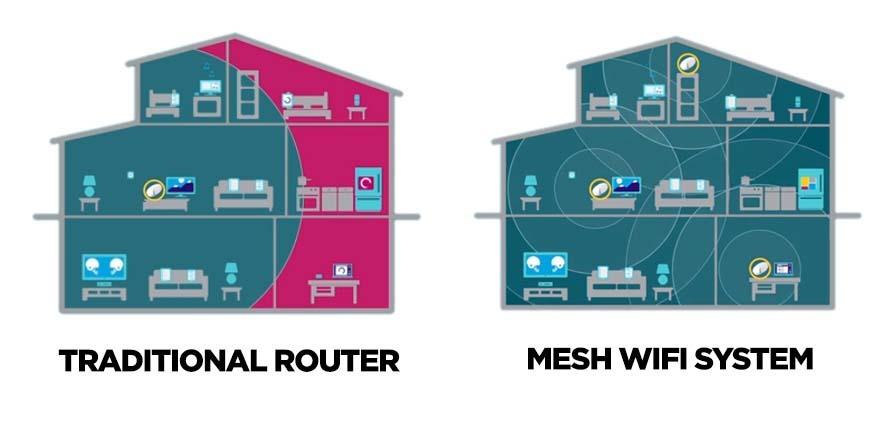
Dead zones are a major annoyance in many offices. Mesh WiFi uses multiple nodes placed strategically around your workspace to provide seamless coverage. This means no more frustrating spots where your connection drops or slows down unexpectedly.
Think about your last meeting when the video call froze because the WiFi was weak in the conference room. With mesh WiFi, such interruptions become rare because the network blankets your entire office evenly.
Consistent Connection Speeds
Slow or inconsistent internet can kill productivity. Mesh WiFi maintains steady speeds by automatically connecting your device to the strongest node available. You don’t have to manually switch networks or reset your router when moving around.
This constant connection quality is especially valuable during high-traffic times or when many devices are online simultaneously. Your team can work without worrying about lag or buffering, keeping momentum going.
Scalability For Growing Teams
Is your team expanding or planning to move to a larger space? Mesh WiFi grows with you. Adding new nodes is simple and doesn’t require complicated rewiring or technical expertise.
This flexibility means you can adapt your network quickly to accommodate new employees or office layouts. Instead of struggling with spotty coverage, your office stays connected no matter how much it changes.

Credit: 1rateservices.com
Comparing Mesh Wifi And Traditional Networks
Choosing the right network for an office impacts productivity and communication. Mesh Wifi and traditional networks offer different benefits and challenges. Understanding their differences helps pick the best fit for your workspace needs.
Setup Complexity
Traditional networks often require running cables and configuring routers manually. This setup can take time and may need professional help. Mesh Wifi systems simplify this process with wireless nodes that connect automatically.
Mesh Wifi setup usually involves placing nodes around the office and using an app to manage them. This approach reduces technical barriers and speeds up installation. Small offices especially benefit from this easy setup.
Coverage And Reliability
Traditional networks rely on a single router or access point. This can cause dead zones where the signal is weak. Expanding coverage means adding more hardware and cables.
Mesh Wifi uses multiple nodes that work together to cover large areas. They create a seamless network without signal drops. This setup is ideal for offices with many rooms or floors.
Cost Considerations
| Network Type | Initial Cost | Maintenance Cost | Scalability |
|---|---|---|---|
| Traditional Network | Lower | Higher (cabling, repairs) | Limited without extra hardware |
| Mesh Wifi | Higher | Lower (less hardware, easy updates) | Easy to expand with new nodes |
Traditional networks may cost less at first but can add expenses over time. Mesh Wifi systems require more upfront investment. Their ease of expansion and low maintenance can save money later.
Choosing The Right Mesh System For Your Office
Choosing the right mesh WiFi system for your office improves internet speed and reliability. A good system handles many devices and covers every corner. It keeps your business online without interruptions. Consider several factors to pick the best mesh system for your office needs.
Assessing Office Size And Layout
Measure your office space to understand coverage needs. Large offices need multiple mesh units for full coverage. Walls and furniture can block WiFi signals. Open layouts allow signals to travel farther. Plan unit placement to avoid dead zones and weak signals.
Number Of Devices Supported
Count all devices that will connect to the network. Include computers, printers, phones, and smart devices. Choose a mesh system that supports more devices than you currently have. This prepares for future growth and prevents slowdowns during busy hours.
Security Features
Office networks require strong security to protect sensitive data. Look for mesh systems with WPA3 encryption. Check for automatic updates to keep security current. Guest network options help separate visitors from your main network. Ensure the system offers firewall and malware protection features.
Installation Tips For Optimal Performance
Setting up a mesh WiFi network in your office can boost connectivity. Proper installation is key for achieving optimal performance. Follow these tips to ensure your mesh WiFi system works efficiently.
Ideal Router Placement
Place your main router in a central location. This ensures even coverage throughout the office. Avoid placing it near walls or in cabinets. Elevate the router on a shelf or desk. This minimizes obstacles and enhances signal strength.
Minimizing Interference
Keep your routers away from electronic devices. Devices like microwaves and cordless phones cause interference. Use different WiFi channels to reduce signal overlap. This helps maintain a stable connection. Ensure there’s minimal physical obstruction between nodes.
Regular Firmware Updates
Check for firmware updates regularly. Manufacturers release updates to improve performance and security. Enable automatic updates if available. This keeps your network running smoothly and securely. Stay informed about new features and enhancements.
Impact On Office Productivity
Office productivity hinges on seamless communication and uninterrupted access to resources. Mesh WiFi can play a significant role in shaping how your team works every day. By improving network stability and coverage, it directly influences how efficiently tasks get done and how well your team collaborates.
Reducing Downtime
Nothing kills productivity faster than a spotty internet connection. Mesh WiFi systems create multiple access points, ensuring your office never relies on a single router. This setup minimizes dead zones and prevents connection drops.
Imagine a scenario where your team is uploading a large file, and the network suddenly slows down or cuts out. With mesh WiFi, the system automatically reroutes traffic to a stronger node, keeping work flowing without interruption.
Supporting Remote Collaboration
Remote work is now part of everyday office life. Mesh WiFi helps maintain a strong, consistent connection for employees working from different areas of the office or even remotely. This means fewer frustrating moments of freezing screens or dropped calls.
Have you noticed how a weak connection can break the flow of brainstorming sessions? Mesh networks support smoother video and audio streams, making it easier to share ideas and stay connected.
Enhancing Video Conferencing Quality
Video meetings can make or break your team’s collaboration. Mesh WiFi reduces lag and buffering by providing a stable network environment. This ensures clearer audio and sharper video, which helps everyone stay engaged and focused.
Think about the last time your video call froze mid-conversation. How much time did you lose trying to reconnect? Mesh WiFi helps avoid these disruptions, so meetings start and end on time, boosting overall efficiency.

Credit: www.pcmag.com
Potential Challenges And Solutions
Using mesh WiFi in an office has many benefits but also some challenges. Knowing these challenges helps to prepare and find solutions. This section highlights common issues and how to fix them. It ensures a smooth and strong network for work.
Network Congestion
Network congestion happens when too many devices use the WiFi at the same time. This slows down the internet speed and causes delays. Offices with many employees and devices may face this issue often.
To reduce congestion:
- Limit the number of devices per mesh node.
- Use dual-band or tri-band mesh systems to separate traffic.
- Place mesh nodes strategically to cover busy areas well.
- Schedule heavy tasks during off-peak hours.
Compatibility Issues
Not all devices or network setups work well with mesh WiFi systems. Older devices may not connect smoothly or at full speed. Some office equipment may require special settings or wired connections.
Solutions include:
- Check device compatibility before buying mesh systems.
- Update device firmware and mesh software regularly.
- Use Ethernet backhaul for critical nodes to improve stability.
- Keep a mix of wired and wireless connections for key equipment.
Troubleshooting Common Problems
Mesh WiFi can face issues like weak signals, drops, or slow speeds. Troubleshooting helps to fix these problems quickly without losing work time.
Try these steps:
- Restart mesh nodes and the main router.
- Check for firmware updates and apply them.
- Move nodes to improve coverage and avoid obstacles.
- Use the mesh system’s app to monitor network health.
- Reset the network if problems persist.
Credit: kb.pineapple.net.au
Frequently Asked Questions
Can Mesh Wifi Improve Office Internet Speed?
Yes, mesh WiFi improves office internet speed by reducing dead zones. It creates a strong, seamless network, ensuring fast connections across all areas.
Is Mesh Wifi Suitable For Large Office Spaces?
Mesh WiFi suits large offices well. Multiple nodes cover wide areas, providing consistent signal strength and reliable connectivity for many devices.
How Secure Is Mesh Wifi For Office Use?
Mesh WiFi offers strong security with WPA3 encryption and frequent updates. It supports guest networks and device isolation for enhanced office data protection.
Can Mesh Wifi Support Multiple Office Devices Simultaneously?
Yes, mesh WiFi supports many devices at once. It balances traffic efficiently, preventing network slowdowns during high office usage.
Conclusion
Mesh WiFi works well in many office settings. It spreads signals evenly across large spaces. Employees get strong, steady connections everywhere. It helps reduce dead zones and slow speeds. Setup is usually simple and quick. Small to medium offices benefit the most.
Big offices may need more units for full coverage. Mesh systems also allow easy network growth. Overall, mesh WiFi offers reliable internet for smooth workdays. Consider your office size and needs before choosing. This way, your team stays connected and productive.