Have you ever struggled with slow WiFi or dead zones in your multi-story house? It’s frustrating when your signal drops just as you need it most.
You might be wondering if mesh WiFi can solve this problem and keep your connection strong on every floor. Imagine walking freely from your basement to your attic without losing a single bar of WiFi. You’ll discover how mesh WiFi works in multi-story homes and whether it’s the right solution for you.
Keep reading to find out how to boost your internet coverage and enjoy seamless browsing everywhere in your house.
Mesh Wifi Basics
Understanding mesh WiFi is key to improving internet coverage in multi-story homes. Traditional routers often struggle to cover large, tall spaces. Mesh WiFi systems offer a smarter solution by using multiple devices that work together. This section explains the basics of mesh WiFi technology and how it operates in a home environment.
What Is Mesh Wifi
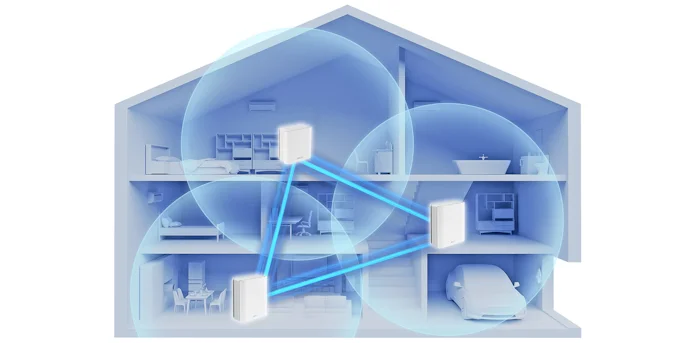
Mesh WiFi is a network system made up of several devices called nodes. These nodes connect to each other wirelessly or through cables. Each node spreads the internet signal, creating a large, seamless coverage area. This setup reduces dead zones and weak signals, especially in big or multi-story houses.
Unlike a single router, mesh WiFi uses many points to provide strong, consistent coverage. It allows devices to connect to the closest node automatically. This makes internet access faster and more reliable throughout the house.
How Mesh Wifi Works
Mesh WiFi systems have one main node connected to the modem. Other nodes are placed around the home to extend the signal. These nodes communicate with each other to share data and keep the connection stable.
When a device moves in the house, mesh WiFi switches it to the best node without interrupting the connection. This process is called seamless roaming. It means no need to reconnect or enter new passwords.
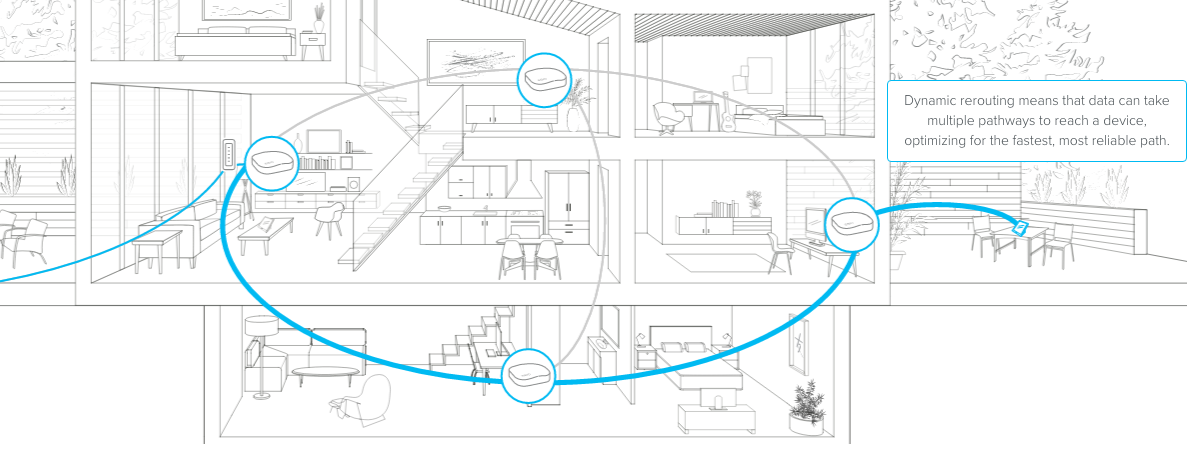
Mesh networks use smart routing to find the fastest path for data. If one node has a problem, others take over to maintain the connection. This makes mesh WiFi very reliable in multi-story homes where walls and floors can block signals.
Challenges In Multi Story Homes
Multi story homes pose unique challenges for wifi coverage. The signal needs to travel through floors and walls, which can weaken it. Many factors affect the strength and reach of a mesh wifi system in these houses. Understanding these challenges helps in setting up a better network.
Signal Obstruction Factors
Several elements block or reduce wifi signals inside multi story homes. Thick walls made of brick or concrete absorb more signals. Metal structures like beams or pipes reflect and scatter the wifi waves. Floors between stories often contain materials that weaken signals further. Large furniture and appliances also interfere with signal flow. Even mirrors and glass can affect the wifi strength in some cases.
Common Wifi Dead Zones
Dead zones are areas with little or no wifi signal. In multi story homes, these spots often appear in basements or attic spaces. Rooms far from the main router or mesh points also suffer from weak signals. Corners behind thick walls or under staircases tend to lose connectivity. Bathrooms and closets can become dead zones due to their enclosed spaces. Identifying these zones helps in placing mesh nodes more effectively.
Benefits Of Mesh Wifi For Multi Story Houses
Mesh WiFi systems offer clear advantages for multi story houses where traditional routers often struggle to provide strong signals on every floor. They create a unified network that adapts to your home’s layout, making your internet experience smoother and more reliable. If you’ve ever moved from one floor to another and lost connection, you know how frustrating it can be—mesh WiFi helps you avoid that entirely.
Seamless Coverage Across Floors
Mesh WiFi nodes communicate with each other to blanket your entire home in consistent WiFi. This means you don’t have to worry about dead zones or weak signals on upper or lower floors. Each node acts as a checkpoint, so your device automatically connects to the strongest signal as you move around.
Imagine streaming a video while walking from your basement to the attic without a single buffering pause. This seamless handoff between nodes keeps your devices connected without you lifting a finger.
Improved Network Stability
Multi story homes often face interference from walls, floors, and other electronic devices. Mesh WiFi reduces this problem by spreading the load across multiple nodes, preventing any single point from becoming overwhelmed.
With mesh, if one node faces interference or congestion, others compensate instantly, maintaining your connection’s speed and reliability. This means fewer dropped calls, faster downloads, and a better experience for all your smart devices.
Placement Tips For Mesh Nodes
Optimizing the placement of mesh nodes in a multi-story house can dramatically improve your Wi-Fi performance. Whether you are streaming your favorite shows or working from home, strategic placement can make all the difference. Let’s dive into some practical tips to ensure your mesh Wi-Fi system delivers strong and stable connectivity across all floors.
Ideal Locations Per Floor
Positioning mesh nodes on each floor is crucial for a seamless connection. Place nodes in central locations, such as the middle of a hallway or the living room, to ensure an even distribution of the Wi-Fi signal. Think about high-traffic areas where you and your family spend the most time.
In bedrooms, a corner might seem convenient, but it could limit coverage. Instead, consider placing nodes on a shelf to maximize signal reach. Remember, visibility is key; walls and furniture can impede the signal.
Avoiding Interference
Interference can be a silent killer of your Wi-Fi signal. Keep nodes away from electronic devices like microwaves and cordless phones, which can disrupt the signal. Avoid placing nodes near metal objects or concrete walls, as these can absorb the signal.
Consider the materials in your home. Large mirrors, for example, can reflect signals, causing weak spots in your coverage. Always aim for open spaces where the signal can flow freely.
Have you ever noticed that Wi-Fi struggles in certain areas of your home? By adjusting the placement of your mesh nodes, you can transform those dead zones into areas of seamless connectivity. Don’t be afraid to experiment and find what works best for your unique home layout.
Choosing The Right Mesh System
Choosing the right mesh WiFi system is key to getting strong signals across all floors. Not all mesh systems work the same in multi-story houses. Some have better range, speed, and features suited for large homes. Picking the right one avoids dead spots and slow connections.
Consider your house size and layout. A system with good coverage and easy setup fits best. Also, think about devices you want to connect. More devices need a more powerful mesh system. Quality of service features can help prioritize important devices.
Key Features To Look For
- Coverage Area:Choose a system that covers your entire house.
- Number of Nodes:More nodes mean better signal on all floors.
- Speed:Ensure the system supports fast internet speeds.
- Easy Setup:Look for user-friendly apps and simple installation.
- Device Capacity:Check how many devices can connect smoothly.
- Security:Strong encryption and regular updates protect your network.
- Advanced Features:Options like parental controls and guest networks add value.
Popular Mesh Wifi Models
| Model | Coverage | Speed | Device Support | Notable Feature |
|---|---|---|---|---|
| Google Nest Wifi | Up to 4400 sq ft | AC2200 | Up to 100 devices | Easy app setup |
| Netgear Orbi | Up to 5000 sq ft | AX6000 | Up to 60 devices | Tri-band technology |
| TP-Link Deco | Up to 5600 sq ft | AX3000 | Up to 150 devices | Parental controls |
| Amazon Eero Pro 6 | Up to 6000 sq ft | AX4200 | Up to 75 devices | Automatic updates |
Credit: edgeup.asus.com
Setup And Optimization
Setting up and optimizing mesh WiFi in a multi-story house can dramatically improve your internet experience. It’s not just about placing devices randomly; thoughtful setup and fine-tuning are essential. You want to ensure strong signals reach every corner of your home without dead zones or slowdowns.
Initial Installation Steps
Start by positioning your main mesh router near your modem on the ground floor or wherever your internet enters the house. This device acts as the hub for your entire network.
Next, place additional mesh nodes on different floors to cover areas where WiFi signals usually weaken. Avoid placing them too far from the main router or inside cabinets, as walls and objects block signals.
- Choose central locations on each floor for better coverage.
- Keep nodes visible and away from electronic interference like microwaves.
- Ensure each node is within the recommended range specified by the manufacturer.
During setup, use the mesh system’s app to connect each node and check signal strength. The app often guides you through optimal placement, so pay attention to its recommendations.
Fine-tuning For Performance
After installation, test the WiFi speed and coverage in every room. Does your basement have the same speed as the living room upstairs? If not, consider moving nodes closer to weak spots.
Adjust the settings in your mesh system’s app. Some systems allow you to prioritize devices or set up separate networks for work and entertainment. This reduces traffic congestion and improves performance.
- Update firmware regularly to keep your system running smoothly.
- Experiment with channel settings to avoid interference from neighbors’ WiFi.
- Use the app’s tools to monitor network health and spot bottlenecks.
Have you noticed certain rooms still struggling despite careful placement? Try adding another node or a WiFi extender to boost signal strength. Remember, every home’s layout is unique, so your setup may need small tweaks over time.
Troubleshooting Common Issues
Troubleshooting common issues helps keep your mesh WiFi running smoothly in a multi-story house. Problems like slow speeds or connectivity drops can disrupt daily use. Understanding simple fixes improves your network’s performance and reliability. This section covers easy ways to solve these common challenges.
Slow Speeds And Solutions
Slow speeds often result from distance or obstacles between mesh nodes. Thick walls and floors block WiFi signals. Devices far from the main router receive weaker signals.
- Place nodes in open, central locations on each floor.
- Keep nodes away from metal objects or appliances that cause interference.
- Use wired backhaul by connecting nodes with Ethernet cables for faster data transfer.
- Update the firmware of your mesh system regularly for better speed and stability.
- Limit the number of connected devices to avoid bandwidth congestion.
Connectivity Drops Fixes
Connectivity drops happen when the signal between nodes breaks. This can create dead zones or cause devices to lose connection.
- Check node placement to ensure good overlap in coverage areas.
- Restart mesh nodes to refresh connections and clear temporary glitches.
- Reduce interference by moving nodes away from other wireless devices.
- Adjust channel settings in the router to avoid crowded frequencies.
- Reset the mesh system if persistent drops continue after other fixes.

Credit: www.engadget.com
Credit: blog.eero.com
Frequently Asked Questions
Can Mesh Wifi Cover All Floors In A Multi-story House?
Yes, mesh WiFi can cover multiple floors effectively by placing nodes on each level. This ensures strong, consistent signals throughout your home.
How Many Mesh Wifi Nodes Are Needed For Multi-story Homes?
The number of nodes depends on the house size and layout. Typically, 2-3 nodes cover a standard multi-story home well.
Does Mesh Wifi Improve Internet Speed In Large Houses?
Mesh WiFi enhances internet speed by reducing dead zones and managing traffic efficiently across all floors.
Is Mesh Wifi Better Than Extenders For Multi-story Houses?
Yes, mesh WiFi offers seamless coverage and better performance compared to traditional extenders, especially in multi-level homes.
Conclusion
Mesh WiFi suits multi-story homes well. It spreads WiFi signals across floors easily. Walls and floors can block signals sometimes. More mesh points can fix weak spots. Setup is simple and user-friendly. It keeps your internet strong everywhere. A steady connection helps with work and fun.
Mesh WiFi can solve many coverage problems. Choose the right system for your home size. Enjoy faster and more reliable WiFi today.