Are you tired of messy wires cluttering your home? Imagine having strong, reliable WiFi everywhere without a single cable running across your floors.
Mesh WiFi promises to do just that, but can it really work without any wires at all? If you’ve ever wondered how wireless your internet setup can be, you’re about to discover the truth behind mesh WiFi systems. Keep reading to find out if you can enjoy seamless internet without the hassle of wires—and how it might change the way you connect every device in your home.
How Mesh Wifi Works
Understanding how mesh WiFi works can change the way you think about your home or office internet setup. It’s not just about placing a single router and hoping for the best. Mesh WiFi creates a network where multiple devices work together to provide seamless coverage, often without the need for wires running through your walls.
Basic Mesh Network Setup
A mesh network starts with a main router connected to your modem. From there, additional devices called nodes or satellites spread the WiFi signal throughout your space.
Each node communicates with the others, creating a web of connectivity. This setup helps eliminate dead zones and ensures you get strong WiFi in every corner of your home.
Role Of Nodes In Connectivity
Nodes act as both receivers and transmitters of the WiFi signal. They work together to find the best path for data to travel, which means your device always connects to the strongest signal available.
Think of nodes as team players—if one node encounters interference, the others can reroute the data to keep your connection smooth. This dynamic communication is what sets mesh WiFi apart from traditional routers.
Wireless Vs Wired Backhaul
One key question is whether mesh nodes need wires to connect. In a wireless backhaul, nodes communicate with each other over WiFi, making installation simple and cable-free.
Wired backhaul uses Ethernet cables between nodes, often resulting in faster and more reliable connections because it reduces wireless interference.
Choosing between wireless and wired backhaul depends on your space and priorities. Would you prefer easy setup or the absolute best performance? You might even combine both for an optimal balance.
Credit: www.makeuseof.com
Wireless Mesh Wifi Benefits
Wireless Mesh WiFi systems offer a range of benefits that can transform how you experience internet connectivity at home or in the office. They provide more freedom in setting up your network without the hassle of running cables through walls or floors. This means you can enjoy strong, reliable WiFi wherever you need it most.
Flexible Placement Of Nodes
With wireless mesh WiFi, you aren’t tied down by the location of power outlets or Ethernet ports. You can place nodes wherever the signal is weak or where you spend the most time online. This flexibility makes it easier to cover dead zones in your space without extra wiring.
Imagine moving a mesh node to your backyard or a far corner of your house without worrying about dragging cables. This adaptability lets you optimize your network based on real needs, not just where wires happen to reach.
Eliminating Cable Clutter
Wires can quickly become a mess, especially in tight spaces or multi-room setups. Wireless mesh systems cut down on this clutter by removing the need for extensive cabling. This keeps your environment clean and safer, especially if you have kids or pets running around.
Think about how much easier it is to clean and rearrange furniture without tripping over cables. Plus, fewer wires mean fewer points of failure and less maintenance over time.
Seamless Roaming Experience
One of the standout benefits of wireless mesh WiFi is seamless roaming. As you move through your home or office, your device automatically connects to the strongest node without dropping the connection. You won’t notice any interruptions during calls, streaming, or gaming.
Have you ever experienced a dropped video call or buffering because your device clung to a weak signal? Mesh WiFi solves this by intelligently managing connections, so your internet feels smooth and consistent everywhere.
Challenges Of Wire-free Mesh
Wireless mesh WiFi can face issues like signal loss and slower speeds without wired connections. Walls and distance often weaken the network’s strength, causing interruptions. Devices may struggle to stay connected smoothly in large spaces without wires.
Mesh WiFi systems promise seamless connectivity without the clutter of wires, but going completely wire-free isn’t without its hurdles. Though the allure of a tidy home and flexible network setup is strong, it’s essential to be aware of the potential challenges. Understanding these can help you make an informed decision about whether a wire-free mesh system is right for you.Signal Interference Issues
Mesh networks often operate on the same frequencies as other household devices like microwaves and baby monitors. This can lead to interference, which affects your WiFi performance. You might experience slower speeds or dropped connections at the most inconvenient times. Consider the layout of your home and the placement of your nodes. Walls, metal objects, and even fish tanks can block signals. A little strategic positioning can go a long way in minimizing interference.Bandwidth Limitations
Sharing your internet connection across multiple devices can stretch your bandwidth thin. If you’re streaming a 4K movie while your kids are gaming online, you might notice a lag. This is because mesh systems distribute available bandwidth across all connected devices. If your household has heavy internet users, a wire-free setup might require a robust plan from your ISP. Evaluate your internet usage and choose a plan that can handle your needs.Power Source Requirements
Each mesh node needs its own power source. This means you’ll need accessible power outlets wherever you place them. In some older homes, this could mean using extension cords or power strips, which can be unsightly. Think about the practicality of your home’s layout. Are there enough outlets to accommodate your mesh nodes? Consider the aesthetics as well as the logistics when planning your setup.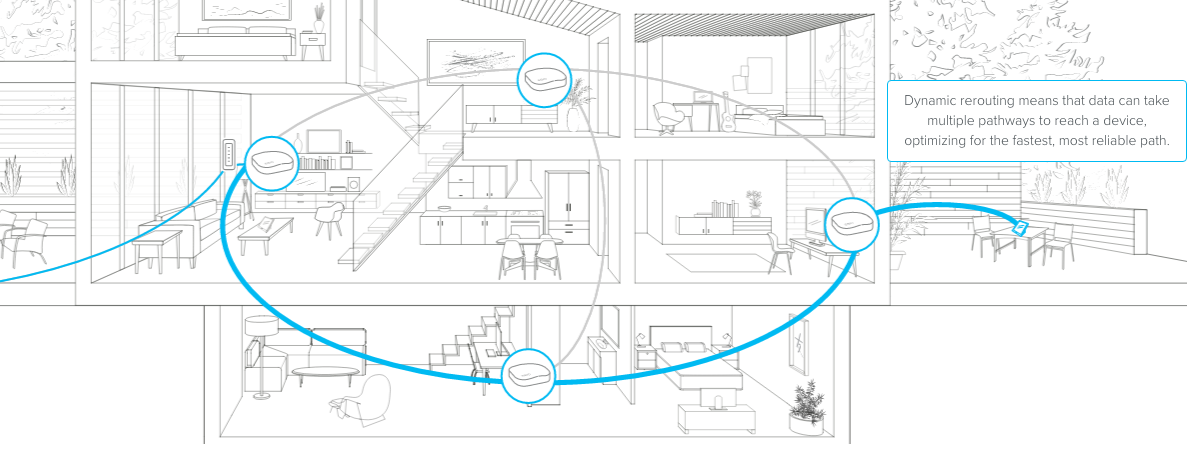
Credit: blog.eero.com
Comparing Wired And Wireless Backhaul
Comparing wired and wireless backhaul is crucial when deciding if mesh WiFi can work without wires. The backhaul connects your mesh nodes, affecting speed, stability, and ease of setup. Understanding the differences helps you make a choice that fits your home or office needs.
Performance Differences
Wired backhaul generally delivers faster and more consistent speeds because it uses Ethernet cables to link nodes directly. This setup avoids interference from walls or other wireless devices, so your network stays strong even at longer distances.
Wireless backhaul, on the other hand, relies on WiFi signals between nodes. While convenient, it can face speed drops if there’s a lot of interference or obstacles. However, for smaller spaces or less demanding internet use, wireless backhaul often performs well enough.
Reliability Factors
Wired connections are less prone to interruptions. You won’t experience sudden drops caused by physical barriers or other wireless networks competing for the same channels.
Wireless backhaul can suffer from signal loss due to walls, floors, or even household appliances. Have you ever noticed your video call freezing when you move to another room? That’s often due to wireless backhaul limitations.
Choosing wired backhaul is safer if you need a rock-solid connection for gaming or streaming. But wireless is flexible and keeps your space cable-free.
Setup Complexity
Setting up wired backhaul means running Ethernet cables between nodes, which can be tricky if your home isn’t pre-wired. You might need to drill holes or hide cables along baseboards, which takes time and effort.
Wireless backhaul is simpler to install—just place the nodes where you want, and they connect over WiFi automatically. This ease of setup is why many people prefer wireless, especially in rentals or places where wiring isn’t possible.
Ask yourself: Is it worth the hassle of cables for better performance? Or do you prefer quick setup and flexibility even if it means some speed trade-offs?
Best Practices For Wireless Mesh Setup
Setting up a wireless mesh network without wires can transform your home or office connectivity. However, the difference between a smooth experience and constant buffering often lies in how you set it up. Paying attention to a few key factors can make your mesh WiFi faster, more reliable, and secure.
Optimal Node Placement
Where you place your mesh nodes matters more than you might think. Nodes should be within range of each other but not too close to cause overlap. Think of spacing them like a chain; each link needs to connect firmly without crowding.
A common mistake is putting nodes in hidden corners or behind thick walls. Instead, place them in open areas, preferably elevated spots like shelves. Have you noticed your signal drops near a metal appliance? That’s a sign to move your node elsewhere.
Minimizing Interference
Wireless signals can get disrupted by many household devices. Microwaves, cordless phones, and even baby monitors can create noise that slows your network. Try to keep your mesh nodes away from these gadgets.
Also, avoid placing nodes near large metal objects or aquariums, which absorb signals. Changing the WiFi channel on your router can help reduce interference from neighboring networks. Have you checked your signal strength in different rooms? Sometimes a small shift can make a big difference.
Firmware And Security Updates
Keeping your mesh system’s firmware up to date is crucial. Updates often fix bugs and improve performance, so ignoring them can leave you with slower speeds or security risks. Most mesh systems notify you when updates are available—don’t delay installing them.
Security is just as important as speed. Use strong, unique passwords and enable automatic updates if your system supports it. Have you ever thought about how an outdated router can be an open door for hackers? Protect your network like you protect your personal information.
Popular Mesh Systems Supporting Wireless Backhaul
Popular mesh WiFi systems that support wireless backhaul allow you to create a seamless network without the clutter of wires connecting the nodes. This means you can place your mesh units anywhere in your home or office for optimal coverage, relying solely on WiFi signals to communicate with each other. But which mesh systems truly deliver on this promise and what should you consider before choosing one?
Top Brands And Models
- Netgear Orbi– Known for strong wireless backhaul performance, the Orbi series offers excellent range and speed, perfect for larger homes.
- Google Nest Wifi– Simple setup and reliable wireless backhaul make Nest Wifi a popular choice for users wanting hassle-free connectivity.
- TP-Link Deco– Offers budget-friendly options with flexible wireless backhaul support, balancing performance and cost effectively.
- Asus ZenWiFi– Combines high-speed wireless backhaul with advanced features like QoS and parental controls.
Key Features To Look For
Look for mesh systems that clearly advertise support for wireless backhaul. This ensures the nodes communicate efficiently without wires. Dual-band or tri-band radios are critical because they dedicate one band for backhaul, improving speed and reducing interference.
Another feature to check is automatic band steering, which helps your devices connect to the best frequency band for both internet access and backhaul. Also, consider systems with easy app controls that let you monitor and optimize your network from your phone.
User Experiences
Many users report that wireless backhaul works best in open layouts where nodes have a clear line of sight. Walls and large furniture can sometimes weaken the signal between nodes, leading to slower speeds.
One user shared how switching to a tri-band mesh system improved their streaming experience drastically because the dedicated backhaul band kept the network stable. Have you noticed any dead zones in your home? Wireless backhaul mesh systems might solve that, but placement is key.
Overall, wireless backhaul offers flexibility but demands thoughtful setup. Testing node placement and using the system’s app to check signal strength can help you get the most out of your mesh network without wires.
Future Trends In Mesh Networking
Mesh networking is evolving fast, shaping how we use wireless internet at home and work. The future of mesh WiFi promises smoother connections and smarter integration. These trends will help mesh systems work better without wires, making them more reliable and easier to use.
Advances In Wireless Technology
New wireless standards like WiFi 6 and WiFi 7 boost speed and reduce lag. They improve how mesh nodes communicate without wires. These advances allow more devices to connect smoothly at the same time. Better signal strength means fewer dead zones and stronger coverage.
Integration With Smart Home Devices
Mesh networks will connect deeply with smart home gadgets. This integration helps devices talk to each other faster and safer. Smart homes will rely on mesh WiFi to run lights, locks, and cameras without delays. This makes homes more convenient and secure.
Improving Wireless Backhaul Speeds
Wireless backhaul links connect mesh nodes without cables. New tech focuses on making these links faster and more stable. Faster backhaul means less interruption and smoother streaming or gaming. This improvement helps mesh networks work fully wireless with no drop in quality.

Credit: www.seeedstudio.com
Frequently Asked Questions
Can Mesh Wifi Systems Work Without Wires?
Yes, mesh WiFi systems can work wirelessly by using WiFi signals to connect nodes. However, wired backhaul improves speed and reliability.
How Does A Wireless Mesh Wifi Network Operate?
A wireless mesh WiFi network uses radio signals between nodes to extend coverage without cables. Nodes communicate directly or through other nodes.
Is Wired Backhaul Necessary For Mesh Wifi Performance?
Wired backhaul is not necessary but recommended. It reduces interference and latency, enhancing network stability and speed across mesh nodes.
What Devices Support Wireless Mesh Wifi Setups?
Most modern mesh WiFi systems support wireless setups. Popular brands like Google Nest, Eero, and Netgear offer wireless-only node connections.
Conclusion
Mesh WiFi can work without wires in many cases. It uses wireless signals to connect devices. This setup helps cover large areas easily. No need to run cables through walls or floors. Still, some wired connections can improve speed and stability.
Mesh WiFi suits homes with many devices and rooms. It offers simple setup and flexible coverage. Wireless mesh networks bring strong WiFi without the clutter. A good choice for easy, reliable internet in your space.