Have you ever struggled with weak WiFi signals in your backyard or garden? Imagine being able to stream music, conduct video calls, or work remotely from the comfort of your outdoor space without any interruptions.
The solution could be simpler than you think. Outdoor WiFi extenders are designed to boost your internet signal, but the question arises: Can they be mounted on a pole for even better coverage? By the end of this article, you’ll discover not just the answer but also how this simple change can revolutionize your outdoor internet experience.
Stay with us as we unravel the secrets to achieving flawless WiFi connectivity, right where you need it most.

Credit: simplewifi.com
Benefits Of Pole Mounting
Mounting an outdoor WiFi extender on a pole offers better signal range. The height allows the device to send and receive signals without many obstacles. This means the WiFi can cover a larger area.
Poles can be placed almost anywhere. This gives you flexibilityto find the best spot for the extender. You can avoid walls, trees, or other things that block WiFi signals.
Outdoor WiFi extenders need to handle rain, wind, and sun. Pole mounting often comes with stronger weather protection. Many mounts and extenders are made to stay safe in tough weather.
Choosing The Right Pole
Choosing the right pole is key for outdoor wifi extenders. The materialof the pole affects its strength and how long it lasts. Common materials include metal, fiberglass, and PVC. Metal poles are strong but can rust. Fiberglass poles resist weather but cost more. PVC poles are cheap but less durable.
The height and diametermust fit your needs. Taller poles give better signal reach but need more support. Diameter should be enough to hold the extender without bending or shaking.
Stability and durabilityensure the extender stays safe. Poles should handle wind, rain, and sun. Using mounting brackets or clamps helps keep the pole steady. A stable pole stops the extender from moving and losing signal.
Mounting Techniques
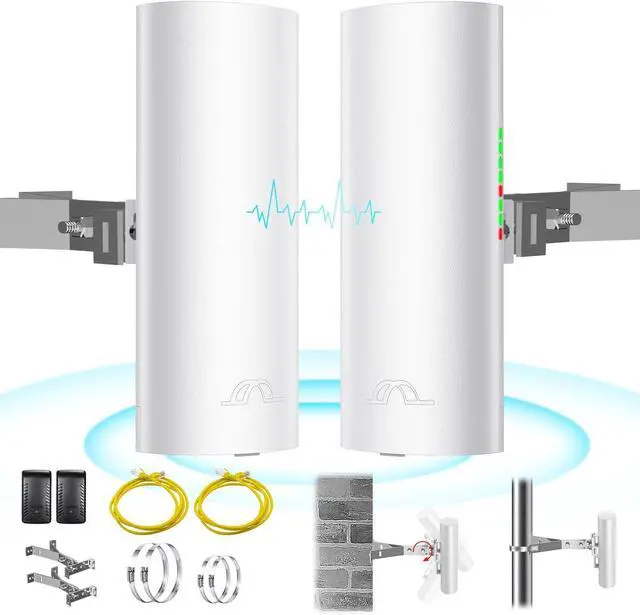
Outdoor WiFi extenders can be securely mounted on poles using brackets or straps. This setup improves signal range by placing the device higher and away from obstacles. Proper mounting ensures better coverage and device stability in various weather conditions.
Tools And Equipment Needed
- Outdoor WiFi extender
- Mounting bracketor pole clamp
- Screwdriveror drill
- Zip tiesor stainless steel straps
- Level toolfor straight mounting
- Weatherproof sealantto protect connections
Step-by-step Installation
Choose a pole that is sturdy and tall enough for good signal reach. Attach the mounting bracket or pole clamp to the extender securely. Use a level tool to keep the extender straight on the pole. Wrap zip ties or straps tightly around the pole and mounting bracket. Tighten screws or bolts to hold everything in place. Seal any exposed parts with weatherproof sealant to avoid damage from rain or dust.
Securing The Extender Safely
Make sure the extender is firmly attached and does not wobble. Avoid placing it near metal objects that block signals. Check that cables are tight and not hanging loosely. Secure cables with zip ties to prevent wind damage. Test the signal strength after installation to ensure good coverage. Regularly inspect the setup for wear or damage.
Weatherproofing Tips
Protect cables and connectorsby using weatherproof tape or sealant. This stops water from entering and causing damage. Make sure cables have a tight seal where they join the extender. Avoid leaving any gaps or loose ends exposed to rain or snow.
Use weatherproof enclosuresto keep devices safe from harsh weather. These boxes are made to protect extenders from wind, rain, and dust. Choose enclosures that fit your extender snugly to prevent moisture build-up inside.
- Check cables and enclosures every few months for cracks or wear.
- Clean dust and dirt off regularly to keep signals strong.
- Replace damaged parts promptly to avoid connectivity issues.
Common Installation Mistakes
Choosing the wrong pole can cause many problems. Poles made of weak material may not hold the extender well. Poles that are too thin or too thick can make mounting hard. The pole height should suit the area for the best signal.
Mounting the extender at the wrong angle lowers its performance. The device should point toward the area needing better wifi. Angles that are too steep or flat may block the signal.
Ignoring grounding can cause damage from lightning or static. Proper grounding protects both the extender and nearby equipment. Always use grounding wires and follow safety rules.

Credit: www.amazon.com
Legal And Safety Considerations
Check local laws before mounting an outdoor WiFi extender on a pole. Some areas require permitsor have rules on pole height and placement. Ignoring these can lead to fines or having to remove the device.
Use proper electrical safetypractices to avoid shocks or fire. Ensure cables are insulated and connections are secure. Ground the pole and device to protect from lightning and power surges.
Choose a location to avoid interferencewith other wireless devices. Keep distance from power lines and other antennas. This helps maintain a strong, stable WiFi signal without interruptions.
Optimizing Performance After Mounting
Adjusting the antenna directionis key to better signal. Turn the antenna slowly to find the strongest signal. Small changes can make a big differencein coverage.
Testing signal strength helps know if the extender is working well. Use signal meter toolsor your device’s WiFi settings. Check from different spots around the area.
| Update Type | Purpose | How Often |
|---|---|---|
| Firmware | Fix bugs and improve device functions | Check every 3 months |
| Software | Enhance user interface and security | Update when notified |
Credit: www.newegg.com
Frequently Asked Questions
Can Outdoor Wifi Extenders Be Mounted On Poles?
Yes, outdoor WiFi extenders can be mounted on poles. Pole mounting improves signal range and coverage in open areas. Ensure the extender is weatherproof and securely fastened to avoid damage from wind or rain.
What Are The Benefits Of Pole Mounting Wifi Extenders?
Pole mounting WiFi extenders elevates the device, reducing obstructions and improving signal strength. It also allows flexible positioning to cover larger outdoor areas efficiently. This method helps extend WiFi coverage in gardens, parks, or large yards.
How To Securely Mount A Wifi Extender On A Pole?
Use sturdy brackets or mounting kits designed for poles. Fasten the extender tightly to prevent movement. Ensure cables are weatherproof and properly connected. Check the device’s manual for specific mounting instructions for safety and optimal performance.
Are There Weather Considerations For Pole-mounted Wifi Extenders?
Yes, outdoor WiFi extenders must be weather-resistant. Pole mounting exposes devices to rain, wind, and sun. Choose extenders with IP ratings for waterproofing and UV protection to ensure durability and consistent performance.
Conclusion
Outdoor WiFi extenders can work well when mounted on a pole. This setup helps boost signal strength and coverage. Make sure the pole is sturdy and placed in a good location. Secure the extender tightly to avoid damage from wind or rain.
Keep cables neat to prevent signal loss. Pole mounting is a simple way to improve outdoor WiFi performance. With the right steps, you can enjoy better internet outside your home or office.