Are you frustrated with slow WiFi or dead zones in your home? Choosing the right device to boost your internet can be confusing.
Should you go for a cheap mesh WiFi system or stick with a regular router? This decision can change how you experience the internet every day. You’ll discover the key differences, benefits, and drawbacks of both options. By the end, you’ll know exactly which one fits your needs and budget.
Keep reading to make your WiFi work smarter, not harder.
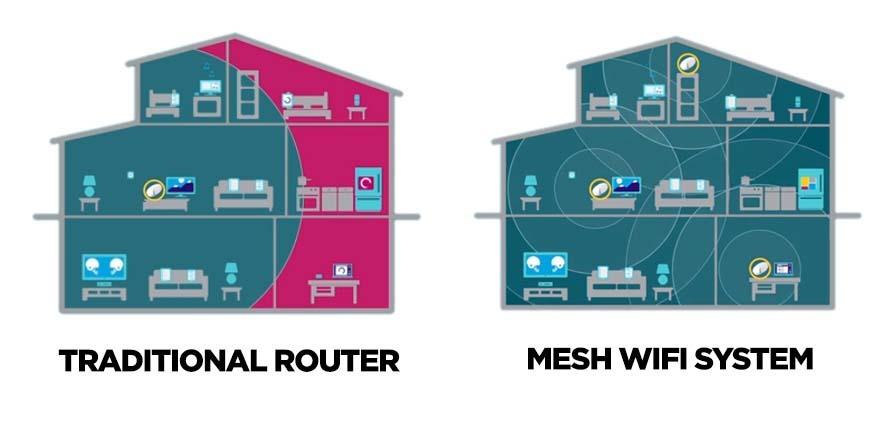
Credit: kb.pineapple.net.au
Mesh Wifi Basics
Mesh wifi systems use multiple devices to spread internet evenly. They help cover large areas with strong signals.
These systems work differently than regular routers by creating a network of nodes. This improves wifi in every corner of your home.
How Mesh Wifi Works
A mesh wifi system has a main router and several satellite nodes. These nodes communicate to share the internet signal.
- The main router connects to your modem.
- Satellite nodes are placed around your home.
- Each node sends and receives wifi signals.
- Devices connect to the strongest nearby node.
- The system automatically manages data paths for best speed.
Key Features Of Mesh Systems
| Feature | Description |
| Seamless Coverage | WiFi signal covers large areas without dead zones. |
| Easy Setup | Simple installation with app guidance. |
| Self-Healing | System reroutes traffic if one node fails. |
| Unified Network | Single network name for all nodes. |
| Scalability | Add more nodes to expand coverage. |
Regular Router Essentials
A regular router connects your devices to the internet. It sends data between your home network and the web.
Routers come in many shapes and sizes. They all have basic tasks to keep your internet running.
Core Functions Of Standard Routers
A standard router has key jobs. It directs internet traffic to the right device in your home.
It also creates a local network for all your devices to connect. This network can be wired or wireless.
- Assigns local IP addresses to devices
- Manages data traffic efficiently
- Provides basic security like firewalls
- Supports wired and Wi-Fi connections
- Allows multiple devices to connect at once
Common Router Types
There are several types of routers for home use. Each type fits different needs and budgets.
- Single-Band Router:Uses one Wi-Fi frequency, good for simple needs.
- Dual-Band Router:Uses two frequencies to reduce interference and improve speed.
- Tri-Band Router:Has three frequencies for many devices and heavy use.
- Wired Router:Connects devices with Ethernet cables for stable connections.
- Wireless Router:Offers Wi-Fi to connect devices without cables.
Cost Comparison
Choosing between a cheap mesh wifi system and a regular router depends a lot on cost. This guide looks at how much each option typically costs.
We will break down the price ranges and see which one fits better for your budget.
Price Range Of Mesh Wifi
Mesh wifi systems usually come with multiple units to cover a larger area. The price varies based on the number of units and brand.
- Basic kits with 2 units start around $100
- Mid-range systems with 3 units cost between $150 and $250
- High-end mesh systems with 4 or more units can be $300 or more
Affordability Of Regular Routers
Regular routers come in many types, from simple to advanced. They usually cost less than mesh wifi systems.
| Router Type | Typical Price Range |
| Basic Router | $20 – $50 |
| Mid-range Router | $50 – $100 |
| High-end Router | $100 – $200 |
Performance Factors
Choosing between a cheap mesh WiFi system and a regular router can affect your internet experience. Let’s explore some performance factors to consider.
Key aspects include coverage, speed, and how many devices each can handle effectively.
Coverage And Range
Coverage determines how well your internet reaches different parts of your home. A mesh WiFi system often covers larger areas than a regular router.
- Mesh systems use multiple nodes to extend range.
- Regular routers rely on a single unit.
- Mesh is better for multi-story homes.
Speed And Bandwidth
Speed and bandwidth are crucial for smooth internet use. Mesh WiFi can offer more consistent speeds across larger areas compared to a single router.
| Type | Speed Consistency |
| Mesh WiFi | High |
| Regular Router | Varies |
Device Handling Capacity
How many devices you can connect without slowdown is crucial. Mesh WiFi systems usually handle more devices better than regular routers.
Setup And Usability
Choosing between cheap mesh wifi and a regular router affects how you set up your network. It also changes how easy it is to manage your internet connection. This guide compares their setup and usability.
Both devices serve to provide internet access, but their installation and control options differ. Understanding these differences helps you pick the right system for your needs.
Installation Process
Setting up a regular router is usually simple. You connect it to your modem and power it on. The setup mostly involves plugging cables and entering some settings on a web page.
Cheap mesh wifi systems also require connection to your modem. But they come with multiple units that you place around your home. This spreads your wifi signal better.
- Regular routers need one device connected to the modem.
- Mesh wifi systems have several units for wider coverage.
- Mesh devices often guide setup through a mobile app.
- Regular routers use a browser interface for configuration.
- Mesh setup may take longer due to placement of nodes.
User Interface And Control
Regular routers usually have a web-based interface. You use a browser on your computer to change settings. This can be tricky for beginners due to technical terms.
Cheap mesh wifi systems focus on easy control with mobile apps. These apps show simple options to manage your network. You can check connected devices and adjust settings with taps.
| Feature | Cheap Mesh Wifi | Regular Router |
|---|---|---|
| Control Interface | Mobile app with simple layout | Browser-based with detailed settings |
| Ease of Use | Easy for beginners | Needs some technical knowledge |
| Network Management | Automatic updates and monitoring | Manual updates and settings |
| Device Control | Easy to block or prioritize devices | More complex to manage connected devices |
Reliability And Stability
Choosing between a cheap mesh WiFi system and a regular router affects your internet’s reliability. Both have strengths and weaknesses in stability.
Understanding how each device handles signal strength and downtime helps you pick the right option for your home or office.
Signal Consistency
Cheap mesh WiFi systems spread the signal across many nodes. This can cover large spaces better than a single router.
Regular routers send signals from one device. This can cause weak spots far from the router.
- Mesh WiFi offers stable signals throughout the area.
- Regular routers may lose signal in distant rooms.
- Cheap mesh systems can have interference between nodes.
- High-quality routers usually provide stronger, steady signals.
Network Downtime
Mesh WiFi systems reduce downtime by using multiple nodes. If one fails, others keep the network running.
Regular routers rely on one device. If it has issues, the whole network can go down.
- Mesh WiFi offers better backup with multiple nodes.
- Regular routers may have longer downtime during failures.
- Cheap mesh devices might have less reliable hardware.
- Good routers often have stronger hardware for fewer crashes.
Security Features
Security matters when choosing between cheap mesh WiFi and regular routers. Protecting your network keeps your data safe from hackers and intruders.
Both devices offer security features, but they differ in options and support. Understanding these differences helps you pick the right device.
Built-in Security Options
Cheap mesh WiFi and regular routers come with basic security tools. These include firewalls, encryption, and guest networks. The quality and variety may vary.
- Cheap mesh WiFi often uses WPA2 or WPA3 encryption.
- Regular routers usually support WPA3 and may have advanced firewall settings.
- Guest network setup is common in both devices to separate visitors.
- Some mesh systems include parental controls and device blocking.
Firmware Updates And Support
Firmware updates keep security strong by fixing bugs and adding patches. Support speed and update frequency differ between cheap mesh WiFi and regular routers.
| Feature | Cheap Mesh WiFi | Regular Router |
| Update Frequency | Less frequent, may delay | More frequent, timely patches |
| Support Availability | Limited or basic support | Often better, with expert help |
| Automatic Updates | Sometimes included | More common and reliable |

Credit: www.netgearstore.in
Ideal Use Cases
Choosing between a cheap mesh WiFi system and a regular router can be confusing. Each has its own strengths. Knowing when to use each can help you get the best internet connection for your home.
This guide will explain the best scenarios to use mesh WiFi or a regular router. Understanding these use cases will help you make an informed decision.
Best Scenarios For Mesh Wifi
Mesh WiFi is great for large homes. It provides strong internet in every room. Mesh systems use multiple devices that work together. This makes them perfect for eliminating dead zones.
Mesh WiFi is also useful if your home has thick walls. Regular routers may struggle with signal. Mesh systems can bypass these barriers. They ensure consistent coverage throughout your home.
- Large homes with many rooms
- Homes with thick walls or obstacles
- Need for seamless roaming
When To Choose A Regular Router
A regular router is suitable for smaller homes. If you live in an apartment or have fewer devices, a regular router is often enough. It provides adequate coverage for smaller spaces.
Choose a regular router if you do not need advanced features. They are simpler and often cheaper. They work well when you have a simple internet setup.
- Smaller homes or apartments
- Fewer devices connected at once
- No need for advanced features
Final Performance Verdict
Choosing between cheap mesh WiFi and a regular router depends on your needs. Both offer different strengths and weaknesses in performance.
This guide helps you understand how each option performs in real life and their value for money.
Strengths And Weaknesses
Cheap mesh WiFi systems cover large areas well. They use multiple devices to spread WiFi evenly. This reduces dead spots in big homes.
Regular routers often have faster speeds in small spaces. They offer strong signals from one device. Setup is simple and quick.
- Cheap Mesh WiFi Strengths:Good coverage, easy expansion, seamless roaming
- Cheap Mesh WiFi Weaknesses:Lower speeds than premium models, more devices to manage
- Regular Router Strengths:High speed in small areas, simple setup
- Regular Router Weaknesses:Weak coverage in large homes, signal drops in corners
Value For Money
Cheap mesh WiFi systems cost more upfront than regular routers. You pay for better coverage and more devices. This can be worth it in big homes.
Regular routers are cheaper and work well in small spaces. They save money but might need extra devices later to fix dead zones.
- Mesh WiFi suits homes with many rooms or floors
- Regular routers suit small apartments or single rooms
- Consider future needs before choosing

Credit: www.theverge.com
Frequently Asked Questions
What Is The Main Difference Between Mesh Wifi And Regular Routers?
Mesh WiFi uses multiple nodes to cover large areas seamlessly. Regular routers rely on a single device, which may cause dead zones. Mesh systems provide better coverage and consistent speed throughout your home or office.
Are Cheap Mesh Wifi Systems Reliable For Home Use?
Cheap mesh WiFi systems offer decent coverage and reliability for small to medium homes. However, they may lack advanced features and slower speeds compared to premium models. For basic internet needs, they are a cost-effective solution.
How Does Mesh Wifi Improve Internet Coverage?
Mesh WiFi uses multiple interconnected nodes to expand coverage. Each node communicates with others, reducing dead zones. This creates a strong and stable WiFi network across large or multi-floor spaces.
Is A Regular Router Better For Gaming Than Mesh Wifi?
Regular routers often provide lower latency and faster speeds for gaming. Mesh WiFi is ideal for coverage but may introduce slight lag due to multiple nodes. Gamers usually prefer high-performance routers for optimal gameplay.
Conclusion
Choosing between cheap mesh WiFi and a regular router depends on your needs. Mesh WiFi offers better coverage in large homes. Regular routers can be enough for small spaces. Cost matters, but so does signal strength. Think about how many devices connect to your internet.
Easy setup and reliability also play a role. Both have pros and cons to consider. Pick the one that fits your home and budget best. A good WiFi setup keeps you connected without frustration.