Are you paying for 1Gbps internet but wondering if your budget router can keep up? Many people invest in high-speed plans only to face slow connections at home.
You might be asking yourself—can a cheap router really handle that blazing-fast speed? Understanding this can save you money and frustration. Keep reading to discover what budget routers can do and whether they meet your 1Gbps internet needs. Your online experience depends on it.
Credit: www.bestbuy.ca
Budget Router Basics
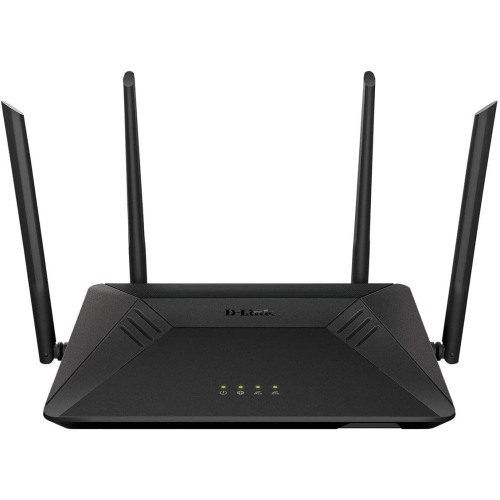
Budget routers are a popular choice for many homes due to their low price. They provide basic internet access and simple network management. Many people wonder if these affordable devices can handle fast internet speeds, like 1Gbps. Understanding their core features and limits helps answer this question clearly.
Typical Features
- Supports Wi-Fi standards like 802.11n or 802.11ac
- Usually includes 4 Ethernet ports for wired connections
- Basic security options like WPA2 encryption
- Simple setup with user-friendly interfaces
- Limited parental controls and guest networks
Common Limitations
- May not fully support 1Gbps wired speeds on all ports
- Wi-Fi speeds often lower than 1Gbps due to older standards
- Limited processing power can cause slower data handling
- Fewer advanced features like QoS or MU-MIMO
- Range and signal strength may be weaker in large homes

Credit: www.reddit.com
What 1gbps Internet Demands
Understanding what 1Gbps internet demands is crucial before deciding if your budget router can handle it. This speed is not just about fast downloads; it requires a combination of specific hardware capabilities and network conditions to deliver the promised performance. If you don’t meet these demands, your experience may fall short, no matter how fast your plan is.
Speed Requirements
1Gbps internet means your connection can transfer up to 1 gigabit per second. However, your router must support this speed natively. Many budget routers claim “gigabit” ports, but often, these ports only handle wired connections at full speed.
Wireless speeds are a different story. Most budget routers use older Wi-Fi standards like 802.11n or early 802.11ac, which can’t reliably deliver 1Gbps speeds over Wi-Fi. You might see speeds drop to 300-600Mbps in real use, especially if multiple devices are connected.
Ask yourself: Is my router’s Wi-Fi standard up to date? If not, can you accept slower wireless speeds or plan to use wired connections? This is a key decision point for maximizing 1Gbps internet.
Hardware Needs
Running 1Gbps internet smoothly also depends on your router’s internal hardware. Budget routers typically have less powerful CPUs and limited RAM, which can bottleneck data processing.
Think of your router like a highway toll booth: if there are too few lanes (low CPU power), traffic (data) slows down. A router with a weak processor struggles to handle high-speed data, especially if you use features like VPNs or parental controls.
Look for routers that specify multi-core processors or at least 1GHz CPU speeds. Also, consider the type of Ethernet ports—some budget models still use older chips that limit gigabit performance.
- Check if your router supports full gigabit WAN and LAN speeds.
- Make sure it has adequate RAM (512MB or more is better).
- Look for routers with updated chipsets that handle 1Gbps routing efficiently.
Have you noticed your internet slowing down at peak times? It might be your router struggling with hardware limits rather than your ISP. Upgrading your router could be the practical step to fully experience 1Gbps speeds.
Can Budget Routers Handle 1gbps?
Budget routers often promise high-speed internet, but their real capability varies. Supporting 1Gbps internet is not just about the number on the box. It depends on the hardware inside and the technology used. Some budget routers can handle 1Gbps, while others may struggle to deliver consistent speeds.
Processor And Ram Impact
The router’s processor and RAM are crucial for managing data flow. A weak processor can bottleneck speeds, causing slow connections. Budget routers usually have simpler CPUs that may not handle heavy traffic well. Limited RAM can also slow down the processing of multiple devices. For smooth 1Gbps performance, look for at least a dual-core processor and 256MB RAM in budget models.
Ethernet Port Speeds
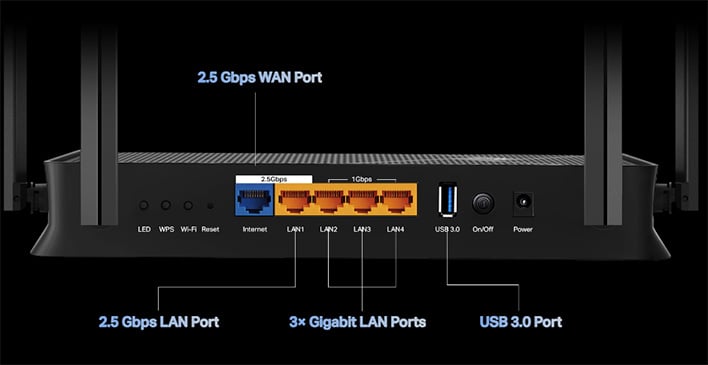
Many budget routers come with Ethernet ports labeled as “Gigabit.” These ports support speeds up to 1Gbps. But some still use Fast Ethernet ports capped at 100Mbps, which limits wired speed. Check the router’s specifications to confirm the port speeds. True 1Gbps internet requires all ports to support gigabit speeds to avoid bottlenecks.
Wi-fi Standards And Throughput
Wi-Fi standards affect wireless speed and range. Older budget routers may use Wi-Fi 4 (802.11n), which rarely reaches 1Gbps speeds. Wi-Fi 5 (802.11ac) and Wi-Fi 6 (802.11ax) offer much higher throughput and better performance. Budget routers with Wi-Fi 5 can handle closer to 1Gbps under ideal conditions. Wi-Fi 6 routers provide improved speed and efficiency, even for multiple devices.
Real-world Performance Tests
In the quest to maximize your internet speed without breaking the bank, budget routers often come into consideration. But can these affordable devices really support 1Gbps internet? To find out, we dive into real-world performance tests. These tests reveal whether budget routers hold up to their advertised speeds and if they maintain stability during intensive use.
Speed Test Results
Speed tests are the first step in evaluating a router’s capability. Many budget routers promise high speeds on paper, but the reality can differ. During tests, some routers managed to hit close to 1Gbps under optimal conditions.
However, factors like the number of connected devices and interference can impact these results. It’s crucial to run multiple tests at different times to get a comprehensive view of performance. Have you ever found your speed varies throughout the day?
Latency And Stability
Latency is just as vital as speed, especially if you’re a gamer or enjoy streaming content. Budget routers can sometimes struggle with maintaining low latency. In tests, some routers showed increased ping times when multiple devices were connected.
Stability is another concern. A router may support high speeds momentarily but might falter during sustained usage. Look out for any buffering or lag that could disrupt your online activities. After all, what’s the use of high speed if the connection keeps dropping?
These real-world tests shine a light on what you can realistically expect from budget routers. While they may not consistently match the performance of high-end models, many still offer impressive speeds and reliability for everyday use. Are you ready to test your own router’s limits?
Upgrading Without Breaking The Bank
Upgrading your home network to support 1Gbps internet doesn’t have to empty your wallet. You can find options that fit your budget while still boosting your internet speed and reliability. Let’s look at how to upgrade without breaking the bank and still enjoy fast, smooth connections.
Affordable Router Options
You don’t need to spend hundreds of dollars to get a router that supports 1Gbps speeds. Many budget-friendly models offer gigabit Ethernet ports and dual-band Wi-Fi, which are essential for fast internet.
Brands like TP-Link, Netgear, and ASUS offer routers under $100 that can handle 1Gbps connections. These devices may lack advanced features, but they deliver solid performance for everyday use.
Consider these features when choosing an affordable router:
- Gigabit Ethernet ports:Ensure wired devices get full-speed access.
- Dual-band Wi-Fi:Offers both 2.4 GHz and 5 GHz for flexibility and speed.
- Basic QoS (Quality of Service):Helps prioritize bandwidth for smoother streaming and gaming.
Have you checked if your budget router supports the latest Wi-Fi standards like Wi-Fi 5 (802.11ac) or Wi-Fi 6? This can make a big difference in speed and stability without raising costs much.
Improving Existing Router Performance
If buying a new router isn’t on your agenda, there are ways to squeeze more speed out of your current device. Small adjustments can boost your network without extra expenses.
- Update the firmware:Router manufacturers often release updates that improve speed and security.
- Optimize placement:Placing your router in a central, elevated spot reduces interference and boosts signal strength.
- Limit connected devices:Too many devices sharing the same router can slow down your network.
- Switch to wired connections:Using Ethernet cables for devices like gaming consoles or PCs can ensure stable 1Gbps speeds.
Did you know that sometimes your router’s default settings aren’t the best for speed? Tweaking channels or enabling features like MU-MIMO can improve performance dramatically.
By focusing on affordable options or improving what you already have, you can enjoy 1Gbps internet without overspending. What simple change could you make today to speed up your connection?
When To Invest In Premium Routers
Deciding when to invest in a premium router can be challenging, especially if you’re trying to balance cost with performance. Budget routers might seem sufficient for everyday tasks, but as your internet needs grow, so does the need for more reliable and faster equipment. Recognizing the right moment to upgrade can save you frustration and improve your online experience.
Future-proofing Your Network
Think about how quickly technology changes. A router that meets today’s 1Gbps internet speed might struggle with tomorrow’s demands. Investing in a premium router means you’re less likely to need an upgrade soon.
Premium routers often support the latest Wi-Fi standards and offer better hardware to handle multiple devices without slowing down. If you add smart home devices or stream in 4K regularly, a budget router can become a bottleneck.
Ask yourself: how much time do you spend troubleshooting slow connections or dropped signals? A premium router can prevent these common issues, saving you time and hassle.
Advanced Features Worth Paying For
Premium routers come with features that budget models usually lack. These include:
- Quality of Service (QoS):Prioritize bandwidth for work calls or gaming sessions.
- Better Security:Advanced firewalls and automatic updates protect your network from threats.
- Mesh Networking:Expand coverage easily without dead zones.
- Parental Controls:Manage screen time and restrict inappropriate content.
From personal experience, upgrading to a router with QoS drastically improved my remote work calls. No more freezing or garbled audio during important meetings.
Have you noticed your budget router slowing down when multiple family members are online? Advanced features in premium routers can keep everyone connected smoothly, making your internet experience truly seamless.
Credit: hothardware.com
Frequently Asked Questions
Do Budget Routers Handle 1gbps Internet Speeds?
Some budget routers support 1Gbps speeds, but many don’t. Check for gigabit Ethernet ports and 802. 11ac or ax Wi-Fi standards. Lower-end models may bottleneck your connection, limiting speed and performance.
What Features Enable Budget Routers To Support 1gbps?
Gigabit Ethernet ports, dual-band Wi-Fi, and modern standards like 802. 11ac or ax enable 1Gbps support. These features ensure fast wired and wireless data transfers without slowing your internet speed.
Can Budget Routers Maintain Stable 1gbps Connections?
Budget routers can maintain stable 1Gbps connections if equipped with quality hardware. However, some may struggle with multiple devices or heavy traffic, causing speed drops and latency issues.
Is Upgrading Necessary For 1gbps Internet Users?
Upgrading is often necessary if your budget router lacks gigabit ports or newer Wi-Fi standards. A suitable router maximizes your 1Gbps plan, ensuring smooth streaming, gaming, and downloads.
Conclusion
Budget routers can support 1Gbps internet, but not all do well. Many offer the speed but lack strong signal and stability. Choosing one means checking specs carefully. A good budget router balances speed and reliability. This helps you enjoy fast internet without big costs.
Think about your home size and device number. The right choice keeps your connection smooth and steady. So, budget routers can work for 1Gbps, just choose wisely.