Are you tired of lag ruining your Xbox gaming sessions? You might have heard that gaming routers can fix this problem.
But do gaming routers really work for Xbox? If you want smoother gameplay, faster speeds, and fewer connection drops, it’s important to know how these routers actually perform. You’ll discover the truth about gaming routers and whether they can boost your Xbox experience.
Keep reading to find out what really makes a difference for your online gaming.

Credit: www.ign.com
Gaming Routers And Xbox
Gaming routers often promise better online play for Xbox users. They claim to reduce lag and offer smoother connections. But what truly makes a router suitable for gaming on Xbox? Understanding the features can help you decide if a gaming router fits your setup.
What Makes A Router Gaming-friendly
A gaming-friendly router focuses on speed and stability. It handles many devices without slowing down. It also prioritizes gaming traffic to keep gameplay smooth. Low latency and strong Wi-Fi signals matter most for Xbox players.
- High bandwidth capacity
- Low latency connections
- Quality of Service (QoS) settings
- Strong and stable Wi-Fi range
- Wired Ethernet ports for direct connection
Key Features For Xbox Performance
Xbox gaming needs reliable network features. Prioritizing Xbox data reduces delays during gameplay. A gaming router often includes these:
- Game traffic prioritization through QoS
- Multiple Ethernet ports for wired Xbox connections
- Dual-band or tri-band Wi-Fi for less interference
- Fast processor to manage heavy traffic
- Easy setup for port forwarding and NAT type control
These features help keep your Xbox online games smooth. They reduce lag spikes and connection drops. This leads to a better gaming experience overall.

Credit: www.popsci.com
Benefits Of Gaming Routers For Xbox
Gaming routers offer several benefits for Xbox players. They improve the overall gaming experience by providing a smoother and more reliable connection. These routers are designed to handle high data traffic and prioritize gaming packets. This helps reduce interruptions and keeps your gameplay steady.
Using a gaming router can make online matches more enjoyable. It can also help avoid common issues like lag and disconnections. Here are some key benefits of gaming routers for Xbox users.
Improved Connection Stability
Gaming routers maintain a steady connection between your Xbox and the internet. They reduce signal drops and interference from other devices. This means fewer sudden disconnections during games. A stable connection is essential for competitive and cooperative play.
Reduced Latency And Lag
These routers lower the delay between your console and the game servers. Lower latency means faster response times in games. Lag can ruin the experience, especially in fast-paced games. Gaming routers use technologies to prioritize gaming traffic and reduce delays.
Better Bandwidth Management
Gaming routers manage how internet speed is shared among devices. They allocate more bandwidth to your Xbox during gameplay. This prevents other devices from slowing down your connection. Effective bandwidth management ensures smooth streaming and downloads alongside gaming.
Setting Up A Gaming Router For Xbox
Setting up a gaming router for your Xbox can dramatically improve your online experience. It’s not just about plugging in a fancy device; it’s about fine-tuning your network to reduce lag, improve speed, and maintain a stable connection during intense gaming sessions. Let’s break down how to configure your router to get the most out of your Xbox.
Optimizing Network Settings
Start by accessing your router’s admin panel through its IP address, usually found on the back of the router or in its manual. Adjust your Wi-Fi channel to one with less interference—channels 1, 6, or 11 are often best for 2.4 GHz networks. If you have a dual-band router, connect your Xbox to the 5 GHz band for faster speeds and lower latency.
Make sure your router’s firmware is up to date. Manufacturers often release updates that improve performance and fix bugs affecting gaming. Have you checked your firmware version recently? It might be the hidden cause of slow game loading or disconnects.
Enabling Quality Of Service (qos)
Quality of Service (QoS) lets you prioritize Xbox traffic over other devices on your network. Enabling QoS ensures your game data packets get preference, reducing lag spikes and improving response times. You can assign high priority to your Xbox by entering its MAC or IP address in the QoS settings.
Not all routers have the same QoS options—some offer simple sliders, while others allow detailed rules. Spend some time experimenting with these settings. Have you noticed your streaming or downloads slow down when gaming? QoS can help balance these activities smoothly.
Port Forwarding Tips
Port forwarding opens specific ports used by Xbox Live to improve connectivity and reduce NAT issues. Forwarding these ports can help you join multiplayer games faster and host sessions without interruptions. Common Xbox Live ports include:
- TCP: 53, 80, 3074
- UDP: 53, 88, 500, 3074, 3544, 4500
Assigning static IP addresses to your Xbox before port forwarding prevents your device from losing its configuration after a reboot. Have you experienced NAT type errors? Proper port forwarding often clears these up, letting you enjoy seamless multiplayer gaming.
Comparing Standard Vs Gaming Routers
Gaming routers offer features like lower latency and better traffic management for Xbox. Standard routers work but may cause slower speeds and lag. Choosing the right router can improve your Xbox online experience.
Choosing the right router for your Xbox can significantly impact your gaming experience. Whether you’re a casual gamer or a hardcore enthusiast, the debate between standard and gaming routers is crucial. Both options have their pros and cons, but understanding their differences can help you make an informed decision.Performance Differences
Gaming routers are specifically designed to enhance your gaming experience. They offer features like Quality of Service (QoS), which prioritizes gaming traffic over other types of data. This means you’ll experience less lag and smoother gameplay. Standard routers, while capable, may not provide the same level of performance consistency during intense gaming sessions. Imagine you’re in the middle of a critical match, and your game starts to lag. A gaming router’s ability to prioritize gaming data can be the difference between victory and defeat. It’s not just about speed; it’s about ensuring seamless connectivity when it matters most.Cost Vs Value Analysis
Gaming routers typically come with a higher price tag. But is the investment worth it for Xbox gamers? It depends on your priorities. If you value high-speed, uninterrupted gaming, the extra cost can be justified. Consider the long-term benefits. A gaming router can provide a more reliable connection, potentially extending the lifespan of your Xbox by reducing stress during online play. On the other hand, if you’re a casual gamer, a standard router might suffice, saving you money for other gaming accessories. Before making a decision, ask yourself: What’s more important to you—saving money upfront or investing in a smoother gaming experience over time? Your answer can guide you to the right choice for your gaming needs.Common Issues And Fixes
Gaming routers promise smoother, faster connections for Xbox, but they aren’t foolproof. You might still face issues like connection drops or network interference that disrupt your gaming experience. Understanding common problems and their quick fixes can save you hours of frustration and keep your gameplay uninterrupted.
Troubleshooting Connection Drops
Connection drops can ruin an intense gaming session. First, check if your router’s firmware is updated. Manufacturers often release updates that improve stability and fix bugs affecting Xbox connectivity.
Next, try rebooting both your router and Xbox. A fresh start often clears temporary glitches causing sudden disconnections. If drops continue, examine your Ethernet cable or Wi-Fi signal strength—damaged cables or weak signals are common culprits.
Have you tested switching from Wi-Fi to a wired connection? Wired connections usually offer more stability, especially if your Wi-Fi is spotty. Also, setting a static IP for your Xbox in the router settings can reduce conflicts and connection drops.
Dealing With Network Interference
Interference from other devices can slow down or interrupt your Xbox’s connection. Microwaves, cordless phones, and even neighboring Wi-Fi networks can cause interference on common frequency bands.
Try changing your router’s Wi-Fi channel to one less crowded. Tools like Wi-Fi analyzers can help you identify the best channel. Moving your router to a more open, central location can also reduce interference.
If your router supports dual-band or tri-band, connect your Xbox to the 5GHz band instead of 2.4GHz. The 5GHz band is less congested and offers faster speeds, though its range is shorter.
Have you noticed interference only at certain times? It might relate to your neighbors’ device usage. Scheduling your gaming sessions or using Quality of Service (QoS) settings to prioritize your Xbox’s traffic can improve performance during peak times.
Top Gaming Routers For Xbox
Choosing the right gaming router can make a huge difference in your Xbox gaming experience. A good router minimizes lag, improves connection stability, and keeps your multiplayer sessions smooth. Whether you’re on a budget or looking for top-tier performance, there are routers that fit your needs perfectly.
Budget-friendly Options
You don’t need to spend a fortune to get solid performance for Xbox gaming. Budget-friendly routers often come with features like Quality of Service (QoS) that prioritize gaming traffic, reducing lag during intense matches. Models like the TP-Link Archer A7 and the Netgear Nighthawk R6700 offer reliable connections and easy setup without breaking the bank.
These routers handle multiple devices well, so your gaming won’t slow down even if others are streaming or browsing. If you’ve ever experienced lag spikes during a critical moment, investing in a budget router with gaming features can be a game-changer. What’s your biggest frustration with your current internet setup?
High-end Routers For Pros
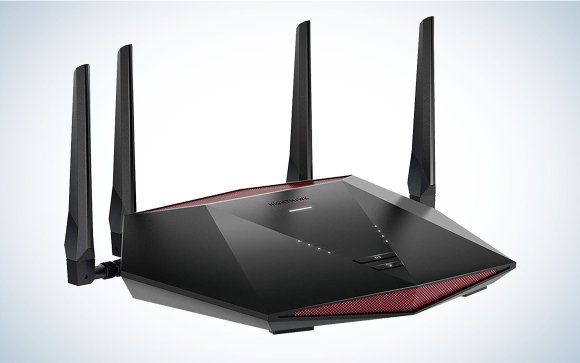
For serious gamers, high-end routers deliver unmatched speed and advanced features tailored for Xbox. Routers such as the ASUS ROG Rapture GT-AX11000 or the Netgear Nighthawk Pro Gaming XR500 offer ultra-low latency, customizable QoS, and powerful hardware designed to handle heavy gaming traffic.
These routers often include dedicated gaming ports and robust security options to keep your connection stable and safe. If you’re streaming, downloading, and gaming simultaneously, these devices prevent any slowdown. Have you tried a high-end router and noticed a clear difference in your gameplay?
Credit: www.popsci.com
Frequently Asked Questions
Do Gaming Routers Improve Xbox Online Gameplay?
Yes, gaming routers optimize traffic for Xbox, reducing lag and improving connection stability. They prioritize gaming packets, ensuring smoother online play and faster response times.
Can Gaming Routers Reduce Xbox Connection Drops?
Gaming routers offer better signal strength and advanced QoS features. These reduce Xbox connection drops by managing bandwidth and minimizing interference effectively.
Are Gaming Routers Compatible With All Xbox Models?
Most gaming routers work seamlessly with all Xbox models. They support standard Wi-Fi protocols and Ethernet connections, ensuring broad compatibility and enhanced performance.
Do Gaming Routers Increase Xbox Download Speeds?
Gaming routers can prioritize Xbox traffic, potentially speeding up downloads. However, actual speed depends on your internet plan and network congestion.
Conclusion
Gaming routers can improve your Xbox experience by reducing lag and boosting speed. They help keep your connection stable during intense gaming sessions. Not all routers are equal, so choose one that fits your needs. A good router can lower delays and make online play smoother.
Still, your internet service and Xbox settings also matter a lot. Investing in a gaming router can be a smart step for serious players. Enjoy faster, more reliable gaming with the right equipment. Simple upgrades can make a big difference in your game time.