Are you wondering if your gaming router can boost your mobile hotspot’s performance? You’re not alone.
Many gamers struggle with slow connections and lag when relying on mobile data. But can a gaming router really make a difference? You’ll discover how gaming routers interact with mobile hotspots, whether they can improve your speed and stability, and what you need to know before trying it yourself.
Keep reading to find out if this setup can take your gaming experience to the next level.
Credit: rog.asus.com
Gaming Routers And Mobile Hotspots
Gaming routers and mobile hotspots serve different purposes, but many gamers wonder if these two can work together to improve their gaming experience. Understanding how each device functions will help you decide if pairing a gaming router with a mobile hotspot is practical for your setup. Let’s break down their roles and how they might interact.
How Gaming Routers Differ
Gaming routers are designed to prioritize gaming traffic and reduce lag. They come with features like Quality of Service (QoS), which lets you give bandwidth priority to your gaming devices. Many also offer advanced settings to minimize ping and packet loss, which are crucial for smooth gameplay.
Unlike regular routers, gaming routers often have more powerful hardware to handle multiple devices without slowing down. They support faster Wi-Fi standards and offer customization options that let you optimize your network. Have you noticed how your games perform better when connected to a dedicated gaming router compared to a standard one?
Mobile Hotspot Basics
Mobile hotspots provide internet access by sharing cellular data through Wi-Fi. They are portable and convenient, especially when you don’t have fixed broadband. However, their speed and stability depend on the cellular signal strength and network congestion.
Mobile hotspots often have data limits and can introduce higher latency, which is a challenge for gaming. They usually lack the advanced traffic management features found in gaming routers. But if you’re on the move or have no other internet options, a mobile hotspot can still keep you connected for casual gaming.
Compatibility Factors
Understanding the compatibility factors between gaming routers and mobile hotspots is key to ensuring smooth gameplay and stable connections. Not every router will work seamlessly with every mobile hotspot, so knowing what to look for can save you frustration. Let’s break down the main technical aspects that affect compatibility and performance.
Router And Hotspot Connection Types
Your gaming router and mobile hotspot need compatible connection methods to communicate effectively. Most mobile hotspots provide internet access via Wi-Fi, USB tethering, or sometimes Bluetooth.
- Wi-Fi Connection:This is the most common method. Your router should support client mode or repeater mode to connect to the hotspot’s Wi-Fi network as a client.
- USB Tethering:Some routers have USB ports that allow direct connection to the hotspot via USB. Check if your router supports USB tethering and if it recognizes your hotspot device.
- Bluetooth:Less common and slower, but some setups might use Bluetooth. Verify if both devices support this and if the router’s firmware accommodates Bluetooth links.
Have you checked if your gaming router supports connecting to Wi-Fi networks as a client, or does it only broadcast signals? This small detail can make or break your setup.
Network Protocol Support
Beyond physical connections, the network protocols your devices support determine how well they communicate and handle data.
- DHCP Compatibility:Most mobile hotspots assign IP addresses dynamically using DHCP. Your router must be able to receive and manage these addresses without conflicts.
- IPv4 vs IPv6:Some hotspots operate on IPv6 networks. If your router only supports IPv4, you might face connectivity issues or slower speeds.
- VPN and Firewall Settings:Hotspots may have built-in firewalls or VPNs that restrict certain gaming traffic. Your router should allow configuration to bypass or adjust these settings.
In my experience, routers with flexible firmware like OpenWRT or DD-WRT often handle these protocol challenges better than standard consumer routers. Are you ready to tweak settings or prefer plug-and-play simplicity?
Setting Up A Gaming Router With A Mobile Hotspot
Setting up a gaming router with a mobile hotspot can enhance your gaming experience on the go. It allows multiple devices to connect through the router, improving network stability and reducing lag. The process requires careful steps to ensure the router communicates correctly with the mobile hotspot.
Using a mobile hotspot as the internet source means the router acts as a bridge. This setup can provide better Wi-Fi coverage and more control over your network settings. Follow the steps below to configure your gaming router properly and avoid common issues during setup.
Step-by-step Configuration
- Turn on your mobile hotspot and confirm it has an active internet connection.
- Connect your gaming router to the mobile hotspot using the router’s WAN port or via Wi-Fi if supported.
- Access the router’s admin panel through a web browser by entering its IP address.
- Navigate to the Internet or WAN settings and select the option to connect via Wi-Fi or USB tethering, depending on your router model.
- Scan for available Wi-Fi networks and select your mobile hotspot’s network name (SSID).
- Enter the hotspot password to establish the connection.
- Save the settings and reboot the router to apply changes.
- Connect your gaming devices to the router’s Wi-Fi or Ethernet ports for stable gameplay.
Common Setup Issues
- Router fails to detect the mobile hotspot network due to signal or compatibility problems.
- Incorrect password entry blocks the router from connecting to the hotspot.
- Mobile hotspot data limits cause the internet to drop unexpectedly.
- Router firmware may not support mobile hotspot connections, requiring an update.
- Network conflicts between the router and hotspot IP addresses cause connection errors.
- Slow mobile data speeds lead to lag during gaming sessions.
Performance Considerations
Understanding how gaming routers work with mobile hotspots is crucial. Performance considerations play a significant role in this setup. The effectiveness of gaming routers depends on various factors. Let’s explore some important aspects of performance.
Latency And Speed
Latency affects online gaming experiences. Mobile hotspots can introduce delays. A gaming router may help reduce these delays. Routers often have advanced technologies to boost speed. Enhanced speed ensures smoother gameplay. High-speed connections keep lag at bay. A stable connection is key for gaming.
Signal Stability
Signal stability is another important factor. Mobile hotspots can have fluctuating signals. Gaming routers aim to stabilize these signals. Consistent signals prevent interruptions during games. A stable connection improves overall performance. Reliable signals ensure competitive gaming experiences. Routers with strong antennas enhance signal reliability. A robust setup ensures fewer dropped connections.
Optimizing Your Gaming Experience
Optimizing your gaming experience when using a gaming router with a mobile hotspot requires more than just plugging in devices. You need to fine-tune your router’s settings to handle the unique challenges of a mobile connection. This helps reduce lag, improve speed, and maintain a stable connection even during intense gameplay moments.
Quality Of Service (qos) Settings
QoS settings allow you to prioritize gaming traffic over other types of data on your network. This means your router can give preference to game packets, reducing delays caused by downloads, streaming, or background apps.
Adjusting QoS can make a noticeable difference, especially if you share your mobile hotspot with others. You might find that your teammates get less interference from other users on the same connection.
- Set your gaming device’s IP address as a high-priority client.
- Limit bandwidth for non-essential apps during your gaming sessions.
- Experiment with different priority levels to find the best balance.
Have you checked if your gaming router’s QoS supports mobile hotspots specifically? Not all routers handle cellular data with the same efficiency.
Firmware Updates And Tweaks
Keeping your router’s firmware up to date is crucial for optimal performance. Manufacturers often release updates that improve compatibility with mobile hotspots and fix bugs that could cause connection drops.
Besides standard updates, some gaming routers offer advanced settings designed to tweak performance for mobile connections.
- Look for options like LTE optimization or enhanced signal stability.
- Adjust DNS settings to speed up response times.
- Disable unnecessary features that may consume bandwidth or processing power.
Have you explored custom firmware like DD-WRT or OpenWrt? These can sometimes unlock additional controls that standard firmware lacks, but they require careful setup.
Optimizing your gaming router settings takes patience, but the payoff is smoother gameplay on a mobile hotspot that feels as reliable as a wired connection.
Credit: www.popsci.com
Troubleshooting Tips
Using a gaming router with a mobile hotspot can boost your gaming experience, but it might also bring some challenges. Troubleshooting these issues quickly helps you stay in the game without frustration. Let’s look at common problems like connection drops and slow speeds and how you can fix them.
Connection Drops
Connection drops are one of the most annoying problems when gaming with a mobile hotspot. This usually happens because mobile signals can be unstable, especially if you’re in an area with weak coverage.
Try moving your hotspot device to a higher or more open spot. Even a small change in location can improve signal strength.
Also, check if your gaming router’s firmware is up to date. Manufacturers often release updates that fix bugs and improve stability.
Are you using multiple devices on your hotspot? Too many connected devices can overload the network and cause drops. Limit the number to the essentials while gaming.
Slow Speeds
Slow speeds can ruin your gaming session, causing lag and delays. Mobile hotspots depend on cellular data, which can slow down if the network is congested or you are far from a cell tower.
To improve speeds, try switching your hotspot to a different frequency band if available, like from 2.4 GHz to 5 GHz. The 5 GHz band often offers faster speeds and less interference.
Another tip is to close apps or background downloads on devices connected to your hotspot. These consume bandwidth and reduce the speed available for gaming.
Have you checked your data plan limits? Sometimes speeds throttle after hitting a certain data cap. Knowing your plan details helps avoid unexpected slowdowns.
Best Gaming Routers For Mobile Hotspots
Choosing the right gaming router for use with a mobile hotspot can dramatically improve your gaming experience. Not all gaming routers handle mobile hotspots well, so you need one that balances strong performance with easy setup. Let’s look at some of the best options tailored for mobile hotspot connections.
Top Models In 2025
- Asus ROG Rapture GT-AX6000: Known for its powerful Wi-Fi 6 support and excellent range, this router handles mobile hotspot signals smoothly. It offers low latency, which is crucial for competitive gaming.
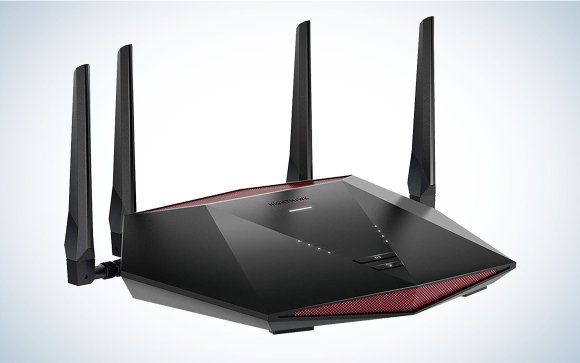
- Netgear Nighthawk XR1000: Designed specifically for gamers, it features advanced QoS settings that prioritize gaming traffic even when connected via a mobile hotspot.
- TP-Link Archer GX90: This router provides strong Wi-Fi 6 speeds and multi-gig Ethernet ports. It’s a budget-friendly choice that still performs well with mobile hotspots.
- Linksys Hydra Pro 6E: Supports Wi-Fi 6E for extra bandwidth and less interference, making it ideal for gamers using 5G mobile hotspots.
Each of these models supports easy setup with mobile hotspots, but your choice should depend on your gaming style and connection needs.
Price Vs Performance
High-end gaming routers offer the best speeds and lowest latency but can cost upwards of $300. Mid-range models often provide sufficient performance for casual to serious gamers at around $150-$250.
Consider what features matter most for your setup. Do you need multiple Ethernet ports for wired connections, or is Wi-Fi 6E support more important for your mobile hotspot?
| Router Model | Price Range | Key Performance Features | Ideal For |
|---|---|---|---|
| Asus ROG Rapture GT-AX6000 | $350 – $400 | Wi-Fi 6, Low Latency, Strong Range | Competitive Gamers |
| Netgear Nighthawk XR1000 | $250 – $300 | Advanced QoS, Wi-Fi 6 | Streamers & Multiplayer |
| TP-Link Archer GX90 | $150 – $200 | Wi-Fi 6, Multi-Gig Ports | Budget-Conscious Gamers |
| Linksys Hydra Pro 6E | $250 – $300 | Wi-Fi 6E, Low Interference | 5G Hotspot Users |
Have you tested a gaming router with a mobile hotspot before? If not, starting with a mid-range model might give you the best balance of cost and performance. Don’t overlook firmware updates—they can greatly improve your router’s compatibility and speed with mobile hotspots.
Future Trends
Looking ahead, the relationship between gaming routers and mobile hotspots is set to evolve quickly. As mobile internet speeds improve and technology becomes smarter, your gaming setup could become much more flexible. Let’s take a closer look at the key trends shaping this future.
5g And Gaming Routers
5G networks are changing how you connect to online games. With much faster speeds and lower lag than 4G, 5G makes mobile hotspots a serious option for gaming. This means you could use a gaming router with a 5G hotspot to get a more stable and responsive connection, even on the go.
Many gaming routers are already starting to support 5G hotspots directly, allowing you to plug in and play without worrying about slowdowns. Have you thought about how much more mobile your gaming setup could become if you weren’t tied down by wired internet?
Advances In Mobile Hotspot Tech
Mobile hotspots themselves are getting smarter and more powerful. Newer models offer longer battery life, multiple device support, and better signal strength. These improvements help maintain a steady connection, which is crucial when you’re in the middle of an intense gaming session.
Some hotspots now include features like network prioritization and QoS (Quality of Service), which gaming routers also use to reduce lag. This means your gaming traffic can get priority over other online activities, making gameplay smoother. Would you consider upgrading your hotspot to enhance your gaming experience on the move?

Credit: www.ign.com
Frequently Asked Questions
Can Gaming Routers Improve Mobile Hotspot Performance?
Yes, gaming routers can enhance mobile hotspot performance by optimizing traffic and reducing latency. They prioritize gaming data for smoother gameplay. However, the overall speed depends on your mobile network quality.
Are Gaming Routers Compatible With All Mobile Hotspots?
Most gaming routers support standard Wi-Fi connections, so they work with many mobile hotspots. Compatibility depends on the hotspot’s settings and frequency bands. Always check your router’s specifications before connecting.
Does Using A Gaming Router Reduce Mobile Hotspot Lag?
A gaming router can reduce lag by managing network traffic efficiently. It prioritizes gaming packets, which helps minimize delays. Yet, lag also depends on your mobile network strength and congestion.
How To Connect A Gaming Router To A Mobile Hotspot?
To connect, enable the hotspot on your mobile device and connect the gaming router to it via Wi-Fi or USB tethering. Then, configure the router’s settings to optimize gaming performance.
Conclusion
Gaming routers can work with mobile hotspots, but expect some limits. Speed and stability depend on your mobile signal strength. A strong connection helps reduce lag and improve play. Not all games need the fastest internet, but many do. Setting up the router is usually easy and helps manage devices.
Overall, using a gaming router with a hotspot is possible. Just remember, performance may vary based on your network conditions. Choose what fits your gaming needs and available internet options.