Are you tired of slow internet in some parts of your home? Do you find yourself constantly losing connection or struggling with weak WiFi signals?
You might be wondering if a mesh WiFi system is the solution you need. Imagine having strong, reliable internet everywhere—no more dead zones or dropped connections. You’ll discover how a mesh WiFi system works, who really needs one, and whether it’s the right choice for your home.
Keep reading to find out if upgrading your WiFi could change the way you connect.

Credit: www.which.co.uk
Signs Your Wifi Needs A Boost
Noticing issues with your wifi can be frustrating, especially when you rely on it for work, streaming, or staying connected. But how do you know if your wifi setup truly needs an upgrade or a mesh system? Paying attention to specific signs can help you decide whether it’s time to boost your network.
Slow Speeds In Certain Areas
You might have lightning-fast internet near your router, but notice a crawl in speed just a few rooms away. This uneven performance often means your current router can’t cover your entire space effectively.
Have you tried streaming a video in the kitchen only to have it buffer endlessly? That’s a clear sign your wifi signal weakens with distance, suggesting your setup needs reinforcement.
Frequent Connection Drops
Does your device lose connection at random moments? Constant drops can interrupt video calls, gaming, or downloads, making your online experience frustrating.
These drops may happen because your router struggles to maintain stable links with multiple devices or due to interference from walls and appliances.
Devices Struggling To Connect
Sometimes, you might find it hard to connect new gadgets to your wifi, or they keep disconnecting soon after joining. This problem often points to your network being overloaded or having weak signals in certain spots.
Think about the last time a smart device refused to join your network. Was your router too far, or was it simply overwhelmed by the number of devices?
Dead Zones In Your Home
Dead zones are areas where your wifi signal simply doesn’t reach. These spots can be frustrating if you want to use your phone or laptop in the basement or a far corner of the house.
Have you noticed rooms where you have to rely on cellular data because wifi just won’t connect? A mesh wifi system can help fill these gaps with strong, consistent coverage.
How Mesh Wifi Works
Understanding how mesh WiFi works helps you see its benefits clearly. It uses several devices called nodes to spread internet signals over a large area. These nodes connect and share data smartly. This system covers places a single router cannot reach well. Mesh WiFi also manages connections smoothly, so your devices stay online without interruptions.
Multiple Nodes For Seamless Coverage
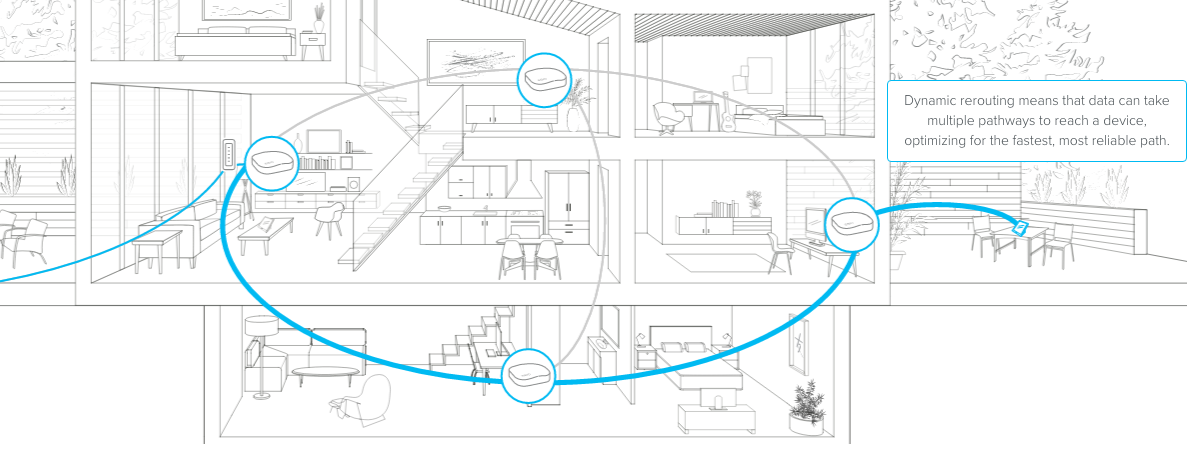
Mesh WiFi has many nodes placed around your home or office. Each node sends and receives WiFi signals. Together, they create one strong network that covers every corner. This setup prevents dead zones where WiFi is weak or missing. You can add more nodes to cover bigger spaces easily.
Automatic Device Connection
Devices like phones or laptops connect automatically to the best node. The system chooses the strongest signal for your device at all times. This means you move around without losing internet or needing to switch networks. The connection stays fast and steady, no matter where you are.
Self-healing Networks
If one node has a problem, the network fixes itself. Other nodes find new ways to send data. This keeps your internet running smoothly without you needing to act. The self-healing feature makes mesh WiFi reliable and easy to maintain.
Benefits Of Mesh Wifi Systems
Mesh WiFi systems offer several benefits that improve your home internet experience. They solve common problems like weak signals and slow connections. Each benefit makes your network stronger and easier to use.
Improved Coverage
Mesh WiFi covers every corner of your home. It uses multiple devices that work together. This creates a strong signal in places where regular routers fail. Say goodbye to dead zones and dropped connections.
Easy Expansion
Add more devices to your mesh system anytime. The network grows with your needs. No complicated setup or technical skills needed. This flexibility helps cover larger homes or new areas quickly.
Simplified Network Management
Control your entire WiFi network from one app. Check device connections, set parental controls, or pause internet access. The user-friendly interface makes managing your network simple and stress-free.
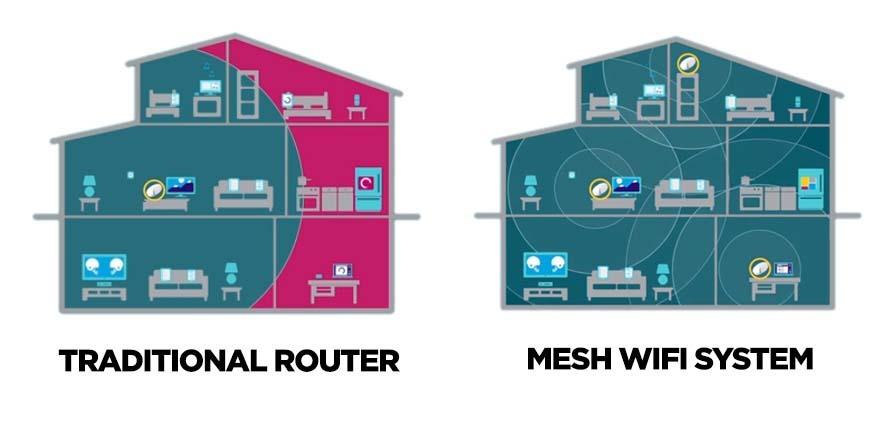
Credit: kb.pineapple.net.au
Comparing Mesh And Traditional Routers
Choosing between a mesh WiFi system and a traditional router can feel like navigating a tech maze. Both have their perks and drawbacks. Which one is right for you? Let’s dive into the differences to help you make a smart decision.
Coverage And Range Differences
A traditional router may struggle to cover larger homes or spaces with many walls. You might find yourself in a WiFi dead zone in the bedroom or home office. If you’re tired of buffering and weak signals, a mesh system can be a game-changer.
Mesh WiFi uses multiple nodes to blanket your entire home with a strong signal. It’s like having a router in every room, ensuring seamless connectivity. Imagine streaming your favorite show without interruption, no matter where you are in the house.
Setup And Maintenance
Traditional routers can be a headache to set up, especially if you’re not tech-savvy. You might end up tweaking settings that sound like a foreign language. Mesh systems, however, are often designed to be user-friendly.
With a mesh system, setup is usually straightforward with step-by-step apps guiding you. Maintenance is also simpler, with automatic updates and troubleshooting tools at your fingertips. It’s a hassle-free experience that saves time and frustration.
Cost Considerations
Price is a crucial factor when choosing between a traditional router and a mesh system. Traditional routers are typically less expensive upfront. However, if you need to buy additional range extenders, costs can add up quickly.
Mesh systems, while more costly initially, often provide better value over time with fewer add-ons needed. Consider your home’s size and layout. Are you willing to invest a bit more for consistent, whole-home coverage?
Factors To Consider Before Buying
Choosing the right mesh WiFi system needs careful thought. Several factors affect how well it will work in your home. These points help you decide if a mesh system suits your needs and budget.
Home Size And Layout
Large homes often have WiFi dead zones. Walls, floors, and furniture block signals. Mesh systems spread WiFi evenly across big spaces. If your home is small, a single router may be enough. Complex layouts with many rooms may need multiple mesh units for strong coverage.
Number Of Connected Devices
More devices mean more data traffic. Smartphones, laptops, smart TVs, and smart home gadgets all connect at once. Mesh systems handle many devices better than single routers. They reduce slowdowns and signal drops in busy households. Think about how many devices use your WiFi daily.
Internet Speed And Provider
Your internet speed affects what WiFi system you need. Fast internet needs strong equipment to keep speeds high. Some providers limit speeds based on your plan. Check your plan speed and choose a mesh system that supports it. This prevents bottlenecks in your network.
Budget Constraints
Mesh WiFi systems cost more than regular routers. Prices vary based on features and coverage area. Set a budget before shopping. Balance cost with your coverage and device needs. Cheaper systems may not cover large homes well. Investing more can improve your WiFi experience.
Popular Mesh Wifi Systems
Choosing the right mesh WiFi system can feel overwhelming with so many options available. Popular mesh WiFi systems offer a range of features designed to boost your home network’s speed and reliability. Understanding what each brand and model brings to the table helps you make a choice that fits your specific needs and space.
Top Brands And Models
- Google Nest Wifi– Known for easy setup and seamless integration with Google Home devices.
- Netgear Orbi– Offers powerful coverage and strong performance for large homes.
- Amazon Eero– Popular for its user-friendly app and reliable connectivity.
- TP-Link Deco– A budget-friendly option with solid features and parental controls.
- Linksys Velop– Provides flexible configurations and fast speeds for multiple devices.
Each model targets different priorities, whether it’s speed, coverage, or smart home integration.
Key Features To Look For
- Coverage Area:How large is your home? Ensure the system covers every corner without dead zones.
- Speed and Band Support:Look for tri-band options if you want the best speed for multiple devices.
- Ease of Setup:Systems with intuitive apps can save you time and frustration.
- Smart Home Compatibility:If you use smart devices, choose a system that integrates smoothly.
- Security Features:Regular updates and built-in protection keep your network safe.
Ask yourself: What’s more important—speed, coverage, or ease of use? Your answer guides the features you should prioritize.
User Reviews And Ratings
Reviews reveal real-life performance beyond specs. Users often highlight if a system lives up to promises like stable connections or easy setup.
For example, many Google Nest Wifi users appreciate how effortlessly it connects multiple devices without drops. On the other hand, some Netgear Orbi buyers mention it’s a bit pricey but worth it for the coverage it offers.
Pay attention to recurring comments about customer service and firmware updates. These insights help you avoid surprises after purchase.
Installation And Setup Tips
Setting up a mesh WiFi system might sound complex, but with the right tips, you can have it running smoothly in no time. The key lies in where you place the nodes, how you configure your network, and knowing how to quickly fix common problems. Let’s dive into these areas to help you get the most out of your new system.
Optimal Node Placement
Placing your mesh nodes strategically is crucial. Each node should be close enough to another to maintain a strong connection, but spread out to cover dead zones.
- Avoid placing nodes near thick walls or metal objects that block signals.
- Elevate nodes off the floor, like on shelves or tables, for better coverage.
- Keep nodes away from microwaves and cordless phones that can cause interference.
Think about your daily routes in the home. Are there spots where your signal drops? Place nodes near those areas to eliminate weak signals.
Configuring Your Network
Once nodes are placed, configuring your network correctly is essential for performance and security. Use the mobile app or web interface provided by your mesh system.
- Set a unique, strong WiFi name (SSID) and password to protect your network.
- Enable automatic firmware updates to keep your system secure and running efficiently.
- Consider setting up guest networks if you often have visitors needing internet access.
Take advantage of parental controls and device prioritization features if available. These tools can enhance your experience by managing who connects and how bandwidth is used.
Troubleshooting Common Issues
It’s normal to run into minor issues during or after setup. Knowing quick fixes saves time and frustration.
- If a node isn’t connecting, try rebooting it or moving it closer to the main router.
- Check for firmware updates regularly to avoid bugs that cause dropouts.
- Reset your network settings if you experience persistent slowdowns or disconnections.
Have you noticed slower speeds in certain rooms even after setup? Sometimes, simple repositioning of nodes or reducing interference sources can make a big difference.
Alternative Solutions To Improve Wifi
Improving wifi at home does not always mean buying a mesh system. There are other solutions that can boost your signal and coverage. These alternatives may suit different budgets and needs. Each option has its own strengths and setup process.
Range Extenders
Range extenders catch your wifi signal and rebroadcast it further. They help cover dead zones in larger homes. Installation is usually simple. Just plug the extender where the signal is still strong. Keep in mind, extenders may reduce internet speed slightly.
Powerline Adapters
Powerline adapters use your home’s electrical wiring to carry internet. Connect one adapter near your router and the other where you want better wifi. This method offers a stable connection without running cables. It works well in houses with thick walls or floors.
Upgrading Your Router
Older routers may not handle modern internet needs well. A new router offers better speed, range, and features. Look for routers with the latest wifi standards like Wi-Fi 6. Place the router in a central location to improve coverage. This upgrade can solve many common wifi problems.
Credit: blog.eero.com
Frequently Asked Questions
What Is A Mesh Wifi System?
A mesh WiFi system uses multiple devices to provide seamless, strong internet coverage throughout your home. It eliminates dead zones by creating a unified network. This system is ideal for large or multi-story homes where a single router struggles to cover all areas effectively.
How Does Mesh Wifi Improve Home Internet?
Mesh WiFi improves home internet by extending coverage and enhancing signal strength. It uses several nodes to distribute WiFi evenly, reducing buffering and dropouts. This results in reliable and fast internet access in every room, perfect for streaming, gaming, and smart home devices.
When Should I Consider A Mesh Wifi System?
Consider a mesh WiFi system if your home has weak or spotty WiFi zones. It’s also useful for large houses or spaces with thick walls that block signals. If you experience frequent disconnections or slow internet in certain areas, mesh WiFi can solve these issues.
Can Mesh Wifi Systems Replace Traditional Routers?
Yes, mesh WiFi systems can replace traditional routers entirely. They act as a single network with multiple access points, offering broader coverage. Unlike extenders, mesh networks manage connections more efficiently, providing consistent speeds and seamless roaming throughout your home.
Conclusion
A mesh WiFi system can improve your home internet easily. It spreads WiFi signals evenly in every room. Big houses or places with thick walls benefit the most. You get fewer dead zones and stronger connections. Setup is usually simple and fast.
Think about your space size and internet use. Choose what fits your needs and budget best. Better WiFi means smoother streaming, gaming, and work. A mesh system often makes life more convenient. Consider it if your current WiFi feels weak or slow.