Are you thinking about boosting your home WiFi with mesh nodes but wonder if they all have to be the same brand? You’re not alone.
Mixing different brands might sound like a smart way to save money or get the best features, but could it cause problems instead? Understanding how mesh WiFi systems work can help you avoid slow connections and dead zones. Keep reading to find out if sticking to one brand really matters and how you can create a strong, seamless network that keeps every corner of your home connected.

Credit: www.seeedstudio.com
Mesh Wifi Basics
Understanding the basics of mesh WiFi is essential before deciding if mesh WiFi nodes need to be from the same brand. Mesh networks provide seamless internet coverage by spreading the signal across multiple points in your home or office. This system improves connectivity, reduces dead zones, and keeps your devices online without interruptions.
How Mesh Networks Work
Mesh networks consist of multiple nodes that communicate with each other to create a unified WiFi network. Each node acts like a mini router, passing data to the next node until it reaches your device. This way, you get a strong signal no matter where you are in the coverage area.
Imagine walking through your house with a video call active. Instead of dropping the call when moving out of range of one router, the mesh nodes hand off your connection smoothly. This handoff makes your internet experience consistent and reliable.
Key Components Of Mesh Systems
- Main Router:Connects directly to your modem and controls the network.
- Satellite Nodes:These extend the network by communicating wirelessly with the main router and each other.
- Backhaul Link:The communication path between nodes that keeps data flowing efficiently.
Some mesh systems use a dedicated wireless band for backhaul, while others use wired Ethernet. Knowing these components helps you understand how the network stays strong and whether mixing brands might affect performance.
Brand Compatibility Factors
Understanding brand compatibility factors is key when deciding if mesh WiFi nodes have to be from the same brand. Not all mesh systems are created equal, and mixing brands can lead to performance issues or setup headaches. By focusing on the underlying technologies and standards, you can better judge if different nodes will work well together in your home network.
Proprietary Technologies
Many mesh WiFi brands use proprietary technologies that optimize how their nodes communicate. These custom protocols often improve speed, reduce interference, and simplify setup—but they also lock you into that brand’s ecosystem. For example, Google Nest WiFi and Eero each rely on their own software and firmware to manage mesh performance.
If you try mixing nodes from different brands with proprietary tech, you might face:
- Reduced speeds due to incompatible communication methods
- Difficulty in managing the network with a single app
- Possible failure to form a stable mesh connection
Have you ever tried using a device outside its intended brand system and noticed it just didn’t perform as expected? That’s often the result of these proprietary limits.
Interoperability Standards
Some mesh WiFi systems support interoperability standards like EasyMesh, designed to make different brands work together. EasyMesh-certified devices can create a unified mesh network regardless of brand, giving you flexibility in choosing nodes.
However, even with standards, not every feature will work perfectly across brands. You may lose access to advanced controls or performance tweaks optimized for a single-brand setup.
Before mixing brands, check if your nodes support standards like EasyMesh. This can save you time and frustration. Ask yourself: do you prioritize seamless control and maximum speed, or are you willing to compromise for flexibility?
Mixing Brands: Pros And Cons
Mixing mesh WiFi nodes from different brands is a tempting option, especially if you want to expand your network without buying an entire kit from one manufacturer. But is this approach smooth sailing, or are there hidden snags? Understanding the pros and cons helps you decide if mixing brands fits your needs or if sticking to a single brand is smarter.
Benefits Of Same-brand Nodes
Using mesh nodes from the same brand guarantees seamless compatibility. These devices speak the same language, making setup and management easier for you.
Many brands optimize their nodes to work together, ensuring consistent speed and coverage. You get better performance because the system is designed as a whole.
Software updates and security patches roll out uniformly, reducing risks and improving reliability. It’s like your network is running on a well-tuned team.
Challenges With Different Brands
Mixing brands can lead to connectivity hiccups. Different manufacturers use distinct protocols, which may cause your nodes to struggle communicating.
You might face complicated setups that require manual configurations. This can be frustrating if you’re not tech-savvy.
Performance inconsistencies are common. One node may slow down the entire network or cause dead zones due to mismatched technology.
Would you trade off ease and reliability just to save a bit on costs or add specific features? Think about what matters more to your home or office network.
Expert Recommendations
Many people wonder if mesh WiFi nodes must be from the same brand. Experts offer advice based on specific needs and situations. While it’s often best to stick with one brand, there are times when mixing nodes can work.
When To Stick To One Brand
Using nodes from the same brand ensures compatibility. This can lead to a smoother setup process. The nodes communicate more effectively, providing better network performance. Consistency in brand often guarantees full access to features. You also get streamlined technical support when using a single brand.
Situations Allowing Mixed Nodes
Mixing brands might suit those with budget constraints. It’s also useful for those upgrading existing networks. Some advanced users prefer customizing their setup. Using different brands can sometimes expand coverage. Ensure the nodes support the same WiFi standards for compatibility. Consider this option if you have technical expertise.
Performance And Reliability
Performance and reliability are key factors when choosing mesh WiFi nodes. Using nodes from the same brand can influence how well your network runs. Different brands may use various technologies that affect speed and stability. Understanding these effects helps in making the right choice for a smooth internet experience.
Impact On Network Speed
Mesh nodes from the same brand usually communicate better. They often use the same wireless protocols and frequencies. This consistency helps maintain high data transfer rates. Mixing brands may cause slower speeds due to incompatible settings. The network might switch between different standards, reducing overall performance.
Uniform nodes optimize the routing of data packets. This reduces delays and improves streaming or gaming quality. Some brands also have features that boost speed when all nodes match. Combining different brands may lose these benefits.
Stability Considerations
Stability is about keeping a steady connection without drops. Nodes of the same brand often have firmware designed to work together. This coordination helps avoid conflicts and connection interruptions.
Mixed-brand setups can face compatibility issues. These issues might cause frequent disconnects or slow reconnections. Also, managing updates and troubleshooting becomes harder with different brands. Same-brand nodes simplify network management and improve reliability.

Credit: www.pcmag.com
Setup Tips For Mixed Nodes
Setting up mixed mesh WiFi nodes can feel a bit tricky at first, especially if you’re mixing brands. But it’s totally doable with the right approach. You just need to pay attention to how you configure each device and be ready to troubleshoot some common hiccups along the way.
Configuration Best Practices
Start by placing your nodes where they get a strong signal from your main router. Avoid walls or large metal objects that block WiFi signals. Each node should be close enough to maintain good communication but spread out enough to cover the whole area.
Use the same network name (SSID) and password on all nodes. This helps your devices switch seamlessly between nodes without dropping the connection. Check if your nodes support the same WiFi standards (like WiFi 5 or WiFi 6) to ensure better compatibility.
Turn off any conflicting features like built-in DHCP servers on secondary nodes. Let your main router handle IP address assignments. Also, update the firmware on every node before setup to avoid bugs or compatibility issues.
Troubleshooting Common Issues
If you notice slow speeds or dropped connections, start by rebooting your nodes one at a time. Sometimes nodes get confused if they were powered on in the wrong order. Also, check if any node is too far from the main router or another node.
Interference can cause problems too. Change the WiFi channel in your router’s settings to avoid crowded frequencies, especially if you live in a busy neighborhood. If your mixed nodes use different apps or interfaces, keep them updated and check their settings frequently.
Are your devices sticking to a weaker node even when a stronger one is nearby? This is common in mixed setups. Try manually reconnecting your device to the stronger node or adjusting node placement. Sometimes, a little trial and error helps you find the best balance.
Future Of Mesh Compatibility
The future of mesh compatibility looks promising as technology advances. Users want flexible systems that work well together. Mixing mesh WiFi nodes from different brands could become easier. This change will benefit many home and office networks.
Emerging Standards
New standards aim to improve cross-brand compatibility. The Wi-Fi Alliance introduced EasyMesh certification. This standard allows devices from different makers to connect smoothly. It ensures better communication and seamless roaming. More brands are adopting EasyMesh for wider support.
Industry Trends
Manufacturers focus on user convenience and flexibility. They want to reduce the need for sticking to one brand. Collaboration between companies is increasing to develop universal solutions. Future mesh systems may support mixed nodes without performance loss. This trend helps users upgrade networks gradually and affordably.
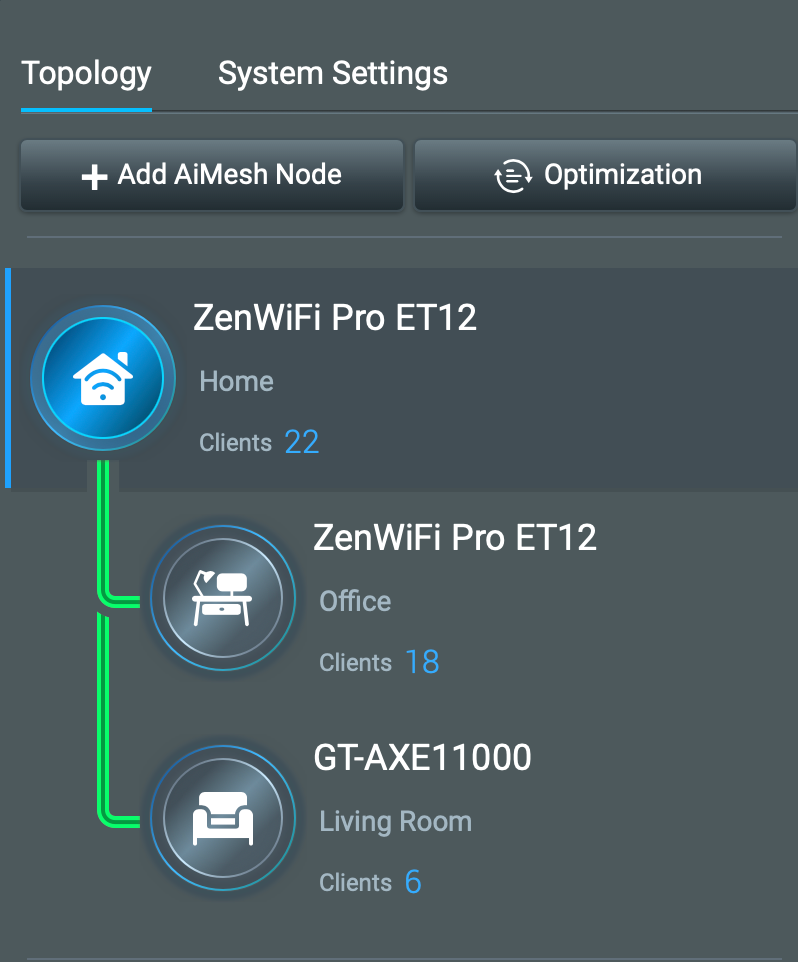
Credit: en.community.sonos.com
Frequently Asked Questions
Do Mesh Wifi Nodes Work Better If Same Brand?
Yes, same-brand mesh nodes ensure better compatibility and seamless connectivity. They use unified software, making setup and management easier for users.
Can Different Brand Mesh Nodes Connect Together?
Different brand nodes may connect but often lack full compatibility. This can cause slower speeds, unstable connections, and limited features.
Is It Cheaper To Mix Mesh Wifi Brands?
Mixing brands might save money but risks network instability and reduced performance. Consistency usually offers better long-term value and reliability.
What Happens If Mesh Nodes Are Different Brands?
Using different brands can cause signal drops and slower speeds. Devices may not sync well, leading to a poor overall WiFi experience.
Conclusion
Mixing mesh WiFi nodes from different brands can cause issues. Brands often design systems to work best within their own lineup. Using the same brand ensures better compatibility and easier setup. Still, some brands support third-party nodes with limited features.
Check your router’s instructions before mixing brands. Choosing the right mesh system helps improve your home WiFi. Keep your network simple for steady, strong internet signals. This way, you enjoy smooth browsing and fast connections without headaches.