Are you worried about your online privacy when you connect to public Wi-Fi during your travels? You might have heard that travel routers can help protect your data, but do travel routers have VPNs built-in?
Understanding how these devices work can keep your information safe and give you peace of mind on the go. You’ll discover the truth about travel routers and VPNs, and learn how to make the best choice for your security needs.
Keep reading to find out how to protect yourself easily and effectively wherever you are.
Credit: blog.flashrouters.com
Travel Routers And Vpn Basics
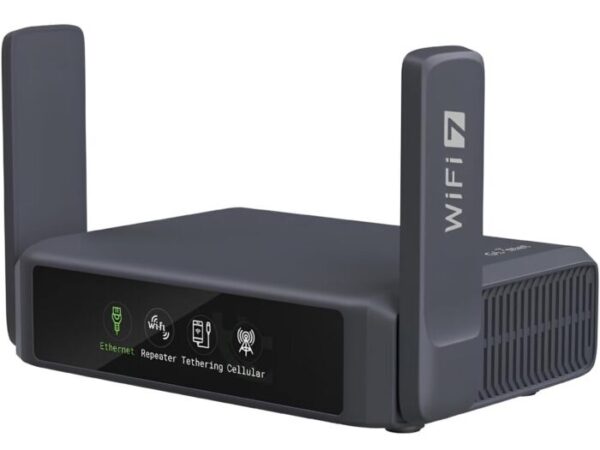
Understanding how travel routers and VPNs work together can change the way you protect your data on the go. Travel routers are small devices designed to create a private Wi-Fi network wherever you are. VPNs, on the other hand, add a layer of security by encrypting your internet traffic, making it much harder for hackers to intercept your information.
What Travel Routers Do
Travel routers let you connect multiple devices to a single internet source, such as a hotel’s wired Ethernet or a public Wi-Fi. They create your own secure network, which can reduce risks compared to connecting directly to public hotspots. Some models even allow you to set up your own network name and password, giving you more control over who accesses your connection.
Have you ever struggled with weak or unreliable hotel Wi-Fi? Travel routers help stabilize your connection, making streaming, video calls, and browsing smoother. They are compact and easy to carry, which means you can bring your private network anywhere you go.
Role Of Vpns In Security
A VPN, or Virtual Private Network, encrypts your internet data, protecting your privacy from hackers and snoopers. When you use public Wi-Fi without a VPN, your data can be exposed to cyber threats. VPNs create a secure tunnel between your device and the internet, hiding your IP address and location.
Integrating a VPN with your travel router adds an extra security layer for every device connected to it. This means your smartphone, laptop, and tablet all benefit from encrypted traffic without needing individual VPN apps. Wouldn’t you want to ensure your sensitive information stays safe even on the most unreliable networks?
Vpn Features In Travel Routers
Travel routers are gaining popularity among frequent travelers for keeping devices connected securely on the go. One key feature many look for is VPN support, which helps protect your data and privacy when using public Wi-Fi networks. Understanding the VPN capabilities in travel routers can help you choose the right device to safeguard your internet activities.
Built-in Vpn Support
Some travel routers come with built-in VPN support, allowing you to connect directly to a VPN service without extra hardware or software. This means your router can encrypt all traffic from connected devices automatically. It’s like having a secure tunnel protecting your data from potential hackers at airports or cafes.
Using a travel router with built-in VPN can save you the hassle of configuring VPN apps on every device you carry. Have you ever struggled with setting up VPN on a smartphone or tablet? A router with this feature can simplify your security setup significantly.
Vpn Passthrough Capability
Not all travel routers have built-in VPNs, but many support VPN passthrough. This feature allows VPN traffic from your devices to pass through the router to an external VPN server. The router doesn’t encrypt the data itself but ensures VPN connections won’t be blocked or interrupted.
VPN passthrough is useful if you prefer running VPN software on your laptop or phone instead of the router. It maintains compatibility with common VPN protocols like PPTP, L2TP, and IPSec. Have you noticed your VPN disconnecting when switching networks? A travel router with passthrough helps keep your VPN stable.
Compatibility With Third-party Vpns
Many travel routers support third-party VPN apps or custom firmware like OpenWRT or DD-WRT, which can add advanced VPN features. This option gives you more control over VPN settings and can enhance your security and privacy. It’s ideal if you want to connect to multiple VPN providers or use specialized VPN protocols.
Flashing custom firmware requires some technical know-how, but it can turn a basic router into a powerful security tool. Have you ever wished your travel router could do more? Installing third-party VPN firmware might be the upgrade you need to protect your data wherever you go.
Benefits Of Using Vpn With Travel Routers
Using a VPN with your travel router can change the way you connect on the go. It adds an important layer of security and flexibility, especially when you rely on public networks or need access to content from different regions. Let’s look at some clear benefits that might convince you to set up a VPN on your travel router today.
Enhanced Privacy On Public Wi-fi
Public Wi-Fi is convenient but often risky. With a VPN on your travel router, your data gets encrypted before it leaves your device, making it nearly impossible for hackers to intercept.
You don’t have to worry about snoopers stealing your passwords or personal info while you’re checking emails or shopping online. This kind of privacy protection works for all devices connected to your travel router at once.
Bypassing Geo-restrictions
Have you ever tried to watch a show or access a website only to see a “not available in your region” message? A VPN helps you bypass these geo-blocks by masking your IP address and making it look like you’re browsing from a different country.
This means you can enjoy your favorite content without switching devices or using complicated setups. It’s perfect for travelers who want to stay connected to their usual entertainment or services no matter where they are.
Securing Multiple Devices
One of the best perks of using a VPN with a travel router is that it protects every device connected to it. Instead of installing VPN software on each gadget, your router handles it all.
This saves you time and ensures consistent security across your phone, laptop, tablet, or even smart devices. It’s an efficient way to keep your entire travel setup safe with just one configuration.
Popular Travel Routers With Vpn
Travel routers often support VPNs to protect your data on public Wi-Fi. Many popular models come with built-in VPN features for safer browsing. Using a VPN on travel routers helps keep your connection private and secure.
Travel routers with VPN capabilities have revolutionized the way we stay connected on the go. They offer enhanced security, allowing you to maintain your privacy while using public Wi-Fi networks. But which travel routers stand out for their VPN features? Let’s dive into the popular models that cater to your secure travel needs.Top Models With Native Vpn
Some travel routers come with native VPN support, allowing you to set up a VPN directly on the device without any additional software. This is a game-changer for travelers who prioritize security and convenience. – GL.iNet GL-AR750S-Ext: Known for its compact design, this router offers OpenVPN and WireGuard pre-installed, making it a favorite among digital nomads. Imagine sitting at a café in Paris, securely accessing your work files as if you were at home. – TP-Link TL-WR902AC: This versatile device supports OpenVPN configurations. It’s lightweight and fits in your pocket, perfect for those spontaneous trips. – Netgear Nighthawk M1: While primarily a mobile hotspot, its native VPN support makes it a strong contender. You can stream your favorite shows securely while lounging by the pool.Best Options For Vpn Passthrough
If you already have a preferred VPN service, you might want a router that supports VPN passthrough. This feature allows your VPN traffic to pass through the router to your device without interruption. – Asus Travel Router: Known for its robust features, this router supports VPN passthrough, ensuring seamless connectivity. You could be attending a virtual meeting from a hotel room in Tokyo, enjoying a lag-free experience. – Linksys WRT3200ACM: This router not only supports VPN passthrough but also offers customizable firmware options for tech enthusiasts. It’s like having a mini IT department in your backpack. – D-Link DIR-506L: Small yet powerful, it supports VPN passthrough, making it an excellent choice for budget-conscious travelers. It’s perfect for those quick weekend getaways where you still want to catch up on your favorite series. When choosing a travel router, consider what suits your needs best. Are you looking for native VPN support, or is VPN passthrough enough for you? With the right choice, you can ensure secure and hassle-free internet access wherever your adventures take you.Setting Up Vpn On Travel Routers
Setting up a VPN on your travel router can significantly boost your online privacy and security while you’re on the move. Whether you’re working from a café or staying at a hotel, a VPN ensures your data stays protected from prying eyes. Let’s look at practical ways you can enable VPN features on your travel router.
Configuring Native Vpn
Many travel routers come with built-in VPN support, making setup straightforward. Start by logging into your router’s admin panel, usually accessible via a web browser using its IP address. Look for the VPN section—this is where you’ll enter your VPN provider’s details.
You’ll typically need to add your VPN username, password, and server address. Some routers support OpenVPN or PPTP protocols natively. If your VPN provider supplies configuration files, upload them directly for easier setup.
Have you checked if your router firmware supports your preferred VPN protocol? This step saves you from compatibility headaches down the road.
Installing Third-party Vpn Firmware
If your router doesn’t support VPNs out of the box, installing third-party firmware like DD-WRT or OpenWRT can unlock this feature. These custom firmwares expand your router’s capabilities, including advanced VPN options.
Before installation, ensure your travel router model is compatible with the firmware to avoid bricking the device. The flashing process involves downloading the firmware, accessing the router’s update section, and uploading the new firmware file.
After flashing, you can configure the VPN client directly on the router interface. This approach centralizes your VPN connection for all devices linked to your router, saving you from setting up VPN on each gadget.
Troubleshooting Common Issues
VPN setup on travel routers can hit snags like connection drops, slow speeds, or failed authentications. Double-check your VPN credentials and server information first; typos are surprisingly common.
If the VPN won’t connect, try switching the protocol within your router settings—some networks block specific VPN protocols. Also, consider updating your router firmware to the latest version to fix bugs and improve stability.
Experiencing slow speeds? It might be the VPN server load or your router’s hardware limits. Testing different servers or upgrading to a more powerful travel router could help.

Credit: www.amazon.com
Limitations And Considerations
Travel routers with VPN features offer convenience but come with certain limitations. These limits affect how well they work and who can use them. Understanding these factors helps set clear expectations.
Security is important, but so is speed and ease of use. Some trade-offs exist between these aspects when using VPN on travel routers.
Performance Impact
Running a VPN on a travel router can slow down your internet speed. Encryption takes extra processing power, which small routers may lack.
Expect slower streaming, downloads, and browsing compared to direct connections. Performance varies by router model and VPN type.
Compatibility Challenges
Not all travel routers support every VPN service or protocol. Some work only with specific VPN providers or settings.
Firmware updates might be needed to maintain compatibility. Some routers do not allow custom VPN configurations at all.
Check router specifications carefully before buying if VPN use is essential.
Cost Vs. Security Trade-offs
Travel routers with built-in VPN features cost more than basic models. Higher price does not always mean better security.
Some inexpensive routers use weak encryption or outdated VPN protocols. Stronger security often requires premium hardware and subscriptions.
Decide if the extra cost matches your privacy needs and travel habits.

Credit: www.youtube.com
Frequently Asked Questions
Do Travel Routers Support Vpn Connections?
Yes, many travel routers support VPN connections. They allow you to secure your internet traffic while traveling. VPN-enabled routers encrypt data, enhancing privacy and bypassing geo-restrictions. However, not all travel routers have built-in VPN features, so check specifications before purchasing.
How Does A Vpn Work On Travel Routers?
A VPN on travel routers encrypts your internet traffic. It routes data through secure servers, hiding your IP address. This protects your online privacy and allows access to restricted content. VPNs on routers secure all connected devices automatically, making them ideal for travel.
Can I Install My Own Vpn On Travel Routers?
In many cases, yes. Some travel routers allow custom VPN client installation. This requires compatible firmware like OpenWrt or DD-WRT. Installing your VPN ensures better control and security on the go. Always verify if your travel router supports VPN client setup.
Are Travel Router Vpns Safe To Use?
Travel router VPNs are generally safe if from reputable brands. They use strong encryption to protect your data. However, always use trusted VPN services and update router firmware regularly. Avoid free or unknown VPNs to minimize security risks during travel.
Conclusion
Travel routers can support VPNs, but not all do. Choosing one with built-in VPN helps protect your data. It keeps your connection private on public Wi-Fi. Some routers need extra setup to use VPNs. Check the specs before buying to avoid surprises.
Using a VPN adds security and peace of mind. Travel smart and stay safe online wherever you go.