Are you tired of unreliable Wi-Fi when you travel abroad? You might wonder, “Do travel routers work internationally?” If staying connected is important to you, this question can make all the difference.
Imagine having a simple device that boosts your internet signal no matter where you are in the world. Sounds good, right? Keep reading, and you’ll discover how travel routers can change the way you connect on your next trip—and what you need to know before packing one in your bag.
Credit: www.techradar.com
How Travel Routers Function
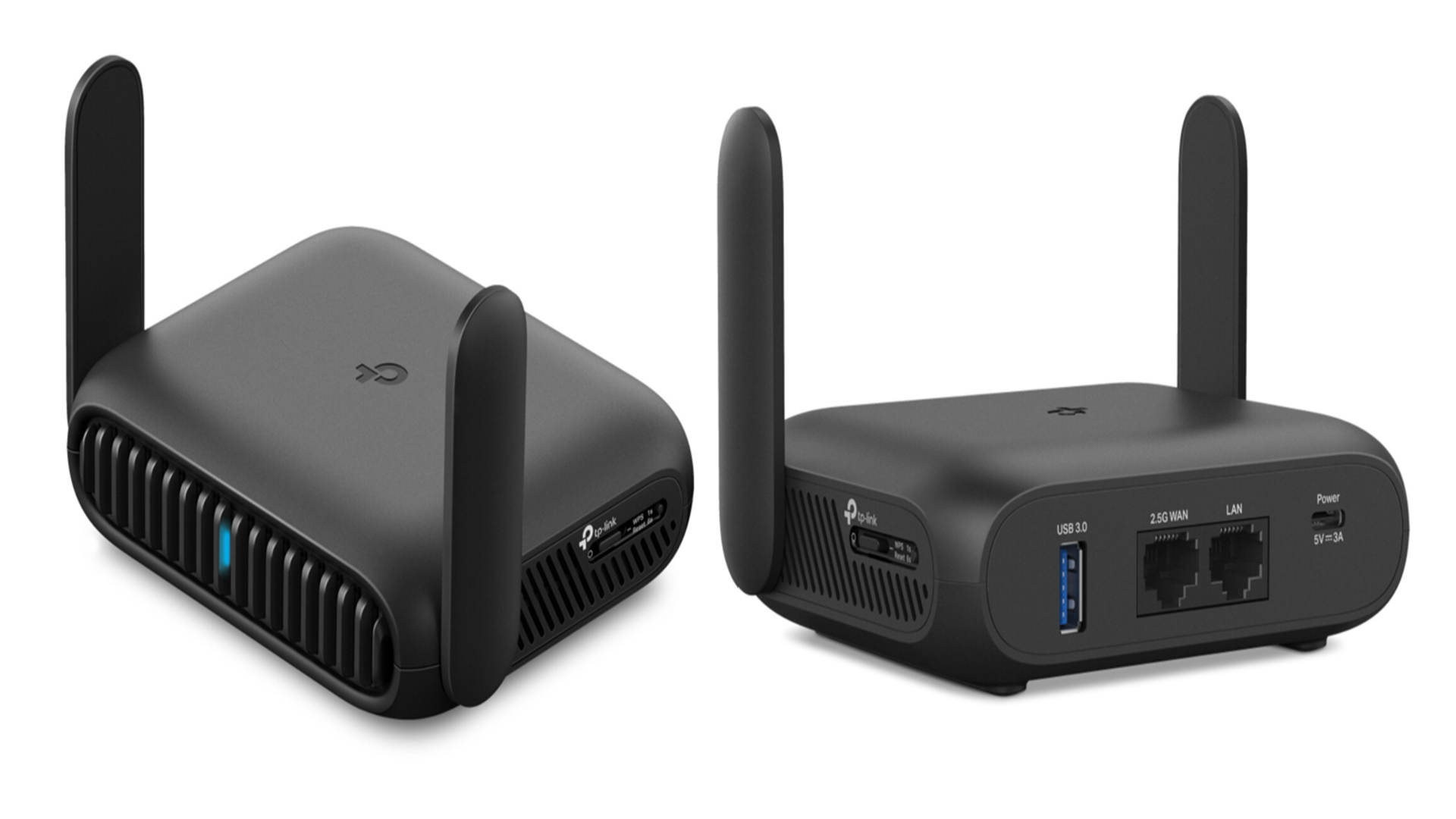
Travel routers help create a private Wi-Fi network using a single internet source. They connect to hotel Ethernet ports, public Wi-Fi, or mobile hotspots. This connection then spreads a secure wireless signal for all your devices. Travel routers make internet access easier and safer on trips.
These devices work by receiving internet data and sharing it with multiple gadgets. They also add security layers to protect your information. Travel routers often have a compact design for easy packing and use anywhere.
Basic Features Of Travel Routers
- Connect to Ethernet or Wi-Fi networks to share internet.
- Create a secure, private wireless network for multiple devices.
- Include encryption to protect your data from hackers.
- Offer easy setup with user-friendly interfaces.
- Provide compact, lightweight design for travel convenience.
- Sometimes include USB ports for file sharing or charging.
Types Of Travel Routers
- Wired Travel Routers:Connect directly to Ethernet ports in hotels or airports.
- Wireless Travel Routers:Capture existing Wi-Fi and create a new private network.
- Battery-Powered Routers:Include built-in batteries for use without power outlets.
- Mobile Hotspot Routers:Use SIM cards to access cellular networks worldwide.
- Universal Travel Routers:Support multiple connection types and international voltage standards.
Compatibility With International Networks
Travel routers can connect to Wi-Fi networks in different countries. Their success depends on compatibility with local network standards and power sources. Understanding these factors helps ensure your device works smoothly abroad.
Frequency Bands And Standards
Different countries use different Wi-Fi frequency bands. Most travel routers support 2.4 GHz and 5 GHz bands. These bands cover many international networks.
Wi-Fi standards like 802.11b/g/n and 802.11ac also vary. Travel routers often support multiple standards. This lets them connect to older and newer networks easily.
Check if your travel router supports the bands and standards used in your destination. Some countries may restrict certain channels or frequencies.
Power Requirements And Adapters
Power plugs and voltage differ worldwide. Travel routers need compatible power adapters. Many come with USB charging options, which work with universal chargers.
Using the right adapter prevents damage to your device. It also ensures the router functions properly without power issues.
Verify your travel router’s voltage range. Some models handle 100-240V input, making them suitable for global use.
Setting Up Travel Routers Abroad
Setting up a travel router abroad can be a game changer for your internet access during trips. It helps you stay connected securely and conveniently, especially when juggling multiple devices. Understanding how to properly configure your travel router in a foreign environment is key to making it work smoothly.
Connecting To Hotel Wi-fi
Hotel Wi-Fi networks often require you to accept terms on a login page before accessing the internet. Your travel router acts as a bridge by connecting to the hotel’s network and then sharing that connection with your devices.
To connect, first link your travel router to the hotel Wi-Fi through its setup interface. Open a browser on a device connected to the router and complete the hotel’s login or authentication page. This step might need repeating if the hotel resets connections frequently.
Using Local Sim Cards
Some travel routers come with SIM card slots, allowing you to use local mobile data abroad. This can be a cost-effective way to avoid expensive roaming charges and enjoy faster speeds in areas with good cellular coverage.
Purchase a local SIM with a data plan, then insert it into your router. Make sure your router supports the network bands of the country you’re visiting. Activating the SIM often requires following the local carrier’s setup instructions, which your router’s interface will guide you through.
Configuring Network Settings
Customizing your travel router’s network settings can improve performance and security. Adjust the SSID (network name) and password to something unique and strong to avoid unauthorized access.
You can also enable features like WPA3 encryption and set up guest networks for visitors. Check your router’s admin panel for options to tweak DNS settings or enable VPN support, which can enhance privacy while using public networks.
Benefits For Travelers
Travel routers offer reliable Wi-Fi access in hotels and airports worldwide. They help secure connections and make sharing internet easy for multiple devices. Travelers enjoy convenience and better online safety during international trips.
Traveling internationally can bring about exciting adventures, but staying connected can sometimes be a challenge. That’s where travel routers come in handy. These compact devices offer numerous benefits for travelers, enhancing your connectivity experience while you explore the world. Here’s a closer look at why they are a must-have for your travel kit.Improved Security
When you connect to public Wi-Fi in hotels, cafes, or airports, security is often a concern. A travel router acts as a personal firewall, offering an additional layer of protection. This can safeguard your sensitive information from potential threats, allowing you to surf the web with peace of mind. Imagine being in a bustling airport lounge, accessing your bank account without worrying about prying eyes. With a travel router, you can create your own secure network, significantly reducing the risk of data breaches.Multiple Device Connectivity
Traveling with a smartphone, tablet, laptop, and perhaps a few other gadgets? A travel router makes it easy to connect multiple devices simultaneously. No more juggling between which device gets the precious Wi-Fi connection. Consider a scenario where you’re uploading photos on your laptop while streaming music on your phone. A travel router ensures all your devices stay connected, so you can multitask seamlessly.Stable Internet Connection
Ever tried to stream a movie or join a video call only for the Wi-Fi to drop? Travel routers can help stabilize your internet connection. They work by strengthening the signal, reducing the frustration of interrupted connections. In a quaint café in Paris, you want to share a live video with friends back home. A travel router can enhance the Wi-Fi signal, ensuring your connection remains steady, allowing you to share those unforgettable moments without interruption. Do you often find yourself struggling with unreliable internet during your travels? A travel router could be the solution you’ve been looking for.Common Challenges And Solutions
Travel routers can be a great solution for staying connected abroad, but they come with their own set of challenges. Understanding these common hurdles helps you prepare and avoid frustration. Let’s look at some typical issues you might face and practical ways to tackle them.
Dealing With Restricted Networks
Many hotels, airports, and cafes limit the number of devices you can connect or block certain services. This can stop your travel router from sharing internet with all your gadgets.
One way around this is to clone your device’s MAC address. Your travel router can mimic your laptop or phone’s MAC, tricking the network into thinking it’s only one device. You can usually find this option in the router’s settings under “MAC address clone” or “Device spoofing.”
Another issue is captive portals—those pop-up login pages that require you to accept terms or enter credentials. Travel routers often struggle to handle these. Some routers let you log into the captive portal through their admin page, then share the connection. If yours doesn’t, you might have to connect each device individually or use your phone as a hotspot temporarily.
Troubleshooting Connectivity Issues
Even with proper setup, you might experience slow speeds or dropped connections. Start by rebooting your travel router and the modem or Wi-Fi source. This simple step can clear temporary glitches.
Check the router’s firmware version. Manufacturers often release updates that fix bugs and improve performance. Updating your router before the trip can save headaches.
Signal interference can also cause problems, especially in crowded places with many Wi-Fi networks. Try changing the router’s channel in the settings to a less crowded one, like 1, 6, or 11 on the 2.4 GHz band. If you have a dual-band router, switching to 5 GHz might help avoid congestion.
Have you ever lost connection right before an important call? Keep a backup plan ready. Carry a USB Ethernet adapter or a SIM card with data, so you can connect directly or use mobile data if needed.
Credit: www.trendhunter.com
Top Travel Routers For International Use
Choosing the right travel router can make a big difference when you’re navigating internet access abroad. Not all routers handle international networks well, so picking one designed for global use is crucial. Let’s look at some top travel routers that suit different budgets, offer premium features, and boast compact designs perfect for your trips.
Budget-friendly Options
If you’re looking to save without sacrificing reliability, budget travel routers can be a smart choice. Models like the TP-Link TL-WR902AC offer dual-band Wi-Fi and multiple modes such as router, repeater, and access point, all under a reasonable price.
These routers typically support a wide range of voltage inputs, making them compatible with international power outlets. Have you considered how often you actually need multiple devices connected during your travels? Budget routers often handle small groups efficiently, perfect for solo travelers or couples.
Premium Models
For those who need faster speeds, stronger security, and more features, premium travel routers deliver. Devices like the GL.iNet GL-AR750S Slate come with advanced VPN support, multiple LAN ports, and robust firmware updates.
These models often include USB ports for file sharing and extended storage, which can be a game-changer on long trips. Investing in a premium router means fewer connectivity issues in hotels or cafes with tricky networks. Have you ever struggled with public Wi-Fi? A premium router can add a layer of protection and reliability.
Compact And Portable Designs
Size matters when you’re packing light. Compact travel routers such as the HooToo TripMate Titan are designed to fit in your pocket or carry-on without adding bulk.
They often combine multiple functions: power bank, file sharing, and Wi-Fi hotspot in one small device. If you travel frequently, wouldn’t having a multifunctional gadget save you space and hassle?
These portable routers generally support international voltage standards and come with adapters, so you won’t have to worry about power compatibility.
Tips For Choosing The Right Travel Router
Choosing the right travel router can make a huge difference in your international trips. Not every router works the same way abroad, and the wrong choice can leave you frustrated without reliable internet. Knowing what to look for helps you avoid common pitfalls and ensures you stay connected wherever you go.
Key Features To Consider
Look for routers that support multiple frequency bands, such as 2.4 GHz and 5 GHz. This flexibility improves compatibility with various international networks. Also, check if the router allows easy setup with different types of internet sources like Ethernet, SIM cards, or public Wi-Fi.
Another important feature is VPN support. This can help protect your data when using unsecured networks in hotels or cafes. Ask yourself: does this router offer guest network options? Sharing your connection securely with others can be a lifesaver during group travels.
Durability And Battery Life
Travel routers that can withstand bumps, drops, and different climates are a smart investment. You don’t want your device to fail after a few uses. Look for compact, sturdy models that feel solid in your hand.
Battery life matters more than you might think. Imagine being stuck at an airport or on a long train ride with no power outlet. A router with long-lasting battery or the ability to charge via USB power banks gives you freedom and peace of mind.
Customer Support And Warranty
International travel can expose you to unique tech challenges. Good customer support can save your trip when something goes wrong. Check whether the manufacturer offers support that’s easy to reach and responsive across time zones.
Warranty coverage is your safety net. It protects you against defects or early failures, especially when buying from lesser-known brands. Would you prefer a router with a one-year warranty or no warranty at all? This small detail can save you money and hassle later.

Credit: www.eiotclub.com
Frequently Asked Questions
Do Travel Routers Work In Different Countries?
Yes, most travel routers work internationally. They support various Wi-Fi standards and frequencies used worldwide. However, check local power plug compatibility and voltage requirements before use.
Can Travel Routers Improve Hotel Wi-fi Quality Abroad?
Travel routers can boost hotel Wi-Fi by creating a private network. This enhances security and connection stability. They also allow multiple devices to share one Wi-Fi source effectively.
Do Travel Routers Support Mobile Data Hotspots?
Yes, travel routers can connect to mobile data hotspots. This enables internet sharing across multiple devices. It’s ideal for travelers relying on SIM cards or mobile broadband abroad.
Are Travel Routers Compatible With All Internet Providers?
Travel routers are generally compatible with most ISPs. They work with Wi-Fi, Ethernet, and mobile data sources. Always verify specific router compatibility with your provider before traveling.
Conclusion
Travel routers can work well in many countries worldwide. They help share internet from hotels, cafes, or airports. Some models need settings changed for different places. Always check power plugs and internet rules before travel. Using a travel router can make your connection safer and easier.
Small, light, and easy to carry. A smart choice for people who need steady internet abroad. Keep your devices connected without hassle. Travel routers offer simple internet sharing on the go.